

The best AI video generator for most people in 2026 is Runway: it has a free plan, and its Pro plan ($35 a month) runs its own Gen-4.5 plus Kling 3.0 and Seedance 2.5. Pick HeyGen for talking-head avatar videos and Pika for the lowest yearly-billed price we could confirm ($8 a month).
Three things changed since our last update. Google's Gemini app is swapping Veo for a model called Gemini Omni. Sora is gone. And the Google plan we quoted was off by 2.5x.
Which AI video generator should you pick?
Pick by the clip you need, not by the most famous name. Each tool below gets one label, and the same label appears in its section and the price table.
Quick picks
- Cinematic clips: Runway
- Clips with sound: Gemini Omni (with a Google AI subscription; check that your tier includes it)
- Newest Kling model: Kling (4.0)
- Seedance credits: Luma
- Talking-head avatars: HeyGen
- Training videos: Synthesia
- Low-cost start: Pika (lowest yearly-billed price we could confirm, $8 a month)
- Second low-cost option: Hailuo
- Already on Adobe: Adobe Firefly
- Covered in our tutorial: Higgsfield
If you want the shorter list written right after Sora closed, read our roundup of the best AI video generators after Sora shut down. This guide is the wider one, by use case, and it includes avatar tools.
What do the plans cost side by side?
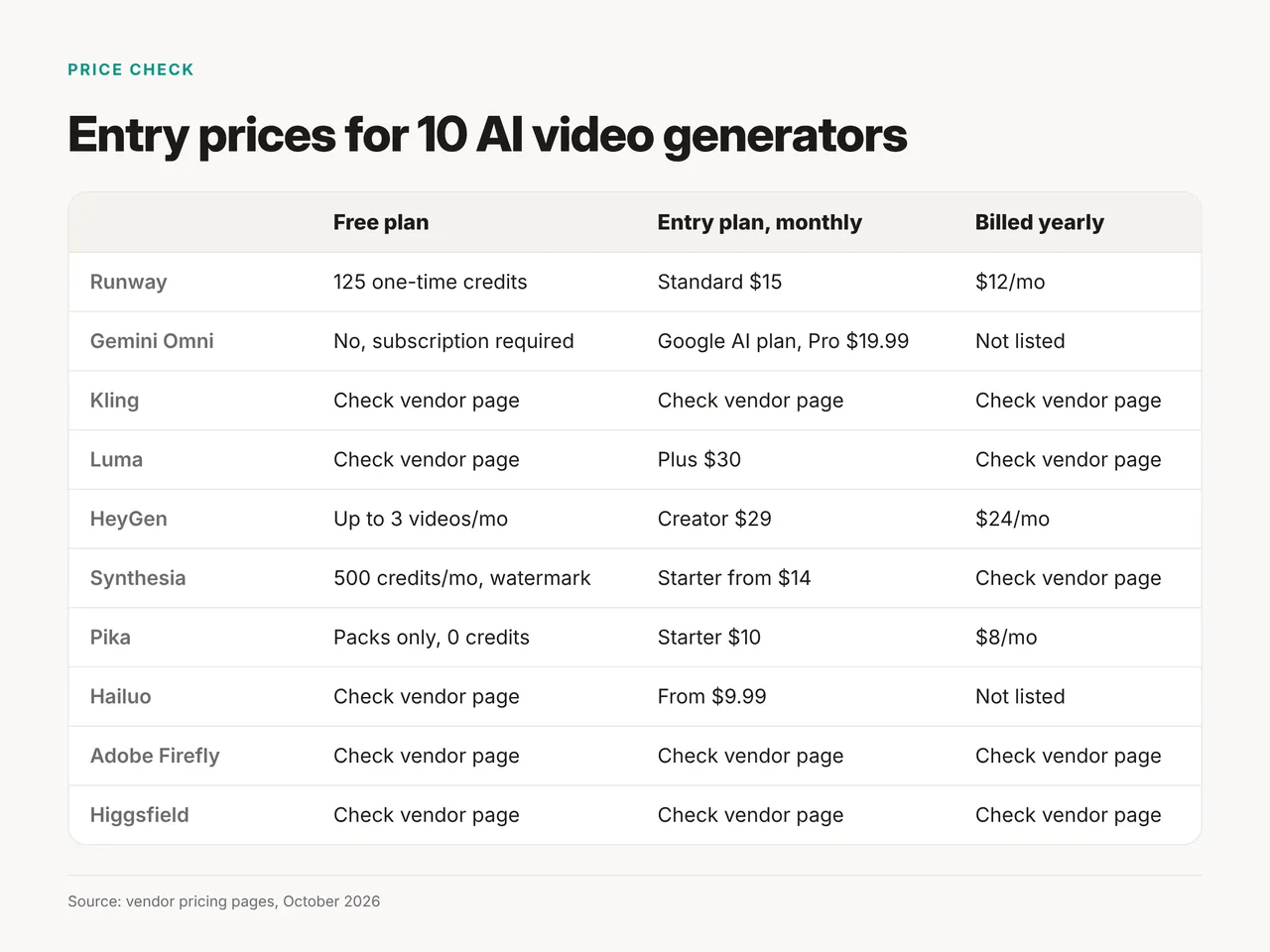
Entry plans run from free to $30 a month, and three of the 10 vendors showed no readable price this month. Prices below are from each vendor's pricing page on October 20, 2026.
| Tool | Best for | Free plan | Entry plan, monthly | Billed yearly | What the entry plan buys |
|---|---|---|---|---|---|
| Runway | Cinematic clips | Yes, 125 one-time credits | Standard $15 | $12/mo | 625 credits, Kling 3.0 included |
| Gemini Omni | Clips with sound | No, subscription required | Google AI plan, Pro $19.99 | Not listed | 10-second clips, no quota listed |
| Kling | Newest Kling model | Not readable | Not readable | Not readable | Check Kling's site |
| Luma | Seedance credits | Check Luma's page | Plus $30 | Check Luma's page | 10,000 credits |
| HeyGen | Talking-head avatars | Yes, up to 3 videos/mo | Creator $29 | $24/mo | Avatar videos |
| Synthesia | Training videos | Yes, 500 credits/mo, watermark | Starter from $14 | See toggle | 15,000 credits a year |
| Pika | Low-cost start | Packs only, 0 credits | Starter $10 | $8/mo | 900 credits |
| Hailuo | Second low-cost option | Not confirmed | From $9.99 | Not listed | Tiers not shown |
| Adobe Firefly | Already on Adobe | Check Adobe | Check Adobe | Check Adobe | Page blocked our check |
| Higgsfield | Covered in our tutorial | Check site | Check site | Check site | No prices shown |
The lowest price we could confirm is Pika Starter at $8 a month billed yearly; Hailuo lists from $9.99 a month but shows no yearly price. Runway Standard costs $144 a year billed yearly, against $180 paid monthly, so annual billing saves $36.
How we chose these 10
We chose tools that a creator, marketer or small-business owner can sign up for today, then sorted them by the job they do best. We read each vendor's own pricing and product pages on October 20, 2026. We did not test these tools hands-on for this article.
Three rules shaped the list:
- Still on sale: a tool with an empty site or a closed app was cut.
- Clear scope: each price names its plan and billing period, or we say we couldn't read it.
- One job each: every tool gets a single "best for" label, so you can scan by need.
Best for cinematic clips: Runway, Gemini Omni, Kling and Luma
Runway is the best pick for cinematic clips because one plan gives you several leading models. The other three are worth it for a specific reason.
Runway
Verdict: the all-rounder to start with.
Runway's pricing page lists Kling 3.0 on Standard, and Seedance 2.5, Gen-4.5 and Kling 3.0 on Pro. That means you can compare models without paying three vendors.
- Good: a free plan with 125 one-time credits, and several models on one bill.
- Watch out: the free credits are one-time, not monthly, and Gen-4.5 and Seedance 2.5 need Pro.
- Price (October 2026): Standard $15 a month or $12 billed yearly with 625 credits; Pro $35 or $28 billed yearly with 2,250 credits. See Runway's plans.
- Toolbit page: Runway
Gemini Omni (formerly Veo in the Gemini app)
Verdict: the easy pick if you already pay for a Google AI plan.
Google says "Gemini Omni will replace Veo in the Gemini app." Its page promises 10-second videos with native audio generation. Veo 3.1 is still listed on Google DeepMind's model page, with access through Google Flow.
- Good: sound is generated with the clip, inside an app you may already use.
- Watch out: Google notes that features vary by tier and geography, and the plans page lists no clip quotas.
- Price (October 2026): Google says a Google AI subscription is required and features vary by tier; Google AI Pro is $19.99 a month and Ultra from $99.99, and Google doesn't say which tier includes Omni. Our old figure of $249.99 for Ultra was 2.5x the current starting price. See Google AI plans.
- Toolbit page: none yet
Kling
Verdict: the pick for the newest Kling model (4.0).
Kling's own site now promotes Kling 4.0. Runway still lists Kling 3.0, so the newest version lives on Kling's site.
- Good: you can try the previous version inside Runway Standard without a second account.
- Watch out: Kling's pricing pages showed no readable text this month, so we can't quote a price.
- Price (October 2026): check Kling's site before you subscribe.
- Toolbit page: Kling AI
Luma
Verdict: the pick if you want Seedance outside Runway.
Luma's pricing page lists Seedance 2.0 at 1080p for 126 credits a second, and Seedance 2.5 as well.
- Good: clear credit costs per second, so you can plan a month.
- Watch out: Plus buys about 79 seconds of Seedance 2.0 at 1080p a month.
- Price (October 2026): Plus $30 a month with 10,000 credits; Pro $90; Ultra $300. See Luma's plans.
- Toolbit page: none yet
Best for talking-head videos: HeyGen and Synthesia
HeyGen is the best pick for talking-head videos made by one person, and Synthesia suits company training. Both turn a script into a presenter on screen.
HeyGen
Verdict: the avatar tool for solo creators and small teams.
HeyGen makes presenter videos from a script with a digital avatar. If you need the same video in other languages, see our guide to video dubbing tools.
- Good: a free plan with up to 3 videos a month, enough to test a script.
- Watch out: stick to your own likeness and stock avatars.
- Price (October 2026): Creator $29 a month, or $24 billed yearly ($288 a year against $348). See HeyGen pricing.
- Toolbit page: HeyGen
Synthesia
Verdict: the pick for training and explainer videos at work.
Synthesia sells credits by the year on paid plans. Its free Basic plan gives 500 credits a month, but those videos carry a Synthesia watermark.
- Good: a watermarked free plan to test before you buy.
- Watch out: the page shows two prices per plan and says you can save up to 4 months with yearly billing. Check which toggle you're on.
- Price (October 2026): Starter from $14 a month with 15,000 credits a year; Pro from $59 a month with 72,000 credits a year.
- Toolbit page: none in this guide
Best for a low-cost start: Pika and Hailuo
Pika has the lowest yearly-billed price we could confirm, and Hailuo is a second low-cost option. Neither has a free monthly allowance we could confirm.
Pika
Verdict: the lowest yearly-billed price we could confirm ($8 a month).
Pika's free tier has 0 monthly credits and works with packs only. Starter gives 900 credits for $10, which works out to 90 credits per dollar.
- Good: a low monthly price with a clear credit count.
- Watch out: the free tier is not free video; you buy packs.
- Price (October 2026): Starter $10 a month or $8 billed yearly; the next tier is $35 with 3,150 credits.
- Toolbit page: none yet
Hailuo
Verdict: a second low-cost option; its page shows only a from-$9.99-a-month price and no tiers.
Hailuo's subscribe page shows a single line: from $9.99 a month. It names no tiers, and we couldn't confirm a free plan.
- Good: a low entry price.
- Watch out: you can't compare tiers before signing in.
- Price (October 2026): from $9.99 a month.
- Toolbit page: none yet
Best if you already use Adobe: Adobe Firefly
Adobe Firefly is the one to check if your team already lives in Adobe. We couldn't read its page this month, so check Adobe's commercial-use terms before you use it for client work.
Adobe Firefly
Verdict: the pick for teams already on Adobe, pending a terms check.
Adobe's site blocked our check this month, so we can't confirm Firefly's video price or clip length. Read Adobe's commercial-use terms before you promise a client anything.
- Good: sits with the Adobe tools your team may already use.
- Watch out: we couldn't verify the current limits.
- Price (October 2026): check Adobe's Firefly pricing page.
- Toolbit page: none in this guide
Covered in our tutorial: Higgsfield
Our Higgsfield tutorial walks through a first project. We couldn't read any prices for it this month.
Higgsfield
Verdict: see the tutorial; no prices were readable.
- Watch out: the pricing page showed no prices this month.
- Price (October 2026): check Higgsfield's pricing page.
- Toolbit page: see the tutorial above
Checked and cut: Haiper, Sora and standalone Seedance
Three names from older lists are out, each for a clear reason.
- Haiper: its site returned an empty page on October 20, 2026. We treat it as unavailable.
- Sora: OpenAI's page says "As of April 26, 2026, the Sora product is no longer available."
- Seedance as a separate product: the site we linked before says it is a community site with "no affiliation with ByteDance." Use Seedance inside Runway Pro or Luma instead.
How to choose in 30 seconds
Answer one question: what is on screen? Then follow the line.
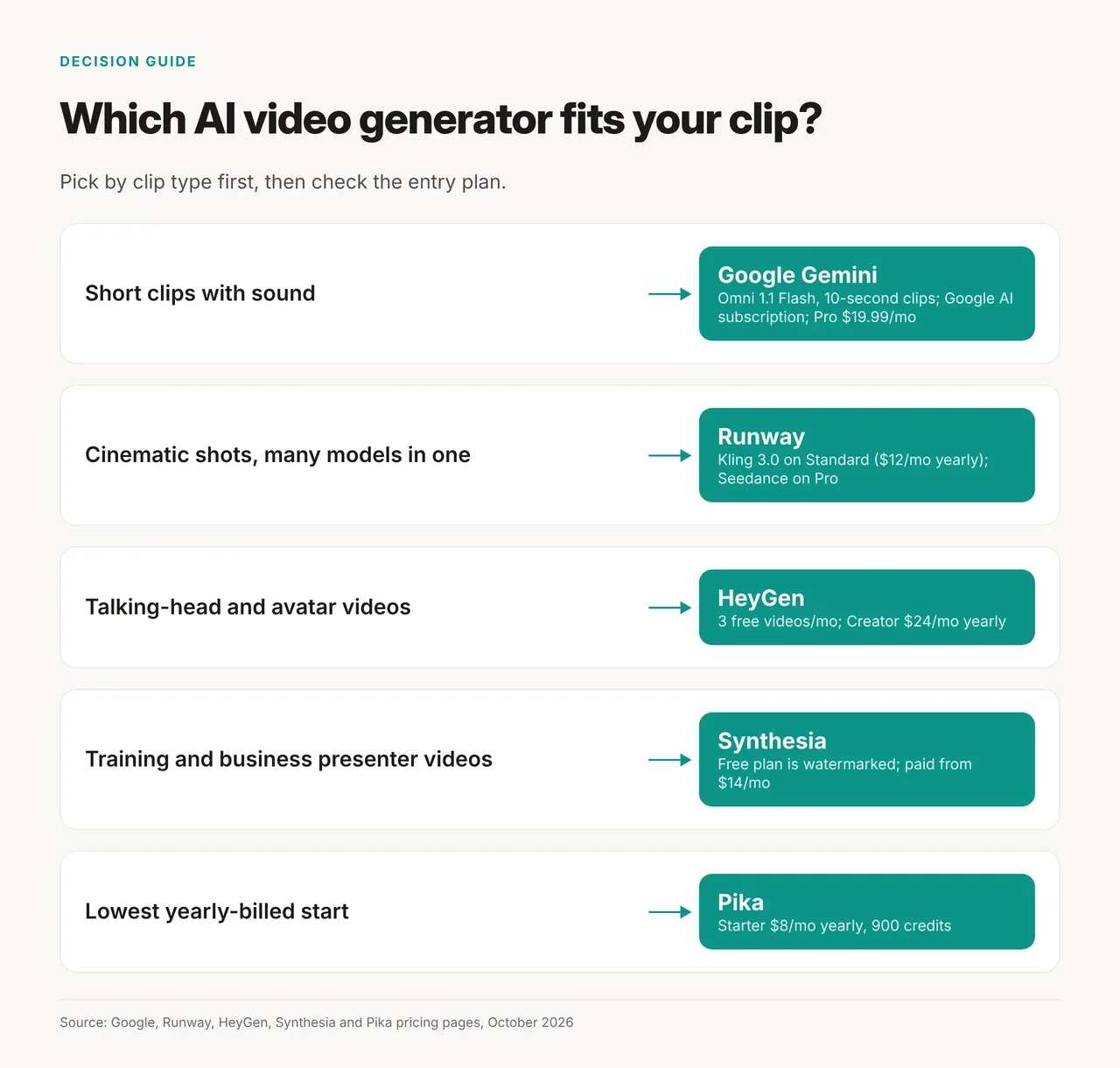
- A person talking to camera: HeyGen if it's you or a small team; Synthesia for company training.
- A cinematic scene or product shot: start on Runway's free plan, then Standard.
- You need sound with the clip and already pay Google: Gemini Omni with a Google AI subscription (check that your tier includes it).
- The newest Kling model: Kling 4.0 on Kling's site, or Kling 3.0 through Runway.
- The lowest yearly-billed price we could confirm: Pika Starter at $8 a month billed yearly.
- Already on Adobe: Adobe Firefly, after you read its commercial-use terms.
Next step: make one clip on a free plan before you pay for anything.
FAQ
Which AI video generator is actually free? Runway gives 125 one-time credits and HeyGen allows up to 3 videos a month. Synthesia's free plan adds a watermark, and Pika's free tier sells packs only.
Veo vs Runway vs Kling: which is best for realistic clips? Start with Runway, because Standard includes Kling 3.0. Choose Gemini Omni if you want sound and already have a Google AI subscription that includes it. We didn't compare output quality.
Is Sora still available? No. OpenAI says the Sora product has been unavailable since April 26, 2026.
Is Veo gone? Not entirely. Gemini Omni replaces Veo in the Gemini app, but Veo 3.1 is still listed on Google DeepMind's page with Google Flow access.