Teacher AI

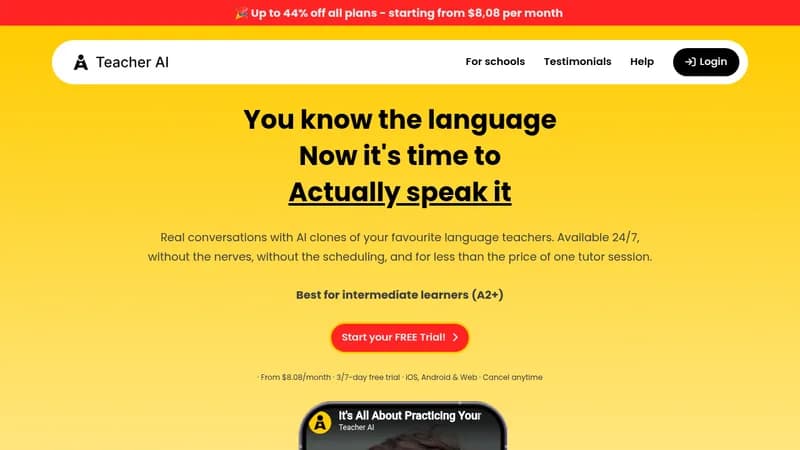
Practice foreign languages through unlimited AI-powered conversations

Monthly Visits: 76.2K
Subscription
Visit Website
Teacher AI

What is Teacher AI?

Teacher AI lets you practice speaking skills with clones of popular language teachers available 24/7. Get personalized conversations in 25+ languages with instant error correction and progress tracking. Ideal for intermediate learners who want affordable, anxiety-free speaking practice.

Key Features of Teacher AI

  1. 1

    Teacher Clones

    Practice with AI versions of real polyglot influencers

  2. 2

    Bilingual Responses

    Teachers understand both English and target language

  3. 3

    Progress Tracking

    Visual vocabulary growth metrics and word counters

  4. 4

    24/7 Availability

    Practice anytime without scheduling constraints

  5. 5

    Voice Control

    Slow down teacher's speech for better comprehension

Teacher AI Tool Use Cases

  • πŸ—£οΈ
    Practice conversational speaking skills
  • πŸ“š
    Learn vocabulary through real dialogues
  • 🌍
    Prepare for language immersion trips
  • πŸ”§
    Overcome speaking anxiety gradually

FAQs from Teacher AI

How is this different from ChatGPT?

Specialized for language learning with translation tools, progress tracking, and teacher clones - more user-friendly than raw ChatGPT

Can complete beginners use this?

Not recommended - best for learners with basic vocabulary who need speaking practice

How many devices can I use?

Unlimited access across devices, but shared accounts mix learning metrics

Pros & Cons of Teacher AI

Pros (4)

  • Access to teaching styles of popular polyglot influencers
  • Bilingual support reduces comprehension barriers
  • Detailed vocabulary progress tracking
  • Costs 85% less than traditional tutoring

Cons (3)

  • No structured curriculum for beginners
  • Shared accounts mix progress metrics
  • Limited Asian language support currently

Teacher AI's Pricing Plans

Monthly

monthly
$25

Features

  • 3-day free trial
  • Unlimited sessions
  • All languages

6 Months

6 months
$107

Features

  • 7-day trial
  • 33% savings
  • Priority support

12 Months

yearly
$147

Features

  • 7-day trial
  • 51% savings
  • Feature updates
For the latest pricing info, pleaseΒ visit the official website

More Info About Teacher AI

Who is using teacher ai?

This tool is best for:

  1. Intermediate language learners
  2. Self-taught students needing speaking practice
  3. Frequent travelers preparing for trips
  4. Polyglots maintaining multiple languages

Teacher AI's Tags

Explore more niche AI tool websites by clicking on a tag* (works only if it has enough tools).

#AITutor #PolyglotTool

Website Analytics of Teacher AI

Teacher AI Website Traffic & SEO Analysis:

Recent data shows that Teacher AI has 76.2K monthly visits (15.3% increase from the previous month), 42.0% bounce rate, and average 2.68 pages per visit.
Traffic is primarily driven by 6 different sources, with users from 5 countries worldwide, led by United States contributing 21% of total traffic. SEO performance is shown by 5 tracked keywords, with "teacher ai" being the top-performing keyword with 4.0K monthly searches. See below for more info.

Monthly Visits

76.2K

(+15.3%)

Pages per Visit

2.68

Bounce Rate

42.0%

Average Time on Site

1m 6s

Traffic Trend(Apr 2025 - Oct 2025)

Loading chart...

Top Keywords

SEO KeywordVolumeCPC
teacher ai
4.0K$0.58
ai teacher
3.0K$0.81
teacherai
620$1.51
your teacher ai
280-
xiomannyc ai
180-

Traffic Sources Distribution

Traffic Share by Source

Loading chart...

Source Breakdown Details

SourceTraffic Share
Direct
36%
Search
44%
Social
11%
Referrals
7%
Paid Referrals
1%

Global Traffic Distribution

Traffic Share by Country

Loading chart...

Geographic Breakdown Details of top 5 countries

Country NameTraffic Share
United States21%
Mexico15%
Brazil6%
Spain6%
Nigeria5%
Analytics data is estimated (from third-party analytics providers) and for reference only.

πŸš€ Teacher AI Launch Badge

Promote your Toolbit Launch by using the badge on your website. It can be inserted on your home page or footer easily.

How to use: Simply copy and paste the embed code into your homepage or footer HTML to display it instantly and build community support.

ToolBit badge

Reviews for Teacher AI