





DevOps AutomationTech Skill DevelopmentInteractive Coding Labs

LabEx

Master tech skills through interactive labs and projects

Monthly Visits: 1.5M
Freemium
Free Version
Visit Website
LabEx

What is LabEx?

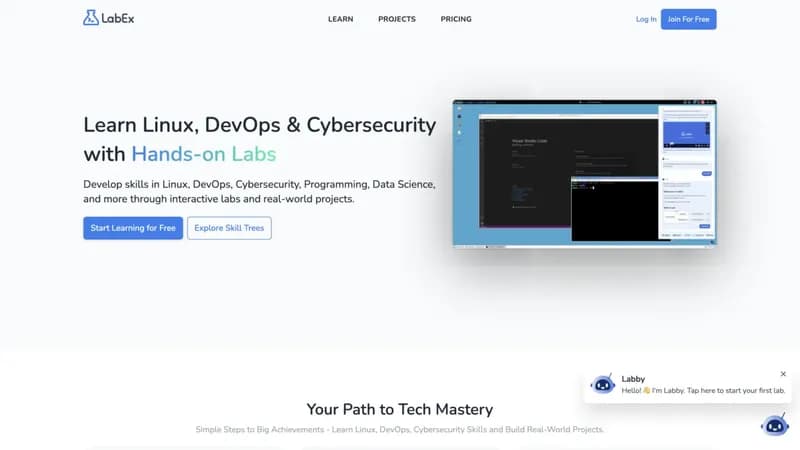
LabEx teaches Linux, DevOps, and Cybersecurity through hands-on browser-based labs instead of video lectures. Get AI-powered tutoring and build real projects while learning in-demand IT skills. Perfect for visual learners who want practical experience.

Key Features of LabEx

  1. 1

    Browser Labs

    Practice Linux/DevOps in real terminal environments

  2. 2

    AI-Powered Tutoring

    Labby chatbot helps debug code and answer questions

  3. 3

    Skill Trees

    Structured learning paths for 20+ tech domains

  4. 4

    Project Portfolio

    Build Docker, Kubernetes & security implementations

LabEx AI Tool Use Cases

  • 🐧
    Learn Linux administration
  • 🔒
    Practice cybersecurity techniques
  • 🤖
    Master DevOps tools like Docker
  • 🐍
    Develop Python programming skills
  • 🐋
    Build Kubernetes cluster projects

FAQs from LabEx

What makes LabEx different from other coding platforms?

Focuses exclusively on hands-on terminal labs with real tools instead of video lectures or code-along tutorials

Can I use LabEx without prior experience?

Basic command-line familiarity recommended, but skill trees guide beginners through fundamentals

Do I get certificates for completed courses?

Certificates available for Pro subscribers upon completing skill trees and projects

Pros & Cons of LabEx

Pros (4)

  • 100% hands-on learning with real environments
  • AI tutor available 24/7 for coding help
  • Free access to core labs and skill trees
  • Progressively challenging project-based curriculum

Cons (3)

  • No video content - text/terminal focused
  • Requires basic command-line familiarity
  • Advanced projects locked behind paywall

LabEx's Pricing Plans

Free

monthly
$0

Features

  • Access to free labs
  • Basic skill trees
  • Community support

Pro Monthly

monthly
$29

Features

  • All labs & projects
  • Priority support
  • Completion certificates

Pro Annual

yearly
$19/month

Features

  • 60% discount vs monthly
  • Full course library
  • Project solutions
For the latest pricing info, please visit the official website

More Info About LabEx

Who is using labex?

This tool is best for:

  1. IT students
  2. DevOps engineers
  3. Cybersecurity enthusiasts
  4. Career changers into tech

LabEx's Tags

Explore more niche AI tool websites by clicking on a tag* (works only if it has enough tools).

#LinuxLabs#HandsOnLearning#CodeInBrowser

LabEx Social Media

Visit LabEx on social media to stay updated with the latest news and features.

Website Analytics of LabEx

LabEx Website Traffic & SEO Analysis:

Recent data shows that LabEx has 1.5M monthly visits (27.6% increase from the previous month), 47.0% bounce rate, and average 4.18 pages per visit.
Traffic is primarily driven by 6 different sources, with users from 5 countries worldwide, led by India contributing 12% of total traffic. SEO performance is shown by 5 tracked keywords, with "linux journey" being the top-performing keyword with 11.9K monthly searches. See below for more info.

Monthly Visits

1.5M

(+27.6%)

Pages per Visit

4.18

Bounce Rate

47.0%

Average Time on Site

3m 58s

Traffic Trend(Apr 2025 - Oct 2025)

Loading chart...

Top Keywords

SEO KeywordVolumeCPC
linux journey
11.9K$1.18
online linux terminal
9.2K$0.89
labex
6.5K$1.22
python数据集
0-
linux terminal online
3.7K$0.56

Traffic Sources Distribution

Traffic Share by Source

Loading chart...

Source Breakdown Details

SourceTraffic Share
Direct
34%
Search
58%
Social
1%
Referrals
6%
Paid Referrals
1%

Global Traffic Distribution

Traffic Share by Country

Loading chart...

Geographic Breakdown Details of top 5 countries

Country NameTraffic Share
India12%
United States12%
Russia6%
France5%
China4%
Analytics data is estimated (from third-party analytics providers) and for reference only.

🚀 LabEx Launch Badge

Promote your Toolbit Launch by using the badge on your website. It can be inserted on your home page or footer easily.

How to use: Simply copy and paste the embed code into your homepage or footer HTML to display it instantly and build community support.

ToolBit badge

Reviews for LabEx