Prompt EngineeringAI DeploymentLLM Development

Latitude

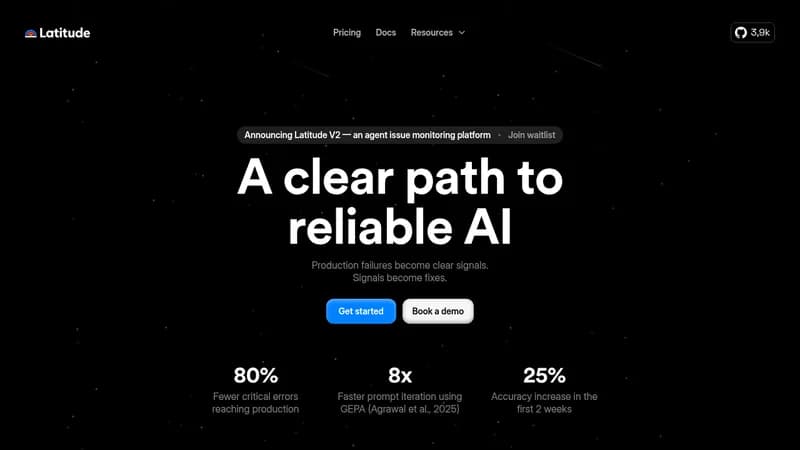
Refine LLM prompts using real data to build reliable AI applications

Monthly Visits: 45.3K
Freemium
Free Version
API Available
Visit Website
Latitude

What is Latitude?

Latitude helps teams develop better AI products by tracking and improving LLM prompts through real-world performance data. It lets you test multiple prompt versions at scale, compare results, and deploy updates confidently. The open-source platform is built for technical teams who need to maintain consistent AI outputs in production environments.

Key Features of Latitude

  1. 1

    Prompt Analytics

    Track production logs to monitor prompt performance

  2. 2

    Version Testing

    Compare multiple prompt versions using batch processing

  3. 3

    AI Refinement

    Automatically improve prompts using performance data

  4. 4

    Open-Source Core

    Self-host or modify platform to meet specific needs

  5. 5

    SDK Integration

    Deploy updated prompts directly to applications

Latitude AI Tool Use Cases

  • πŸ› οΈ
    Engineering reliable chatbot responses
  • πŸ“Š
    Optimizing AI product performance
  • πŸ€–
    Testing LLM prompt variations at scale
  • πŸ‘₯
    Collaborating on prompt version control

FAQs from Latitude

Can I self-host Latitude?

Yes, Latitude is open-source and can be self-hosted for full control over your infrastructure

What types of evaluations does Latitude support?

Supports both automated LLM-based evaluations and human evaluations for quality checks

How does version control work for prompts?

Allows comparing different prompt versions side-by-side using historical performance data

Pros & Cons of Latitude

Pros (4)

  • Open-source foundation for customization
  • Data-driven prompt improvement cycle
  • Production-to-testing feedback loop
  • Free tier for small-scale usage

Cons (3)

  • Requires technical setup for integration
  • Self-hosting adds infrastructure complexity
  • Primarily targets developers vs end-users

Latitude's Pricing Plans

Hobby

monthly
$0

Features

  • 40k prompt runs/month
  • Basic analytics
  • Community support

Team

monthly
$49

Features

  • Unlimited prompt runs
  • Advanced analytics
  • Priority support
  • Team collaboration

Enterprise

annual
Custom

Features

  • Dedicated infrastructure
  • SLA guarantees
  • Custom integrations
  • Security reviews
For the latest pricing info, pleaseΒ visit the official website

More Info About Latitude

Who is using latitude?

This tool is best for:

  1. LLM application developers
  2. AI product teams
  3. Technical prompt engineers
  4. DevOps engineers managing AI systems

Latitude's Tags

Explore more niche AI tool websites by clicking on a tag* (works only if it has enough tools).

Website Analytics of Latitude

Latitude Website Traffic & SEO Analysis:

Recent data shows that Latitude has 45.3K monthly visits (-5.0% decrease from the previous month), 41.0% bounce rate, and average 2.56 pages per visit.
Traffic is primarily driven by 6 different sources, with users from 5 countries worldwide, led by India contributing 16% of total traffic. SEO performance is shown by 5 tracked keywords, with "latitude" being the top-performing keyword with 164.0K monthly searches. See below for more info.

Monthly Visits

45.3K

(-5.0%)

Pages per Visit

2.56

Bounce Rate

41.0%

Average Time on Site

33s

Traffic Trend(Apr 2025 - Oct 2025)

Loading chart...

Top Keywords

SEO KeywordVolumeCPC
latitude
164.0K$0.98
latitude io
200-
latitude agent
110-
latitittude
70-
latitude so
60-

Traffic Sources Distribution

Traffic Share by Source

Loading chart...

Source Breakdown Details

SourceTraffic Share
Mail
2%
Direct
45%
Search
31%
Social
6%
Referrals
15%
Paid Referrals
1%

Global Traffic Distribution

Traffic Share by Country

Loading chart...

Geographic Breakdown Details of top 5 countries

Country NameTraffic Share
India16%
United States11%
Spain8%
Czech Republic7%
Nigeria6%
Analytics data is estimated (from third-party analytics providers) and for reference only.

πŸš€ Latitude Launch Badge

Promote your Toolbit Launch by using the badge on your website. It can be inserted on your home page or footer easily.

How to use: Simply copy and paste the embed code into your homepage or footer HTML to display it instantly and build community support.

ToolBit badge

Reviews for Latitude