









Data IntegrationFinancial Reporting AutomationSpreadsheet Enhancement

Genius Sheets

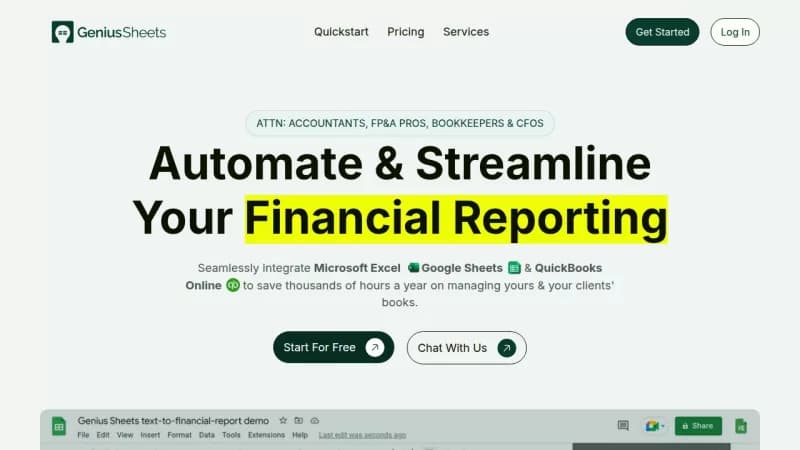
Automate financial reporting with real-time data syncing

Monthly Visits: 48
Subscription
Visit Website
Genius Sheets

What is Genius Sheets?

Genius Sheets helps financial professionals automate their data syncing from QuickBooks to spreadsheets like Google Sheets and Excel. This eliminates manual tasks like copy-pasting and ensures you always have up-to-date financial information. It saves time, reduces errors, and lets you focus on strategic analysis instead of data entry.

Key Features of Genius Sheets

  1. 1

    Live Data Sync

    Automatically updates transaction data daily for real-time insights.

  2. 2

    QuickBooks Integration

    Seamlessly connects with QuickBooks Online for accurate data flow.

  3. 3

    Automated Reporting

    Generates financial reports and models without manual effort.

  4. 4

    Real-time Dashboards

    Provides live financial insights for quick decision-making.

  5. 5

    Custom Alerts

    Sends real-time notifications for budget and expense tracking.

Genius Sheets AI Tool Use Cases

  • πŸ“Š
    End-of-period reporting
  • πŸ“ˆ
    Build financial models
  • πŸ“Š
    Live dashboards
  • πŸ’°
    Expense monitoring
  • πŸ’³
    Manage debt repayment

FAQs from Genius Sheets

How do I start a free trial?

You can sign up with no credit card for a two-week free trial.

Are there enterprise plans available?

Yes, for larger teams and organizations, we offer customized enterprise plans. Please reach out to [email protected] for more info.

How do I cancel my subscription?

You can cancel a monthly subscription at any time by sending an email to [email protected].

How do I connect to QuickBooks?

Connect your account to QuickBooks on the dashboard page of the website, then download either the Google Sheets or Excel add-in.

Pros & Cons of Genius Sheets

Pros (4)

  • Saves time on manual data entry and reporting
  • Provides real-time financial data syncing
  • Integrates seamlessly with QuickBooks, Google Sheets, and Excel
  • Scalable for managing multiple clients with unlimited sub-accounts

Cons (3)

  • Limited monthly queries in the starter plan
  • Only supports integration with QuickBooks Online, Google Sheets, and Excel
  • May require initial setup and learning for new users

Genius Sheets's Pricing Plans

Starter Plan

monthly
$15

Features

  • One User, One QBO Connection
  • Live Data Connection
  • 20 Queries per month
  • 20 Category Filters per month
  • $10/mo For Addl Users

Business Plan

monthly
$75

Features

  • One User, Up to 5 QBO Connections
  • Live Data Connection
  • Unlimited Monthly Queries
  • Consolidated Reporting
  • Unlimited Category Filters
  • $10/mo For Addl Users

Premium Plan

monthly
Contact Us

Features

  • Usage-Based Pricing w/ Bulk Discounts
  • Live Data Connection
  • Unlimited Monthly Queries
  • Consolidated Reporting
  • Unlimited Category Filters
  • Custom Integrations
  • Dedicated Live Support
For the latest pricing info, pleaseΒ visit the official website

More Info About Genius Sheets

Who is using genius sheets?

This tool is best for:

  1. Accountants
  2. Financial Analysts
  3. Bookkeepers
  4. Freelance Financial Professionals

Genius Sheets's Tags

Explore more niche AI tool websites by clicking on a tag* (works only if it has enough tools).

#DataAutomation #FinancialReporting#SpreadsheetTools#GeniusSheets#QuickBooksIntegration

Integrate Genius Sheets With These Apps

Genius Sheets can be integrated with these apps and services:

  • QuickBooks Online
  • Google Sheets
  • Excel

Genius Sheets Social Media

Visit Genius Sheets on social media to stay updated with the latest news and features.

Website Analytics of Genius Sheets

Genius Sheets Website Traffic & SEO Analysis:

Recent data shows that Genius Sheets has 48 monthly visits (-94.6% decrease from the previous month), 40.0% bounce rate, and average 1.04 pages per visit.
Traffic is primarily driven by 6 different sources, with users from 1 countries worldwide, led by United States contributing 100% of total traffic. SEO performance is shown by 4 tracked keywords, with "geniussheets" being the top-performing keyword with 70 monthly searches. See below for more info.

Monthly Visits

48

(-94.6%)

Pages per Visit

1.04

Bounce Rate

40.0%

Traffic Trend(Jul 2025 - Oct 2025)

Loading chart...

Top Keywords

SEO KeywordVolumeCPC
geniussheets
70-
genuis sheets
70-
genius sheets
50-
genius sheet
10-

Traffic Sources Distribution

Traffic Share by Source

Loading chart...

Source Breakdown Details

SourceTraffic Share
Direct
42%
Search
33%
Social
10%
Referrals
13%
Paid Referrals
2%

Global Traffic Distribution

Traffic Share by Country

Loading chart...

Geographic Breakdown Details of top 1 country

Country NameTraffic Share
United States100%
Analytics data is estimated (from third-party analytics providers) and for reference only.

πŸš€ Genius Sheets Launch Badge

Promote your Toolbit Launch by using the badge on your website. It can be inserted on your home page or footer easily.

How to use: Simply copy and paste the embed code into your homepage or footer HTML to display it instantly and build community support.

ToolBit badge

Reviews for Genius Sheets