






Slack IntegrationCommunication ToolAcronym Management
Glossary favicon

Glossary

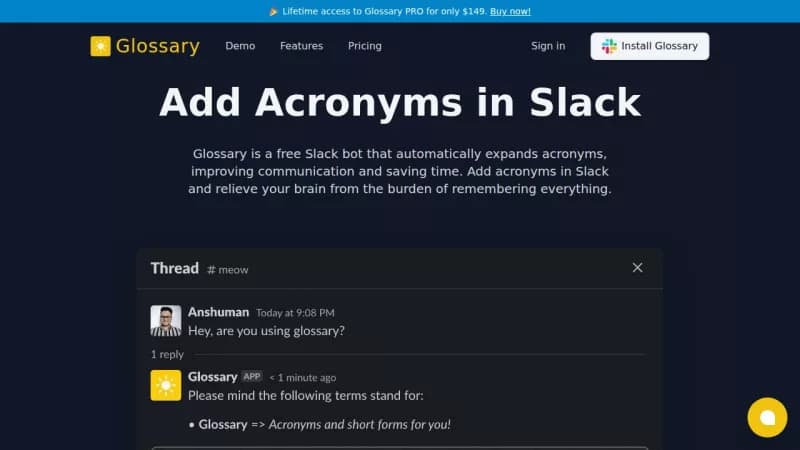
Automatically expand acronyms in Slack to improve communication

Monthly Visits: 454
Freemium
Free Version
Visit Website
Glossary screenshot

What is Glossary?

Glossary is a free Slack bot that automatically explains acronyms in your conversations. This saves you time by reducing the need to ask for definitions or remember them yourself. It's easy to set up and use directly within Slack, making team chats clearer and more efficient.

Key Features of Glossary

  1. 1

    Auto-Expand

    Automatically explains acronyms in Slack messages to save time

  2. 2

    Custom Acronyms

    Add and manage your own acronym definitions using simple commands

  3. 3

    Bulk Import

    Upload multiple acronyms at once for quick setup and management

  4. 4

    Toggle Replies

    Turn automatic explanations on or off as needed for flexibility

  5. 5

    Built-in Commands

    Use Slack commands to add, view, and explain acronyms easily

Glossary AI Tool Use Cases

  • 🔍
    Define acronyms in team chats
  • ✍️
    Add new acronyms with commands
  • 📊
    Import acronyms in bulk
  • ⚙️
    Control when explanations appear

FAQs from Glossary

Is it really free forever?

Yes, you can use Glossary for free, forever, up to 10 acronyms.

What’s included in the PRO plan?

The PRO plan includes unlimited Glossary terms and explanations, with unlimited users and one day email support.

Can I cancel anytime?

Yes, cancellation is self-serve with no questions asked and no long-term contracts.

Pros & Cons of Glossary

Pros (4)

  • Free version available up to 10 acronyms
  • Easy integration with Slack using simple commands
  • Bulk import feature for quick acronym setup
  • No long-term contracts or cancellation fees

Cons (2)

  • Limited to 10 acronyms in the free version
  • Only available for Slack, not other communication platforms

Glossary's Pricing Plans

PRO

one-time
$149

Features

  • Unlimited users
  • Unlimited acronyms
  • One day email support
  • Unlimited explanations
For the latest pricing info, please visit the official website

More Info About Glossary

Who is using glossary?

This tool is best for:

  1. Team leaders
  2. Project managers
  3. Slack users

Glossary's Tags

Explore more niche AI tool websites by clicking on a tag* (works only if it has enough tools).

#ProductivityTool #TeamCommunication#SlackBot#AcronymManager

Integrate Glossary With This App

Glossary can be integrated with this app or service:

  • Slack

Website Analytics of Glossary

Glossary Website Traffic & SEO Analysis:

Recent data shows that Glossary has 454 monthly visits (-47.1% decrease from the previous month), 39.0% bounce rate, and average 1.04 pages per visit.
Traffic is primarily driven by 6 different sources, with users from 1 countries worldwide, led by United States contributing 100% of total traffic. SEO performance is shown by 2 tracked keywords, with "slack acronym" being the top-performing keyword with 230 monthly searches. See below for more info.

Monthly Visits

454

(-47.1%)

Pages per Visit

1.04

Bounce Rate

39.0%

Traffic Trend(Aug 2025 - Oct 2025)

Loading chart...

Top Keywords

SEO KeywordVolumeCPC
slack acronym
230-
slack glossary app
10-

Traffic Sources Distribution

Traffic Share by Source

Loading chart...

Source Breakdown Details

SourceTraffic Share
Direct
42%
Search
34%
Social
10%
Referrals
13%
Paid Referrals
1%

Global Traffic Distribution

Traffic Share by Country

Loading chart...

Geographic Breakdown Details of top 1 country

Country NameTraffic Share
United States100%
Analytics data is estimated (from third-party analytics providers) and for reference only.

🚀 Glossary Launch Badge

Promote your Toolbit Launch by using the badge on your website. It can be inserted on your home page or footer easily.

How to use: Simply copy and paste the embed code into your homepage or footer HTML to display it instantly and build community support.

ToolBit badge

Reviews for Glossary