








LeaseLens

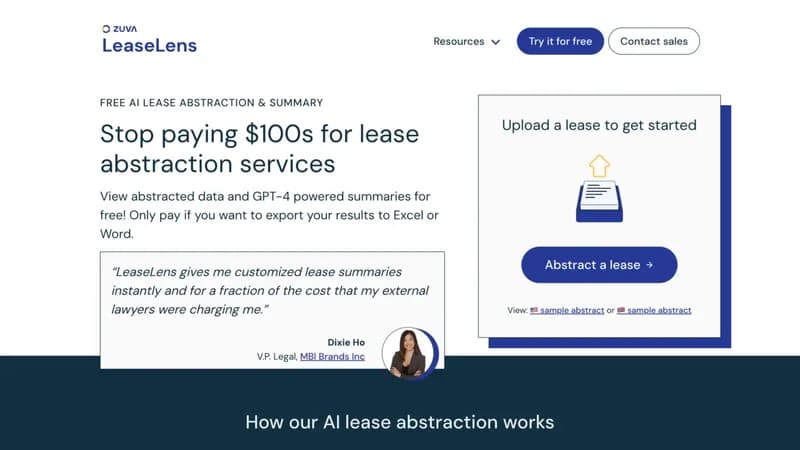
Automate commercial lease analysis with instant AI-powered summaries

Monthly Visits: 2.8K
Freemium
Free Version
Visit Website
LeaseLens

What is LeaseLens?

LeaseLens uses AI to extract key details from complex lease agreements in minutes, saving hours of manual work. Get free GPT-4 generated summaries and only pay $25 if you need to export results to Excel or Word. It's particularly valuable for property managers and legal teams handling multiple leases.

Key Features of LeaseLens

  1. 1

    GPT-4 Summaries

    AI-generated lease overviews highlighting critical terms

  2. 2

    Bulk Processing

    Handle multiple leases simultaneously for portfolio reviews

  3. 3

    OCR Integration

    Reads scanned documents and PDFs automatically

  4. 4

    Custom Exports

    One-click exports to Excel/Word formats

  5. 5

    12-Year Training

    ML model refined on thousands of real leases

LeaseLens AI Tool Use Cases

  • ๐Ÿข
    Manage commercial property portfolios
  • โš–๏ธ
    Accelerate legal contract reviews
  • ๐Ÿ“ˆ
    Streamline merger due diligence
  • ๐Ÿ–จ๏ธ
    Process equipment leasing agreements

FAQs from LeaseLens

What lease types does LeaseLens support?

Handles real estate (commercial/residential) and equipment leases

Can I process multiple leases at once?

Yes, bulk processing available through enterprise sales contact

How accurate is the AI extraction?

Trained on thousands of leases over 12 years, used by top law firms

Pros & Cons of LeaseLens

Pros (4)

  • Saves $300+ per lease vs manual abstraction
  • Processes leases in minutes instead of hours
  • Supports bulk uploads for portfolio analysis
  • Integrates with Yardi and other PM systems

Cons (3)

  • $25/export fee for editable formats
  • No mobile app for on-site reviews
  • Human review requires separate upsell

LeaseLens's Pricing Plans

Free Analysis

per use
$0

Features

  • View AI-generated abstract
  • Access GPT-4 summary
  • 200+ field extraction

Export Package

per abstract
$25

Features

  • Excel/Word exports
  • ETL-ready formatting
  • Custom field selection
For the latest pricing info, pleaseย visit the official website

More Info About LeaseLens

Who is using leaselens?

This tool is best for:

  1. Commercial property managers
  2. Corporate legal teams
  3. CRE investment firms
  4. Equipment leasing companies

LeaseLens's Tags

Explore more niche AI tool websites by clicking on a tag* (works only if it has enough tools).

#LegalAI #RealEstateTech #CREautomation#LeaseAbstraction

Integrate LeaseLens With This App

LeaseLens can be integrated with this app or service:

  • Yardi

Website Analytics of LeaseLens

LeaseLens Website Traffic & SEO Analysis:

Recent data shows that LeaseLens has 2.8K monthly visits (36.3% increase from the previous month), 36.0% bounce rate, and average 2.07 pages per visit.
Traffic is primarily driven by 6 different sources, with users from 1 countries worldwide, led by United States contributing 100% of total traffic. SEO performance is shown by 5 tracked keywords, with "ai lease reader" being the top-performing keyword with 210 monthly searches. See below for more info.

Monthly Visits

2.8K

(+36.3%)

Pages per Visit

2.07

Bounce Rate

36.0%

Average Time on Site

1m 53s

Traffic Trend(Apr 2025 - Oct 2025)

Loading chart...

Top Keywords

SEO KeywordVolumeCPC
ai lease reader
210-
lease analyzer ai
130-
leaselens
430-
ai tool for review red flags in commerical real estate leasing agreement
390-
free ai tool for review red flags in commerical real estate leasing agreement
390-

Traffic Sources Distribution

Traffic Share by Source

Loading chart...

Source Breakdown Details

SourceTraffic Share
Direct
51%
Search
27%
Social
15%
Referrals
6%
Paid Referrals
1%

Global Traffic Distribution

Traffic Share by Country

Loading chart...

Geographic Breakdown Details of top 1 country

Country NameTraffic Share
United States100%
Analytics data is estimated (from third-party analytics providers) and for reference only.

๐Ÿš€ LeaseLens Launch Badge

Promote your Toolbit Launch by using the badge on your website. It can be inserted on your home page or footer easily.

How to use: Simply copy and paste the embed code into your homepage or footer HTML to display it instantly and build community support.

ToolBit badge

Reviews for LeaseLens