
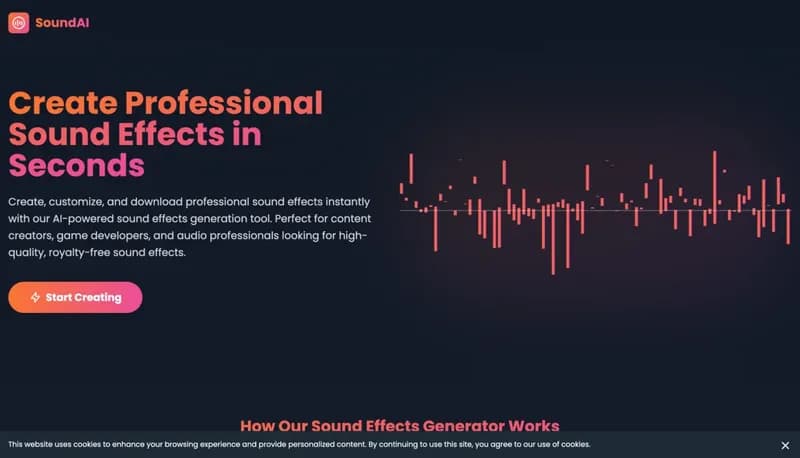







SoundAI Studio

Generate custom sound effects instantly with AI-powered audio creation

Monthly Visits: 570
Pay-As-You-Go
Visit Website
SoundAI Studio

What is SoundAI Studio?

SoundAI Studio lets anyone create professional-grade sound effects using simple text prompts. It's designed for creators who need unique audio fast, without expensive software or licensing hassles. The tool produces royalty-free WAV files ready for commercial projects, making it ideal for video producers, game developers, and podcasters needing instant audio solutions.

Key Features of SoundAI Studio

  1. 1

    Instant Generation

    Create sound effects in seconds using text descriptions

  2. 2

    Commercial Rights

    Royalty-free audio for personal and professional projects

  3. 3

    Parameter Control

    Adjust sound characteristics to match your vision

  4. 4

    WAV Exports

    High-quality audio files compatible with all major software

  5. 5

    Flexible Credits

    Pay-per-use system with no subscription required

SoundAI Studio AI Tool Use Cases

  • ๐ŸŽฅ
    Enhance film/TV projects with custom Foley sounds
  • ๐ŸŽฎ
    Create unique game sound effects on demand
  • ๐ŸŽ™๏ธ
    Produce podcast intros/transitions quickly
  • ๐Ÿ“ฑ
    Generate app notification sounds
  • ๐ŸŽญ
    Design immersive theater/live event audio

FAQs from SoundAI Studio

Can I use generated sounds in commercial projects?

Yes, all sound effects are royalty-free and cleared for commercial use without attribution.

What audio formats are supported?

Currently only WAV format is available for exports.

How many sounds can I create?

1 credit = 1 sound effect. Purchase additional credits as needed.

Pros & Cons of SoundAI Studio

Pros (4)

  • 100% royalty-free commercial usage
  • No recurring subscriptions - pay per sound effect
  • Full control over sound parameters
  • 24/7 support included with all purchases

Cons (2)

  • Limited to WAV format exports only
  • Credit system requires frequent purchases for heavy users

SoundAI Studio's Pricing Plans

Pay what you need

one-time
$1.00

Features

  • 10 sound effect credits
  • Commercial usage rights
  • WAV format exports
  • Full parameter controls
  • 24/7 support access
For the latest pricing info, pleaseย visit the official website

More Info About SoundAI Studio

Who is using soundai studio?

This tool is best for:

  1. Video content creators
  2. Indie game developers
  3. Podcast producers
  4. Multimedia artists

SoundAI Studio's Tags

Explore more niche AI tool websites by clicking on a tag* (works only if it has enough tools).

#RoyaltyFreeMusic #GameDevTools #SoundDesignTool#AISoundEffects

Website Analytics of SoundAI Studio

SoundAI Studio Website Traffic & SEO Analysis:

Recent data shows that SoundAI Studio has 570 monthly visits (201.6% increase from the previous month), 58.0% bounce rate, and average 1.55 pages per visit.
Traffic is primarily driven by 6 different sources, with users from 1 countries worldwide, led by United States contributing 100% of total traffic. SEO performance is shown by 5 tracked keywords, with "sound ai.com" being the top-performing keyword with 0 monthly searches. See below for more info.

Monthly Visits

570

(+201.6%)

Pages per Visit

1.55

Bounce Rate

58.0%

Average Time on Site

33s

Traffic Trend(Apr 2025 - Oct 2025)

Loading chart...

Top Keywords

SEO KeywordVolumeCPC
sound ai.com
0-
soundai
410$1.71
sound ai
4.7K$1.48
soundstills ai
250-
ai studio audio type
200-

Traffic Sources Distribution

Traffic Share by Source

Loading chart...

Source Breakdown Details

SourceTraffic Share
Direct
37%
Search
43%
Social
11%
Referrals
8%
Paid Referrals
1%

Global Traffic Distribution

Traffic Share by Country

Loading chart...

Geographic Breakdown Details of top 1 country

Country NameTraffic Share
United States100%
Analytics data is estimated (from third-party analytics providers) and for reference only.

๐Ÿš€ SoundAI Studio Launch Badge

Promote your Toolbit Launch by using the badge on your website. It can be inserted on your home page or footer easily.

How to use: Simply copy and paste the embed code into your homepage or footer HTML to display it instantly and build community support.

ToolBit badge

Reviews for SoundAI Studio