


AI Music GenerationAudio ProductionCreative Asset Marketplace

SFX Engine

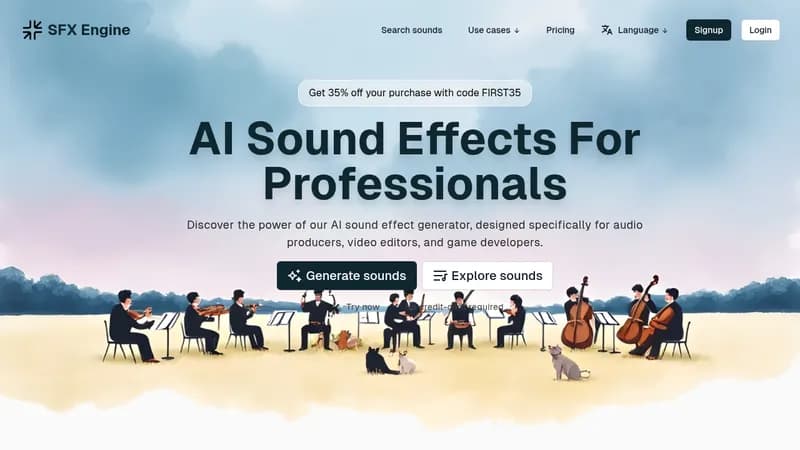
Create custom sound effects for films, games, and media

Monthly Visits: 151.2K
Freemium
Free Version
Visit Website
SFX Engine

What is SFX Engine?

SFX Engine uses AI to generate unique sound effects for video editors, game developers, and content creators. Get exactly what you need by describing sounds in text, no expensive recording equipment required. All generated sounds come with commercial licenses, and you can even sell your creations in their marketplace.

Key Features of SFX Engine

  1. 1

    Infinite Variations

    Generate endless sound effect variations from text prompts

  2. 2

    Text Customization

    Fine-tune sounds using detailed descriptions for precision

  3. 3

    Pay-Per-Use

    Only pay for what you need with credit-based system

  4. 4

    Commercial Licensing

    Ready-to-use sounds with full commercial rights

  5. 5

    Sound Marketplace

    Sell your creations and earn from downloads

SFX Engine AI Tool Use Cases

  • ๐ŸŽฅ
    Add cinematic effects to film projects
  • ๐ŸŽฎ
    Create immersive game soundscapes
  • ๐ŸŽง
    Design unique podcast intros/transitions
  • ๐Ÿ“ฑ
    Generate app notification sounds
  • ๐Ÿ“บ
    Produce YouTube video background audio

FAQs from SFX Engine

Can I use generated sounds commercially?

Yes, all sound effects include commercial licensing by default

How many free sounds can I make?

3 free credits (1 credit per sound effect) on signup

Pros & Cons of SFX Engine

Pros (4)

  • No subscription required - pay per sound
  • Includes commercial licensing by default
  • Marketplace for monetizing creations
  • Beginner-friendly text-to-sound interface

Cons (2)

  • Credit system limits free users (3 initial credits)
  • Unclear generation time estimates

SFX Engine's Pricing Plans

Starter

monthly
$9

Features

  • 10 credits/month
  • Commercial usage rights
  • Basic sound customization

Pro

monthly
$29

Features

  • 40 credits/month
  • Priority generation
  • Marketplace selling
  • Advanced customization
For the latest pricing info, pleaseย visit the official website

More Info About SFX Engine

Who is using sfx engine?

This tool is best for:

  1. Video editors
  2. Game developers
  3. Podcast producers
  4. Social media content creators

SFX Engine's Tags

Explore more niche AI tool websites by clicking on a tag* (works only if it has enough tools).

SFX Engine Social Media

Visit SFX Engine on social media to stay updated with the latest news and features.

Website Analytics of SFX Engine

SFX Engine Website Traffic & SEO Analysis:

Recent data shows that SFX Engine has 151.2K monthly visits (27.4% increase from the previous month), 38.0% bounce rate, and average 1.97 pages per visit.
Traffic is primarily driven by 6 different sources, with users from 5 countries worldwide, led by United States contributing 10% of total traffic. SEO performance is shown by 5 tracked keywords, with "ai sound effect generator" being the top-performing keyword with 7.3K monthly searches. See below for more info.

Monthly Visits

151.2K

(+27.4%)

Pages per Visit

1.97

Bounce Rate

38.0%

Average Time on Site

28s

Traffic Trend(Apr 2025 - Oct 2025)

Loading chart...

Top Keywords

SEO KeywordVolumeCPC
ai sound effect generator
7.3K$7.42
sfx engine
930-
sound effect generator ai
1.2K$2.77
ai sfx generator
1.3K$4.74
ai sound effects generator
760$8.21

Traffic Sources Distribution

Traffic Share by Source

Loading chart...

Source Breakdown Details

SourceTraffic Share
Direct
42%
Search
45%
Social
5%
Referrals
7%
Paid Referrals
1%

Global Traffic Distribution

Traffic Share by Country

Loading chart...

Geographic Breakdown Details of top 5 countries

Country NameTraffic Share
United States10%
Russia8%
Germany6%
Indonesia6%
France4%
Analytics data is estimated (from third-party analytics providers) and for reference only.

๐Ÿš€ SFX Engine Launch Badge

Promote your Toolbit Launch by using the badge on your website. It can be inserted on your home page or footer easily.

How to use: Simply copy and paste the embed code into your homepage or footer HTML to display it instantly and build community support.

ToolBit badge

Reviews for SFX Engine