

Starting in December, OpenAI says the ChatGPT and Codex usage limit on Plus, Pro and Business plans becomes one shared allowance, measured in tokens. Instant chat won't count against it, but heavier models, agent tasks and coding work will all come out of the same pool. OpenAI hasn't published how big that pool is on any plan or the exact start date, so the smart move is to learn your current pace now and decide in advance what you'll do when you run dry.
What is changing with the ChatGPT and Codex shared usage limit in December?
As of November 2026, OpenAI's help center says that from December, Plus, Pro and Business subscribers will have one usage allowance shared across ChatGPT and Codex, measured in tokens. OpenAI frames it as part of bringing the agent features of Work into the main ChatGPT experience.
Tokens are the small units of text ChatGPT reads and writes, so a long, complex request costs more than a quick one. OpenAI is explicit that your allowance does not equal a fixed number of messages or tasks.
Think of it like a family phone plan with shared data. Work inside ChatGPT already uses the same pricing, credits and usage limits as Codex, according to OpenAI's pricing page, so those two already share a bucket. In December, ChatGPT usage joins that bucket too, with Instant chat as the stated exception.
Will my ChatGPT chats use up my Codex limit?
Mostly, yes. Instant chat is the stated exception, and today GPT-6 Pro in Chat has its own message limits, separate from the shared Work and Codex allowance. OpenAI hasn't said whether that changes once the pool starts. OpenAI says more advanced models and complex tasks use more of the shared allowance, while Instant chat does not draw from it at all.
Here's how that plays out. Say you're on Plus and spend the morning asking an advanced model to rework a batch of sales emails, then open Codex in the afternoon to fix a broken signup form on your website. From December, both come out of the same allowance, so a heavy morning leaves less for the afternoon.
Some things drain the bucket faster than others, according to OpenAI's current pages:
- Advanced models and complex tasks use more of your allowance than simple ones.
- Fast mode uses your included allowance at 2.5 times the Standard rate, per OpenAI's Pro tiers page.
- Image generation uses included limits about 3-5x faster on average, depending on image quality and size, per OpenAI's pricing page.
OpenAI said, according to TechCrunch, that the change won't affect most users, but that depending on usage and model, some people may need to wait for resets more often.
How will the shared limit affect Plus, Pro and Business?
All three plans join the shared pool in December, per OpenAI, but as of November 2026 no plan's allowance size has been published. What OpenAI has published is how each plan's Work and Codex limits work today, which is your best clue to how the pool will feel.
| Plan | Joins the shared pool in December? | How Work and Codex limits work today | Shared allowance size | What to watch |
|---|---|---|---|---|
| Plus | Yes, per OpenAI | Five-hour windows on top of a weekly quota (since late August). OpenAI's pricing page gives local-message estimates per window, not fixed limits. Limited GPT-6 Astra usage, with optional credits for more. | Not published | You need allowance left in both the five-hour and weekly limits to keep going |
| Pro 100 | Yes, per OpenAI | No five-hour limit currently, but an included allowance. Now includes twice its previous Work and Codex allowance. | Not published | OpenAI hasn't said if "no five-hour limit" survives the pool |
| Pro 200 | Yes, per OpenAI | No five-hour limit currently, but an included allowance | Not published | Same open question as Pro 100 |
| Pro 500 | Yes, per OpenAI | No five-hour limit currently. Now includes twice its previous Work and Codex allowance. Highest included usage of the three Pro plans. | Not published | The top of the ladder if you keep running out |
| Business | Yes, per OpenAI | Business Standard seats include limited GPT-6 Astra usage in Work and Codex, with optional credits for more | Not published | Five-hour and weekly details for Business aren't in the pages we checked |
| Free and Go | Not mentioned | Not covered by the announcement | Not mentioned | OpenAI's help article doesn't mention these plans at all |
How does the five-hour window work on Plus?
On Plus, a new five-hour window starts when you send your first Work or Codex message after the previous window ends, not on a fixed clock. You can also hit the five-hour limit before five hours have passed, even with weekly usage left.
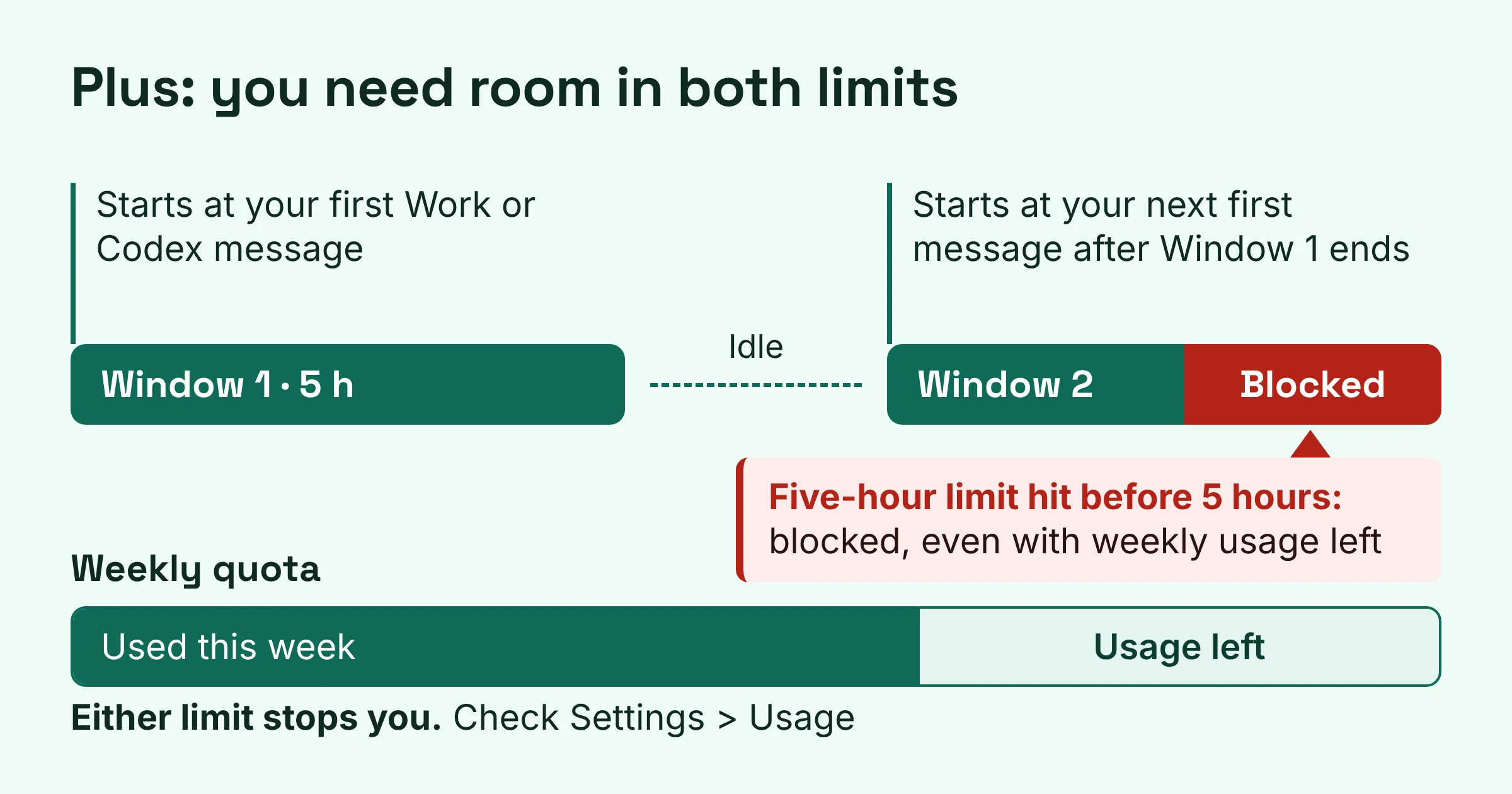
Where both limits apply, you need allowance remaining in both to continue. Picture two locks on one door: either one stops you. The figures on OpenAI's pricing page are estimates, not fixed limits, and OpenAI tells you to check your actual usage.
When does it start, how big is it, and what about Free and Go?
OpenAI hasn't said. As of November 2026, four things are still missing: the allowance size on each plan, the exact December start date, how often the shared allowance resets, and what happens to Free and Go. Notebookcheck flagged the same gaps after reading OpenAI's help article.
| Unknown | Why it matters to you |
|---|---|
| Allowance size per plan | You can't yet tell whether your current habits fit inside the new pool |
| Exact start date | OpenAI says "December" but hasn't named a day, so prepare early |
| Reset cadence after the merge | Five-hour plus weekly, weekly only, or something else changes how you pace work |
| Free and Go plans | The help article doesn't mention them |
| Whether Pro keeps "no five-hour limit" | Pro has no five-hour limit today, but OpenAI hasn't said if that continues once usage is pooled |
The first gap is the sore point: you're metered in tokens, but no plan says how many tokens you get. Until OpenAI publishes numbers, your own usage history is your best guide.
Where do I check how much usage I have left?
Go to Settings > Usage. OpenAI says this is where you'll see your combined remaining ChatGPT and Codex usage and reset times once the pool starts, and it already shows remaining allowance, usage windows and reset times for Work and Codex.
OpenAI's timing advice is simple. Check Settings > Usage before a large task, so you don't start a big job with almost nothing left, and look at the dashboard every week or two to understand your pace.
Make it a habit: before you ask Work to build a full slide deck or Codex to refactor a project, glance at the reset time. If the reset is close, waiting may beat paying for credits.
Hit the limit: should you wait, buy credits, upgrade or switch to Instant?
OpenAI lists three options when you reach your limit: wait for the reset, upgrade your plan, or buy credits for eligible features. Instant chat gives you one more, because it doesn't draw from the pool at all.
Go down this table and stop at the first row that fits:
| If this is you | Do this | Why |
|---|---|---|
| You hit the limit mid-task | Let it finish | OpenAI says an agent can keep working on an active turn after you hit the limit, subject to fair use limits |
| You only need quick answers, drafts or look-ups | Switch to Instant chat | Instant doesn't draw from the shared allowance. Switching to another advanced model won't help, because OpenAI says switching models does not restore allowance in a shared pool |
| You rarely hit the limit and the reset is close | Wait | Costs nothing, and Settings > Usage shows the reset time |
| You hit it occasionally and have a deadline now | Buy credits | OpenAI says Plus and Pro users can buy credits instead of upgrading |
| You hit it most weeks | Upgrade | Pro plans have no five-hour limit today (OpenAI hasn't said if that lasts after pooling), and Pro 500 has the highest included usage of the three Pro plans |
What do credits cover?
Credits are a top-up, not a bigger plan. OpenAI says your included usage is spent first, then your credit balance. Credits cover eligible usage in Codex, Work, and the Word, Excel and PowerPoint add-ins, but OpenAI notes they don't add usage for every ChatGPT model or feature.
Can you stretch the allowance before paying?
Often, yes. OpenAI's advice: if usage is higher than expected, see whether a smaller model or a tighter task scope still gets you a useful result.
Asking for "a short follow-up email to this client" uses far fewer tokens than "rewrite our entire email sequence and explain every choice." Skipping Fast mode and going easy on image generation stretches the same allowance further.
Is the Chat and Work tab merge the same thing as the shared limit?
No. These are separate changes: the merged Chat and Work tab goes first to select users for feedback before a wide rollout, while the shared allowance arrives in December for Plus, Pro and Business.
OpenAI describes three different experiences. Chat is for fast, everyday questions, Work is an agent for longer multi-step tasks and finished deliverables, and Codex is for software development and technical work. Codex stays a separate view, with its history kept apart from ChatGPT history.
So seeing (or not seeing) the merged tab tells you nothing about whether your limit has been pooled. Settings > Usage is where to check that.
What should I do before December?
You can't control the allowance size, but you can walk into December knowing your own numbers:
- Take a baseline this week. Open Settings > Usage and note how much you have left and when it resets.
- Check again a week later. OpenAI suggests every week or two. Comparing the snapshots shows your real pace.
- Make Instant your default for small stuff. Quick rewrites, look-ups and brainstorming don't need an advanced model, and Instant won't touch your pool.
- Turn off Fast mode unless speed truly matters for the task.
- Pick your overflow rule now. Occasional overruns get credits; regular overruns get an upgrade.
- On Free or Go? Watch OpenAI's help article. Nothing has been published for your plan yet.
If the new limits push you to look elsewhere, our guide to Claude Pro, Max and Ultra plans and their limits shows how another assistant handles usage, and the Claude vs ChatGPT comparison covers the bigger picture.
Plan details and limits were checked on OpenAI's help and pricing pages in November 2026; they change often.