
Choosing between Claude Personal Finance and ChatGPT Finances mostly comes down to two things: which plan you're on, and how much cleanup you're willing to do later. As of November 2026, ChatGPT Finances works on Free, Go, Plus and Pro in the US. Claude Personal Finance is a US-only beta for Pro, Max and Ultra subscribers.
Neither one can move your money. The real differences are in the training rules and in what stays behind after you leave.
Everything below comes from the vendors' own pages: Anthropic's help page and announcement, and OpenAI's and Plaid's help pages. We found no independent accuracy tests, so we can't tell you which assistant gets your numbers right more often. What this post does cover is what each one reads, what each vendor promises, and how to get out cleanly.
Claude Personal Finance vs ChatGPT Finances: how do they compare side by side?
As of November 2026, both assistants connect to US bank accounts through Plaid in read-only mode. They differ on four things:
- who can use them
- what they read
- how your chats feed model training
- whether a deletion deadline is published
| Claude Personal Finance | ChatGPT Finances | |
|---|---|---|
| Who can use it | Pro, Max and Ultra plans, US only, beta with a gradual rollout | Free, Go, Plus and Pro, in the US |
| Not available on | Free, Team, Enterprise | Not listed |
| Devices | Not covered in our sources | Web, iOS, Android |
| How banks connect | Plaid, US banks only, up to 16 banks | Plaid for banks, Experian for credit reports (separate connections) |
| Transaction history | Up to 24 months | Not stated on OpenAI's help page |
| Investment, loan and card accounts | Balances and credit limits only | Whatever your institution chooses to share |
| Can it move money? | No | No |
| Model training | Chats in the Personal Finance hub aren't used; elsewhere, your privacy settings apply | Follows the training setting you pick across ChatGPT |
| A way to keep a chat away from your accounts | You can stop Claude reading accounts automatically | Temporary chats don't access connected accounts |
| Deletion after you disconnect | No deadline stated on the help page | Within 30 days at OpenAI and at Plaid |
| Best for | People already paying for Claude who want Personal Finance hub chats kept out of training | Free users, or anyone who also wants credit report help |
Do I need a paid plan to use either one?
You need a paid plan for Claude but not for ChatGPT. As of November 2026, Anthropic's help page lists Claude Personal Finance as a beta on the Pro, Max and Ultra plans only, in the US. OpenAI's help page lists ChatGPT Finances on Free, Go, Plus and Pro in the US, on web, iOS and Android.
The Claude side has a few catches:
- Plans: it isn't offered on Free, Team or Enterprise.
- Rollout: Anthropic is rolling it out gradually, so you may not see it yet even if you already pay for Pro.
- Banks: you can only link US banks.
On the ChatGPT side, the credit score feature runs through a separate Experian connection, and you don't need to link a bank to use it. To compare the two assistants beyond money features, see our broader Claude vs ChatGPT comparison.
What can Claude actually see in my bank account, and what does ChatGPT see?
According to Anthropic's help page (November 2026), Claude Personal Finance reads two things:
- up to 24 months of transactions, with amount, date, merchant, category and your bank's description
- balances and credit limits
ChatGPT Finances reads whatever your institution shares, and OpenAI says that may be balances only. OpenAI's help page doesn't state a transaction history window.
What Claude sees
- Transactions: up to 24 months, with amount, date, merchant, category and the bank's own description.
- Investment, loan and card accounts: balances and credit limits only. Anthropic says Claude does not read "holdings, trades, rates, or terms."
- Account numbers, sometimes: if your bank writes a full account number into an account's name or a transaction description, Claude may see it there.
Two quirks matter before you trust a total. First, Anthropic says balances "can be a day or two old." Second, an account you link through two logins may be counted twice.
For example, say a joint checking account is linked from your login and again from your partner's. Your net worth suddenly looks a lot healthier than it is.
What ChatGPT sees
ChatGPT pulls bank data through Plaid. If you choose, it also pulls your credit report through Experian. OpenAI warns that "an institution may share balances but not full transaction history, investment holdings, loan details, APRs, due dates, or other fields."
Syncing is automatic. OpenAI says the first sync usually takes a few minutes, but in rare cases it may take several hours.
OpenAI's help page doesn't say how many months of history ChatGPT pulls. It also doesn't say how ChatGPT handles full account numbers that appear in descriptions.
Can Claude or ChatGPT move my money?
No. As of November 2026, both Anthropic and OpenAI describe their finance features as read-only, so neither Claude nor ChatGPT can move money for you.
Think of both as a sharp friend reading your statements over your shoulder, not someone holding your debit card. Anthropic also says Claude "doesn't ask for or see your bank password," because you sign in through Plaid.
Both vendors add caveats:
- OpenAI states that ChatGPT "is not a fiduciary, registered investment adviser, broker-dealer, tax preparer, or law firm."
- Anthropic tells you to "check important figures against your bank's own app or statements."
Is my financial data used to train the AI?
It depends on which assistant you use and where you chat. As of November 2026:
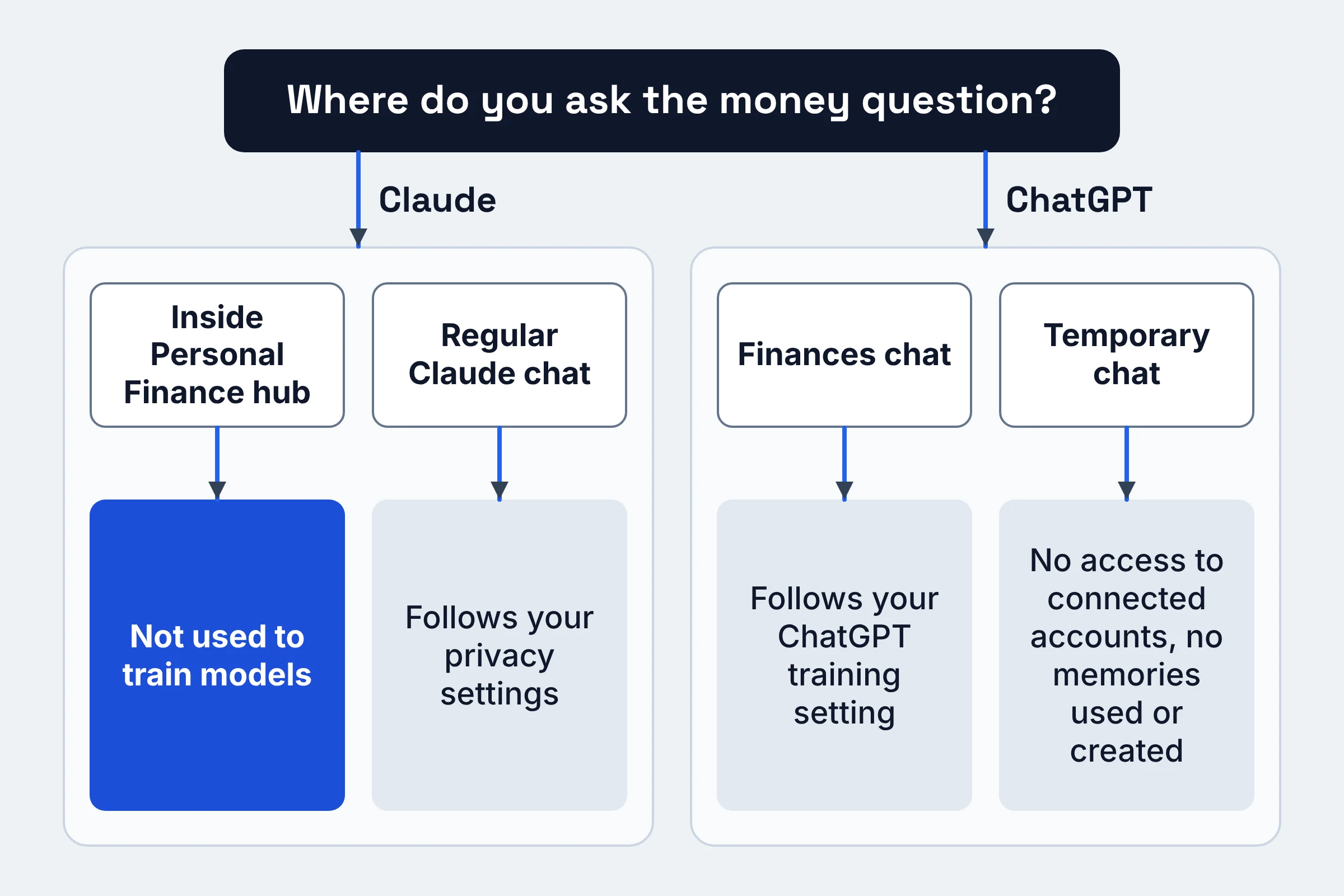
- Claude: Anthropic says chats inside the Personal Finance hub "aren't used to train our models." Anything you share outside the hub follows your privacy settings.
- ChatGPT: OpenAI says Finances chats follow the same training setting you choose across ChatGPT.
That gives you one practical habit for each assistant:
- In Claude: keep money questions inside the Personal Finance hub. If you ask "how much did I spend on takeout?" in a regular chat, that chat falls under your normal privacy settings instead.
- In ChatGPT: check your model training setting before you connect anything, because Finances inherits it. For a one-off question you want kept away from your accounts, use a temporary chat. OpenAI says temporary chats won't access connected accounts or use or create memories.
ChatGPT also saves "financial memories." You can view or delete them from the Finances home page.
Is it safe to connect my bank account to Claude or ChatGPT?
Neither Anthropic nor OpenAI promises zero risk, and we found no independent accuracy tests of either assistant. What their pages do show:
- both are read-only
- you sign in through Plaid, which Anthropic says keeps your bank password away from Claude
- a few exposure points remain, and you control them
Run through this checklist before you link anything:
- Pick where your money chats will live. In Claude, that's the Personal Finance hub. In ChatGPT, make sure your training setting is the one you want.
- Decide if Claude should read accounts on its own. Anthropic says Claude reads your linked accounts "without asking each time, unless you change that."
- Look at how your bank names accounts. If a full account number shows up in names or descriptions, assume the assistant may see it.
- Treat shared links as public. Anthropic says a shared chat link shows Claude's replies, "including any figures from your accounts." Sending your partner a link to "our budget chat" sends the numbers too.
- Have your bank login ready. Anthropic says to finish the Plaid sign-in within 10 minutes and return to Claude right away.
- Verify big numbers. Anthropic suggests you "ask which transactions are behind a number" before acting on it.
For the wider habit of keeping sensitive details out of chatbots, see what not to paste into ChatGPT, Claude or Gemini.
How do I disconnect my bank from Claude or ChatGPT?
Unlink inside the assistant first, then clean up chats, shared links, artifacts and memories separately. Both Anthropic and OpenAI say disconnecting doesn't erase what the AI already told you. Plaid adds one more step, because its own disconnect stops future sharing only.
Claude exit checklist
- Save your budgets before the last unlink. Anthropic says unlinking your last bank resets the dashboard: "Your widgets, their settings (such as budgets), and your setup answers are deleted, and this can't be undone." Screenshot anything you want to keep.
- Unlink by bank login, not by account. Every account under that login goes at once, and Anthropic says "You can't unlink a single account." So if you only want to drop your savings account, you can't. The whole login goes.
- Delete chats that contain figures. Earlier answers stay in your chats, artifacts and shared links until you remove them.
- Delete published artifacts separately. Anthropic says a published artifact "stays until you delete it, even if you delete the chat."
- Unlink even if you're cancelling. When a paid plan ends, Claude can't read your accounts, but "Your banks stay linked until you unlink them."
ChatGPT exit checklist
- Disconnect the Plaid source. OpenAI says synced data is then deleted within 30 days (details in the next section).
- Disconnect Experian separately, if you connected it. It's a separate connection. OpenAI says disconnecting it doesn't remove past conversations or financial memories.
- Delete financial memories from the Finances home page.
- Delete the conversations themselves. OpenAI says disconnecting a source "does not delete information already in your conversation history."
If you also want ChatGPT or Claude to forget details that aren't about money, our guide on deleting what ChatGPT, Claude and Gemini remember walks through memory and chat history.
The Plaid step, for both
You can also disconnect apps from Plaid's side. But Plaid's help center says this "stops future data sharing only. The app may still keep data it has already collected."
To delete that data, Plaid says to contact the app directly, which here means Anthropic or OpenAI. Plaid's disconnect guide has the steps.
What happens to my data after I unlink or cancel?
As of November 2026, OpenAI states a deletion clock for ChatGPT Finances. Synced account data is deleted from OpenAI's systems within 30 days. Data tied to that ChatGPT connection is deleted from Plaid within 30 days, under Plaid's policies.
Anthropic's Personal Finance help page doesn't state a deadline for synced bank data. And Claude keeps your banks linked after a paid plan ends, until you unlink them.
Here's what lingers in each, according to the help pages:
| What lingers | Claude Personal Finance | ChatGPT Finances |
|---|---|---|
| Synced bank data | No deadline on the Personal Finance help page | Deleted within 30 days |
| Past answers in chats | Stay until you remove them | Stay until you delete the conversations |
| Shared chat links | Show figures from your accounts | Not covered in our sources |
| Published artifacts | Stay even after the chat is deleted | Not covered on OpenAI's help page |
| Saved financial memories | Not covered in our sources | Stay until you delete them from the Finances home page |
| Dashboard and budgets | Wiped, irreversibly, when your last bank is unlinked | Not covered on OpenAI's help page |
| After a paid plan ends | Banks stay linked until you unlink them | Not covered on OpenAI's help page |
The plan-end trap is the easiest one to miss. Cancelling Claude Pro doesn't end the bank connection. It only stops Claude from reading your accounts, so unlink on purpose.
You can read the full terms on Anthropic's Personal Finance help page and OpenAI's Finances help page.
Claude or ChatGPT for personal finance: which should you pick?
Pick ChatGPT Finances if:
- you're on a free plan
- you want credit report help
- you want a deletion deadline spelled out on the feature's own help page
Pick Claude Personal Finance if:
- you already pay for Pro, Max or Ultra
- you want chats in the Personal Finance hub kept out of training, regardless of your other settings
Find your situation in the table:
| Your situation | Better fit | Why, per the help pages |
|---|---|---|
| You don't pay for either assistant | ChatGPT Finances | Available on Free and Go; Claude needs Pro, Max or Ultra |
| You want your credit report in the picture | ChatGPT Finances | Optional Experian connection, no bank link needed |
| You want hub chats excluded from training no matter what | Claude Personal Finance | Anthropic says hub chats aren't used to train its models |
| You want a deletion deadline on the feature's own help page | ChatGPT Finances | OpenAI states 30 days; Anthropic's Personal Finance help page doesn't state one |
| You want a stated history window | Claude Personal Finance | Anthropic states up to 24 months; OpenAI doesn't state one |
| You live outside the US | Not Claude; check OpenAI's page | Claude is US only; OpenAI lists availability in the US |
| You want the AI to pay bills or move money | Neither | Both are read-only |
Do this next
- Check your plan and your training setting. That alone may settle the choice.
- Run the pre-link checklist above. Pay special attention to the shared-link and account-name checks.
- Bookmark the exit checklist. On the day you leave, unlink on purpose and delete your chats, artifacts and memories. Remember that Plaid's own disconnect isn't a delete button.
FAQ
Which one is better for tracking subscriptions?
We found no independent accuracy tests of either assistant, including for subscription tracking. Anthropic's page says Claude reads merchant names and bank descriptions for up to 24 months, which is the raw material for spotting repeat charges.
OpenAI doesn't state its history window, and some institutions share balances only. With either assistant, ask it to list the transactions behind a total.
Can I use my linked accounts in Claude projects, scheduled tasks or Cowork?
Mostly no. Anthropic says Claude can't use linked accounts in scheduled tasks, Cowork tasks or Claude Code, "and may not be able to use them in a project." If you were planning to hand budgeting to Claude Cowork or another agent mode, keep it in the Personal Finance hub instead.
Do I have to link a bank to use ChatGPT's credit score feature?
No. OpenAI says the Experian credit connection is separate from Plaid, and connecting a bank through Plaid does not connect your credit.
Plan availability and limits were checked on Anthropic's, OpenAI's and Plaid's help pages in November 2026; they change often.