Teacher ToolsLesson PlanningClassroom Management Software

Teach Catalyst AI

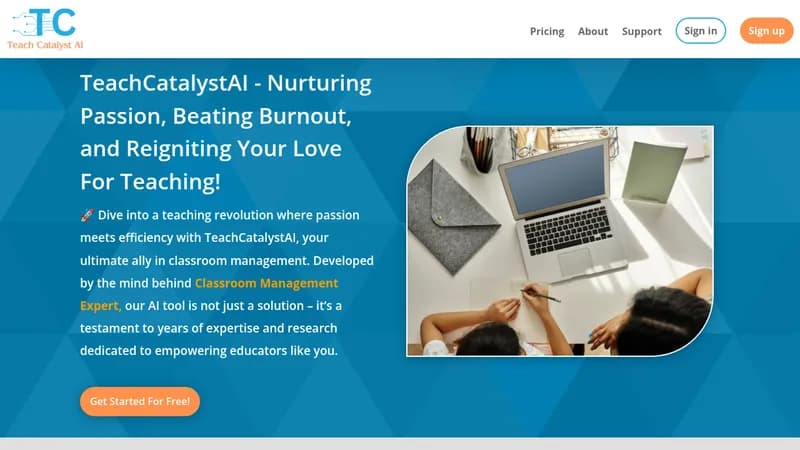
Automate lesson planning and classroom management to reduce teacher burnout

Monthly Visits: 129
Freemium
Free Version
Visit Website
Teach Catalyst AI

What is Teach Catalyst AI?

Teach Catalyst AI helps educators create lesson plans, worksheets, and quizzes in minutes using AI. It analyzes student behavior and generates reports to save teachers 10+ hours weekly on administrative tasks. The platform focuses on preventing teacher burnout while improving classroom engagement and learning outcomes.

Key Features of Teach Catalyst AI

  1. 1

    Quiz Generator

    Creates tailored assessments aligned with lesson objectives

  2. 2

    Behavior Insights

    Identifies root causes of student misbehavior patterns

  3. 3

    Report Writer

    Generates personalized student progress reports automatically

  4. 4

    Lesson Architect

    Builds customized curricula with warm-up activities

  5. 5

    Worksheet Builder

    Produces classroom materials in under 5 minutes

Teach Catalyst AI Tool Use Cases

  • πŸ“
    Create customized lesson plans
  • 🧩
    Generate math problems/quizzes
  • πŸ“Š
    Write student progress reports
  • 🎯
    Analyze classroom behavior patterns
  • ⏱️
    Create time-filler activities

FAQs from Teach Catalyst AI

Do I need technical skills to use this?

No technical knowledge required - just answer questions and generate materials

How quickly can I start using the tools?

Immediately after signup, starting with free plan options

Does this replace human teachers?

No - designed to assist educators, not replace them

Pros & Cons of Teach Catalyst AI

Pros (4)

  • Reduces administrative workload by 70%+ according to testimonials
  • 20+ specialized tools for different teaching scenarios
  • No technical skills required for operation
  • Designed by educators with classroom experience

Cons (3)

  • Primarily focused on K-12 education needs
  • Limited customization for higher education
  • Template-based approach might require adjustments

Teach Catalyst AI's Pricing Plans

Free Plan

Features

  • Basic template access
  • Limited generations
  • Core classroom tools

Premium

Features

  • Unlimited content generation
  • Advanced analytics
  • Priority support
  • Custom template saving
For the latest pricing info, pleaseΒ visit the official website

More Info About Teach Catalyst AI

Who is using teach catalyst ai?

This tool is best for:

  1. K-12 Teachers
  2. Special Education Instructors
  3. Curriculum Coordinators
  4. New Educators

Teach Catalyst AI's Tags

Explore more niche AI tool websites by clicking on a tag* (works only if it has enough tools).

#EdTechTools #TeacherProductivity #BurnoutPrevention#AIClassroom

Website Analytics of Teach Catalyst AI

Teach Catalyst AI Website Traffic & SEO Analysis:

Recent data shows that Teach Catalyst AI has 129 monthly visits (Infinity% increase from the previous month), 49.0% bounce rate, and average 1.01 pages per visit.
Traffic is primarily driven by 6 different sources, with users from 1 countries worldwide, led by Canada contributing 100% of total traffic. SEO performance is shown by 1 tracked keywords, with "catalyst ai" being the top-performing keyword with 2.6K monthly searches. See below for more info.

Monthly Visits

129

(+Infinity%)

Pages per Visit

1.01

Bounce Rate

49.0%

Traffic Trend(Apr 2025 - Oct 2025)

Loading chart...

Top Keywords

SEO KeywordVolumeCPC
catalyst ai
2.6K$2.16

Traffic Sources Distribution

Traffic Share by Source

Loading chart...

Source Breakdown Details

SourceTraffic Share
Direct
35%
Search
42%
Social
6%
Referrals
14%
Paid Referrals
2%

Global Traffic Distribution

Traffic Share by Country

Loading chart...

Geographic Breakdown Details of top 1 country

Country NameTraffic Share
Canada100%
Analytics data is estimated (from third-party analytics providers) and for reference only.

πŸš€ Teach Catalyst AI Launch Badge

Promote your Toolbit Launch by using the badge on your website. It can be inserted on your home page or footer easily.

How to use: Simply copy and paste the embed code into your homepage or footer HTML to display it instantly and build community support.

ToolBit badge

Reviews for Teach Catalyst AI