





Trae

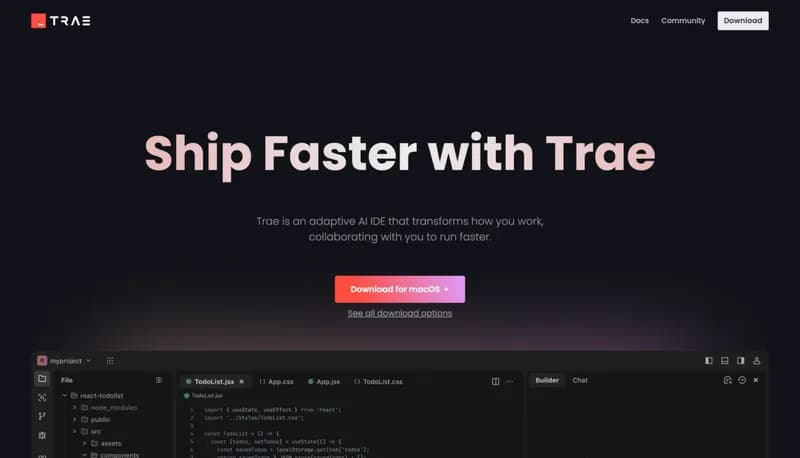
Ship faster with adaptive AI collaboration

Monthly Visits: 2.2M
Freemium
Free Version
Visit Website
Trae

What is Trae?

Trae is an AI-powered coding assistant that works alongside developers like a smart teammate. It intelligently balances tasks between human and AI to handle repetitive work while keeping you in control. The tool offers a familiar VS Code-like experience with enhanced productivity features and a sleek interface developers love.

Key Features of Trae

  1. 1

    Adaptive Collaboration

    Balances human/AI tasks for optimal productivity

  2. 2

    VS Code Transition

    Smooth switch from popular IDE with familiar UI

  3. 3

    Builder Mode

    Create apps without writing code via AI assistance

  4. 4

    Sleek Interface

    Clean, intuitive design praised by developers

Trae AI Tool Use Cases

  • πŸ› οΈ
    Build no-code RAG applications
  • πŸ“š
    Learn new programming languages like Rust
  • πŸ”„
    Transition from VS Code seamlessly
  • πŸš€
    Accelerate team development workflows

FAQs from Trae

How does Trae compare to VS Code?

Offers similar interface with added AI collaboration features for smoother transition

What languages does Trae support?

Works with multiple programming languages through AI assistance, including Rust

Is there a free version?

Yes, Trae offers a completely free option with core features

Pros & Cons of Trae

Pros (4)

  • Smart task delegation between developer and AI
  • Familiar VS Code compatibility
  • Proven productivity gains in user testimonials
  • Modern, user-friendly interface

Cons (2)

  • Currently only available for macOS
  • Limited control over AI model settings mentioned in feedback

Trae's Pricing Plans

Free Plan

$0

Features

  • Core AI collaboration features
  • Builder mode access
  • VS Code-like interface
For the latest pricing info, pleaseΒ visit the official website

More Info About Trae

Who is using trae?

This tool is best for:

  1. Software developers
  2. Coding learners
  3. Engineering team leads

Trae's Tags

Explore more niche AI tool websites by clicking on a tag* (works only if it has enough tools).

Platforms & Device Support

Use Trae on your favorite device - available across multiple platforms for flexibility.

Desktop App

Mac
βœ“ Available

Trae Social Media

Visit Trae on social media to stay updated with the latest news and features.

Website Analytics of Trae

Trae Website Traffic & SEO Analysis:

Recent data shows that Trae has 2.2M monthly visits (-11.2% decrease from the previous month), 42.0% bounce rate, and average 3.37 pages per visit.
Traffic is primarily driven by 6 different sources, with users from 5 countries worldwide, led by China contributing 36% of total traffic. SEO performance is shown by 5 tracked keywords, with "trae" being the top-performing keyword with 206.1K monthly searches. See below for more info.

Monthly Visits

2.2M

(-11.2%)

Pages per Visit

3.37

Bounce Rate

42.0%

Average Time on Site

2m 59s

Traffic Trend(Apr 2025 - Oct 2025)

Loading chart...

Top Keywords

SEO KeywordVolumeCPC
trae
206.1K$2.63
trae ai
52.0K$2.36
trea
33.9K$0.53
trae ide
10.1K$2.70
cursor
2.2M$2.09

Traffic Sources Distribution

Traffic Share by Source

Loading chart...

Source Breakdown Details

SourceTraffic Share
Direct
55%
Search
32%
Social
3%
Referrals
9%
Paid Referrals
1%

Global Traffic Distribution

Traffic Share by Country

Loading chart...

Geographic Breakdown Details of top 5 countries

Country NameTraffic Share
China36%
Brazil8%
India7%
United States6%
Vietnam4%
Analytics data is estimated (from third-party analytics providers) and for reference only.

πŸš€ Trae Launch Badge

Promote your Toolbit Launch by using the badge on your website. It can be inserted on your home page or footer easily.

How to use: Simply copy and paste the embed code into your homepage or footer HTML to display it instantly and build community support.

ToolBit badge

Reviews for Trae