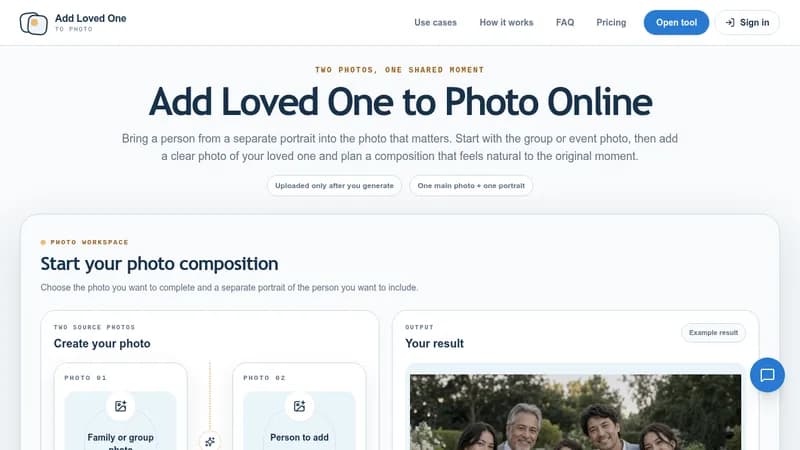
Add Loved One to Photo is an AI-powered tool that integrates a person from a separate portrait into an existing group or event photo. Users start with a main photo—such as a wedding, graduation, or family portrait—and upload a clear portrait of the person they want to include. The tool generates a composed result that adjusts lighting, scale, and perspective to create a natural-looking image.
Workflow
- Choose the group or event photo that serves as the main scene.
- Upload a separate portrait of the person to add, with an optional placement note.
- Review the generated result in full-screen view and download the completed image.
Key Features
- Two-photo workflow: one base photo and one portrait per generation.
- Optional placement note to guide where the added person should appear.
- Full-screen review and zoom for inspecting generated results.
- Supports JPG, PNG, and WebP files up to 10 MB.
- One free generation available per browser; additional generations use credits.
Use Cases
- Memorial photos: adding a deceased loved one to a family photo.
- Wedding photos: including someone missing from the original group.
- Graduation photos: completing a milestone portrait.
- Family portraits: creating a unified portrait from separate photos.
Requirements
- Best results require high-resolution originals with clear, unobstructed faces.
- Similar camera angles, body positions, and lighting directions between the two photos improve naturalness.
- Severely damaged or low-quality portraits may need restoration before use.
Privacy
Photos remain in the browser during review. After generation starts, both photos and any placement note may be sent to third-party image-analysis and image-generation providers. Result links and job records are temporary and not intended as permanent storage.