Six months from now, nobody will ask you what happened in today's meeting. They will ask something much harder. What did we decide about the renewal date? Who promised the migration timeline to the client? Which calls mentioned the pricing objection that killed the Q2 deal? The summary that looked so polished when it landed in your inbox at 5pm is useless for that question, because you no longer remember which meeting it was, who was in it, or even which quarter it happened in.
That is the gap between recap and recall, and it is where most AI meeting tools quietly fall apart. A recap is a summary of the meeting you just left. Recall is finding the one sentence that was said, once, four months ago, in a meeting you barely remember attending. Every notetaker on the market markets itself on recaps. Almost none of them advertise how they perform on the delayed question, because the honest answer is usually uncomfortable.
This is a comparison of three of the most popular options, Read AI, tl;dv, and Fireflies, judged on the only test that matters six months out: can you search your meeting history and get the answer with a citation, at a price you would actually pay?
The job is recall, not recap
Say you run a small agency. Over six months you accumulate somewhere between 150 and 300 recorded calls: client check-ins, sales pitches, internal planning, a few vendor negotiations. Somewhere in that pile, in a meeting you have long forgotten, a client agreed to a 10 percent discount if the contract ran two years. The renewal conversation is next week. You need that moment.
Notice what this task actually requires. It is not summarization. A summary of every meeting would be worse than useless, since reading 200 summaries takes longer than the answer is worth. It is search: the ability to ask "what did we agree about contract length or discounts with this client" and get pointed to the exact call and the sentence that settled it.
Three things make this hard for tools, and each tool in this comparison fails at a different one:
- The index has to cover everything, not just recent meetings.
- The question is fuzzy. You do not remember the words that were used, so keyword search alone dies here.
- The answer has to cite its source. An AI that answers confidently without pointing to the moment is worse than no answer, because you cannot check it before repeating it to a client.
Recaps are a solved problem in 2026. Every tool here produces decent summaries. Recall is where the plans, prices, and philosophies diverge, so that is what we tested.
The delayed-question test
Before looking at any specific tool, here is the test. It takes about an hour and it will tell you more than any feature list.
Collect a folder of at least five real transcripts from the past six months. If you already use a notetaker, export what you have. If not, upload old recordings, most tools accept audio or video uploads. Then ask each tool the same four questions:
- A decision question: "What did we decide about the pricing model?" Tests whether the tool can synthesize a decision out of a rambling conversation.
- A commitment question: "Who agreed to do what, and by when?" Tests action-item extraction across meetings, not just inside one.
- A trend question: "Which meetings mentioned the new competitor?" Tests cross-meeting keyword search, the plain mechanical layer under the AI.
- A needle: one specific number or date that was said exactly once, months ago. Tests precision. This is the one that separates tools that index transcripts from tools that improvise.
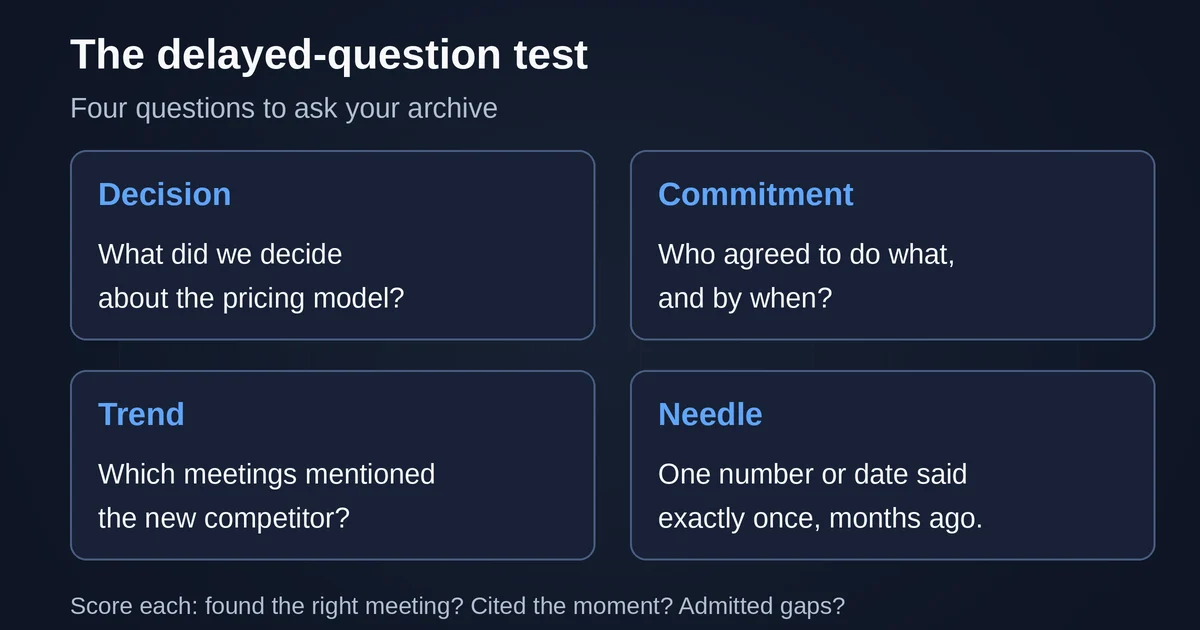
Score each answer on three things: did it find the right meeting, did it point you to the moment in the transcript, and did it admit when nothing was actually said. That last one matters more than people expect. A tool that answers the trend question with plausible invention has just cost you a client conversation.
Run this test before you commit six months of your company's memory to any vendor, because the failure mode is silent: the tool works beautifully on day one, when every meeting is fresh and the question is about yesterday. The disappointment arrives in month four, when the archive is large, the plan limits have kicked in, and the question is about a call you barely remember.
What good cross-meeting search looks like
There are four layers, and a tool is only as good as its weakest one.
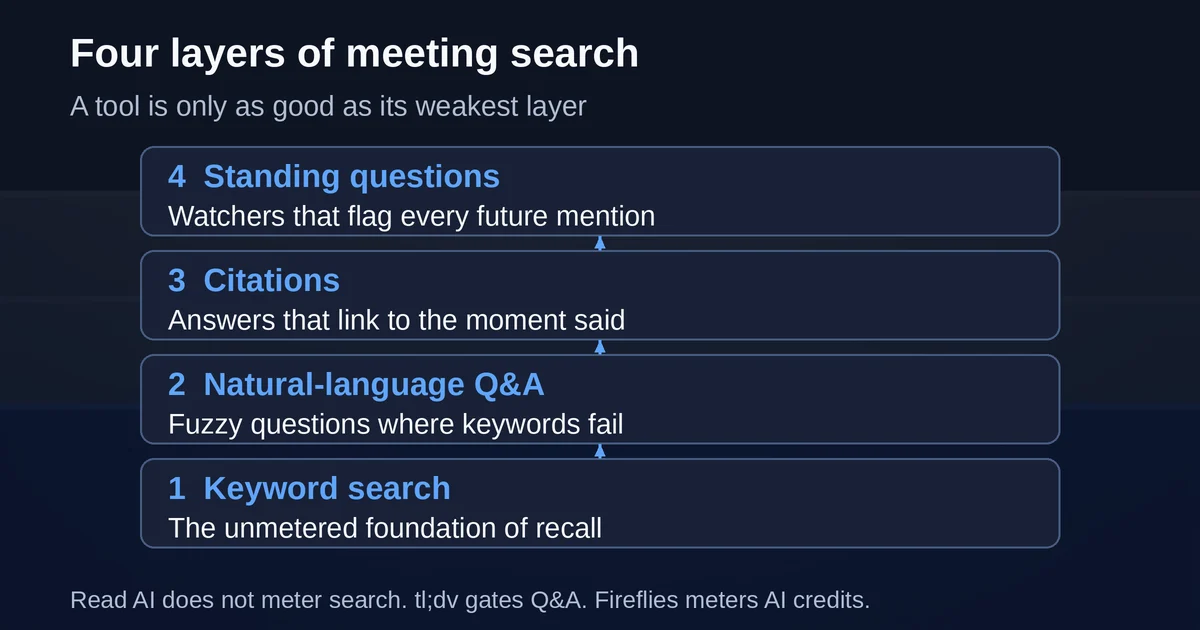
Keyword search across the whole library is the foundation. It sounds trivial but the tiers matter: some tools meter it, some gate it behind a paid plan, some include it everywhere. When your memory of the meeting is "someone said the word indemnity," keyword search is the only thing that saves you.
Natural language Q&A is the second layer, the "what did we decide about X" layer. This is where the AI actually earns its subscription, because it handles the fuzzy question where keywords fail. But it is also the layer vendors most like to paywall, meter, or starve of credits, so check the tier, not the feature page.
Citations are the third layer. The answer should link to the meeting and ideally to the timestamp. Read's Ask Read page promises exactly this: summarized answers with citations and direct links to sources. Fireflies' Notebook similarly lets you search within transcripts and jump to the moment where the keyword appears. Without that link back, you are trusting the model's paraphrase of a conversation you cannot verify.
The fourth layer is the standing question. Sometimes the question is not delayed but continuous: flag every future mention of "churn risk" or "competitor X" without anyone having to ask. Very few tools do this well, and it changes which one fits you.
Read AI: the search layer nobody meters
Read AI's positioning in 2026 has shifted from notetaker to something closer to enterprise search: its pricing page lists "unlimited enterprise search" on the Free plan, and the homepage now advertises Read AI as a Claude Connector, ChatGPT App, and MCP Server.
The recall-relevant facts, as of September 2026:
- The Free plan is $0 and includes 5 meeting transcripts per month plus unlimited search.
- Ask Read, the natural-language layer, searches meeting reports plus connected sources: Gmail, Outlook, Slack, Teams, Google Drive, OneDrive, and on paid plans Confluence, Notion, HubSpot, and Salesforce. The help center (updated July 31, 2026) is explicit that Ask Read is available free to all Read users, with no limit on the number of searches, and filters for date, source, and author.
- Pro is $19.75 per user per month, or $15 billed annually, and removes the transcript cap.
The interesting design decision is what Read did not meter. Search and questions are unmetered on every plan, including free. What is limited is capture: five meetings a month on Free. So the trade is inverted relative to everyone else in this comparison. Your archive grows slowly unless you pay, but every meeting in it is fully searchable and question-able forever, with citations.
For the delayed-question test, this makes Read the strongest answer-slinger of the three, with one caveat worth saying plainly: a free-tier archive of five meetings a month is 30 meetings over six months, which is thin coverage if you actually run a meeting-heavy job. Recall quality is excellent; recall coverage is a paid feature.
The other thing to know is that Read's summaries, its "intelligent summaries" with topics, action items, and key questions, are among the best in the category, but that is almost beside the point here. Summaries are the demo. Search is the product.
tl;dv: keyword search cheap, cross-meeting AI expensive
tl;dv is the most generous tool in the category at the capture layer and the most conservative at the intelligence layer. The Free plan includes unlimited recordings and transcriptions in 30-plus languages, with AI notes capped at 10 meetings per month. For building a six-month archive, that is unbeatable: your whole meeting history is in there, in text, for nothing.
Then you try to ask it a delayed question, and the tiering gets sharp. tl;dv's own honest review of its pricing structure states it directly: Ask tl;dv questions across multiple meetings are capped at five queries on Free and Pro, and "querying your whole library properly is a Business plan feature." Global keyword transcript search does arrive on Pro, at $18 per seat per month billed annually ($29 monthly). But the natural-language layer over your whole history, the exact feature this article is about, waits for Business at $29 per seat per month annually ($39 monthly).
So the delayed-question scoreboard for tl;dv reads: needle question, excellent, keyword search is precise and cheap. Trend question, good on Pro. Decision and commitment questions across the archive, pay for Business or ration five queries.
That is a defensible design, and tl;dv is at least candid about it. But notice what it means for the person with the renewal next week: the archive you built for free is only fully question-able at the second paid tier. If your recall needs are occasional and keyword-shaped, tl;dv Pro is arguably the best value in this comparison. If they are fuzzy and synthesis-shaped, budget for Business.
Fireflies: standing watchers, metered answers
Fireflies takes the opposite bet from Read on almost every axis, and the difference shows up in two features.
The first is Topic Trackers, part of the company's Smart Search suite alongside AI Filters and Sentiment Filters. You define a topic, say "Pricing" with the tags expensive, costly, and per-seat, and Fireflies highlights every mention in every call, automatically, forever. This is the standing-question layer done properly, and neither Read nor tl;dv has a real equivalent. If your recall problem is "watch for these five things across everything we record," Fireflies is the only one of the three built for it.
The second is the meter. Fireflies runs AI features on a credit system: 20 one-time credits at signup on Free and Pro, more as paid add-ons. The Pro tier documentation is blunt that AI credits are not included in the base price. AskFred, the natural-language Q&A reachable right from the Notebook search bar, consumes those credits. Keyword-level global search, by transcript, title, host, participant, or date, is included and unmetered, including on Free, and it is genuinely good.
Pricing, per the knowledge base: Free $0 with 3 transcription credits (unlimited transcription if you enable Auto Join) and 400 minutes of storage per seat, Pro $10 per user per month annually or $18 monthly with 8,000 minutes of storage, Business $19 annually or $29 monthly, Enterprise $39 annually.
Two recall warnings follow from the fine print. First, the free tier's 400 minutes of storage means a six-month archive on a free plan is not realistic, the oldest recordings have to be deleted to make room. Second, the credit pool is one-time, not monthly, so AskFred as a daily habit runs dry and turns into a line item. Fireflies is the best tool here for keyword recall and standing watchers, and the most expensive one to use as a question-anything-every-day engine.
Which tool for which recall job
The delayed-question test does not crown one winner, because the three tools optimized for genuinely different recall jobs:
| Your recall job | Best fit | What it costs |
|---|---|---|
| Fuzzy questions over meetings plus email and chat, with citations | Read AI Ask Read | Free to start; $15/user/mo annual for a real archive |
| Precise keyword recall over a huge free archive | tl;dv Pro | $18/seat/mo annual |
| Ask-anything across your whole tl;dv library | tl;dv Business | $29/seat/mo annual |
| Standing watchers: flag a keyword everywhere, forever | Fireflies Topic Trackers | Free tier upward |
| Daily natural-language Q&A over every call | Read AI (unmetered) or Fireflies with credit add-ons | varies |
If you run client work and your questions will be "what did we agree," Read AI is the default answer: unmetered search with citations is the correct architecture for recall. If your questions are "where did they say X," tl;dv at the Pro tier is cheaper and its keyword layer is excellent. If the question is continuous rather than delayed, Fireflies' Topic Trackers do something the other two simply do not offer.
Two practical notes for any of them. First, run the delayed-question test in week one, on the free tier, before your history is locked in. Second, decide your archive policy deliberately: three vendors means three copies of every sensitive conversation, and the consent problem of a recording bot joining client calls is real, as we covered in our breakdown of bot-free meeting notes with Granola, Fathom, and Meetily. If bots are a problem for your clients, that article's local-first options matter more than any search feature here.
If you are weighing these three on price alone, we have published a detailed look at what the free plans of Fathom, tl;dv, and Fireflies actually cut off, and for the meetings that should never touch a vendor's cloud at all, our guide to private transcription with Meetily and Whisper covers the local route.
When to keep a doc instead
None of this replaces writing things down, and it is worth being precise about why.
Meeting search is recall insurance. It answers "what was said." It does not answer "what is true now," because the conversation where the decision was made and the conversation where it was quietly reversed may both be in the archive, and a search will happily cite the wrong one. Search also only reaches people who know to ask. A new team member will not ask the archive what the client's escalation path is, they will look for a document.
So keep a doc when the decision has a long life: contracts, pricing agreements, architecture choices, hiring rubrics. The pattern that works is not transcript or doc, it is both: the meeting tool captures the conversation, and whoever owns the decision writes two lines into a real document where future people will look. If you are building that habit at team scale, the same logic applies to the research workspace tools, a corpus you curate deliberately beats an archive you hope to search.
The delayed question is the honest test of a meeting tool. Recap quality is what demos well. Recall quality, search that covers everything, answers that cite their sources, limits that do not quietly strangle your archive, is what you will still be using in March.
Pricing and plan details are as published by the vendors around September 2026 and can change; confirm on the official sites before you buy.
Two questions people ask
Is a transcript enough as a legal or contractual record?
No, and do not let any vendor's marketing tell you otherwise. A transcript is evidence of what was said, filtered through speech recognition and an AI summary. Decisions that matter should be confirmed in writing, by email at minimum, and your meeting archive is where you check what was said, not where you store what was agreed.
Do I need to pay for all three features, keyword search, AI Q&A, and trackers?
Not usually. Most people's recall needs are 80 percent keyword search and 20 percent fuzzy questions. If your meetings produce decisions more than discussions, start with the cheapest keyword layer that covers your whole archive, add the Q&A tier only if the test above shows you actually use it, and skip watchers unless you have a specific, recurring thing to watch for.