
A ceramic mug sits on your kitchen counter. It is 9am, the light through the window is doing something genuinely nice to the glaze, and you have a Shopify store to fill before lunch. Ten years ago this moment belonged to people with light tents and studio strobes. In September 2026 it belongs to a phone and one of three very different tools: Photoroom, Claid, or remove.bg.
Here is the problem. These three get tossed into the same "AI product photo tools" bucket, and they are not the same job. remove.bg cuts a product out of its background. Photoroom and Claid try to build a finished listing image around it: white sweep, soft shadow, maybe a lifestyle scene. Pick the wrong category of tool for your workflow and you either overpay for generations you never use, or you get a cutout with nowhere to go.
Also, one of the three is about to stop existing. If remove.bg is part of your workflow, you have a hard deadline in December 2026.
A cutout and a listing image are different jobs
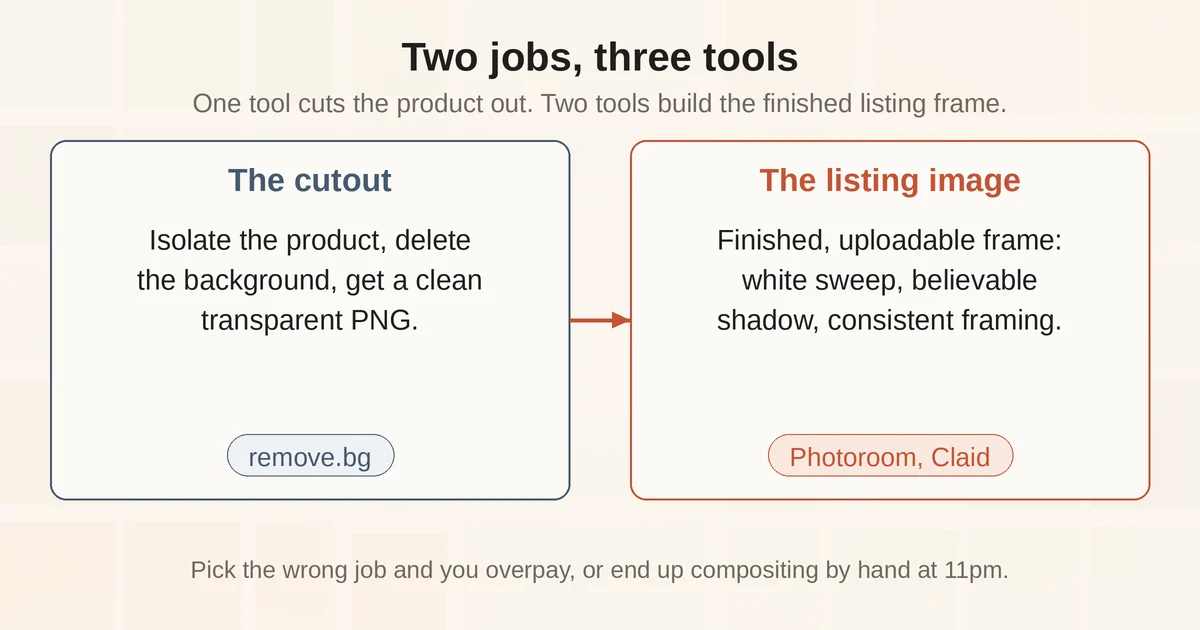
Strip away the branding and there are two distinct jobs hiding under "AI product photos."
Job one is the cutout: isolate the product, delete the counter, the cat, the laundry basket, and hand back a clean PNG with a transparent background. The output is an ingredient. You still need somewhere to put it.
Job two is the listing image: a finished, uploadable picture. Correct background color, believable shadow under the product, edges that survive zoom, consistent framing across your whole catalog. Amazon wants your main image on pure white at RGB 255, 255, 255 with the product filling 85% of the frame. A transparent PNG does not meet that requirement on its own. You need a compositor.
remove.bg is a job-one tool. It does one thing, the cutout, and it does it fast. Photoroom and Claid are job-two tools. They cut out too, but their real pitch is the finished frame: AI backgrounds, generated shadows, batch consistency, Shopify sync.
The mistake small shops make is paying a job-two subscription to do a job-one task, or the reverse: exporting cutouts from a job-one tool and then compositing them by hand in a free editor at 11pm. Neither is a workflow. Both cost you an evening.
The test: one mug, three tools, five photos
We ran one ordinary phone photo through all three. The setup was deliberately unglamorous: a matte ceramic mug on a wooden counter, overhead kitchen light, no tripod. From that single photo we asked each tool for the same three things: a white background version, a lifestyle background version, and a batch of five processed at once.
remove.bg did the cutout in a few seconds and the mask was clean: the mug handle was intact, the shadow it cast on the counter was removed with the background, as intended. What came back was a floating mug on transparency. To turn it into an Amazon-legal main image we had to drop it onto a white canvas ourselves, scale it to 85% of frame, and add a shadow manually. The free preview download is a 0.25 MP image, fine for a quick check, useless for a listing; full resolution costs credits. There is no background generation, no shadow tool, no batch editor on the web app. It is a very good pair of scissors.
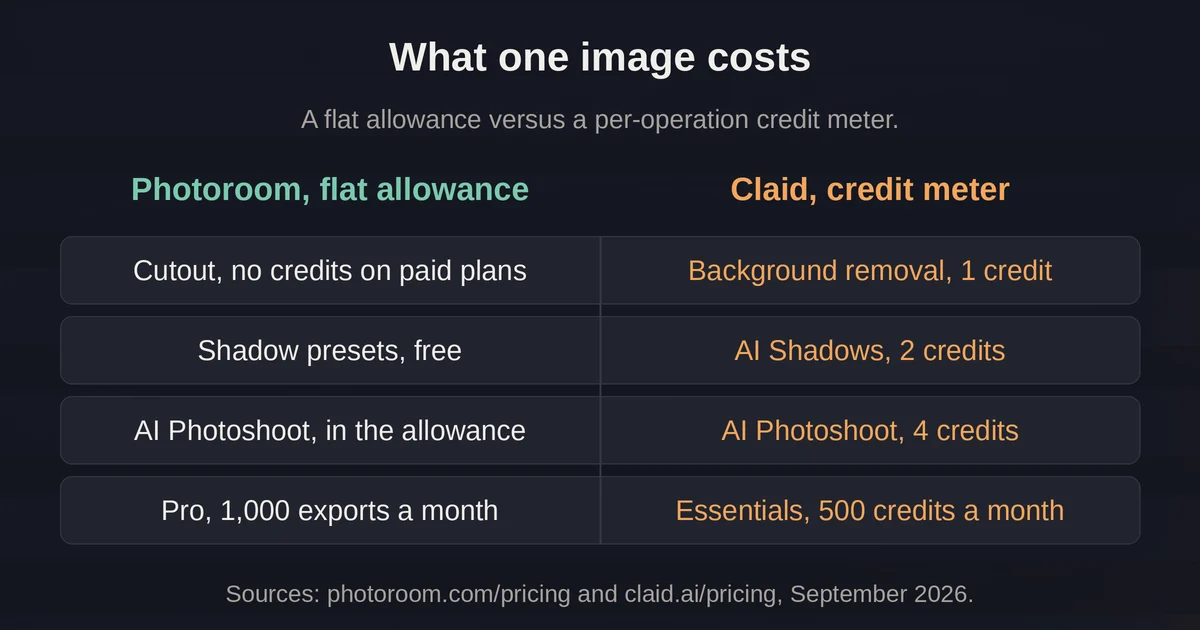
Photoroom produced the most complete listing image with the least effort. White background with a soft contact shadow looked like something from a mid-tier catalog shoot, and the shadow presets are free on every paid plan: Soft, Hard, Floating, or None. The lifestyle background prompt gave us a sunlit table scene with the mug grounded in it, and this is where the first honest caveat appeared: at 100% zoom, the rim of the mug had been redrawn slightly, the kind of micro-edit you would never notice at thumbnail size and might notice on a 4K monitor. The batch of five ran in one pass with a single consistent lighting direction, which matters more than people think, because a catalog where every shadow points a different way instantly looks like a junk drawer.
Claid felt like the same job done with more machinery. AI Photoshoot generated the white-background catalog shot and the lifestyle scene, and its shadows were arguably the most physically convincing of the three, likely because Claid trains on product photography only and is obsessive about preserving labels and textures. The catch is the credit meter: a standard-quality Photoshoot generation costs 4 credits and a Studio-quality 2K one costs 10, out of 500 credits a month on the $9 Essentials plan. The white background and lifestyle versions were fine at standard. The batch of five was quick, but the same five at Studio quality (2K) would burn 50 credits, a tenth of the monthly allowance, on one product, and the top 4K resolution is reserved for the Pro and Business plans.
A pattern worth naming: all three tools, given one mediocre kitchen photo, produced something uploadable. None of them produced something indistinguishable from a real studio shoot. The gap between the original photo and the outputs was closed, not erased.
Photoroom: the practical default for small catalogs
Photoroom is built for the seller with 8 products, not 8,000, and it earns a spot on any shortlist of AI tools that punch above their weight. The pricing page says it outright: Pro is "perfect for solopreneurs," Max "great for small businesses."
The plan structure is metered on two things. Exports are every image you save, and the free plan gives you 100 a month. AI credits power the heavy generative tools, and the core tools, background removal, shadow presets, retouch, image enhancing, resizing, cost no credits on any paid plan. Pro runs $7.50 a month billed yearly, and includes 1,000 exports and 8,000 AI credits. For a shop doing one photo per SKU, the credit pool mostly sits there untouched; it only starts to bite when you generate backgrounds at volume or touch the video tools.
The AI Shadows tool is the part small shops should actually care about, the kind of under-documented feature that quietly does most of the work, like these in other popular tools. The presets are free and cover most cases, but the advanced settings, shadow direction, intensity, and hardness, consume AI credits and are web-only. If your product photos look like the item is hovering slightly above the surface, that is the "Floating" preset doing its literal job; switch to Soft and add direction until the light matches your other photos.
Where Photoroom falls short: the more of the image AI generates, the more it redraws. Lifestyle scenes occasionally repaint product edges, and you do not want that on a marketplace main image where the photo is your product truth. Use generated scenes where accuracy rules are loose (social, ads, your own site) and keep the main image boring.
Claid: when the catalog is the product
Claid's entire pitch is product photography and nothing else, and that focus shows. The suite covers AI Photoshoot, AI Fashion Models for garments, background removal, upscaling, and even product video now, with native 4K output. It is alive, actively shipping new models, and claims more than 10,000 business customers. For a small shop the interesting capabilities are the ones Photoroom charges credits for done slightly better: shadow physics, texture and label preservation, and the Shopify export presets.
Pricing is a straight credit meter. The pricing page's credit table lists the Essentials plan at 500 credits for $9 a month and Pro at 2,000 credits for $35. Background removal is 1 credit, AI Shadows is 2, and an AI Photoshoot generation is 4 credits at standard quality, 10 at Studio quality. The free trial gives you 50 credits plus 5 trial images, enough to answer "does this work on my products" before paying anything.
The honest verdict for a small shop: Claid is a tool for when the catalog is the business, marketplace sellers with hundreds of SKUs, apparel brands that need on-model shots without models, agencies cleaning up supplier photos. If you sell a dozen products a year, you will pay $9 a month to use 60 credits of it. If you relaunch 200 SKUs every season, the credit math turns the other way and Claid's per-image quality starts mattering more than Photoroom's flat export allowance.
remove.bg: a great tool with an expiry date
Here is the part that makes this comparison unusual. remove.bg, the tool that basically defined the one-click cutout category, is winding down as a standalone product. The notice on their own site says background removal is being migrated into the Canva platform, and the pricing page banner is more specific: the standalone website will no longer be available from 1 December 2026 at 9:00am CET. The API moves to Leonardo.Ai, which Canva also owns. Canva acquired Kaleido, remove.bg's Austrian parent company, back in February 2021, so this is a consolidation five years in the making rather than a collapse.
What that means practically:
- If you use remove.bg as a quick website cutout, the feature lives on inside Canva, so you will need a Canva account and a workflow that goes through it.
- If you wired the remove.bg API into anything, an inventory pipeline, a Shopify app, a script, that integration points at a service with a published shutdown date. The replacement is Leonardo.Ai's API, which is a different vendor, different keys, different rate limits.
- Unused credits do not convert into anything. Spend what you have before December 1.
For pricing, the subscription model has been credit-based for a while: free preview-resolution downloads, paid credits for full resolution, with pay-as-you-go credit packs starting at a few dollars for a small bundle of credits. The pricing page is the authority and it is changing as the migration proceeds, so treat any specific number as approximate and check before buying a large pack.
The cutout quality itself remains excellent. It is simply that in 2026 a pure cutout tool, with no shadow, background, or batch workflow, is a hard product to build a shop on when two competitors bundle the cutout as step one of a listing pipeline.
Where AI backgrounds quietly hurt listings
The failure mode nobody warns you about is not a bad cutout. It is a beautiful image that breaks a rule.
On Amazon, the main image requirements are strict and enforced: pure white background, product at 85% of frame, no text, logos, borders, or props, and the image must "accurately represent the real scale, quantity, and color of the product," per the official image guide. An AI-generated lifestyle scene as your main image can fail on multiple counts at once: generated props are literally props, generated environments are not pure white, and a redrawn product edge is, strictly read, a product that no longer exactly matches what ships. Amazon's remedy for a non-compliant main image is suppression from search until you fix it, which for a small shop means days of invisible inventory.
Etsy's Seller Policy takes a different angle: listing photos must be "your own photographs or video content, not stock photos, artistic renderings, or photos used by other sellers or sites." A scene an AI generated around your real photo sits in an uncomfortable gray zone between "your own photograph" and "artistic rendering," and Etsy separately requires you to disclose when an item is created with AI. Different marketplaces draw the line differently: some tolerate AI-edited backgrounds in secondary images, some restrict synthetic models, some hold your main image to photographic reality.
None of these policies is a lawyer's puzzle if you follow one rule: check your marketplace's current policy before uploading, every time. The tools will happily generate images that violate rules they have never read. The policy page is the only place the actual rules live, and platforms have been actively updating their AI image rules through 2026, which is exactly why a six-month-old forum answer is not a source.
The safe division of labor we would actually recommend: keep your main image a real photo, cleaned up (background to pure white, shadow added, nothing about the product itself redrawn). Spend your AI-generation budget on secondary images, ads, and social, where lifestyle scenes genuinely lift performance and the accuracy rules are lighter. The boring image protects the listing; the pretty ones sell it.
What still needs a window and a diffuser
AI has eaten the compositing end of product photography, not the capture end. Three things still decide your ceiling before any tool touches the file:
- Light. A phone photo near a window with a piece of white paper bouncing light back beats any upscale feature applied to a dark, grainy shot. Every tool in this comparison can sharpen what exists; none can invent detail that was never captured.
- The honest angle. Shoot the product straight on for the main image, from the same height every time. Batch consistency is less about AI and more about whether your five photos look like they were taken in the same universe.
- A real shadow reference. The most common AI tell is a shadow that does not match the product: a hard-edged drop shadow on an object with rounded feet, or a shadow pointing left when the product's own highlights say the light came from the right. Every tool here has shadow controls. None of them knows where your light actually was. You do, if you looked.
The verdict
If you run a small shop and want one tool: Photoroom. The free plan covers a first store, Pro at $7.50 a month billed yearly is the right size for a small catalog, the core cutout and shadow tools are unlimited on paid plans, and the batch editor keeps a growing catalog coherent.
If the catalog is large, or you sell apparel and need on-model imagery: Claid. Better shadow physics and texture fidelity, a serious API, and a credit meter that scales down to $9 a month if you just want to test it against your own photos.
If you only need cutouts: remove.bg still does them as well as anyone, but the standalone site ends 1 December 2026. Existing cutout workflows should move to Canva or fold the step into Photoroom or Claid before the deadline, and any remove.bg API integration needs a rebuild on Leonardo.Ai's API or an alternative now, not in late November.
And whichever you choose: the main image stays a real photo, and the marketplace policy page gets a read before the upload button does.
Pricing and plan details are as published by the vendor around September 2026 and can change. Confirm on the official site.
FAQ
Do AI product photos meet Amazon or Etsy image requirements?
Not automatically. Amazon requires a main image on pure white that accurately represents the product, and Etsy requires your own photographs or video rather than renderings. AI edits like background cleanup and shadow adjustment are generally fine; AI-generated scenes, props, or redrawn product edges can fail review. Always check the marketplace's current policy for your category before uploading.
Which tool is best for batch editing product photos?
Photoroom's Batch applies one edit, including one shadow direction, across thousands of images with a monthly export allowance rather than a per-image charge. Claid handles batches too, but each generation draws credits, so volume adds up fast. remove.bg has a desktop app for bulk cutouts, but it produces cutouts, not finished listing images.
Pricing and plan details are as published by the vendor around September 2026 and can change - confirm on the official site.