

The best AI setup for most job roles in 2026 is a free general assistant, ChatGPT or Claude, plus one tool built for your role. Our picks: Canva for marketers, GitHub Copilot for developers and Figma for designers. HubSpot fits sales, ClickUp project managers, Descript creators and Gemini Notebook students. Recruiters should start with the assistant alone.
Start every pick on its free plan and pay only when a cap stops your work. GitHub Copilot Free, for example, stops at 2,000 completions and 50 chat requests.
Quick picks
- Best for marketers: Canva
- Best for developers: GitHub Copilot
- Best for designers: Figma
- Best for sales teams: HubSpot
- Best for HR and recruiting: your general assistant, judged by the criteria below
- Best for project managers: ClickUp
- Best for content creators: Descript
- Best for students and educators: Gemini Notebook (formerly NotebookLM)
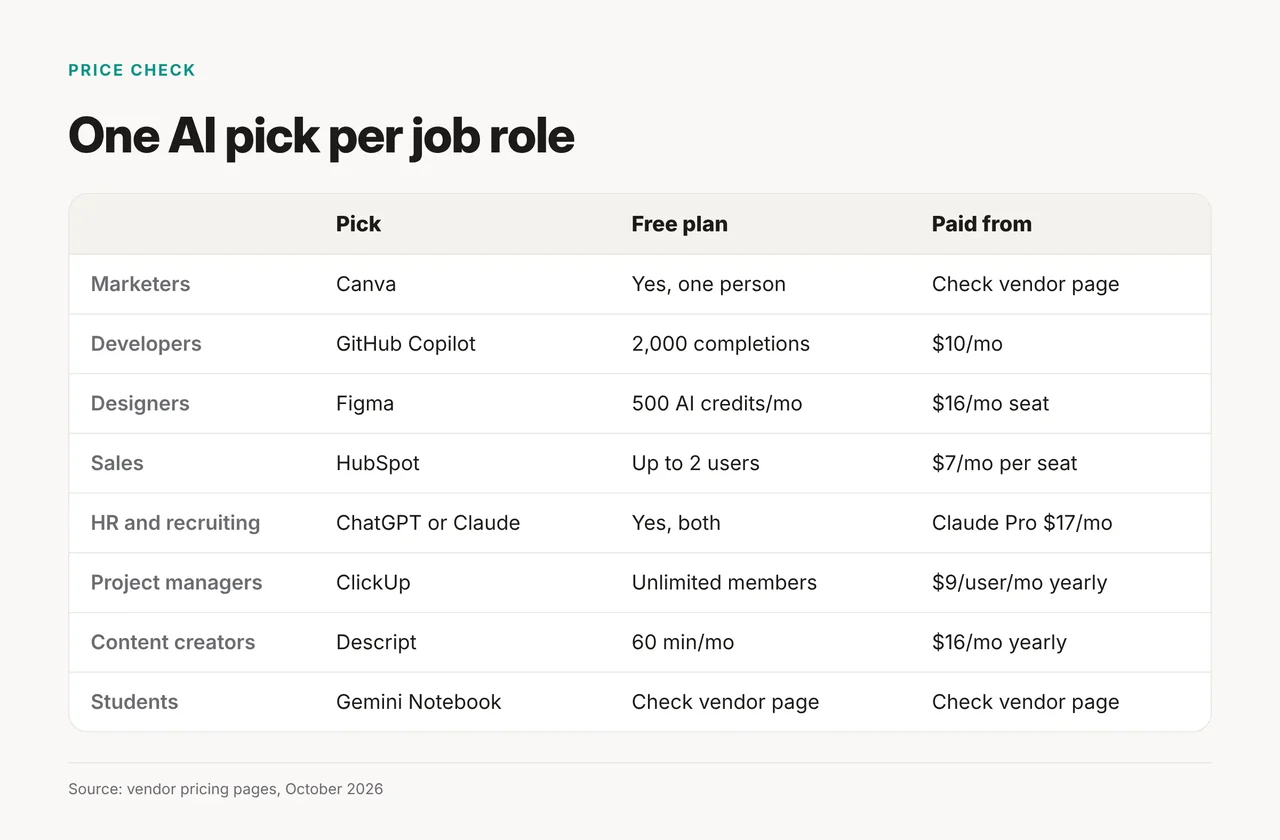
Seven of the eight picks have a $0 plan; prices are from vendor pages, October 21, 2026.
| Role | Pick | Free plan | Paid from | Billing note |
|---|---|---|---|---|
| Marketers | Canva | Yes, $0 for one person | Check vendor page | Pro has 10x the AI of Free, Canva says |
| Developers | GitHub Copilot | 2,000 completions, 50 chat requests | Pro $10/month | Pro+ is $39/month |
| Designers | Figma | 150 AI credits/day, up to 500/month | Professional Full seat $16/month | Shown on the default (annual) view |
| Sales teams | HubSpot | $0 for up to 2 users | Starter from $7/month per seat | Hub tiers not separated |
| HR and recruiting | ChatGPT or Claude | Yes, both | Claude Pro $17/month | $20 if billed monthly |
| Project managers | ClickUp | Free Forever, unlimited members | Core $9/user/month | Billed yearly; regular price $12 |
| Content creators | Descript | 60 minutes/month | $16/person/month | Yearly; $24 billed monthly |
| Students and educators | Gemini Notebook | Check vendor page | Check vendor page | Plans: Standard, Plus, Pro, Ultra |
How we chose these picks
We chose one tool per role that a working professional can sign up for today, with a free plan or a clearly priced entry tier. One pick is an exception: Gemini Notebook stays because Google's help page confirms which plans include it, but we could not read its price, so its price cells say to check the vendor page. We read each vendor's pricing and product pages on October 21, 2026, and did not test these tools hands-on for this article.
Three rules shaped the list:
- One general assistant for everyone: ChatGPT and Claude both offer a free plan, so the role pick is the second tool, not the first.
- A price we could read: a tool whose pricing page we could not verify was cut or named without claims.
- Fits the work itself: the pick handles the role's core output (code, layouts, pipeline, video) rather than general chat.
If you are still choosing the assistant, our ChatGPT vs Claude comparison covers that choice in detail.
Best for marketers: Canva
Canva is the marketing pick because its free plan covers one person at $0 and its Pro tier adds AI tools such as resize, translate and background removal.
- What the vendor's page shows: Canva lists AI tools such as resize, translate and background removal in its Pro tier. Canva says Pro has 10x more AI than Canva Free.
- Pros: a free plan for one person; Canva says Pro has 10x the AI of Free.
- Cons: the Pro monthly price was not shown on the page we read, so check the vendor page before budgeting.
- Price, October 2026: Free at $0; Pro price: check vendor page.
- Skip it if: your bottleneck is moving content between apps. Zapier's free plan includes 100 tasks per month, and its Professional plan starts from $19.99 a month.
Pair it with your assistant for briefs and copy, then let Canva handle the visuals.
Best for developers: GitHub Copilot
GitHub Copilot is the developer pick because Copilot Free costs $0 with 2,000 completions and 50 chat requests, and Pro costs $10 a month.
- What the vendor's page shows: Copilot Free is limited to 2,000 completions and 50 chat requests, including Copilot Edits. Pro chat and agent use is metered in credits, with $10 of base credits plus a $5 flex allotment.
- Pros: a real free tier; a low Pro price; Pro+ at $39 a month for heavier use.
- Cons: credit metering on Pro makes heavy agent use harder to forecast.
- Price, October 2026: Free $0, Pro $10 a month, Pro+ $39 a month on the Copilot plans page.
- Skip it if: you want an AI-first editor. Cursor now lists Free at $0, Plus at $8 a month and Premium at $30 a month; a July 2026 roundup lists Cursor at $20, but Cursor's own page shows Plus at $8. Claude Code is included in Claude Pro.
Either way, read every suggestion before it merges.
Best for designers: Figma
Figma is the design pick because its free Starter plan includes 150 AI credits a day, up to 500 a month.
- What the vendor's page shows: Starter is free with 150 AI credits a day, up to 500 AI credits a month. Figma Make is listed as a product, and Figma says AI add-ons are now available for all plans.
- Pros: AI credits on the free plan; a Professional Full seat adds 3,000 AI credits a month.
- Cons: the $16 seat price appears on the page's default view, which we read as annual billing.
- Price, October 2026: Starter free; Professional Full seat $16 a month on Figma's pricing page.
- Skip it if: you need concept art rather than interfaces. Midjourney has no free plan; Basic costs $10 a month or $96 a year, and Standard, Pro and Mega cost $30, $60 and $120 a month.
Best for sales teams: HubSpot
HubSpot is the sales pick because its free CRM costs $0 for up to two users with no credit card, which lets a small team start without a budget request.
- What the vendor's page shows: the Free tier is free for up to 2 users, and Starter begins at $7 a month per seat.
- Pros: a $0 start; a low first paid seat.
- Cons: HubSpot's CRM page doesn't say which AI features each tier includes; confirm before you buy.
- Price, October 2026: Free $0; Starter from $7 a month per seat.
- Skip it if: your company already runs another CRM. Use its built-in features and draft outreach and call prep in your general assistant.
Edit every AI-drafted message before it goes out, because generic outreach is easy for a prospect to spot.
Best for HR and recruiting: your general assistant
For recruiters, start with ChatGPT or Claude rather than a named recruiting tool, because we could not verify any HR or applicant-tracking product's pricing this month.
Use the assistant for job descriptions, structured interview questions and candidate-note summaries. Move to a dedicated recruiting platform only when it passes these checks:
- It connects to your applicant tracking system instead of adding another place to copy data.
- It shows its screening criteria, so a person still makes the shortlist and the final call.
- It publishes a price you can read before a sales call.
- It runs a free trial on your own roles, not a demo dataset.
Best for project managers: ClickUp
ClickUp is the project-management pick because its Free Forever plan allows unlimited free members, so the whole team can join before anyone pays.
- What the vendor's page shows: Free Forever at $0 with unlimited free members; Core at $9 per user a month billed yearly, against a regular price of $12.
- Pros: room for the full team on the free plan; a low Core seat.
- Cons: the $9 price needs yearly billing.
- Price, October 2026: Free $0; Core $9 per user a month billed yearly.
- Skip it if: your company already standardized on another project tool. Use its built-in features, and send status updates and meeting summaries through your assistant.
For what ClickUp's AI layer does, read our look at ClickUp Brain.
Best for content creators: Descript
Descript is the creator pick because its free plan gives you 60 minutes a month of media to edit before you pay anything.
- What the vendor's page shows: the paid tier costs $16 per person a month billed yearly or $24 billed monthly, with 10 media hours and 400 AI credits a month.
- Pros: a free plan to test your own recordings; a clear media allowance on the paid tier.
- Cons: 60 minutes goes quickly if you publish weekly long-form video.
- Price, October 2026: Free $0; paid tier $16 per person a month yearly.
- Skip it if: you mostly write. Grammarly Free includes 100 AI prompts per month plus spelling and grammar checks, and Pro lists at $12. Tone adjustment, full-sentence rewrites and plagiarism detection are not on Free.
Best for students and educators: Gemini Notebook
Gemini Notebook, the new name for NotebookLM, is the study pick because Google lists it as part of its Standard, Plus, Pro and Ultra plans.
- What the vendor's page shows: notebooklm.google now redirects to Gemini Notebook, and Google's help page lists Standard, Plus, Pro and Ultra plans.
- Pros: part of Google's plan lineup; formerly NotebookLM.
- Cons: we could not read a price or free-tier limit on the pages we fetched.
- Price, October 2026: check vendor page.
- Skip it if: you teach K-12 in the US. OpenAI lists ChatGPT for Teachers as a free plan for verified U.S. K-12 educators through June 2027.
ChatGPT also lists Study mode in its plan comparison, but the page did not show which plans include it.
Checked and cut
We dropped tools whose pricing or plans we couldn't verify in October 2026, including Salesforce Einstein, Devin, Motion and CapCut; Gemini Notebook is the one exception explained above. No named HR or applicant-tracking tool passed, so recruiters get criteria instead.
How to choose: stay on free until a cap hits
Stay on the free plans of your assistant and your role tool until a published cap blocks real work, then upgrade only that one tool.
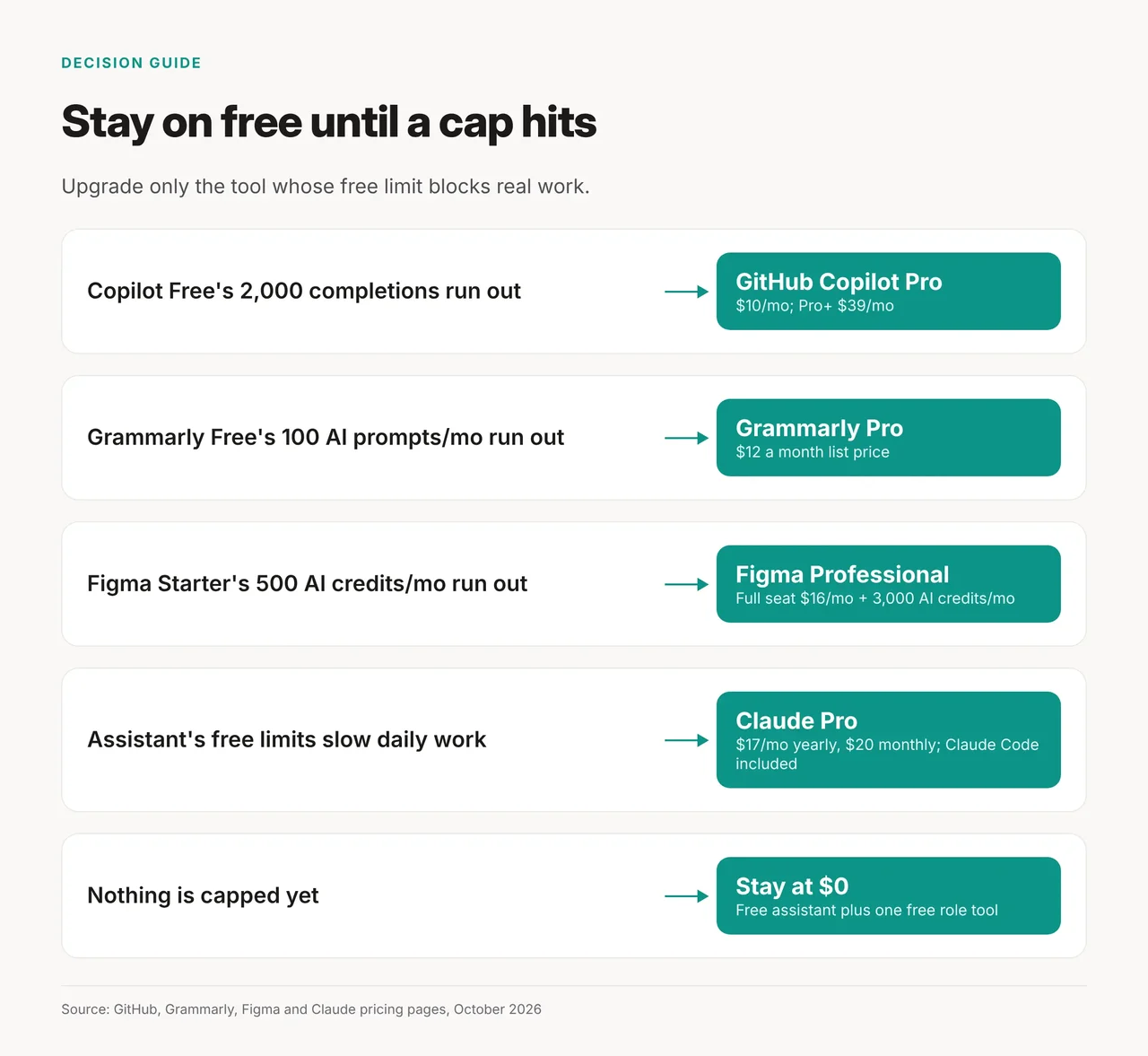
- Copilot Free's completions or chat requests run out: move to Copilot Pro at $10 a month.
- Grammarly Free's 100 AI prompts a month run out: Pro lists at $12.
- Figma Starter's 500 AI credits a month run out: a Professional Full seat costs $16 a month with 3,000 AI credits.
- Your assistant's free limits slow daily work: Claude Pro costs $17 a month yearly or $20 monthly and includes Claude Code.
- Nothing is capped yet: stay at $0.
How we checked
- What we did: Read the pricing and plan pages for Claude, ChatGPT, GitHub Copilot, Cursor, Figma, Midjourney, Canva, HubSpot, Zapier, ClickUp, Descript, Grammarly and Gemini Notebook, October 21, 2026.
- Hands-on: We did not test these tools hands-on for this article.
- AI assistance: Researched and drafted with AI assistance; fact-checked and approved by the Toolbit team before publishing.
- Last verified: October 21, 2026