Every assistant now has the same pitch: stop re-explaining yourself. Claude calls it a Project. ChatGPT calls it a Project too. Gemini calls it a Gem. All three are containers where you park a set of instructions, a pile of reference files, and the conversations that belong to one ongoing effort, so the context is already there when you come back.
The pitch is identical. The products are not. The three features differ in exactly the places that decide whether your workspace survives contact with real work: how much knowledge they hold, whether chats inside them build on each other, what a paid plan buys you, and what happens the moment you try to share any of it with another human.
Here is the short version, then the reasoning behind each row.
The decision table
| If you need... | Pick | Why |
|---|---|---|
| The best home for long writing and documents you keep reworking | Claude Projects | Largest effective knowledge capacity on paid plans (automatic RAG), strong long-form output, isolated per-project memory |
| A workspace where chats build on each other | ChatGPT Projects | Chats inside a project can reference each other, so context accumulates across conversations instead of resetting |
| A configured assistant you can hand to other people | Gemini Gems | Drive-style sharing on any plan, with viewer and editor roles and expiration dates |
| The best deal if you already pay for Google or Microsoft | Gems, or Copilot agents | Gems are free on every Gemini plan; Copilot agents ride the Microsoft 365 license you already have |
| To share a workspace with your team on a consumer plan | None of them | ChatGPT and Claude both gate project sharing behind business plans, and ChatGPT's sharing permanently changes the project's memory |
Two honest footnotes to the table. "Best for long writing" is a judgment call: ChatGPT Projects is a close second, and the two features trade blows depending on whether you value accumulated conversation history (ChatGPT) or raw knowledge capacity and prose quality (Claude). And "worst at sharing" deserves its own section below, because the failure mode is subtle and expensive to discover after the fact.
Claude Projects: the one built around a knowledge base
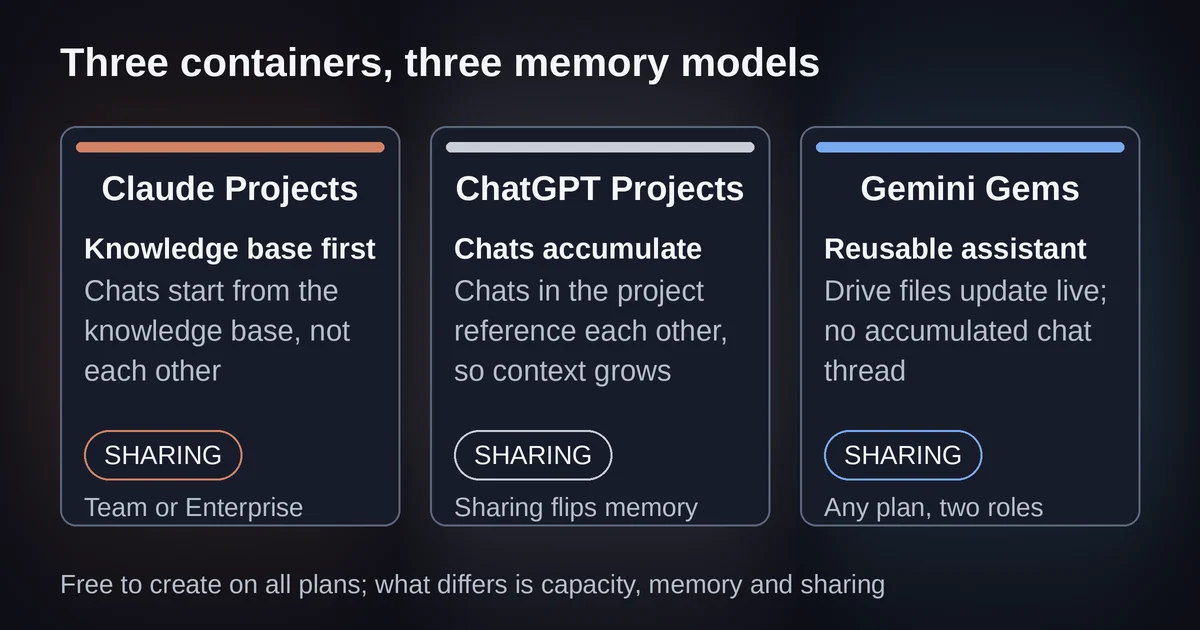
Claude's project page describes exactly what you get: "self-contained workspaces with their own chat histories and knowledge bases." The knowledge base is the heart of it. Upload documents, text, or code once, and every chat in the project treats that material as background, alongside a block of project instructions that shapes how Claude behaves in that project.
The mechanics have one twist that surprises everyone: chats inside a Claude project do not see each other. Anthropic's help center is unusually blunt about it: context is not shared across chats within a project unless the information is added to the project knowledge base. What carries over is the knowledge, the instructions, and each project's own memory, which is kept separate from your non-project chats. So a Claude project works like a filing cabinet with a very well-read librarian inside: the material persists, but each conversation starts from the files, not from the previous conversation.
On paid plans, the filing cabinet gets much bigger. When project knowledge approaches the context window, Claude switches to retrieval-augmented generation automatically, which Anthropic says expands effective capacity by up to 10x with no setup. In practice that is the difference between "a few long documents" and "your actual document collection." Free accounts get projects too, capped at five, without the automatic scaling.
Sharing is a Team and Enterprise feature, full stop. There is no way to hand a project to a colleague from a personal Pro or Max account. On the business plans, sharing is done well: view or edit permissions, individual or bulk invites, an option to make a project visible to the whole organization, and conversations that stay private even when the knowledge base is shared.
ChatGPT Projects: the one where the work accumulates
ChatGPT Projects, which OpenAI's help center describes as smart workspaces for long-running efforts, makes the opposite trade from Claude. The headline feature is that chats inside a project can reference each other. Ask a question in a chat on Tuesday, and Thursday's chat can draw on it. For iterative work, drafting a proposal over two weeks, working through a course, planning a launch, that accumulated thread is the entire point, and Claude does not have an equivalent.
The knowledge side is more constrained. File caps run 5 per project on Free, 25 on Go and Plus, and 40 on Edu, Pro, and Business plans, with 10 files per upload batch and 512MB per file. Those are counts, not the context-based capacity Claude offers, though for most work a handful of well-chosen documents is plenty. Project instructions replace your global custom instructions inside the project rather than stacking on top of them, which matters if you have tuned your account-wide instructions carefully.
The sharing story is the weakest of the three, in two separate ways. First, when this comparison was first drafted, project sharing existed only on Business, Enterprise, and Edu plans; OpenAI has since rolled it out to every plan including Free, so the plan gate no longer bites, though workspace admins can still restrict it. Second, and this is the part that bites: the moment you share a project, it flips permanently to project-only memory, meaning it loses access to your saved memories and outside conversations, and it stays that way even after you remove every collaborator. Sharing a project is a one-way door. If the project's quality depended on your personal context, you just downgraded it, and no setting will undo that.
We walk through the full setup, memory modes, and limits in our ChatGPT Projects guide, including the August 2026 change that finally let you switch an existing project's memory mode after creation.
Gemini Gems: the one built to be shared
Gems are still called Gems in September 2026, despite a year of Google renaming nearly everything else in its AI stack. The notable rename, NotebookLM becoming Gemini Notebook in July 2026, was a different product. Gems remain the build-your-own-assistant feature inside the Gemini web app: a name, a block of instructions, and optional knowledge files drawn from your device, Google Drive, or a Gemini Notebook.
Two design choices make Gems feel different from the other two. First, Drive files are read at their current version: update the document, and the Gem's knowledge updates with it. Claude and ChatGPT snapshot your files at upload; Gems can track a living document. That alone makes Gems the best fit for reference material you keep editing, a style guide, a product sheet, a running list of FAQs. Second, Gems are free on every Gemini plan. The structural feature is not paywalled; upgrading buys you longer video and audio inputs, not more Gem.
The sharing model is the best of the three, and it is not close. Sharing a Gem works like sharing a file in Google Drive: pick people, give them viewer or editor access, set an expiration date, attach a message. Shared Gems live in your Drive. A teammate with editor access can improve the instructions, which makes a Gem the only one of these three that works as a genuine team artifact on an ordinary personal account.
One caveat that Google states plainly and everyone should read before sharing: any user with access to a Gem can view its instructions and uploaded files. Your carefully engineered prompt is visible to everyone you share with. If your instructions contain anything sensitive, client terms, pricing logic, internal process, that is a real constraint, not a technicality.
The weakness is on the workspace side. A Gem has no project structure around it: no accumulated conversations that reference each other, no per-project memory in the ChatGPT sense. A Gem is a reusable starting point, not a place where ongoing work builds up. And Gems cannot be used with Gemini Live, so they are absent from Google's voice mode entirely.
If you live in Microsoft 365
Microsoft does not have a direct equivalent of these three in the consumer sense, but if your employer pays for Microsoft 365 Copilot, the same pattern exists under a different name: agents.
| Copilot agents in Word and Outlook | |
|---|---|
| What it is | A configured Copilot with custom instructions, knowledge sources, and actions |
| Where it runs | Copilot Chat, Teams, Word, Excel, PowerPoint, Outlook |
| Knowledge | SharePoint, OneDrive, Teams, Copilot connectors, and since July 2026, SharePoint lists |
| Sharing | Org catalog and Agent Store behind admin review, not person-to-person like Gems |
The declarative agent model is the same instructions-plus-knowledge-plus-actions recipe as the other three, but built for an organization rather than an individual: agents ground in your company's SharePoint and mail through Microsoft Graph, respect existing permissions and sensitivity labels, and since mid-2026 can be published to an org-wide catalog after admin approval. If your workspace reality is "my files live in SharePoint and my work happens in Outlook," an agent in the Copilot pane beats any of the three standalone workspaces on convenience, because it is already inside the documents you are editing. What it does not give you is the casual, personal, five-minute setup of a Gem or a project.
What sharing actually looks like on each
Since this is the row that decides team purchases, here it is without the table framing.
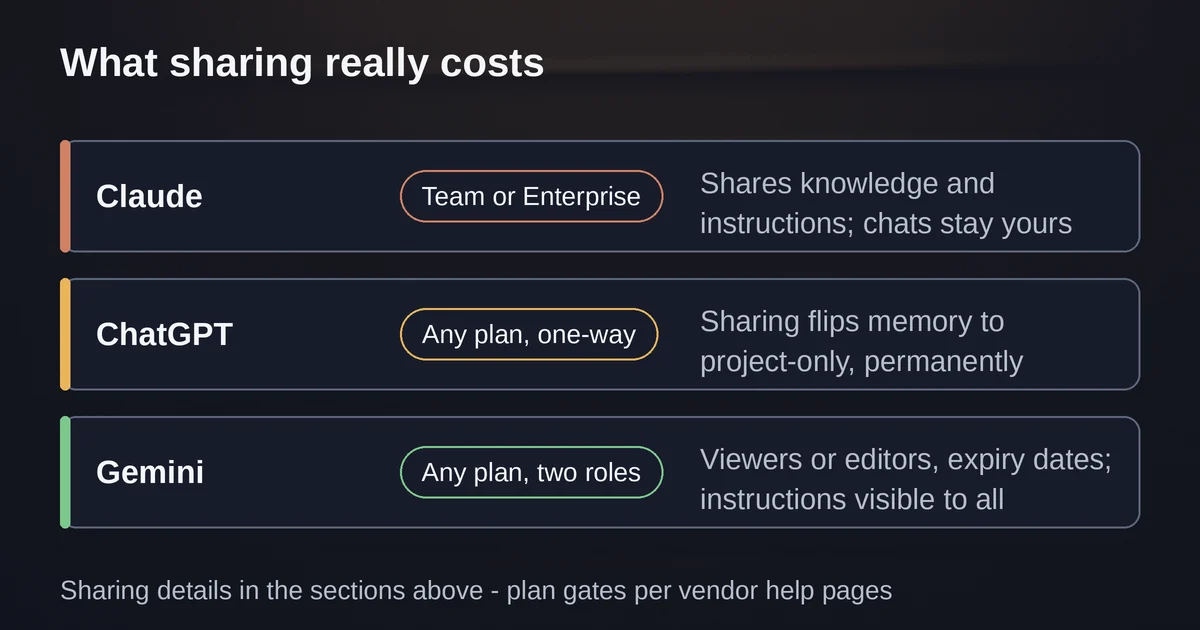
Claude: Team or Enterprise only. You share a project with specific people by email, with view or edit permissions, or make it visible to the whole organization. What collaborators get is the knowledge base and the instructions; your conversations stay yours. Nothing about the project changes when you share it. The only catch is the plan gate.
ChatGPT: Sharing is now available on every plan, but the act of sharing permanently switches the project to project-only memory, cutting it off from your saved memories and outside chats, with no way back even after you remove everyone. Collaborators work from the same files and instructions, and their moved-in chats stop appearing outside the project. The strongest accumulation feature of the three, and the most punishing sharing model.
Gemini: Anyone, any plan. Viewer or editor roles, expiration dates, shared Gems stored in Drive like any other file. The trade: full instruction and file visibility for anyone with access, and a Gem built on a Gemini Notebook cannot be shared at all.
Which one should you actually use
Start with where your files and your audience already are, then with what kind of work it is.
If the work is one long evolving effort, a manuscript, a thesis, a multi-month client engagement, and the material you keep feeding it is documents rather than conversation, Claude Projects is the strongest container, and its RAG scaling is the only capacity story of the three that grows with you.
If the work is iterative and conversational, where the value lives in the accumulated thread of what you have already figured out together, ChatGPT Projects is the only one designed for that, and the file caps rarely matter in practice.
If the thing you are building is meant to be used by other people, a company writing assistant, a tutor for your kid's physics homework, a team's brainstorming partner, build a Gem, because it is the only one your colleague can open without your company buying seats.
And if you are choosing between assistants at the model level rather than the workspace level, that is a different question with different answers; our Claude vs ChatGPT comparison covers it. If you are migrating away from custom GPTs, whose retirement timeline has new GPT creation ending and running GPTs scheduled to stop in December 2026, the custom GPTs retirement guide maps where each use case lands, and for most personal workspace use cases the answer is a project.
Pricing and plan details are as published by the vendor around September 2026 and can change - confirm on the official site.
Frequently asked questions
Are all three free to use? Claude Projects are available on free accounts, capped at five projects. ChatGPT Projects are on every plan including Free, with file caps of 5 to 40 per project by tier. Gems are free on every Gemini plan. The paid differences are capacity and features, not access.