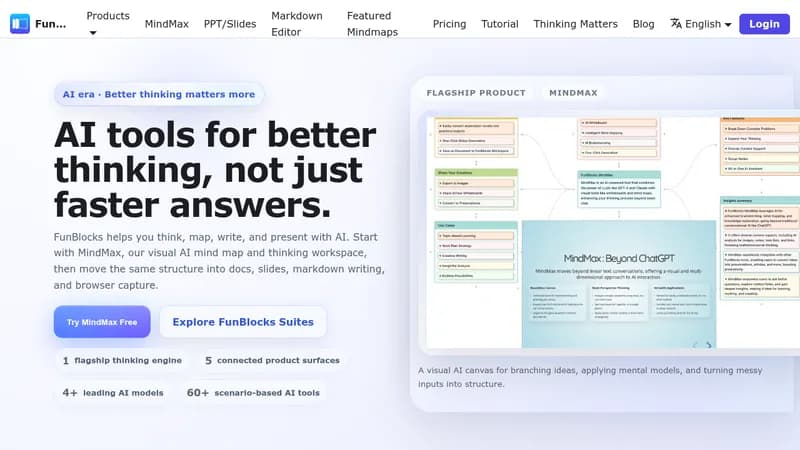
FunBlocks AI

Transform ideas into actionable plans with AI-powered mind mapping and document creation

Monthly Visits: 25.6K
Freemium
Free Version
Visit Website
FunBlocks AI

What is FunBlocks AI?

FunBlocks AI helps you work smarter with an all-in-one suite that turns brainstorming sessions into structured documents and presentations. 'nIt combines mind mapping, writing assistance, and slide creation with AI insights that learn from your knowledge base. 'nThe browser extension brings AI support to emails, content reading, and YouTube video summaries across any website.

Key Features of FunBlocks AI

  1. 1

    AI Mind Mapping

    Visual brainstorming with automatic insights and knowledge organization

  2. 2

    Contextual Assistance

    Browser-based AI help for emails, videos, and web content

  3. 3

    One-Click Slides

    Generate presentation decks from Markdown with AI design support

  4. 4

    Custom Prompts

    Tailor AI behavior to your workflow and industry needs

  5. 5

    Knowledge Integration

    AI learns from your accumulated documents and mind maps

FunBlocks AI Tool Use Cases

  • 🧠
    Brainstorm product strategies with visual mind maps
  • πŸ“Š
    Create investor-ready presentations in minutes
  • πŸ“©
    Generate context-aware email replies instantly
  • πŸŽ₯
    Summarize YouTube tutorials with one click
  • πŸ“š
    Build personal knowledge bases with AI insights

FAQs from FunBlocks AI

Can I use FunBlocks AI without the browser extension?

Core features like mind mapping and slides work standalone, but website integration requires the extension

How does the AI learn from my work?

The system analyzes your documents and mind maps to provide increasingly relevant suggestions

Can teams collaborate on projects?

Yes, the platform supports shared knowledge spaces for team collaboration

Pros & Cons of FunBlocks AI

Pros (4)

  • All-in-one workspace combining multiple productivity tools
  • Context-aware browser extension works across websites
  • Continuous learning from user-created content
  • Customizable prompts for specialized workflows

Cons (2)

  • Requires browser extension for full functionality
  • Steep learning curve for advanced customization

More Info About FunBlocks AI

Who is using funblocks ai?

This tool is best for:

  1. Content creators and marketers
  2. Academics and students
  3. Project managers and strategists

FunBlocks AI's Tags

Explore more niche AI tool websites by clicking on a tag* (works only if it has enough tools).

#BrowserAI#AIMindMapping#AISlidesGenerator

Website Analytics of FunBlocks AI

FunBlocks AI Website Traffic & SEO Analysis:

Recent data shows that FunBlocks AI has 25.6K monthly visits (-5.4% decrease from the previous month), 41.0% bounce rate, and average 1.59 pages per visit.
Traffic is primarily driven by 6 different sources, with users from 5 countries worldwide, led by United States contributing 25% of total traffic. SEO performance is shown by 5 tracked keywords, with "funblock" being the top-performing keyword with 200 monthly searches. See below for more info.

Monthly Visits

25.6K

(-5.4%)

Pages per Visit

1.59

Bounce Rate

41.0%

Average Time on Site

20s

Traffic Trend(Apr 2025 - Oct 2025)

Loading chart...

Top Keywords

SEO KeywordVolumeCPC
funblock
200-
picser is a powerful and elegant image viewer
110-
tutorial funblocks en espaΓ±ol generar imagenes
180-
nothing playground
11.2K-
lovable cloud review
310-

Traffic Sources Distribution

Traffic Share by Source

Loading chart...

Source Breakdown Details

SourceTraffic Share
Direct
51%
Search
29%
Social
8%
Referrals
11%
Paid Referrals
1%

Global Traffic Distribution

Traffic Share by Country

Loading chart...

Geographic Breakdown Details of top 5 countries

Country NameTraffic Share
United States25%
Vietnam9%
Germany8%
India8%
Italy4%
Analytics data is estimated (from third-party analytics providers) and for reference only.

πŸš€ FunBlocks AI Launch Badge

Promote your Toolbit Launch by using the badge on your website. It can be inserted on your home page or footer easily.

How to use: Simply copy and paste the embed code into your homepage or footer HTML to display it instantly and build community support.

ToolBit badge

Reviews for FunBlocks AI