No-Code DevelopmentAI PrototypingModel Training

Liner.ai

Train machine learning models without writing code

Monthly Visits: 17.4K
Free
Free Version
Visit Website
Liner.ai

What is Liner.ai?

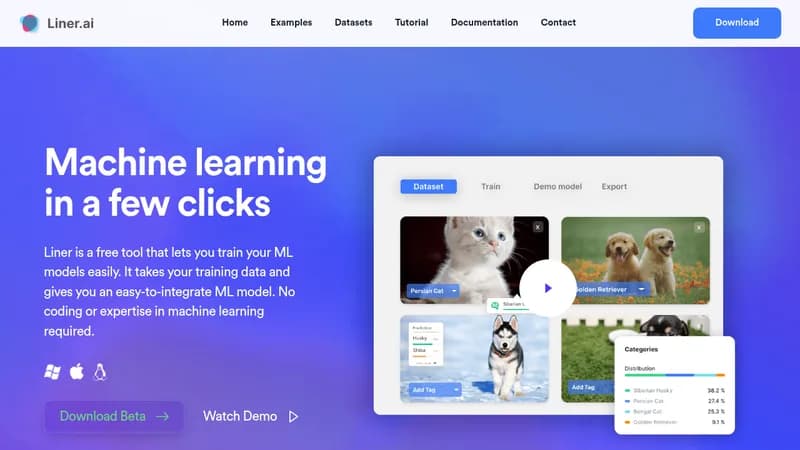
Liner.ai lets anyone create machine learning models through a simple visual interface – no coding skills required. Just upload your data, pick a template, and get a ready-to-use model in minutes. All processing happens locally on your computer, keeping your data private while eliminating the need for expensive cloud services or powerful GPUs. Export trained models directly to mobile apps or edge devices for real-world use.

Key Features of Liner.ai

  1. 1

    No-Code Training

    Create ML models through click-based interface

  2. 2

    Local Processing

    Data never leaves your computer for privacy

  3. 3

    Pre-Built Templates

    7+ project types like image/text classification

  4. 4

    Cross-Platform Export

    Deploy models to mobile and edge devices

  5. 5

    CPU Optimization

    Fast training without requiring GPUs

Liner.ai Tool Use Cases

  • πŸ“·
    Classify product images for e-commerce
  • πŸ“
    Automate customer support ticket categorization
  • πŸŽ™οΈ
    Identify sound patterns in audio recordings
  • πŸ–ΌοΈ
    Detect defects in manufacturing quality control

FAQs from Liner.ai

Is my data secure?

All training happens locally on your computer – your data never leaves your device.

Do I need a powerful computer?

No – models are optimized to train quickly on standard CPUs without requiring GPUs.

Can beginners use this tool?

Yes, Liner's interface is designed to be intuitive for users with no ML experience.

Pros & Cons of Liner.ai

Pros (4)

  • Completely free with no hidden costs
  • Beginner-friendly interface requiring no ML expertise
  • Strong data privacy through local processing
  • Fast training times on standard computers

Cons (1)

  • Advanced customization may require coding elsewhere

Liner.ai's Pricing Plans

Free Plan

one-time
$0

Features

  • All ML templates available
  • Local model training
  • Cross-platform export
  • Community support
For the latest pricing info, pleaseΒ visit the official website

More Info About Liner.ai

Who is using liner.ai?

This tool is best for:

  1. Developers without ML expertise
  2. Small business owners
  3. Educators/teachers
  4. AI hobbyists

Liner.ai's Tags

Explore more niche AI tool websites by clicking on a tag* (works only if it has enough tools).

Platforms & Device Support

Use Liner.ai on your favorite device - available across multiple platforms for flexibility.

Desktop App

Mac
βœ“ Available
Windows
βœ“ Available

Website Analytics of Liner.ai

Liner.ai Website Traffic & SEO Analysis:

Recent data shows that Liner.ai has 17.4K monthly visits (11.0% increase from the previous month), 41.0% bounce rate, and average 1.55 pages per visit.
Traffic is primarily driven by 6 different sources, with users from 5 countries worldwide, led by United States contributing 33% of total traffic. SEO performance is shown by 5 tracked keywords, with "linerai" being the top-performing keyword with 3.3K monthly searches. See below for more info.

Monthly Visits

17.4K

(+11.0%)

Pages per Visit

1.55

Bounce Rate

41.0%

Average Time on Site

12s

Traffic Trend(Apr 2025 - Oct 2025)

Loading chart...

Top Keywords

SEO KeywordVolumeCPC
linerai
3.3K$1.73
liner ai
41.2K$1.33
ferramenta liner ia
310-
linear ai
4.4K$2.50
liner ai free
1.0K$2.02

Traffic Sources Distribution

Traffic Share by Source

Loading chart...

Source Breakdown Details

SourceTraffic Share
Direct
44%
Search
41%
Social
6%
Referrals
8%
Paid Referrals
1%

Global Traffic Distribution

Traffic Share by Country

Loading chart...

Geographic Breakdown Details of top 5 countries

Country NameTraffic Share
United States33%
India15%
Korea, Republic of12%
Philippines12%
Vietnam12%
Analytics data is estimated (from third-party analytics providers) and for reference only.

πŸš€ Liner.ai Launch Badge

Promote your Toolbit Launch by using the badge on your website. It can be inserted on your home page or footer easily.

How to use: Simply copy and paste the embed code into your homepage or footer HTML to display it instantly and build community support.

ToolBit badge

Reviews for Liner.ai