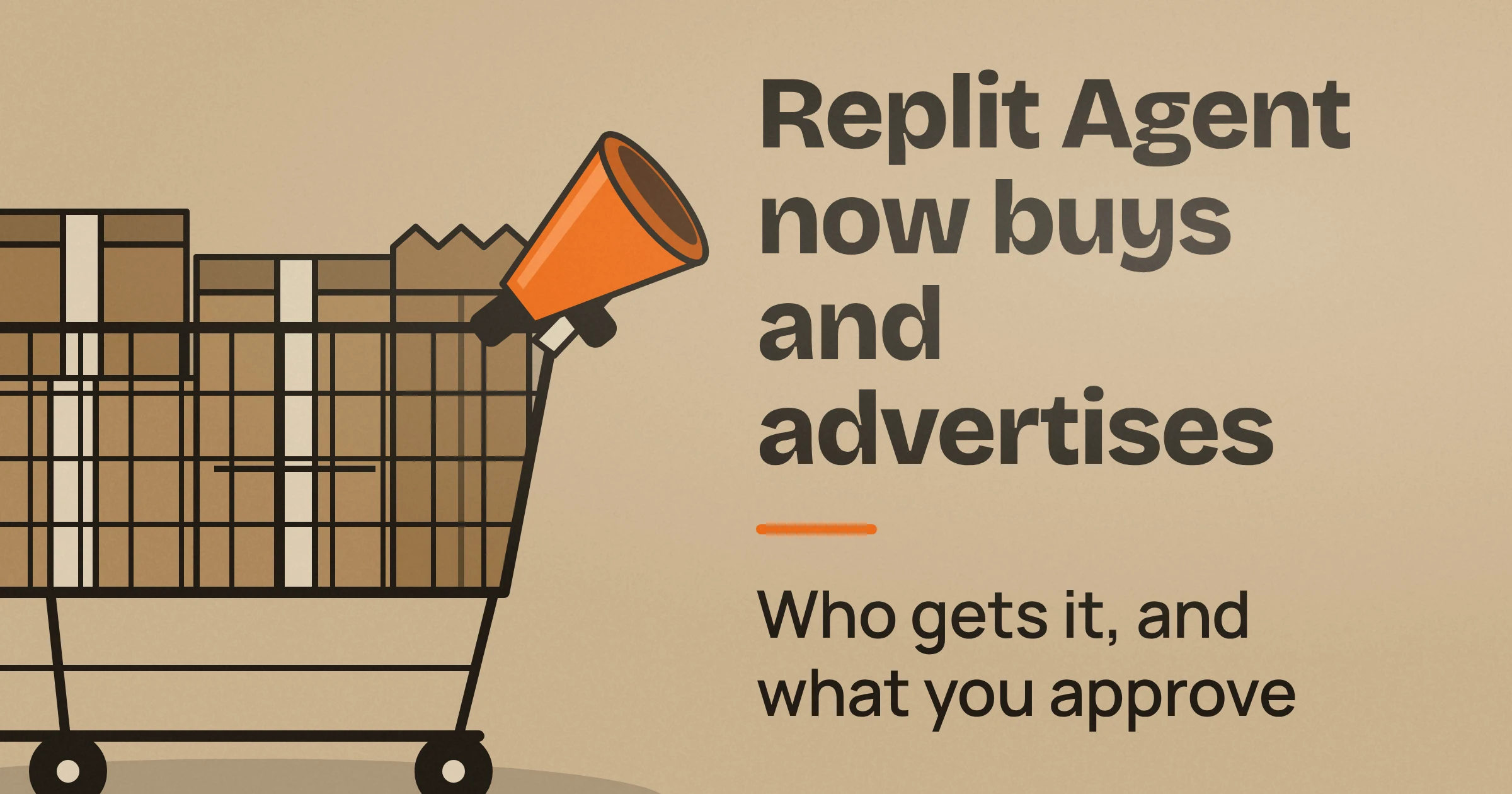
Yes, Replit Agent can now buy things and run Google Ads for your business, but it never gets a blank cheque. As of November 2026, buying supplies (Agentic Commerce, paid through Link and Visa) is open to Replit Core and Pro users in the US. Google Ads campaigns (Agentic Ads) are open to Pro users worldwide.
In both cases, the agent does the legwork and you approve the money. The biggest trap is on the ads side. Google's average daily budget is not a hard daily cap, and charges can still arrive after you pause.
What can Replit Agent actually buy and do for your business?
As of November 2026, Replit Agent has two new jobs, according to Replit's launch announcement:
- It can buy supplies for your business with Link and Visa.
- It can help you reach customers with Google Ads.
Think of it as an assistant who fills the cart and drafts the ad, then hands you the pen to sign.
Buying supplies (Agentic Commerce)
Say you run a bakery and need new packaging. Agent finds options and prepares the merchant checkout. Then, in Replit's words, "it waits for you to approve the final total before anything is charged."
Payment runs through Link, Stripe's digital wallet.
Running Google Ads (Agentic Ads)
Say you run a yoga studio and want more class sign-ups. Replit says Agent:
- analyzes your website or app content,
- drafts ad copy,
- generates images,
- and recommends daily budgets.
You review, approve, and launch. You still set the campaign goal, targeting, budget, and landing page.
Agent can also add conversion tracking (code that records when a visitor actually signs up or buys). That way you judge the campaign on sign-ups and sales, not just clicks.
The supported campaign type is Performance Max. In this Google format, Google chooses which ad combinations to show and where, based on your campaign goal. The trade-off is that you give up some control over placement.
Who gets Replit Agent's buying and Google Ads features?
As of November 2026, Replit Agent's two features have different requirements:
- Agentic Commerce needs a Replit Core or Pro plan and starts in the US only.
- Ads with Google need a Pro plan and are available worldwide.
Per Replit's pricing page, Pro costs $100/month.
The table below puts both features side by side, drawn from Replit's docs and Google's budget rules. Read it before you approve anything.
| Agentic Commerce (buying) | Agentic Ads (Google Ads) | |
|---|---|---|
| Plan needed | Core or Pro | Pro, plus a personal Workspace for a Replit-managed Google Ads account |
| Where it works | US to start; other countries not announced | Worldwide |
| What Agent does | Finds options, prepares the checkout | Drafts copy, generates images, recommends daily budgets, can add conversion tracking |
| What you approve | The final checkout terms, including the total with taxes and fees | Activating the campaign, plus the goal, targeting, budget, and landing page you set |
| Main limits | One-time purchases at launch; subscriptions only with identical fixed initial and renewal totals | Performance Max only; one campaign at a time on Replit-created accounts; minimum $15 USD average daily budget |
| Where the money comes from | Your Link wallet | Your Replit credit balance, topped up by auto-reload |
| Budget trap | Approval isn't proof the order went through; resubmitting can double-charge | Average daily budget isn't a hard cap; charges can show up after you pause |
| Best for | One-off supplies at a fixed price | A guided first campaign judged on real sign-ups and sales |
Is this available outside the US?
Only half of it is.
- Ads with Google are available to Pro users worldwide.
- Replit says Agentic Commerce is "starting in the US," and it hasn't published which countries come next.
What does the Pro plan include besides ads?
Replit's pricing page says Pro adds more Free Mode usage, up to 10 parallel Agent tasks, and up to 15 builders.
Before you upgrade, note one more requirement. A Replit-managed Google Ads account also needs auto-reload enabled and available Replit credits.
Can Replit Agent spend without asking?
No. Replit says Agent "never gets open-ended permission to spend." During payment, shell access and general browsing are disabled, and approval checks are enforced in code rather than left to the model.
In plain terms, the AI can't talk its way past the approval step. The gate is hard-wired, not a rule the AI is politely asked to follow.
What does not count as approval
Per Replit's buying docs, none of these lets Agent spend:
- Connecting Link. Linking your wallet does not approve a purchase.
- Asking Agent to research a product. Researching does not authorize buying.
- Taking over the browser to sign in. If a merchant asks you to sign in or verify, you do it yourself in the browser. Taking control is not payment approval.
- Connecting a Google Ads account. Replit's ads docs say this does not approve campaign spending.
Connecting Link also can't switch buying on. If buying is unavailable for your account or workspace, Link does not override that.
What to check before you tap approve
Look at three things:
- the shipping address,
- the delivery option,
- the final total, including taxes and fees.
If any purchase terms change afterwards, Replit asks for a new approval instead of reusing your earlier one.
Never paste card details, passwords, or verification codes into the chat. If a merchant asks you to sign in or verify, do it yourself in the browser instead.
What your approval does and doesn't mean
Your approval gives permission to proceed. It does not confirm that payment completed or that the merchant accepted the order.
If the status looks uncertain, don't submit the same purchase again. Replit warns that a second attempt could create a duplicate charge or order, so check with the merchant first.
Can Replit Agent pay for a subscription?
Mostly no, as of November 2026. Replit's announcement says Agentic Commerce is limited to one-time purchases. The docs allow a subscription only when the initial and renewal totals are identical and fixed.
That rules out a lot of common software deals. These are not supported:
- trials,
- introductory prices,
- usage-based billing,
- prorations (partial charges when you switch plans mid-cycle),
- variable renewal totals.
For example, a design tool offering a free first month wouldn't qualify.
One more catch: an authorization end date stops Replit's permission for new payments, but it does not cancel the subscription with the merchant. To actually end it, cancel with the merchant yourself.
Is the average daily budget a hard cap on Google Ads spend?
No. Replit's ads docs state that "an average daily budget is not a hard daily spending cap." Google's own budget page says that for most campaigns, a single day can cost up to 2 times your average daily budget, and a month up to 30.4 times it.
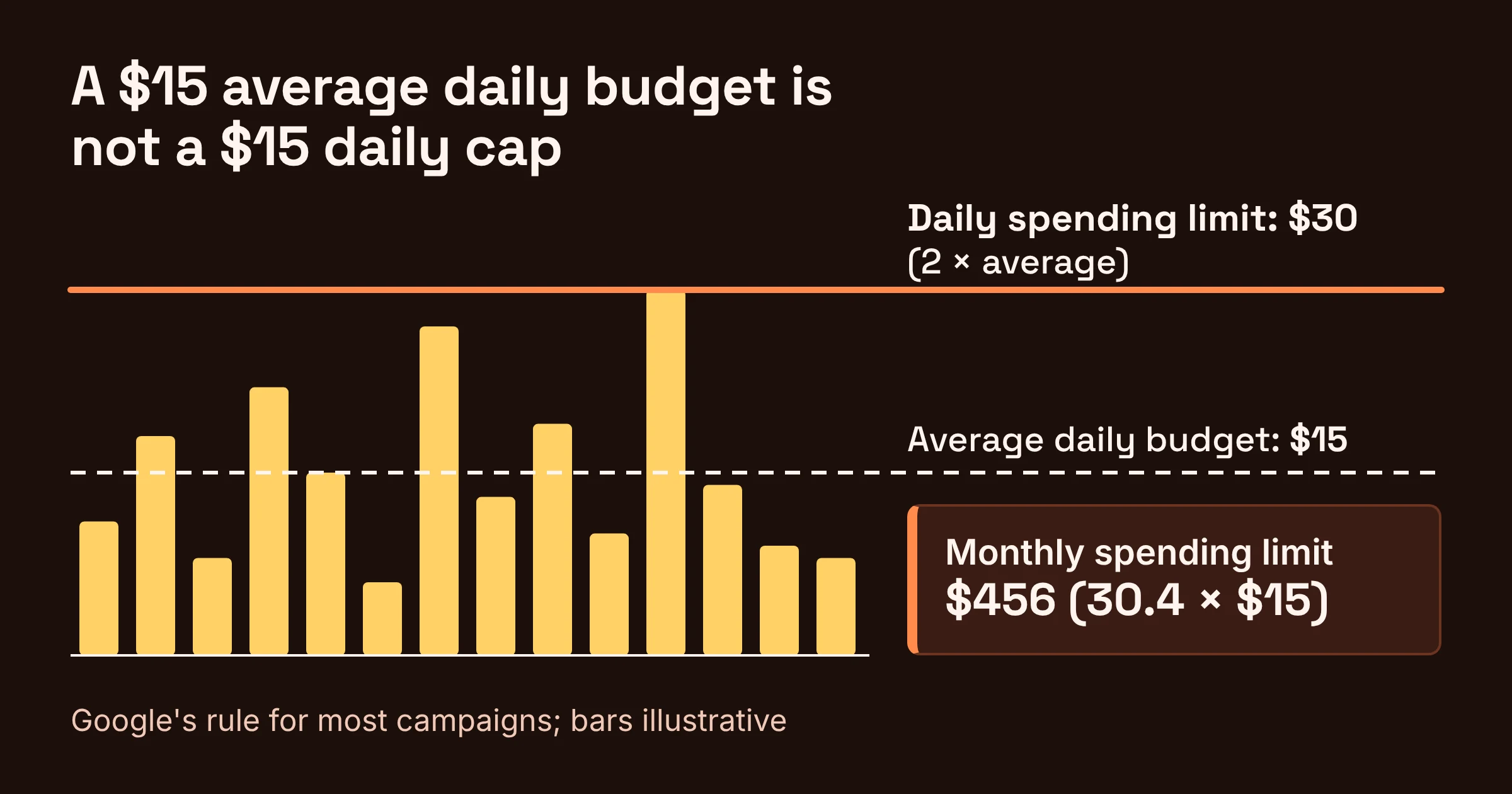
Google's Budgets overview explains the logic: some days spend less than the average and some spend more. Google also says you'll never pay more than your daily spending limit in a day or your monthly spending limit in a month.
What does that mean at Replit's $15 minimum?
Campaign creation through Replit requires an average daily budget of at least $15 USD. Here's Google's general rule applied to that minimum:
| What it is | Google's rule (most campaigns) | At a $15 average daily budget |
|---|---|---|
| Average daily budget | The number you set | $15 |
| Daily spending limit (most you pay in one day) | Average times 2 | $30 |
| Monthly spending limit (most you pay in one month) | Average times 30.4 | $456 |
For comparison, Google's own example uses a $10 average, which gives a $20 daily limit.
These multipliers come from Google's general rule. Replit mentions a limit shown during setup, so confirm the numbers on screen before you launch.
What else shows up on your bill?
Ad spend isn't the only cost. Replit says ads draw on your Replit credit balance, and auto-reload can charge your payment method to top that balance up. Replit's own usage for preparing and managing ads is billed separately from the ad spend itself.
Replit also warns that a Mission budget is not an advertising spending cap.
So a realistic monthly picture for a small campaign has three parts:
- Google ad spend, up to the monthly limit.
- Replit usage for managing the ads.
- The $100/month Pro plan.
Can you still be charged after you pause a campaign?
Yes. Charges from a Replit-managed Google Ads campaign can still appear after you pause it, because Google reporting is delayed. Replit's docs say usage and charges "may appear after the activity occurred, including after you pause a campaign."
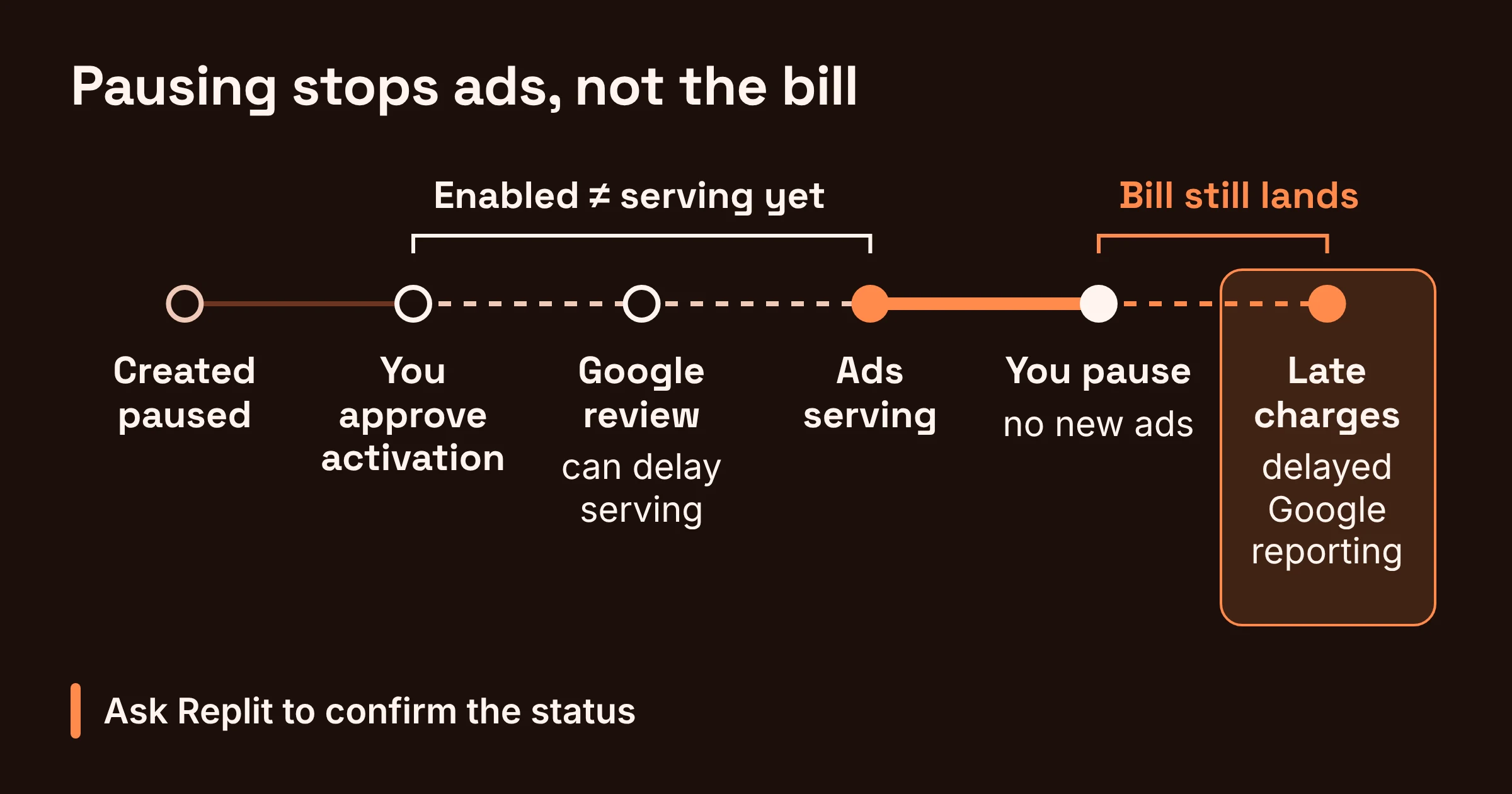
Pausing does stop new ads, because a paused campaign does not serve ads. The late charges come from activity that already happened but hadn't been reported yet. Think of a restaurant bill that arrives after you've left the table.
Replit also says not to assume a campaign will stop automatically. Ask Replit to confirm its status.
Timing works the other way too. Campaigns can be created paused, and you approve activation. But "enabled" doesn't mean ads are already running, because Google's review and eligibility checks can delay serving.
Can Replit Agent use your existing Google Ads account or a team workspace?
Yes, you can connect an existing Google Ads account to Replit Agent, and its billing stays separate from Replit-managed billing. Connecting it does not approve any campaign spending.
If Replit creates the account for you instead, two limits apply:
- It can run one campaign at a time.
- The Replit-managed launch is for personal Workspaces, not Enterprise Workspaces.
So a business on Replit's Enterprise setup won't get the managed option.
What should you check before Replit Agent spends?
Copy this into your notes and run through it before each first purchase or campaign.
Before Agent buys anything
- You're on Core or Pro, and buying in the US.
- It's a one-time purchase, or a subscription with the same fixed price now and at renewal.
- Shipping address and delivery option are correct.
- The final total includes taxes and fees, and you're happy with it.
- Any merchant sign-in happens in the browser, never in chat.
- If the order status is unclear, you check with the merchant before trying again.
- For subscriptions, you know you'll cancel with the merchant yourself.
Before Agent launches ads
- You're on Pro with a personal Workspace (for a Replit-managed account).
- You've reviewed your auto-reload settings, since auto-reload can charge your payment method.
- The campaign is created paused, so you can review copy, images, targeting, and landing page.
- You've done the math: for most campaigns, a day can cost up to 2 times your average and a month up to 30.4 times.
- Conversion tracking is on, so you measure sign-ups and sales.
- When stopping, you pause, ask Replit to confirm, and expect late charges.
Which feature should you start with?
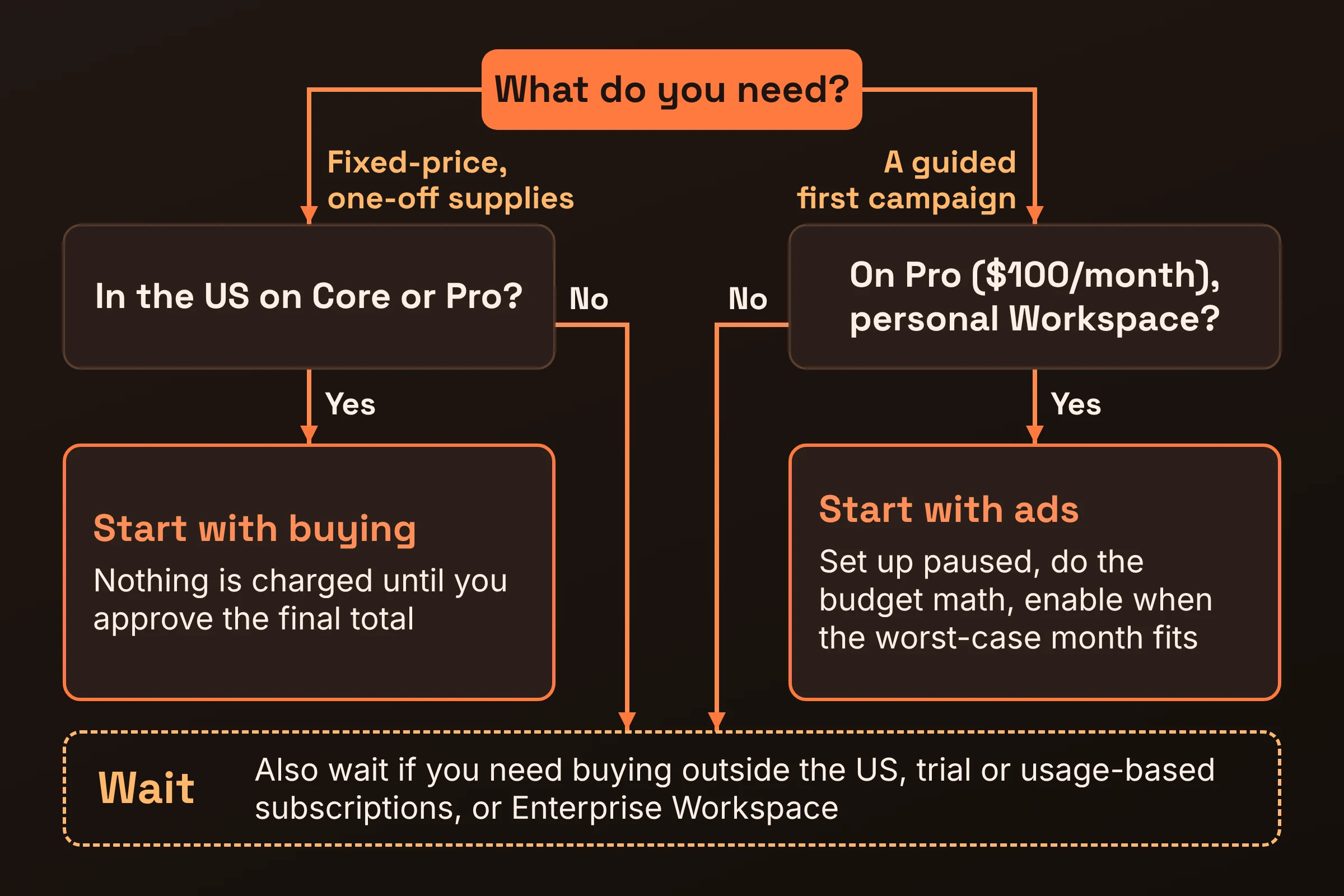
Start with buying if you're in the US on Core or Pro and need fixed-price, one-off supplies. Nothing is charged until you approve a final total.
Start with ads if you're already on Pro, or ready to pay for it, and want a guided first campaign. Take these steps:
- Set the campaign up paused.
- Do the budget math at your chosen average.
- Enable it only once the worst-case monthly figure fits your plans.
Wait if any of these apply to you:
- You need buying outside the US.
- You want to pay for trial or usage-based subscriptions.
- You want a Replit-managed ads launch in an Enterprise Workspace.
Replit's docs say buying starts in the US, trials and usage-based subscriptions aren't supported, and the Replit-managed ads launch isn't available for Enterprise Workspaces.
Plan prices, budget rules, and limits were checked on Replit's and Google's pages in November 2026; they change often.