If neither you nor your workspace owner has heard from Notion, Notion says it hasn't identified your workspace as affected by the Fireworks AI breach, and no action is needed right now. If you did get a notice, treat your Notion AI chat transcripts as exposed. Review them in Notion's Security incident review, then rotate any passwords or API keys you pasted into Notion AI.
Notion puts the affected group at fewer than 1% of workspaces. As of November 2026, its investigation is still ongoing. The short version for admins has three parts. Check for a notice. Hunt for pasted secrets. Stop taking any AI vendor's "we don't keep your data" line at face value.
Was my Notion workspace affected by the Fireworks breach?
Notion says fewer than 1% of Notion workspaces are affected, and the way to know is to check for a notice. According to Notion's security advisory, "If you haven't heard from us, we haven't identified your workspace as affected, and no action is needed right now."
Check with your workspace owner first. Notion's guidance, as summarized by BleepingComputer, covers both users and workspace owners: no action is needed for now only if neither has received a notice. A quiet inbox on your side doesn't settle it.
Then remember the timing. The investigation is ongoing, so "not affected" currently means "not identified so far." Keep an eye on the advisory page rather than treating today's answer as final.
What did the breach expose: my chats, my pages, or my name?
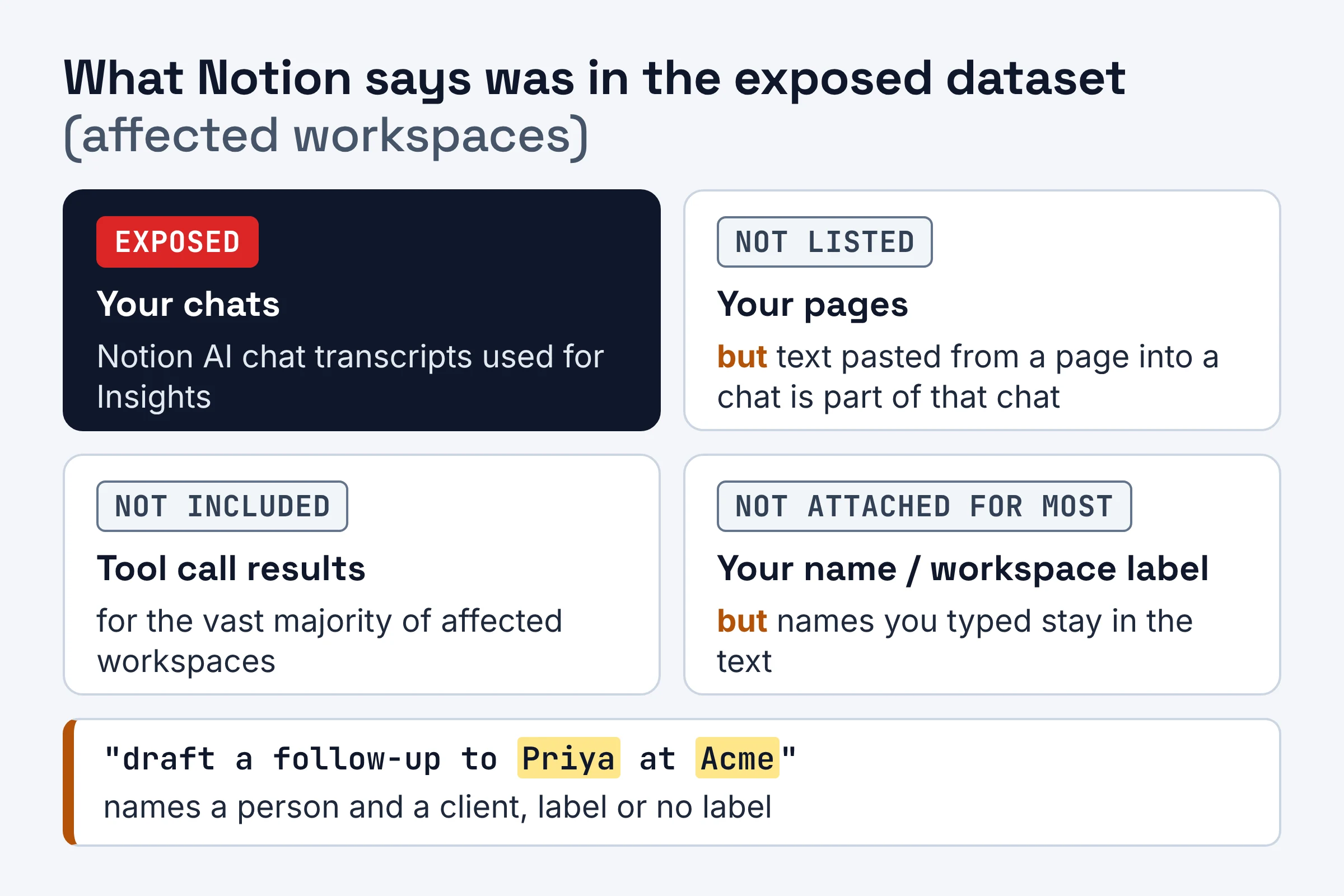
Notion says the exposed dataset included Notion AI chat transcripts used for its Insights feature. For the vast majority of affected workspaces, it says those transcripts were "unattributable." In Notion's words, that means the chats weren't labeled with who wrote them or which workspace they came from, and they did not contain tool call results.
In plain terms:
- Your chats: yes, if your workspace was affected. That means the transcripts Notion used for Insights.
- Your pages: Notion's disclosure describes chat transcripts and doesn't list your pages. Anything someone pasted from a page into a chat is still part of that chat.
- Tool call results: these were not included for the vast majority of affected workspaces, per Notion's definition of "unattributable." Tool call results are the outputs of actions the AI takes for you, such as content it pulls in while searching your workspace.
- Your name: for most affected workspaces, chats weren't tagged with a user or workspace. But "vast majority" is not "all," and anything you typed into a chat travels with the transcript.
That last point is the one people miss. Picture someone asking Notion AI to "draft a follow-up to Priya at Acme about the overdue invoice." That transcript names a person and a client, label or no label.
Why did Fireworks have these chats at all? Notion says it used Fireworks AI for classification work behind Insights, a feature that helps customers understand their own AI usage. It also used Fireworks as a general inference provider for open-weight models. Inference just means running a model to get an answer. Open-weight models are AI models whose underlying files are publicly released, so any provider can host them.
What should you do after the Notion Fireworks AI breach?
Your next step depends on whether your workspace got a notice and what people pasted into Notion AI. For affected customers, Notion's advice is to "treat this data as if it were exposed."
| Your situation | What it means | What to do now |
|---|---|---|
| No notice to you or your workspace owner | Notion hasn't identified your workspace as affected, and the investigation is ongoing | Nothing required yet. Watch Notion's advisory for updates |
| Your workspace owner received a notice | Your workspace is in the affected group | The owner reviews the data in Security incident review, then tells members what was found |
| Someone pasted a Notion API key into Notion AI | Notion says it revoked exposed Notion API keys it found in affected messages | Check which integrations stopped working and issue fresh keys |
| Someone pasted a key from another service | Notion says it reported these to the vendors that issued them | Rotate the key yourself at that service. Reported is not the same as replaced |
| Someone pasted a password | Notion's revocation covered Notion API keys, not your passwords | Change it, plus anywhere the same password is reused |
| Someone pasted client or personal details | The text sits in the transcript even if unlabeled | Note it during review and follow your own data-handling policy |
Do you need to rotate passwords or API keys you pasted into Notion AI?
Yes, if your workspace is affected and you pasted them into Notion AI during the incident timeframe. Notion's advisory is blunt about this. If affected workspaces pasted "sensitive information, passwords, API keys, or other credentials into Notion AI during the timeframe of the incident, rotate them."
Rotating a credential means creating a new one and switching the old one off. The work splits by type:
- Notion API keys. Notion says that on November 11 it revoked exposed Notion API keys found in affected user messages. If an integration broke around then, it may have been using one of those keys.
- Keys from other services. On November 12, Notion says it reported exposed third-party API keys to the vendors that issued them. That vendor may or may not act, so rotate the key yourself.
- Passwords. Nobody else can reset these for you. Change them at the source.
There's a trap here: deleting the chat does not make you safe. As VentureBeat's report puts it, "Removing a stored secret alone does not invalidate the underlying credential." Throwing away a copy of your house key doesn't change the lock.
Not affected? Notion isn't asking you to rotate anything. But if your team pastes live keys into AI chats, now is a good time to stop. Our guide on what not to paste into ChatGPT, Claude or Gemini applies just as well to Notion AI.
How do workspace owners review the affected data?
Affected workspace owners review the exposed data through Security incident review in Notion's desktop web interface. They follow instructions Notion sends by email. Notion says affected customers can retrieve and review the impacted data securely inside their own workspace.
A practical review routine for an owner:
- Start from the notice email, not a search result or a forwarded link, so you land in the real workspace.
- Scan for secrets first. Look for words like "password," "key," "token," "login," or anything that looks like a long random string.
- Then scan for people and clients. Look for names, email addresses, phone numbers, deal terms, and health or HR details.
- Build a rotation list with one owner per credential and a done date.
- Decide who needs to know. Your legal, compliance, or client-facing teams may have their own rules about exposed personal data.
Do the secrets pass before the people pass. A leaked API key can be abused quickly. A client's name in an unlabeled chat is a slower, quieter risk.
Is Notion AI still safe to use, and what did Notion switch off?
As of November 2026, Notion says it has disabled the Insights feature while it investigates. It also says it no longer serves open-weight models through Fireworks. On top of that, it says it deleted all its data in the Fireworks system on November 4, "out of an abundance of caution."
So the pipeline involved in this incident is off. Notion hasn't published a final report yet, because the investigation is still open.
A sensible rule for teams: if you're comfortable with Notion's response, keep using Notion AI for everyday drafting, summarizing, and searching. Just treat every AI chat, on any tool, as a place where secrets don't belong.
What did Fireworks say was and wasn't affected?
Fireworks' own bulletin says a subset of incomplete model weights and datasets were accessed for certain customers. It says it has not detected any impact to its Inference, Training SDK, and Nexus products, and that payment card numbers were not stored and were not impacted.
| Area | Fireworks' status (per its bulletin) | What it means for a Notion admin |
|---|---|---|
| Stored datasets and model weights | A subset of incomplete model weights and datasets accessed for certain customers | Stored data is what was accessed. Notion's Insights transcripts were in the exposed set, per Notion |
| Inference, Training SDK, Nexus | No impact detected; described as zero data retention by default | Live requests are not where the problem showed up |
| Payment card numbers | Not stored by Fireworks, not impacted | Nothing to do about cards, per Fireworks |
| Self-serve dataset uploads and downloads | Disabled while Fireworks investigates | Batch Inference and dataset-based training users will notice this |
Model weights are the learned numbers that make up an AI model. "Incomplete" is Fireworks' own description.
The Fireworks security bulletin also explains how the attackers got in. A third-party cloud provider that hosted Fireworks R&D machines had a security incident, which was then used to reach Fireworks development machines. Fireworks says the evidence links to a financially motivated cybercriminal group that sells access to AI models, a practice known as LLMJacking.
For scale, Fireworks has more than 10,000 customers, according to The Record as cited by VentureBeat.
When did each step of the Fireworks incident happen?
The incident began at a cloud provider used by Fireworks in late October 2026. Notion's cleanup steps ran through mid-November. Here is the sequence, joined from both companies' disclosures.
| Date | What happened | Source |
|---|---|---|
| October 23, 2026 | A third-party cloud provider hosting Fireworks R&D machines has a security incident | Fireworks |
| October 24, 2026 | That access is used to reach Fireworks development machines | Fireworks |
| November 4, 2026 | Notion deletes all its data in the Fireworks system | Notion |
| November 8, 2026 | Fireworks confirms the final impacted dataset | Notion |
| November 11, 2026 | Notion revokes exposed Notion API keys found in affected messages | Notion |
| November 12, 2026 | Notion reports exposed third-party API keys to the vendors that issued them | Notion |
| As of November 2026 | Notion's investigation remains ongoing | Notion |
Why didn't "zero data retention" protect Notion's stored chats?
At Fireworks, zero data retention describes how live requests are handled by default. It doesn't cover every feature. Per Fireworks' documentation, as quoted by VentureBeat, "A few features do store customer content, such as stored responses, batch jobs, and training." Neither company has said which feature held Notion's transcripts.
Zero data retention (ZDR) is a promise that your prompts and the AI's answers aren't saved after a request finishes. VentureBeat's reporting on Fireworks' policy says that by default, prompt and generation data "exist only in volatile memory for the duration of the request." Volatile memory is short-term memory that's wiped when the job ends.
There's a second layer that confuses people. VentureBeat reports that Fireworks' formal Zero Data Retention policy is available on Enterprise accounts, applies to Inference and Training, and reads "Off by default." So the default handling of live requests and the formal policy appear to be separate things.
Notion's side adds a twist. Per BleepingComputer, Notion's FAQ highlights that Fireworks had contractually committed to zero data retention for Notion data. Yet Insights transcripts still ended up in the exposed dataset. VentureBeat also notes that nothing in the disclosures shows the policy would have stopped the intrusion.
Think of an office with a strict shredding rule at the front desk. The rule is real, but it says nothing about the filing cabinet in the back room.
The decision rule: a zero-retention promise is only as wide as the list of features it names. A vendor's product might save, batch, analyze, or train on your content anywhere. If it does, assume that copy exists until someone shows you otherwise.
What should you ask any AI vendor about data retention?
Ask three things first. Which features store your content? Is zero retention on by default for your plan? Does the promise extend to the companies they pass your data to? Copy this checklist into your next vendor review or security questionnaire:
- Which of your features store our content, even briefly? Ask specifically about analytics, batch jobs, saved responses, and training.
- Is zero data retention on by default for our account, or a setting we must turn on? At Fireworks, per VentureBeat, the formal policy is an Enterprise option that is off by default.
- Does your retention promise cover your subprocessors? Subprocessors are the other companies a vendor sends your data to, the way Notion sent Insights data to Fireworks.
- Can we see the retention settings ourselves? On Fireworks, per VentureBeat, any account member can read the policy settings. Ask your vendor for the same visibility.
- Are stored chats labeled with user or workspace? Unlabeled data is harder to tie back to a person. That is what Notion's "unattributable" wording describes: chats not labeled with who wrote them or which workspace they came from.
- If stored data leaks, can you show us exactly what was taken? Notion's in-workspace review is a good bar to hold vendors to.
- When you drop a provider, how fast do you delete our data there?
- How will you notify us, and who receives the notice: every user or only the owner?
If a vendor can't answer the first question clearly, the rest of its privacy page doesn't tell you much.
Your next moves this week
Today: ask your Notion workspace owner whether a notice arrived. No notice means no action for now, per Notion.
If you're affected: open Security incident review from the email instructions and scan for secrets first. Then rotate every credential on your list at its source. Don't stop at deleting chats.
Next vendor review: run the checklist above on every AI tool your team uses. Start with any that offer usage analytics, batch processing, or training on your data. At Fireworks, features like batch jobs and training are among those documented as storing customer content.