The main Claude Sheets limits, as of November 2026, are a cap of 100,000 cells per sheet, no pivot tables or macros, no live data from connected apps, and no HIPAA, CMEK or ZDR support. Claude Sheets is a beta on the Pro, Max, Ultra, Team and Enterprise plans. It's on by default for Team and off by default for Enterprise until an admin switches it on.
The short verdict: use Claude Sheets for light, shared sheets you build with Claude. Keep anything heavy, regulated or already living in Excel or Google Sheets where it is.
Anthropic launched Claude Sheets and Claude Whiteboards in beta on November 10, 2026. On the same day, Claude Dashboards became generally available under a new name, Claude Data. The plan details, admin defaults and limits are spread across Anthropic's launch post, help center and artifacts page. Here they are in one place, including the spot where Anthropic's own pages disagree.
Which Claude plans get Sheets, Whiteboards and Data?
As of November 2026, all three are paid-plan features. Anthropic's launch post says "These are available on all paid plans," and the Sheets help article names Pro, Max, Ultra, Team and Enterprise.
What differs is the release status and whether each one is switched on when you arrive. This table pulls it together:
| Artifact | Status (Nov 2026) | Plans | Team default | Enterprise default | Biggest launch limit | Best for |
|---|---|---|---|---|---|---|
| Claude Sheets | Beta | Pro, Max, Ultra, Team, Enterprise | On | Off until an admin turns it on | 100,000 cells per sheet, no live data | Light shared trackers and lists you build with Claude |
| Claude Whiteboards | Beta | All paid plans, per the launch post | On | Off until an admin turns it on | Claude only uses what's on the board | Sketching plans and diagrams, then sending them to Lucid, Miro or Zoho Vani |
| Claude Data | Generally available (formerly Claude Dashboards). Certified queries and live sharing are still beta | All paid plans | On | On by default from November 19, 2026 | Needs a data connector, such as a warehouse or CRM | Asking questions of company data that's already defined |
"Beta" here means you can use it today, but Anthropic is still adding features and changing limits. The launch post says so directly: "For now, sheets have simple spreadsheet functionality, but we are working on adding more."
If you're still choosing a tier, our Claude Pro vs Max vs Ultra plan comparison covers how the paid plans differ.
What are the Claude Sheets limits, and what can't it do yet?
As of November 2026, Anthropic's Claude Sheets help article lists these launch limits:
- a ceiling of 100,000 cells per sheet;
- several everyday power features that aren't built yet;
- no Excel automation;
- no live data;
- only basic read-only access on mobile;
- no HIPAA, CMEK or ZDR support.
Here's what each limit means in practice:
| Area | Limit at launch | What it means for you |
|---|---|---|
| Size | Up to 100,000 cells per sheet | Cells are rows times columns, so a wide sheet runs out of rows sooner than a narrow one |
| Not available yet | Pivot tables, protected ranges, find and replace, multi-column sort, filter views, multi-select dropdowns, PDF export | Summaries need formulas instead of pivots. Anyone with edit access can change any cell |
| Excel features not supported | Macros, VBA, Power Query, DAX, print layout | Automated or heavily modelled workbooks stay in Excel |
| Live data | Can't pull live data from connected apps. Docs, decks and dashboards can't use a sheet as a data source | The numbers are a snapshot. You update them yourself |
| Platforms | Web and desktop supported, basic read-only access on mobile | Plan to edit at your desk |
| Data controls | HIPAA, CMEK and ZDR not yet supported | Regulated or sensitive data stays out for now |
What Claude Sheets can do
Inside those limits, Claude can do a fair amount. Per the help article, it can:
- add tabs;
- write formulas that work across tabs;
- apply formatting and conditional formatting;
- add dropdowns, checkboxes and charts.
Formulas stay in the cells, so you can click any number and see how it was calculated. That beats a chatbot handing you a total you have to take on trust.
Getting data in and out is simple. You can import a CSV, Google Sheets or Excel file, and export a sheet as an .xlsx or CSV file. New sheets start private to you until you click "Share."
Should you use Claude Sheets or stay in Excel or Google Sheets?
As of November 2026, Claude Sheets is not a replacement for Excel or Google Sheets, and Anthropic doesn't present it as one. The help article says to use it for "a light, shared sheet that you build with Claude." It points you to Claude for Excel, Claude for Google Workspace or an export when your file already lives elsewhere or you need the full feature set.
The stay-in-Excel rule
Stay in Excel or Google Sheets if any one of these is true:
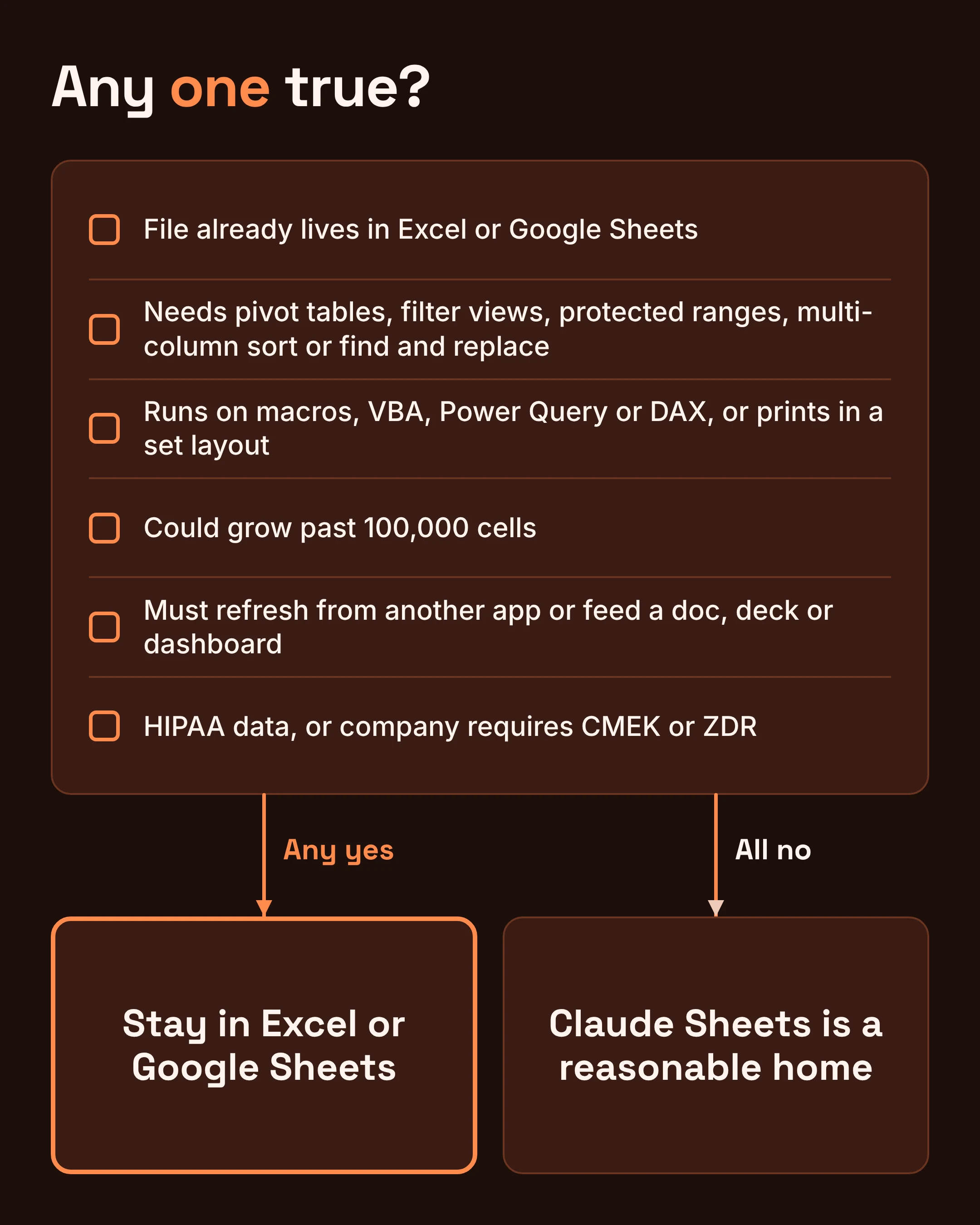
- The file already lives there and other people or systems depend on it.
- You need pivot tables, filter views, protected ranges, multi-column sort or find and replace.
- The workbook runs on macros, VBA, Power Query or DAX, or it has to print in a set layout.
- The sheet could grow past 100,000 cells.
- The numbers must refresh from another app, or feed a doc, deck or dashboard.
- The data falls under HIPAA, or your company requires CMEK or ZDR.
If every answer is no, Claude Sheets is a reasonable home for the job.
Pick Claude Sheets if...
- You're starting from a blank page and want Claude to build the structure, formulas and charts with you.
- The sheet is shared and lightweight: a tracker, a checklist, a small budget, a content calendar.
- You want to see the formulas Claude wrote rather than trust a number in a chat reply.
Two examples from real work
A marketing team planning a product launch fits well. They ask Claude for a tracker with a status dropdown, an owner column, checkboxes for "approved," conditional formatting that turns overdue rows red, and a chart of tasks by status. That's light, shared and built with Claude, which is exactly the use Anthropic describes.
A finance team's month-end workbook doesn't fit. It leans on pivot tables and a macro that reformats the bank export, and it gets printed for sign-off. All of that is on the not-yet or not-supported list, so it stays in Excel. Claude for Excel is the route Anthropic suggests there.
For a wider look at AI help inside spreadsheet apps, see our comparison of Julius, Claude and Copilot for spreadsheets.
Why can't you see Claude Sheets on an Enterprise account?
On Enterprise plans, Claude Sheets and Claude Whiteboards are off by default as of November 2026. An admin has to turn them on in Organization settings > Artifacts. On Team plans, all three artifacts are on from the start.
Claude Data works the other way round on Enterprise. Per Anthropic's launch post, it "turns on by default on November 19, 2026." If your organization isn't ready for people to point Claude at warehouse or CRM data, decide before that date and switch it off in the same settings page. Anthropic says you can change these anytime.
A few more admin details are worth knowing:
- Sharing stays internal by default. On Team and Enterprise, according to Anthropic's artifacts page, shared links stay inside your organization unless an Owner or Primary Owner turns on External sharing in Organization settings > Artifacts.
- Regulated orgs start with everything off. In HIPAA-enabled and zero data retention (ZDR) organizations, nothing in the new artifacts turns on by default, and some types aren't available at all.
- Claude Meetings is separate. TechCrunch reports Anthropic also launched Claude Meetings in beta on Team and Enterprise plans, working with Google Meet at launch.
Is Claude Data the same as Claude Dashboards?
Yes, mostly: on November 10, 2026, Claude Dashboards became generally available under the new name Claude Data, according to Anthropic's launch post. If you used Dashboards in beta, this is the same product under a new name, now with a general-availability label.
Some practical points:
- It needs a data connector. Anthropic gives a warehouse or CRM as examples. With no connector, there's nothing for it to query.
- Some parts are still beta. Certified queries and live sharing haven't reached general availability yet.
- It isn't meant to replace your BI tool. Anthropic says Claude Data answers questions on the data and definitions your company already has, including definitions in dbt, Looker and Cube. BI (business intelligence) tools are the reporting software your analysts already maintain.
- It can't read your Claude Sheets. The Sheets help article says dashboards can't use a sheet as a data source. A tracker you built in Claude Sheets won't feed a Claude Data chart.
What does Claude Whiteboards do, and where does it stop?
Claude Whiteboards is a beta visual board where Claude helps you lay out ideas. As of November 2026, Claude works only from what's on the board, and it can't see your connected apps.
That last point catches people out. If your project notes live in a connected app, Claude won't read them while you're on the board. Paste in the key details first.
When the board is done, you can export it as a PNG or send it to Lucid, Miro or Zoho Vani. Anthropic's Whiteboards help article says more destinations are coming. A typical use: sketch a launch timeline with Claude, export the PNG for a slide, and send the board to Miro so the wider team can keep working on it there.
Whiteboards isn't available to organizations with HIPAA-ready configurations.
Can you use Claude Sheets with HIPAA or zero data retention?
No, not as of November 2026. Anthropic's Sheets help article says that because it's a beta product, "HIPAA, CMEK, and ZDR are not yet supported."
In plain words, those three are:
- HIPAA: the US health-privacy rules.
- CMEK (customer-managed encryption keys): your company holds the keys that lock its data.
- ZDR (zero data retention): data isn't kept after it's processed.
Claude Whiteboards is also unavailable to HIPAA-ready organizations. In HIPAA-enabled and ZDR orgs, none of the new artifacts turn on by default.
For a clinic, an insurer or any team bound by these controls, the decision is simple for now. Keep patient, claims or other covered data in your approved tools, and recheck the help article's "Data controls" line as the beta matures.
Do Sheets and Whiteboards count toward your Claude usage limits?
Yes. As of November 2026, both the Sheets and Whiteboards help articles say each one "counts toward your plan's usage limits, like the rest of your work with Claude."
Building a sheet is just more Claude work, not a separate allowance. A long session spent restructuring a big tracker draws on the same budget as a long chat. The pages we checked don't spell out how Claude Data counts against limits.
Does Claude Sheets work on your phone?
Only partly, and Anthropic's pages disagree. The launch post says Whiteboards, Sheets and Data "work on web, desktop, and mobile." The Sheets help article says web and desktop are supported, "with basic read-only access on mobile."
Go with the more specific help article. Expect to view a sheet on your phone, but do your editing on the web or desktop app. If mobile editing matters to your team, test it on your own device before you rely on it.
FAQ
Can I export a Claude sheet to Excel?
Yes. Per Anthropic's help article, you can export any sheet as an .xlsx or CSV file. PDF export isn't available yet, so download the .xlsx and handle printing in Excel.
Can people outside my company open a sheet I share?
Not by default on Team or Enterprise. Shared links stay inside your organization unless an Owner or Primary Owner turns on External sharing in Organization settings > Artifacts. New sheets also start private to you.
Is Claude Sheets on the free plan?
Anthropic's pages describe Sheets, Whiteboards and Data as paid-plan features. The Sheets help article lists Pro, Max, Ultra, Team and Enterprise.
Do this next
First, check access. If you're on Enterprise and can't see Claude Sheets or Whiteboards, ask your admin to turn them on in Organization settings > Artifacts. Admins should also decide whether to keep Claude Data on before November 19, 2026.
Next, run your sheet through the stay-in-Excel rule. Try Claude Sheets only for a light, shared, new sheet with no regulated data. Export to .xlsx whenever you need Excel's full toolset.
Then, recheck the beta regularly. These limits will shrink as features ship. When you revisit the Sheets help article, look at:
- the cell limit;
- the "Features not available yet" list;
- the "Excel features not supported" list;
- the live data line;
- the mobile line;
- the data controls line.
Limits, plan availability and admin defaults were checked on Anthropic's pages in November 2026. Beta details change often, so confirm before you commit a workflow.