Yes, Claude Code could send your account email to websites, most visibly inside curl User-Agent headers. This happened because Claude Code placed that email in the context it gives the model. Update to Claude Code 2.1.317 or later, which adds a built-in privacy mod, on by default, that refuses shell commands containing your email that also name a User-Agent.
That mod covers exactly one call shape. Web tools, MCP tools, scripts, and request bodies in commands that don't name a User-Agent all pass through it. The real fix is removing the email from the model's context, which an Anthropic team member says is coming in the next release. Until then, think of the mod as a bouncer guarding one door of a building with several.
Does Claude Code send your email address to websites?
Yes, it could. As of November 2026, the Claude Code email leak isn't fully closed. Claude Code versions before 2.1.317 had no hard check stopping the model from putting your account email in an outbound request.
The reporter of GitHub issue #107757 says Claude Code put their email in the User-Agent during web searches. They write that they now receive "dozens of scam emails per day". That is one user's account, and nobody has independently verified the link between the two.
An earlier change was a soft one. The changelog entry for 2.1.234 (Aug 17) says "Claude is now told to use your account email only to identify you, and not to send it to unrelated services unless you ask." That is an instruction in the prompt, not enforcement. Models follow instructions most of the time, which isn't the same as all of the time.
Why did Claude Code put your email in a curl User-Agent?
Claude Code put your email in the model's context so the model would stop inventing names. The model then sometimes reused that email as a contact address in requests. An Anthropic Claude Code team member explained this on Hacker News.
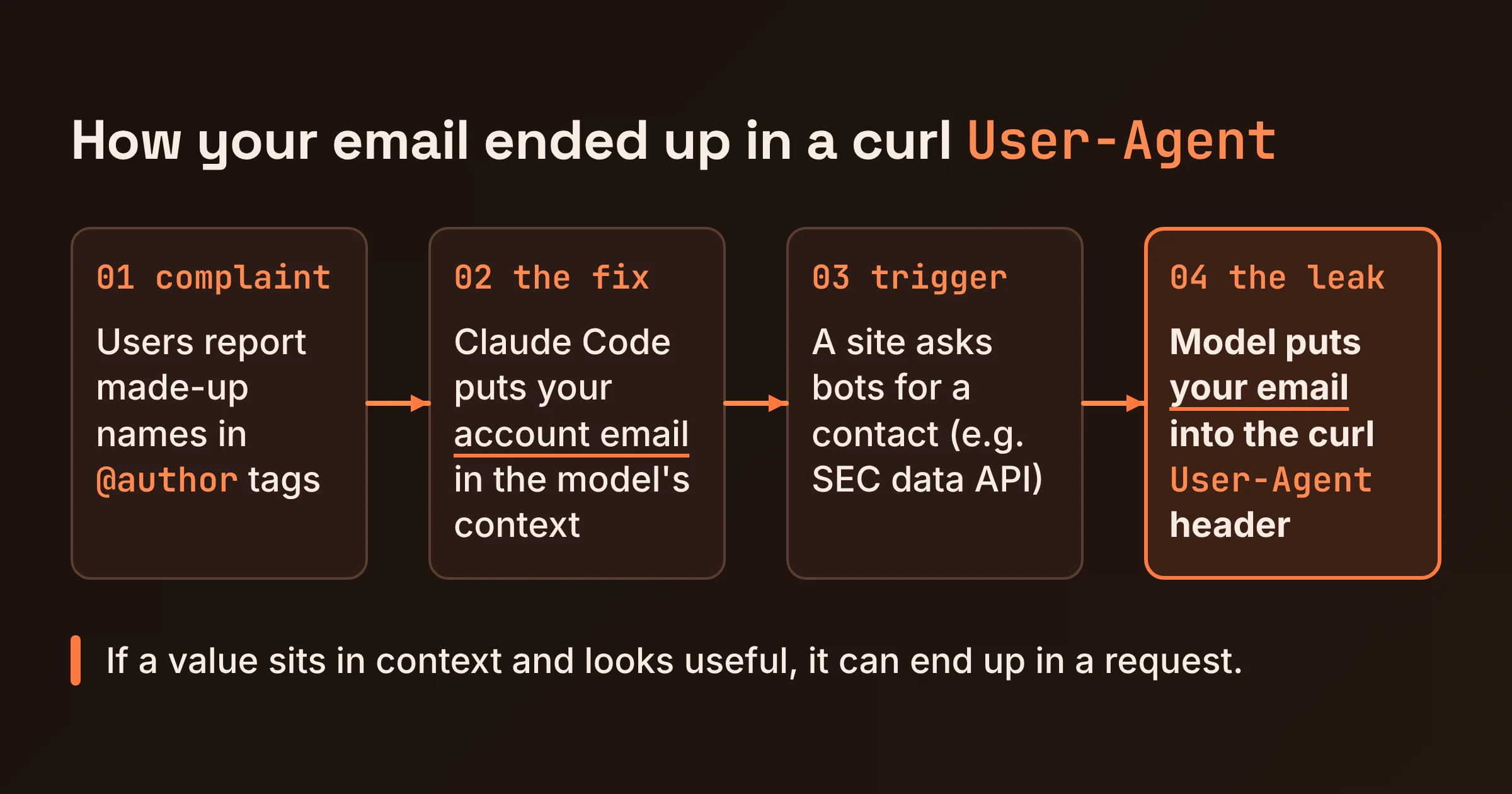
According to that comment, users had reported that Claude would hallucinate names for things like @author tags because it had no information about the account. So the email went into the context. The trouble starts with sites that ask automated clients for a contact. The SEC's data API is the example given, and Claude would sometimes fill that in with the email it had on hand.
The SEC case turned out to be less clear-cut than it first looked. A commenter first reported being rejected without an email in the User-Agent, then edited the comment to say the SEC accepts most non-cURL user agents. Either way, the pattern holds: if a value sits in the model's context and looks useful for a request, it can end up in one. Our overview of Claude Code's capabilities, memory and cost covers what else lives in that context.
Which Claude Code version blocks the email in User-Agent headers?
Claude Code 2.1.317, released November 3, 2026, is the first version with the privacy check, per Anthropic's changelog. As far as the changelog shows, no released version has removed the email from context yet.
The team member on Hacker News noted that the stable channel was still on 2.1.311 at the time. Their advice: "update to 2.1.317 or later." If you pin to stable, check which version you're actually running.
Here's the timeline, joined up from the changelog and the issue thread:
| Version | Date | What it does about your email |
|---|---|---|
| 2.1.234 | Aug 17 | Tells Claude to use the email only to identify you (instruction only) |
| 2.1.311 | Stable channel at the time of the HN comment | No privacy check |
| 2.1.317 | Nov 3, 2026 | Adds the built-in privacy mod (cc-plugin-privacy) |
| 2.1.319 | Nov 6, 2026 | Latest changelog entry at time of writing; adds permissions.denyInsteadOfPrompting; nothing about removing the email |
| Next release | Announced, not shipped | Email removed from the context given to the model |
Treat that last row as a promise until it shows up in the Claude Code changelog.
Does the privacy mod block WebFetch, WebSearch or MCP tools?
No. As of November 2026, the Claude Code privacy mod's README says only Bash, PowerShell and Monitor calls are checked, and "WebFetch and WebSearch are not checked, and neither are MCP tools."
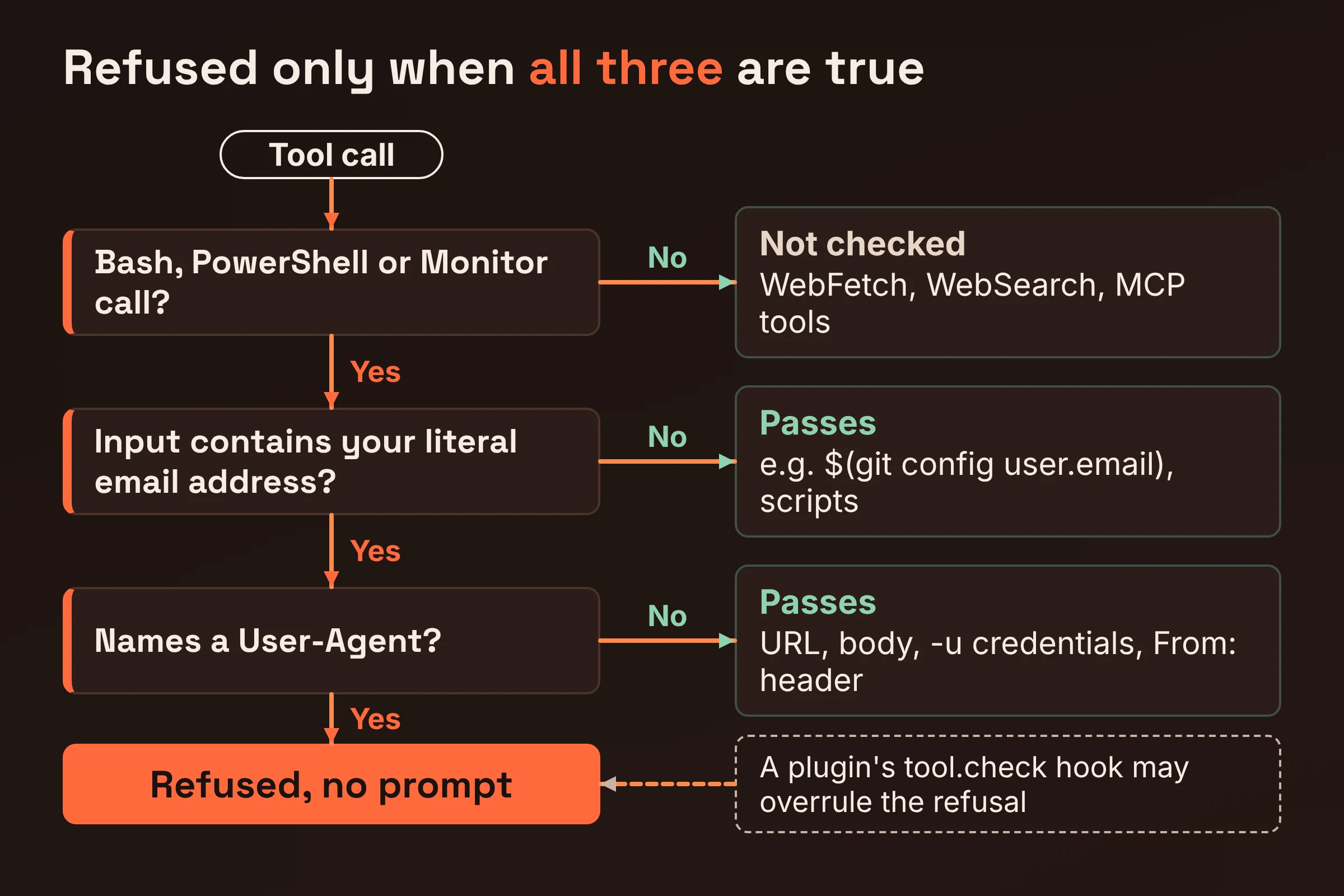
The mod holds one tool.check hook, which is a check that runs before a tool call executes. A shell call is refused when its input contains your address and names a User-Agent. The README says matches count in any letter case or when percent-encoded, and it describes the whole thing as "a courtesy, not a boundary, and it covers one shape."
Here are the call shapes the privacy mod README lists, with what each means for you:
| Call shape | Example | Built-in mod result (per README) | What it means for you |
|---|---|---|---|
| Shell command with your literal address and "User-Agent" | curl -H "User-Agent: you@example.com" ... | Refused, no prompt | The one case covered |
| Address in a URL | curl "https://api.example.com/?email=you@example.com" | Passes | No User-Agent named, so no match |
| Address in a request body | curl -d '{"email":"you@example.com"}' ... | Passes | Same reason |
| Address as credentials | curl -u you@example.com ... | Passes | Same reason |
From: header | curl -H "From: you@example.com" ... | Passes | A header, but not the User-Agent |
| Value computed at run time | curl -H "User-Agent: $(git config user.email)" ... | Passes | Your address never appears literally in the input |
| Variable, file sent by name, or script holding the address | python fetch.py where the script has your email | Passes | The mod sees the command, not what it runs |
| WebFetch / WebSearch | Built-in web tools | Not checked | Read these calls yourself |
| MCP tools | Any MCP server's tool | Not checked | Same |
The matching itself has quirks too. The test is two word matches over the whole input, with no parser, so false refusals happen. For example, a command that mentions "User-Agent" in a comment and also contains your email for an unrelated reason can get refused.
It also isn't clear whether curl's -A flag counts. The README describes the check as looking for a call that names a User-Agent, and -A sets the header without spelling it out. Test that in your own setup instead of assuming.
Does the privacy check ask you first or refuse outright?
Anthropic's Claude Code changelog says the 2.1.317 check "asks" first, but the privacy mod's README says it refuses with no prompt. The README documents the mod itself, so treat it as the better guide to behaviour, then verify locally.
The exact wording: the changelog says 2.1.317 "Added a check that asks before a web or shell tool call sends your account email address to the network," while the README says the refusal "raises no prompt, whoever is there and whatever the permission mode."
The scope differs too. The changelog mentions web tool calls, but the README says WebFetch and WebSearch are not checked. The Anthropic contributor on the GitHub issue describes the mod as a way "to deterministically block this behavior in v2.1.317 and later."
The README adds details that matter if you automate Claude Code:
- Allow rules can't wave it through. "A saved allow rule and auto mode's classifier do not clear it." That's good news for privacy: in auto mode, a refused call stays refused.
- Other plugins can override it. A hook from an installed plugin sits above the mod and, on
tool.check, "may overrule the refusal."
The practical takeaway: don't expect a permission prompt to warn you about a web or MCP call carrying your email. Nothing in the README says one will appear.
How do you check the privacy mod is on, or turn it off?
The built-in privacy mod (cc-plugin-privacy) is on by default in Claude Code 2.1.317 and later, and you manage it through /plugins, per the Anthropic contributor on the issue. To confirm it's working:
- Confirm your version is 2.1.317 or later.
- Open
/plugins. Findcc-plugin-privacyand confirm it's enabled. - Search your settings. Look for
"cc-plugin-privacy@builtin": falseunderenabledPluginsin three places: your user settings, any file you pass with--settings, and managed settings if your company uses them. Per the README, a repository's settings can't turn the mod off, so a cloned repo can't quietly disable it. - Review other plugins. Any installed plugin with a
tool.checkhook sits above the mod and can overrule its refusal. - Run a harmless test. Ask Claude Code to run
curl -H "User-Agent: <your account email>" http://localhost/. This is the exact shape the README says gets refused. If it executes, either the mod isn't active or another plugin's hook is overruling it.
To turn the mod off, run /plugin disable, or add this under enabledPlugins in user, --settings or managed settings:
{
  "enabledPlugins": {
    "cc-plugin-privacy@builtin": false
  }
}
The only good reason to disable it is false refusals. If they're blocking real work, try rewording the command first. The match is purely on words, so dropping the stray "User-Agent" mention often clears it.
What can you do until Anthropic removes the email from context?
Assume the model knows your email and can put it anywhere the mod doesn't look. The team member on Hacker News said the mod doesn't prevent all cases, and gave scripts Claude writes and runs as an example. This checklist covers the gaps in the table above:
- Update to 2.1.317 or later, even if your stable channel lags behind.
- Confirm the mod is on using the steps above, including the localhost test.
- Read WebFetch, WebSearch and MCP calls before approving them. Scan URLs, headers and bodies for your address, because none of these are checked.
- Grep generated scripts before they run, for example
grep -i "you@example.com" fetch.py. The mod sees the command that launches a script, not the script's contents. - Watch for indirect values like
$(git config user.email)in headers. They pass the mod even when they resolve to your address. - Hand Claude a contact on purpose. When an API wants a contact address, put a dedicated alias in your prompt. That gives the model a better option than the account email in its context. It's a nudge, not a guarantee.
- Consider
permissions.denyInsteadOfPrompting(added in 2.1.319) for unattended runs. Per the changelog, "a tool call that would wait on a permission prompt is denied and the turn continues, in terminal sessions, subagents and teammates." It denies everything that would have prompted, not just email-carrying calls. That makes it a fit for runs where nobody is around to read prompts anyway. - Watch the changelog for the entry that removes the email from context, then re-check your setup.
Do this next
- Update and verify today. Get to 2.1.317 or later, open
/plugins, and run the localhost test so you know the mod actually fires. - Change your review habit. Until the context fix ships, read every web, MCP or script call before approving it. The mod covers one shape, and its own README calls it a courtesy.
- Set a reminder to check the changelog for the context-removal entry. Once it lands, the root cause is gone and the mod becomes a backstop rather than your main defence.
Keep the mod on unless false refusals are getting in your way. It's on by default, and repository settings can't switch it off behind your back.