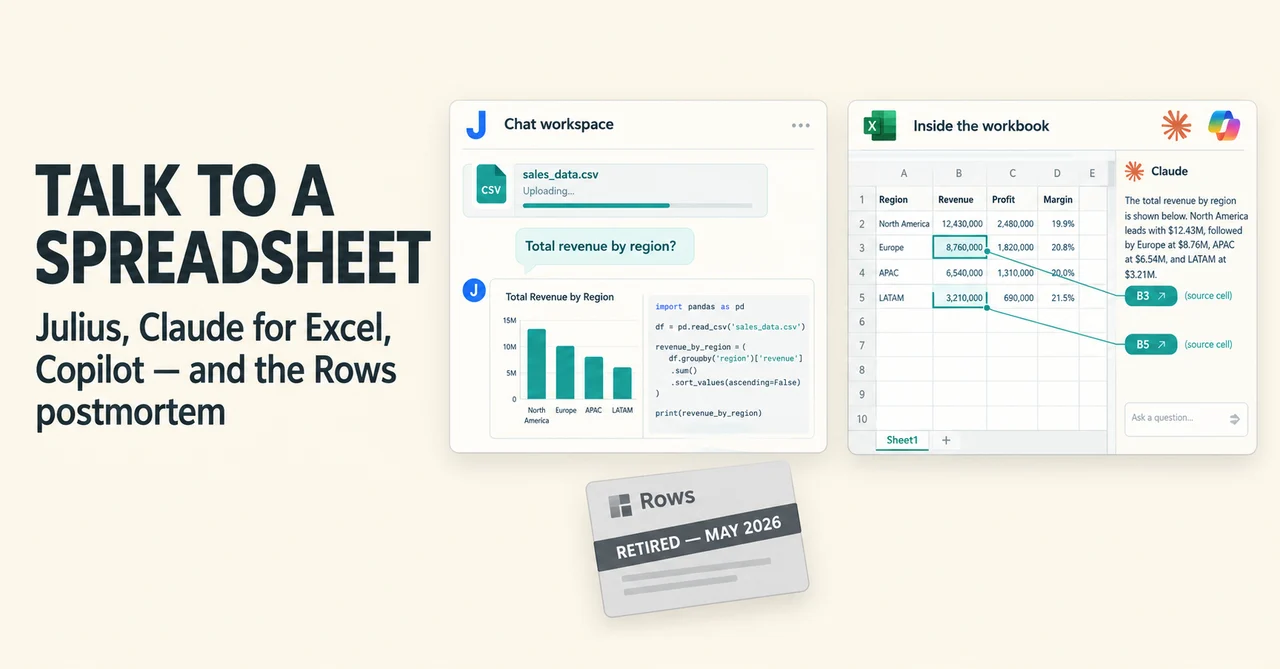
You just exported a CSV with 4,000 rows of order data and the intern is on vacation. Five years ago your options were a pivot table marathon or a very apologetic email to the data team. Today they include uploading that file to a chatbot, opening a sidebar inside Excel, or asking the spreadsheet itself a question in plain English.
The problem is that "AI spreadsheet tools" now means three genuinely different things: a chat workspace that runs Python on your file, an assistant living inside the workbook you already share with finance, and a full spreadsheet product rebuilt around AI. They look similar in a demo and behave nothing alike on a Tuesday afternoon. This is the honest state of the four names people search for most, verified against what each vendor actually publishes as of September 2026.
The wrong way to pick an AI spreadsheet tool
Most comparisons start with a feature matrix. That is the wrong first question. The right first question is: where does your data live, and where does the answer need to end up?
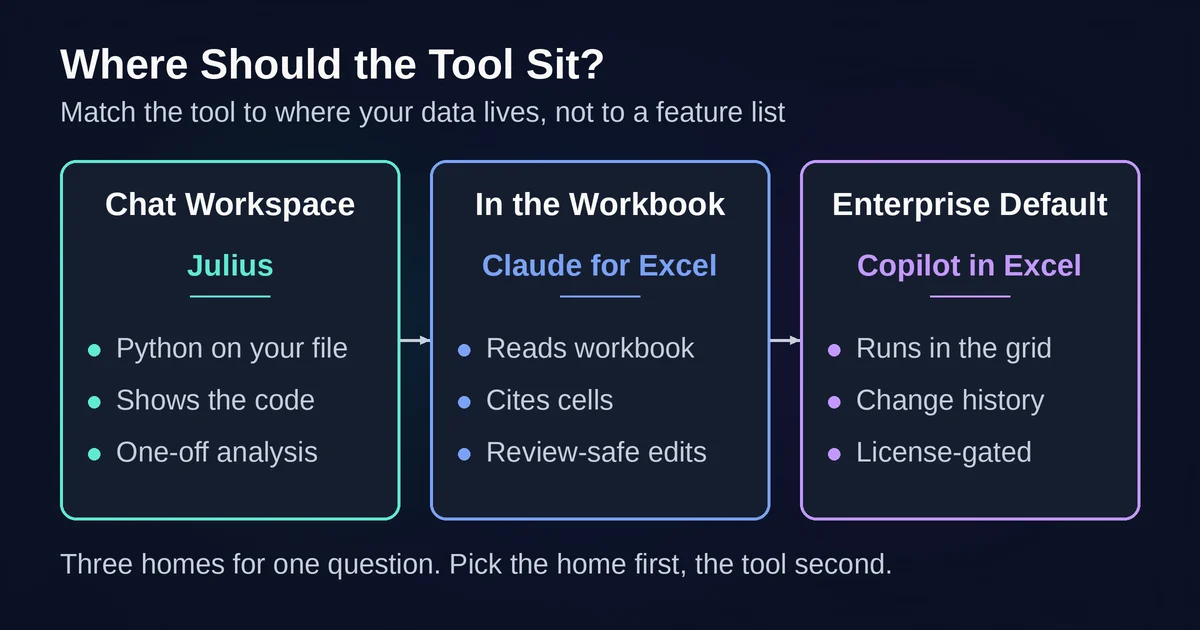
If your data is a one-off export and the answer is a chart for a Slack thread, a chat workspace like Julius wins, because you are done in ten minutes and nothing needs to be maintained. If the answer has to live inside the workbook your finance team already uses, with formulas that survive review, you need AI inside Excel itself, which means Claude for Excel or Copilot. If your data lives in SaaS tools and you want it flowing into a living spreadsheet on a schedule, that was the Rows problem, and its disappearance in 2026 opened a real gap.
A second question people skip: who verifies the output? A chatbot's chart that nobody recomputes is a decoration. An AI edit inside a shared financial model is a liability unless the tool shows exactly what changed. Pick the tool whose verification story matches the stakes.
And a third: which license do you actually hold? Copilot in Excel only exists if your Microsoft 365 plan includes it, and Microsoft now splits that into tiers where the entry label does not include Copilot in the Office apps at all. Claude for Excel needs a paid Claude plan. Julius has a free tier. Checking your license before reading one more review will save you an hour.
The test workbook: run this before you trust any of them
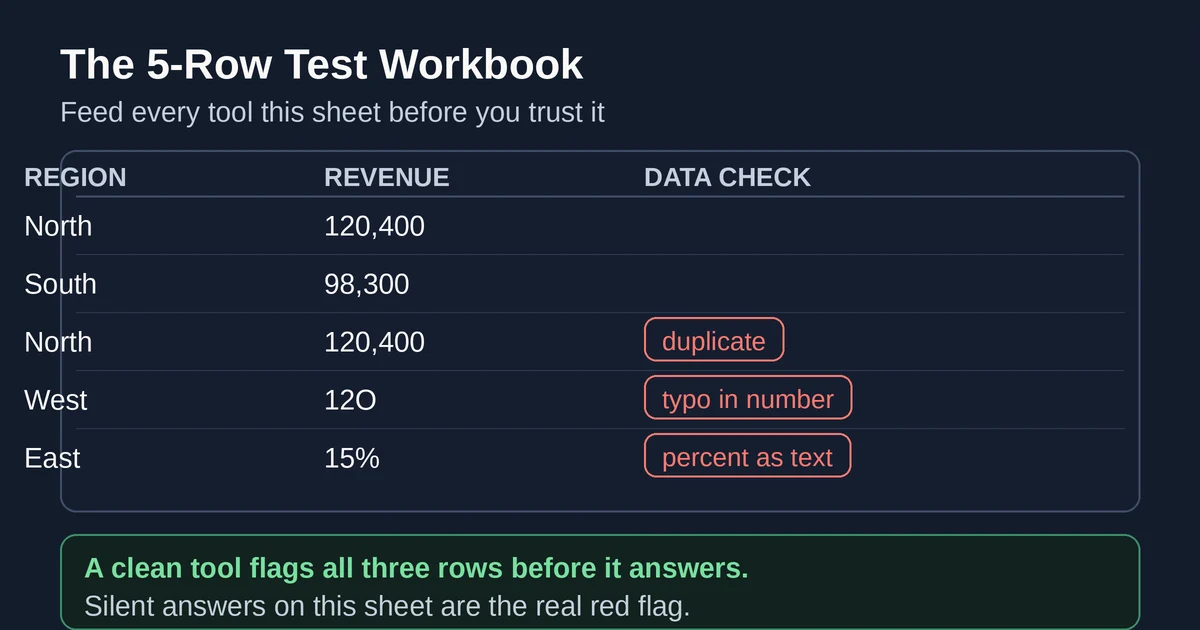
Before you hand a tool real work, hand it a deliberately messy sheet. This takes five minutes to build and tells you more than any vendor demo:
- A duplicate row, so you learn whether the tool notices or silently double-counts.
- A cell with a typo in a numeric column, like "12O" instead of "120".
- A blank where a value should be.
- A percentage stored as text ("15%") next to real numbers.
- Two date formats in one column, like "2026-03-04" and "04/03/2026".
Then ask something simple: "What is total revenue by region?" and one thing that requires judgment: "Which region looks wrong, and why?"
The first answer tests whether the tool shows its work. Does it tell you the duplicate row existed? Does it warn that the percentage column is text? The second answer tests whether it flags problems or just produces confident prose around whatever the data happens to say. Any tool that gives you a clean chart with no caveats about that sheet is telling you it does not read carefully, and you now know what supervision it needs.
Julius, for instance, runs Python on your file and shows you the code it wrote, so you can see how it treated the messy column. Claude for Excel answers with clickable citations to the specific cells it used, so you can jump straight to the dirty data. Copilot works inside the grid, so you can see and undo the results in place. Tools differ mainly in how easy they make this verification, not in whether they need it.
Julius: the strongest chat-with-a-CSV experience
Julius sits closest to what most people picture: upload a spreadsheet, ask questions in plain English, get analysis and charts back. Under the hood it writes and runs Python on your file, and it shows you the code, which matters more than it sounds. When the answer to "what drove the March spike?" is a chart plus the actual pandas script that produced it, you can check the logic instead of trusting a vibe. Its pricing page names its tiers and models openly, which is rarer in this category than it should be.
Its 2026 pricing, taken from the official pricing page: a Free plan with a daily credit allowance, Plus at $20 per month or $16 billed yearly with 2,000 credits, Pro at $45 (or $37 yearly) with 5,000 credits and an expanded context window, Max at $200 (or $166 yearly) with 25,000 credits, and Business at $450 (or $375 yearly) with 60,000 credits and up to 50 team members. The paid tiers name their models openly: GPT-5.6 and Claude Sonnet 5 on Plus, and Claude Fable 5 from Pro upward.
Two things worth knowing before you build a workflow on it. First, the credit meter is the real cost. Heavy analysis burns credits faster than chat does, and the jump from Pro at $45 to Business at $450 is steep, with nothing in between for a small team that outgrows one seat. Second, Julius has repositioned itself as a general AI workspace that also builds presentations, reports, websites, images, and video, so evaluate the data-analysis part specifically rather than the bundle. The old sandbox memory figures (2 GB of RAM on the free tier) are no longer published on the pricing page, so treat any RAM number you read elsewhere about Julius as stale. Database connectors like Postgres, BigQuery, and Snowflake are listed on the Business plan card, and the cheapest tier that connects a real database is not stated cleanly on the page, so confirm before you buy if that is your use case.
Where Julius genuinely wins: exploratory analysis you do once and do not need to maintain. Where it does not: anything that must live as a formula in a shared workbook, and anything your finance team would file without rechecking. A chat transcript is not an audit trail.
Rows: the 2026 cautionary tale you should know about
Rows deserves its section here precisely because it is no longer a recommendation. On February 22, 2026, the company announced that Superhuman had agreed to acquire it, with rows.com fully winding down on May 31, 2026, after nine years and 2.2 million users. The team folded into Superhuman's suite to strengthen Coda.
Understanding why people liked it tells you what to look for in its successors. Rows was a full spreadsheet rebuilt around live data: 50-plus native integrations that pulled business data into the grid on a schedule, an AI Analyst you could ask questions in chat, an =AI() function usable cell by cell, and Python blocks for heavier work. Its pricing metered AI as a monthly pool of "AI Tasks", 200 a month on the $8-per-user Plus plan, 1,000 on the $79-plus-$8-per-user Pro plan. Teams that built live dashboards in Rows had three months to migrate.
The lesson is not "Rows was bad". It was, by most accounts, good. The lesson is about where you let a startup's product sit in your workflow. A tool that extracts, analyzes, and chats about your data is replaceable. A tool that is the storage layer for a live business process is not. When you adopt an AI spreadsheet product, ask what happens to your work if the company is acquired or the pricing triples, and keep an export path.
The Rows-shaped gap still exists: teams that want a spreadsheet wired directly to their SaaS data should look at its official migration path through Coda, or at equals-style and Coefficient-style connector tools. And if you encounter a 2025 blog post ranking Rows as a top pick, check the publication date before you trust anything else on that page.
Claude for Excel: the AI that lives where your model lives
Claude for Excel is Anthropic's official add-in, generally available since May 7, 2026 on all paid Claude plans: Pro, Max, Team, and Enterprise. There is no free tier, and usage draws on your existing Claude plan limits rather than a separate bill. Anthropic's product page and official docs are unusually specific about what it can and cannot do, which is a good sign in a category full of vague marketing.
What makes it different from a chatbot is that it reads the workbook you have open, not a pasted table. Ask "why does terminal value look like that?" and it answers with citations to specific cells, clickable, so you can jump to the assumption being discussed. Ask it to change an input and it works through the dependency chain instead of pasting values over formulas. It debugs errors to their root cause, builds models from scratch or fills templates, edits pivot tables, applies conditional formatting, and sets up data validation dropdowns, all as native Excel operations. Since launch it gained connectors, so it can pull context from sources like S&P Global or LSEG into the sidebar, and one conversation can carry across Excel, Word, and PowerPoint when the files are open.
The official documentation is unusually frank about limits, which is worth quoting in spirit: no macros or VBA, no Excel data tables, and files must be .xlsx or .xlsm. Excel 2016 and 2019 perpetual licenses are not supported, and neither is Excel on iPad or Android. The add-in's chat history is stored locally in your browser, not on Anthropic's servers and not synced across devices, and the activity does not appear in Enterprise audit logs or the Compliance API. For regulated teams, that last sentence is a decision, not a footnote.
Anthropic's own docs also say the quiet part every AI spreadsheet user should internalize: it is not recommended for final client deliverables without human review, or for audit-critical calculations without verification. Reviewers testing it in 2026 found the practical habit is enabling "Ask Before Edits" mode on day one, since by default it can be a bit eager to change cells, and checking for hard-coded numbers left where a formula belongs. The failure mode is not usually a wrong answer; it is a plausible answer with a typed-in subtotal instead of a SUMIFS.
If your deliverable is a maintained Excel model, this is the strongest option of the three active tools. If your work is one-off CSV analysis, it is overkill.
Copilot in Excel: the enterprise default that got good in 2026
Copilot in Excel had the most improved 2026 of anyone in this list, and it is worth taking seriously even if you tried it in 2024 and left unimpressed.
In April 2026, Edit with Copilot gained step-by-step reasoning, a proper chat-and-edit switcher, and the ability to use Python directly for advanced analysis, without leaving the workbook. Microsoft simultaneously brought OpenAI GPT-5.5 and Claude Opus 4.7 models into Excel, which quietly complicates every "Copilot vs Claude" comparison: the Microsoft default can now run a Claude model itself. By August 2026, Copilot in Excel had added a Python skill in Insider builds, persistent chat history, chart and PivotTable skills, and a change-history feature that summarizes recent edits and can tell you who changed what, including what the AI itself modified. That last one is quietly one of the best audit features in this whole category. Copilot also supports custom skills: markdown files describing your repeatable formatting and analysis steps, stored in a OneDrive folder and applied on request. One more September detail: the experimental =COPILOT() cell function was retired on September 14, 2026, with Copilot in Excel itself generally available and covering the same ground.
The catch is the license, because "Copilot in Excel" is not one thing. Microsoft now labels access in three tiers: Copilot Chat (Basic), which does not include Copilot in Word, Excel, PowerPoint, or OneNote at all; Microsoft 365 Copilot (Basic), which gives standard access to Copilot in those apps; and Microsoft 365 Copilot (Premium), which is the paid add-on with the full experience, priority access, and model choice. The enterprise add-on runs $30 per user per month on annual commitment, on top of a qualifying Microsoft 365 plan. Business bundles exist at $23.50 per user per month with Business Standard and $32 with Business Premium, and Microsoft is running a first-year promotional add-on price for business customers through December 2026, so the number on your invoice depends on your tenant and when you signed. Consumers need a Microsoft 365 Personal, Family, or Premium subscription. Before comparing Copilot against anything, check which label your account actually carries.
How they compare, side by side
| Julius | Claude for Excel | Copilot in Excel | (Rows, for the record) | |
|---|---|---|---|---|
| What it is | Chat workspace that runs Python on your files | Add-in inside Excel | Microsoft's built-in assistant | Was a standalone AI spreadsheet |
| Data source | Uploaded files, Drive, and warehouse connectors | The workbook open in front of you | The workbook, plus org data with premium licensing | Live SaaS integrations, now gone |
| Best for | One-off exploratory analysis, charts, quick answers | Maintained models, formula-safe edits, explanations with citations | Organizations already on Microsoft 365, audit-conscious edits | Historical reference only |
| Entry cost | Free tier, then $20/mo | Any paid Claude plan | Included in some M365 plans; premium add-on $30/user/mo enterprise | n/a since May 2026 |
| Watch out for | Credit metering; the $45 to $450 team-plan gap | No macros/VBA; local-only history; not in Enterprise audit logs | License tiers differ in what they unlock; quality varies by data shape | Do not build on it; it is gone |
The check before you send the chart
Whatever tool produced your number, the rule is the same: never ship a number you did not recompute. Practically, that means:
- Recompute the headline figure with a plain Excel formula or a five-line Python script. If it does not match, the interesting question is which one is wrong.
- Trace every percentage and growth rate in the output back to raw cells. Percentages stored as text are the single most common silent error in exported data, and tools handle them inconsistently.
- Check row counts before and after any AI "cleanup". A dedupe that removes 200 rows you did not mean to dedupe is a finding, not a feature.
- If AI edited a shared workbook, review the change log. Copilot's change history and Claude's highlighted cells with explanations exist precisely for this. Use them.
- Keep the prompt. Six months later, "why is this number 15 percent higher than last quarter's version?" is answerable only if the reasoning trail survived.
None of these tools, at their best, is a finance-grade analysis pipeline. They are accelerants for a human who still owns the result. Anthropic says it about its own add-in and it applies to all of them: audit-critical calculations need verification, every time. If you want to understand why the verification step is not paranoia, our pieces on why AI hallucinates and the prompt injection risks hiding in shared files cover the failure modes in detail. Claude for Excel's own documentation warns that spreadsheets from external sources can contain hidden instructions aimed at the AI reading them, so treat an unfamiliar workbook the way you would treat an unfamiliar macro.
One tool we are deliberately not deep-reviewing here is Formula Bot, which converts prompts into spreadsheet formulas, because it gets its own dedicated post. And if you are choosing between the models underneath these tools, our Claude vs ChatGPT comparison and the guide to picking the right AI model cover that decision on its own terms.
Pricing and plan details are as published by the vendors around September 2026 and can change; confirm on the official site before buying.
FAQ
Which tool should I pick for "chat with CSV" work? Julius, today. It has a genuine free tier, it shows the Python it wrote, and uploaded-file analysis is exactly what it is built for. Claude for Excel and Copilot are the better picks once the answer has to live inside a workbook.
Is Rows still a valid option in 2026? No. Superhuman announced the acquisition on February 22, 2026 and rows.com wound down on May 31, 2026. Any guide still recommending it was written before that date.
Claude for Excel or Copilot, which one? If your team already pays for a Copilot license that includes Excel access, start there, since it is zero marginal cost. If your work is financial modeling with formulas you must not break, Claude for Excel's cell-level citations and dependency-aware edits are the stronger fit. Both need the same human verification.
Can I trust AI numbers in a board deck? Not without recomputing them. Every tool in this category produces plausible outputs from whatever data it was actually given, including the messy parts. The five-minute test workbook above is the floor for trust, and the recompute rule is the ceiling of it.