Google Workspace Studio is free in one sense only: it costs nothing on top of an eligible Google Workspace plan. There is no Studio price of its own. Google says Studio is included in Google Workspace business and enterprise plans, so you pay for the Workspace seat and get a monthly run budget with it.
As of November 2026, Google lists a typical limit of 400 flow executions per month on Business Standard, Business Plus, Enterprise Standard and Enterprise Plus, with caps of 25 flows per person and 100 steps per flow. Business Starter gets promotional access with no published end date, and a regular personal Gmail account is not a supported route.
Below: which plans qualify, the published limits in one table, and a worksheet to test your own automations against that 400.
What is Google Workspace Studio, and is it the old Workspace Flows?
Google Workspace Studio is Google's automation builder inside Workspace, and it grew out of Google Workspace Flows. Google calls Studio "an evolution of the capabilities we released in alpha as Google Workspace Flows". So if you searched for Flows pricing or access, Studio is the product to check.
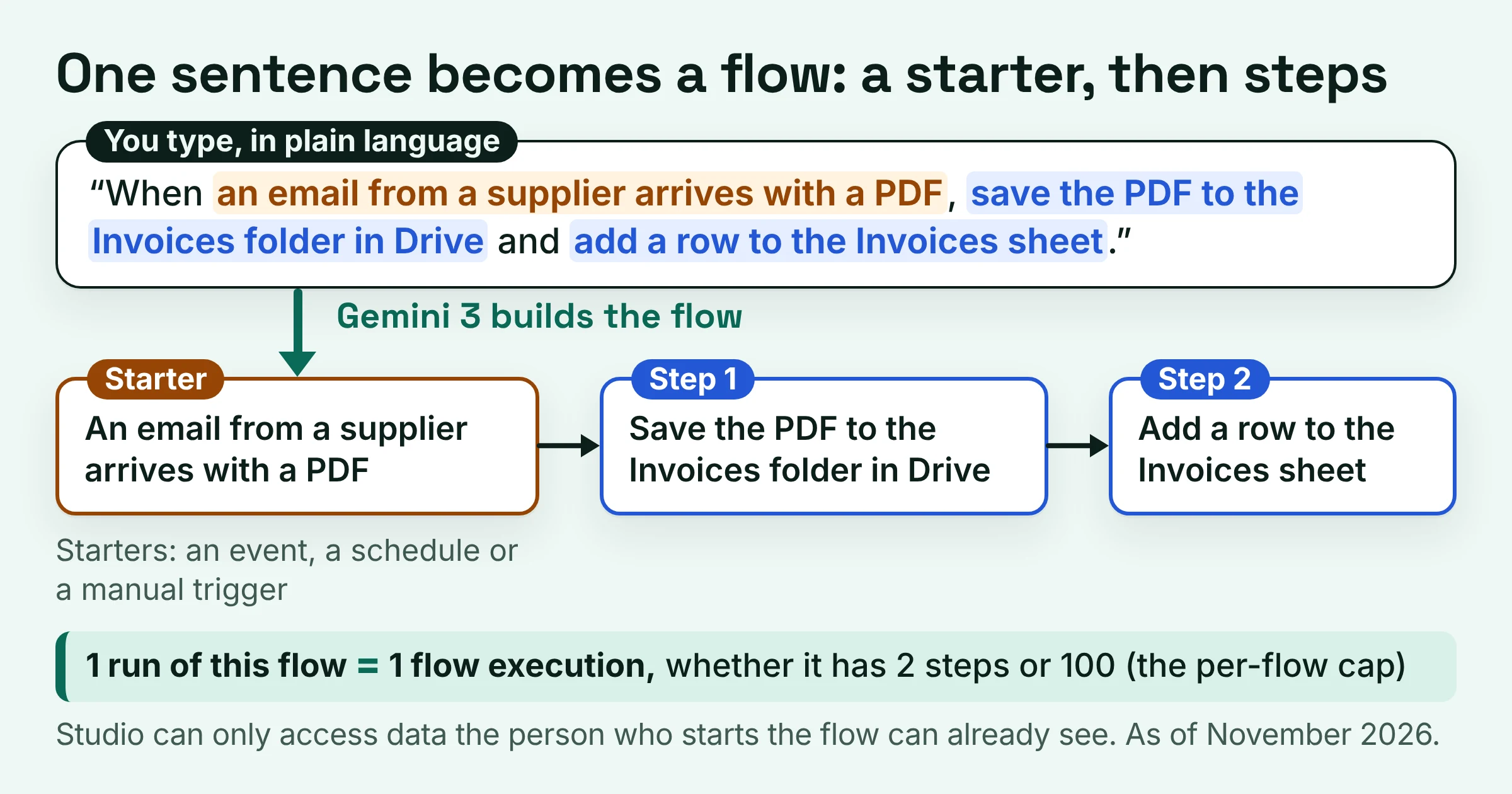
You describe what you want to automate in plain language, and Gemini 3 builds the flow for you. A flow is a chain of steps that runs on its own, and its starter is the event, schedule or manual trigger that kicks it off.
Google's own examples are pleasantly ordinary: spot and label high-priority emails, or save email attachments to a Drive folder and record them in Sheets without leaving Gmail. Picture a bookkeeper who no longer drags supplier PDFs into folders every Monday morning.
Two details shape what it can touch. First, Studio can only access data that the person who starts the flow already has permission to see.
Second, it reaches beyond Google's own apps. Google says agents can connect to Asana, Jira, Mailchimp and Salesforce, and to other services through webhooks (a web address another app listens on). Custom steps built with Apps Script can reach your internal tools.
Is Google Workspace Studio free with every Workspace plan?
No. As of November 2026, Google Workspace Studio comes with Google Workspace Business and Enterprise plans, and Google lists Education editions as eligible. Business Starter gets what Google's admin table calls promotional access rather than a fixed limit, and a regular personal Gmail account is not a supported route.
| Plan or account | Studio access (as of November 2026) | Run limit Google lists | List seat price, per user per month | Best for |
|---|---|---|---|---|
| Business Starter | Eligible | Promotional access, no end date published | $7.00 | A cheap trial before you commit |
| Business Standard | Included | Typical 400 flow executions per month | $14.00 | Small teams with a few steady flows |
| Business Plus | Included | Typical 400 flow executions per month | $22.00 | Teams that need Plus for other reasons |
| Enterprise Standard and Plus | Included | Typical 400 flow executions per month | Not covered here | Companies already on Enterprise |
| Enterprise Starter | In Google's launch post, not on the access page | Not in the typical figure | Not covered here | Check with your admin first |
| Education Fundamentals, Standard and Plus | Eligible; school users under 18 get no AI steps | Not in the typical figure | Not covered here | Schools and universities |
| AI Expanded Access or AI Ultra Access license | Add-on route to more Studio use | Higher since June 1, 2026; no number published | AI Expanded Access price not shown on the pricing page | Power users who keep hitting 400 |
| Personal Gmail account | Not supported, per the usage-limits page | None published | n/a | Curiosity only |
Seat prices are Google's list prices per user per month, before tax, as its pricing page shows them for all users from February 10, 2027 onwards. New Google Workspace customers can get up to 50% off their first 3 months.
Look at the Business Plus row. It costs more per seat than Standard but carries the same typical Studio limit, so upgrading just for more Studio runs buys you nothing.
Google's own pages disagree about personal accounts. The Workspace Studio access page says "You can use Workspace Studio on work, school, and personal accounts", adding that a personal account needs Google Workspace Experiments. The usage-limits page says "This product doesn't support personal accounts."
Treat personal Gmail as a sandbox at best, never as the home for business automations.
One more gap between Google's pages: the launch post also lists Google AI Ultra for Business, which the current access page leaves out.
As for Business Starter, Google says customers may get increased access to new AI features before usage limits are enforced. With no end date published, don't build your operation on Starter's promotional access.
How much does Google Workspace Studio cost, and how many runs do you get?
Google Workspace Studio costs nothing on top of your seat. As of November 2026, each user on Business Standard, Business Plus, Enterprise Standard or Enterprise Plus typically gets 400 flow executions per month.
An execution is one run of one flow: Google counts one each time a flow you built runs. Think of a phone plan that counts calls, not minutes. A short flow and a 100-step flow cost the same single run, and runs you don't use are gone when the month ends.
Here are the limits Google publishes, from the Studio limits help page, the Workspace Studio usage-limits page and Google's flow troubleshooting page:
| Limit | What Google says (as of November 2026) | What it means for you |
|---|---|---|
| Monthly runs | Typical 400 flow executions per month | Resets on the first day of the month at 12:00 AM PT; no rollover, no sharing |
| Daily run limit | All your flows combined in a 24-hour period; no number published | Flows stop until it resets, then run again as scheduled |
| Flows you can create | 25, including flows that are turned off | Switching a flow off frees no slot |
| Active Gmail-started flows | No more than 25 | Same as the overall cap |
| Steps per flow | 100 | Long flows still cost one run each |
| Idle flows | Turned off after 6 months without a run | Check seasonal flows before their season |
Three things in that table trip people up:
- No pooling. Your allowance can't be shared with other people. A five-person team gets no shared bucket, so plan the budget per builder.
- A daily ceiling with no number. Google publishes no figure for the daily run limit. A month-end rush of invoices could stop your flows until it resets, even when the monthly total looks fine.
- Flow counts that disagree. Google's troubleshooting page shows the error "You already have 100 flows turned on." Plan around 25, the number on the dedicated limits page, and remember Google says limits are subject to change.
Need more runs? Google says that starting June 1, 2026, users with AI Expanded Access and AI Ultra Access licenses have higher limits on Studio. The pricing page pitches AI Expanded Access as more Workspace Studio automations, but shows neither the higher number nor the add-on's price.
How many automations can a small team run on Studio?
As of November 2026, a typical Workspace seat's 400 monthly flow executions average out to about 13 Google Workspace Studio runs a day for each flow builder over a 30-day month. That easily covers scheduled reminders and filtered Gmail flows. It may not cover a flow that fires on every incoming email in a busy inbox.
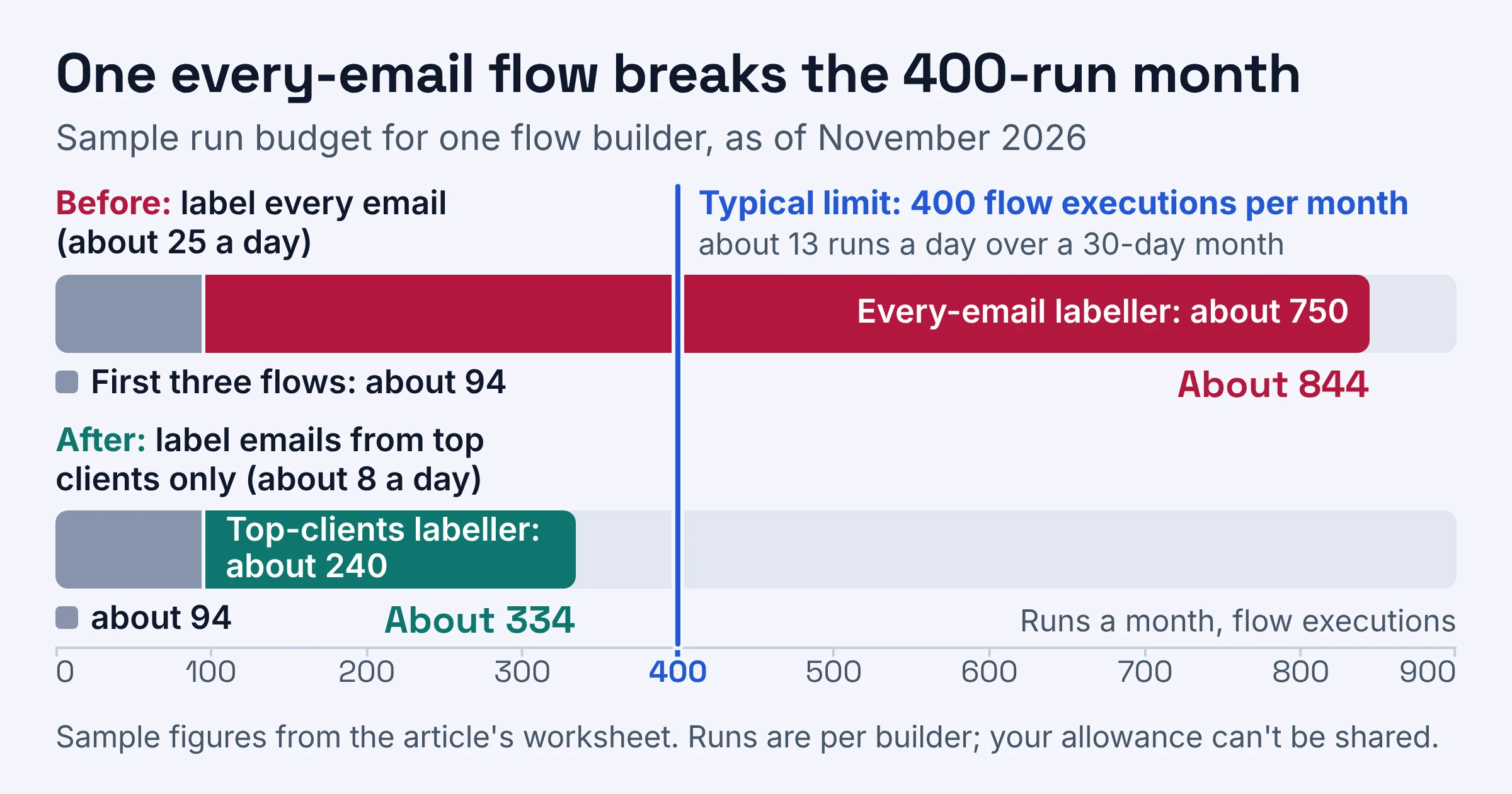
Here is a sample run budget for one office manager who builds all of a small team's flows. Swap in your own numbers; the method is the point.
| Flow (sample) | Starter | How often it fires | Runs a month | Running total |
|---|---|---|---|---|
| Friday email asking the team to update the sales sheet | Schedule, weekly | Once a week | About 4 | About 4 |
| Daily stand-up reminder email | Schedule, daily | Once a day | About 30 | About 34 |
| Supplier invoices saved to Drive, logged in Sheets and labelled | Gmail, only emails with an invoice | About 2 a day | About 60 | About 94 |
| Label high-priority emails | Gmail, every email | About 25 emails a day | About 750 | About 844 |
The first three flows use about 94 runs, roughly a quarter of the month. The every-email labeller alone needs about 750, nearly double the whole budget.
The fix is Google's own advice: make starters more specific so flows don't run when they don't need to. Narrow the labeller to emails from your top clients, say about 8 a day, and it drops to about 240 runs. The total lands at about 334, with room to spare.
Use these rules when you fill in your own version:
- Count runs, not steps. One execution per flow run, whatever happens inside it.
- Do the 13-a-day test. A flow that fires on every email will blow the monthly budget alone if that inbox gets more than about 13 emails a day.
- Let filters do the dropping. Google says a flow that starts with When I get an email doesn't start for emails you automatically archive or move to trash. A Gmail filter that archives newsletters keeps them out of your run count.
- Slow the schedules. Google suggests checking whether scheduled flows can run less often. A daily report nobody reads until Friday can be weekly.
- Off is not gone. Turning off flows you don't need saves runs, but switched-off flows still count toward the 25-flow cap.
If your flows lean on inbox rules or spreadsheets, browse our Gmail guides and Google Sheets guides for setups to pair with your starters.
How do you access and turn on Google Workspace Studio?
As of November 2026, you use Google Workspace Studio from a work or school account on an eligible edition, once your admin has enabled Gemini. Admins can switch Studio on or off for each organizational unit or group. Google's access page also lists a Google AI expansion add-on as another way in for a work or school account.
Google rolled Studio out in stages:
- December 3, 2025: admin console settings start rolling out.
- March 2, 2026: end-user access starts rolling out.
- March 19, 2026: Google says Studio has launched to all Rapid Release and Scheduled Release domains.
So if you still can't find Studio, check your edition and the admin settings below before blaming the rollout.
If you are the admin:
- Enable Gemini. Google's access page says your admin must enable Gemini before anyone can use Studio.
- Turn Studio on where it is needed. You can enable or disable it per organizational unit (a department-style folder of accounts in the Admin console) and per group, so you can start with one team.
- Choose the connectors. Use the Google Workspace Marketplace allowlist to control which connectors and published custom steps people can use.
If you are building flows:
- Tell Gemini what to automate, in one plain sentence. For example: When an email from a supplier arrives with a PDF, save the PDF to the Invoices folder in Drive and add a row to the Invoices sheet.
- Check the starter. You can pick an event, a schedule or a manual trigger. The narrower the event, the fewer runs you burn.
- Test on yourself. Google warns "A test run takes real actions." It will send messages, update files and set up meetings, so point test runs at your own inbox and a copy of the sheet.
Google Workspace Studio vs n8n and Zapier: which counts your runs more kindly?
As of November 2026, Google Workspace Studio counts one execution per flow run, n8n counts one execution per run of an entire workflow, and Zapier counts every successful action as a task while triggers are free. Studio and n8n meter whole runs; Zapier meters each action.
| Tool and plan | List price | Monthly allowance | How one run is counted | Best for |
|---|---|---|---|---|
| Google Workspace Studio on Business Standard | Included in a $14.00 per user per month seat | Typical 400 flow executions per user | One execution per flow run, up to 100 steps | Teams whose work starts in Gmail, Drive and Sheets |
| Zapier Free | Free | 100 tasks | One task per successful action; triggers don't count | Testing a couple of light Zaps |
| Zapier Professional | From $19.99 per month | Not covered here | Same task rule | Zapier teams that outgrow 100 tasks |
| n8n Starter (cloud) | 20€ per month, billed annually | 2.5K workflow executions, unlimited steps | One execution per whole workflow run | Busy multi-step workflows |
| n8n self-hosted | Standard version on GitHub | Not covered here | Not covered here | Teams with someone technical to run a server |
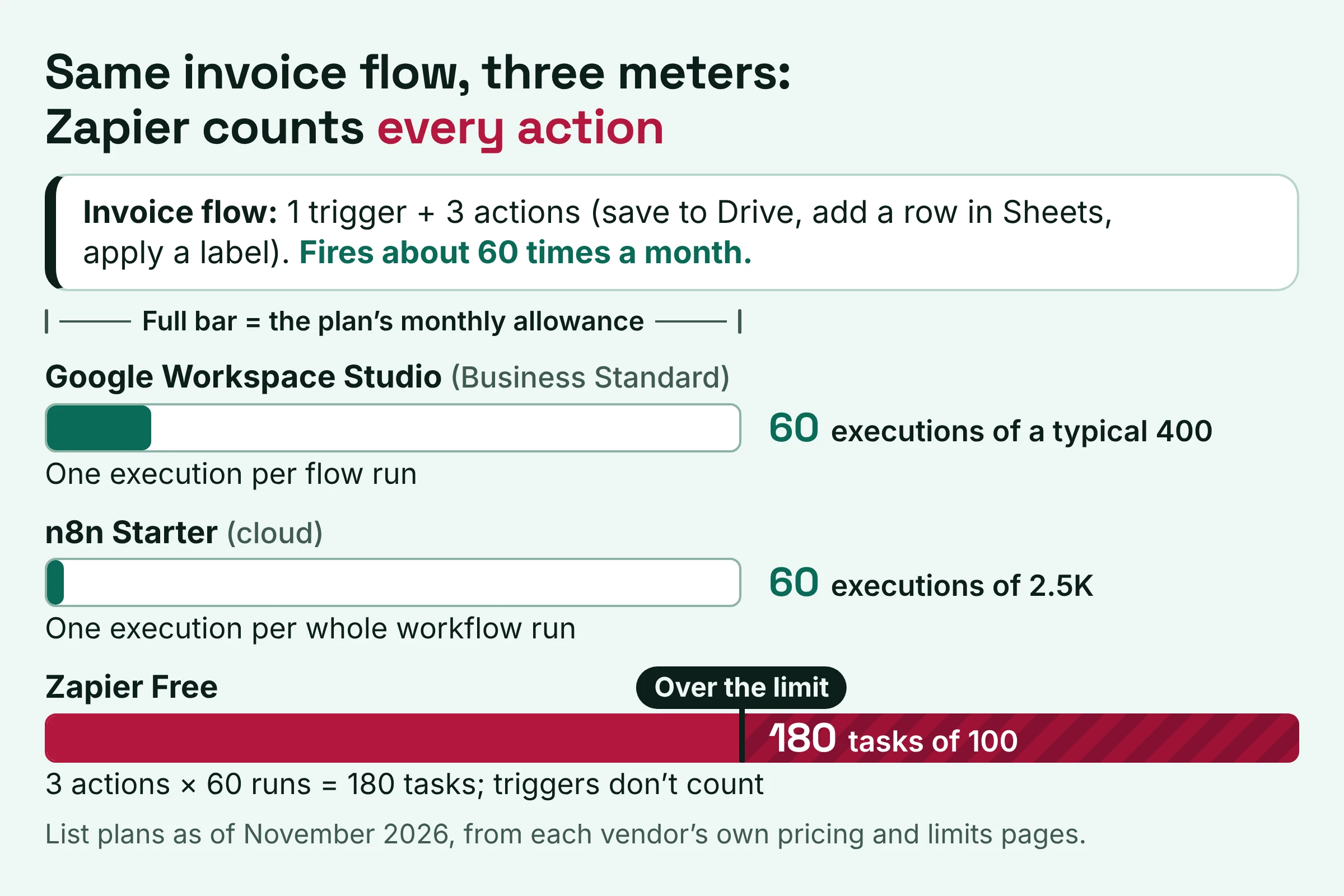
Run the invoice flow from the worksheet through all three meters. It has one trigger and three actions (save to Drive, add a row in Sheets, apply a label) and fires about 60 times a month:
- Studio: 60 executions, out of a typical 400.
- n8n Starter: 60 executions, out of 2.5K.
- Zapier: 3 actions times 60 runs is 180 tasks, well past the Free plan's 100 tasks.
That is the whole difference: on Zapier, every extra action adds to the task count, while on Studio and n8n a longer flow still counts once. If Zapier's free tier is what you're weighing, see our guide to whether Zapier Agents is free.
Pick Studio if most of your automations start in Gmail, Drive or Sheets, each builder's monthly total stays well under 400, and your team already pays for Business Standard or above.
Pick n8n if you run long, multi-step workflows at volume, since Starter's 2.5K executions come with unlimited steps, or if you have someone who can self-host it.
Stay on Zapier if a flow already works there, touches apps beyond the ones Google names for Studio, and runs rarely enough that paying per action stays affordable.
Do this next: a three-step switch plan
The fastest way to decide whether Studio can take over your automations is to check your seat, count your runs, and move the quiet flows first. Here is the plan for this week:
- Confirm your seat. On Business Standard, Business Plus, Enterprise Standard or Enterprise Plus, expect a typical 400 runs a month. On Business Starter, treat Studio as a trial; on personal Gmail, stop here. Then ask your admin to enable Gemini and switch Studio on for your group.
- Fill in the worksheet. List every automation you run today and estimate its runs a month per builder. Anything firing more than about 13 times a day needs a narrower starter or a different home.
- Move the easy wins first. Start with scheduled reminders and filtered Gmail flows. Keep high-volume flows on Zapier or n8n for a month while you watch whether the unpublished daily limit ever stops anything.
Every seat price, plan and Studio limit here was checked on the vendor's own page in November 2026. Google itself says its limits are subject to change, so recheck before you sign anything.