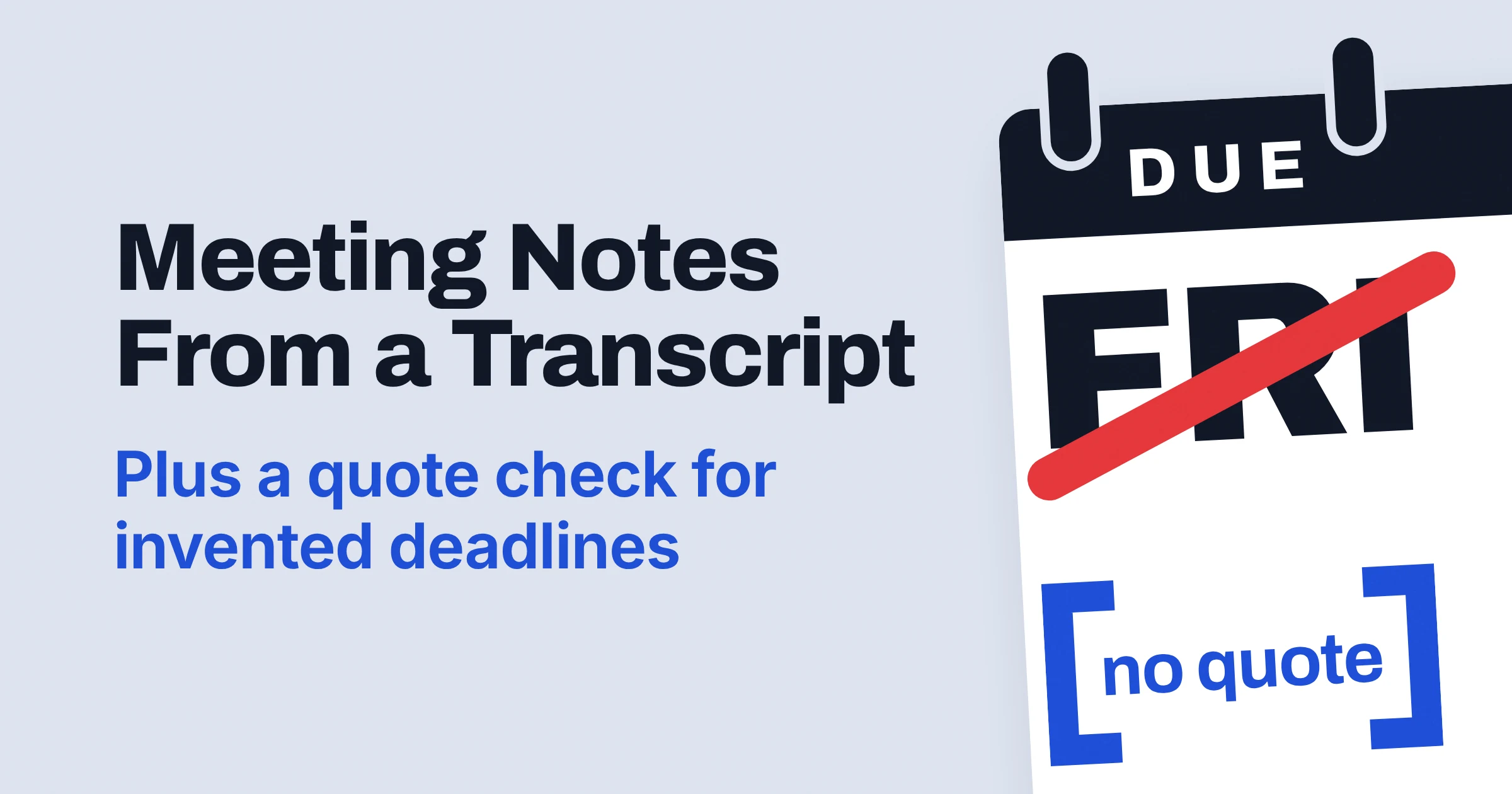
The best prompt for meeting notes from a transcript puts the transcript first, asks for decisions, action items and owners under fixed headings, and tells the AI to write not stated instead of guessing a name or a date. Then a second prompt, run in the same chat, makes the AI quote the transcript for every decision, owner and deadline and cut whatever it can't back up.
Both prompts are below, ready to paste into ChatGPT, Claude or Google Gemini. Both build on published guidance from OpenAI, Anthropic, Google and Microsoft.
Why two prompts? The real danger in AI notes isn't clumsy wording. It's a confident line like Sam sends the vendor quote by Friday when Sam never said Friday, and OpenAI's own help page warns that ChatGPT "might sound right but be wrong".
What is the best ChatGPT prompt for meeting notes from a transcript?
The best ChatGPT prompt for meeting notes from a transcript gives the AI one job, the full transcript inside clear tags, and an exact output shape. It also tells ChatGPT to write not stated when the transcript names no owner or date, the way you'd tell a new assistant that a blank beats a guess.
Copy the whole block (Prompt 1), fill in the square brackets, and paste your transcript where it says so.
You are writing meeting notes for people who missed this meeting. The transcript comes first, then your instructions.

<transcript>
[paste the full transcript here, with speaker names and timestamps if you have them]
</transcript>

<context>
Meeting: [meeting name and date]
Attendees: [names and roles]
Readers: [who gets these notes]. They will act on the notes without watching the recording, so every task needs a clear owner and due date, or a clear "not stated".
</context>

<instructions>
1. Use only what is said in the transcript, not your general knowledge.
2. Summary: 3 to 5 bullet points on the main topics.
3. Decisions: list each decision with one status: Aligned, Needs Further Discussions, Disagreed, or Shelved.
4. Action items: a table with the columns Task | Owner | Due date | Timestamp.
5. Name an owner only when the transcript shows a person taking or being given the task. Otherwise write "not stated".
6. Give a due date only when one is said out loud. For vague timing like "soon" or "after the launch", copy those exact words.
7. Open questions and disagreements: list questions nobody answered and points where people disagreed.
8. If part of the transcript is unclear, say so in that section rather than guessing.
</instructions>

Write the notes in plain language, under 300 words, using exactly these headings:
## Summary
## Decisions
## Action items
## Open questions and disagreements
How to fill it in
- Transcript: paste all of it. Speaker names matter most, because the owner rule only works if the AI can see who said what.
- Readers: be specific. The sales team, who need to know what changed in the Acme proposal tells the AI what to keep. The team tells it nothing.
- Tags: the labels in angle brackets, such as
<transcript>, are XML tags. They mark where each block starts and ends, so keep every opening and closing pair. - Rules 5, 6 and 8: leave them in, even if they feel fussy. Anthropic says giving the model permission to admit uncertainty "can drastically reduce false information", and these three rules are that permission.
How do you stop AI from inventing owners and due dates?
To catch invented owners and due dates in AI meeting notes, run a second prompt that makes the AI find a word-for-word quote in the transcript for every decision, owner and date, and remove anything it can't support. This follows the method in Anthropic's guide to reducing hallucinations (hallucinations are confident, made-up details in an AI's answer).
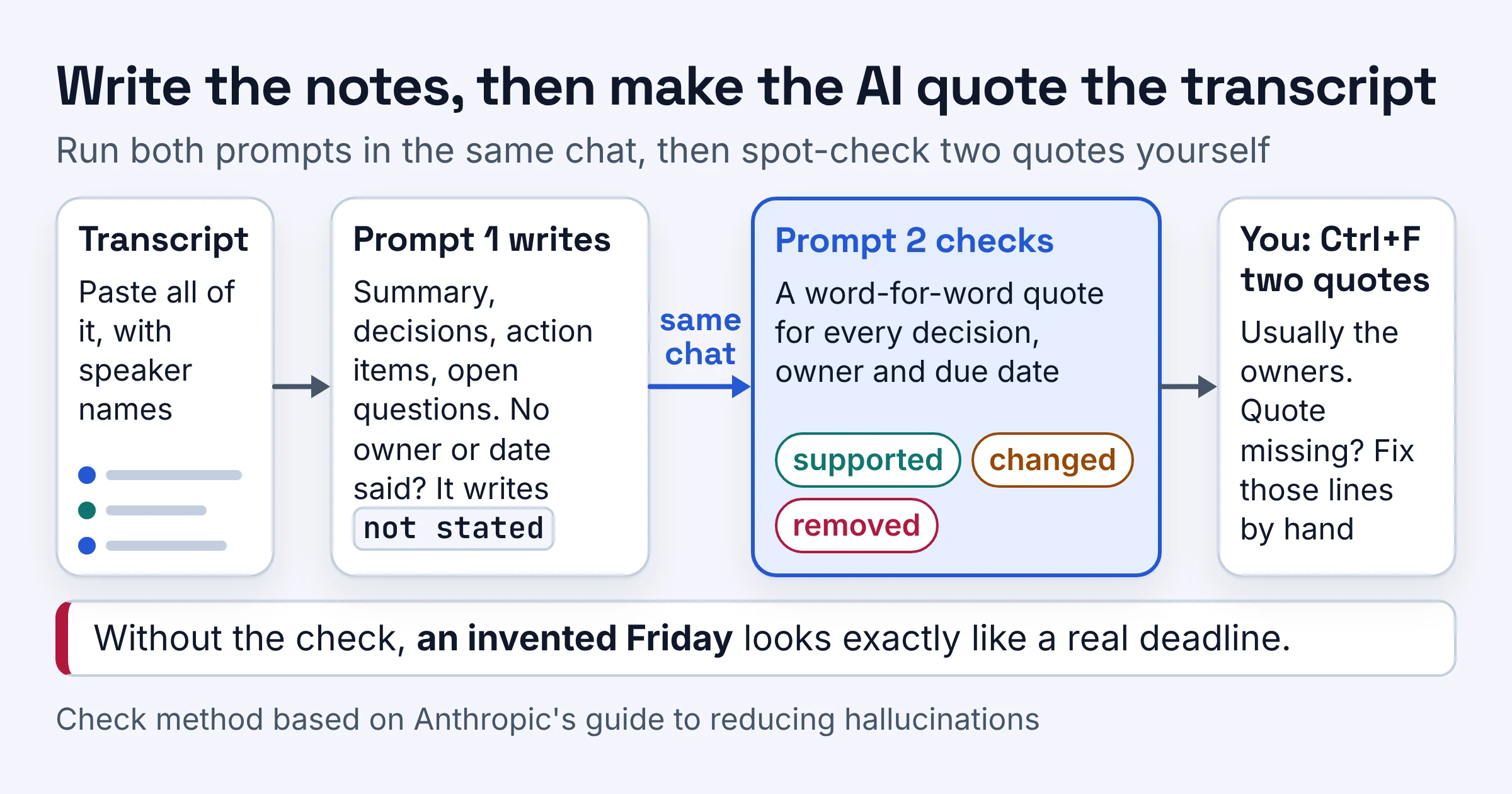
Run this check (Prompt 2) in the same chat, right after Prompt 1, so the transcript is still there. It's a separate prompt on purpose: Google's Workspace prompting guide says to break related tasks into separate prompts, and checking is a different job from writing.
Check the notes you just wrote against the transcript above.

For every decision, owner and due date in the notes:
1. Find the words in the transcript that support it and copy them word for word, with the speaker and timestamp.
2. If you cannot find a supporting quote, remove that item from the notes and put [] where it was.
3. If a quote supports the task but not the owner or the date, keep the task and replace the owner or date with what the quote actually says, or "not stated" if it says nothing.

Return two things:
A. A table with the columns Item | Supporting quote | Speaker | Timestamp | Verdict (supported, changed, or removed).
B. The corrected notes, in the same format as before.
Rules 1 and 2 come from Anthropic's method, and rule 3 is our own extension of it. Anthropic suggests having the model find a supporting quote for each claim after it writes, and retracting any claim it can't support. Its own example marks removed spots with empty [] brackets, so you can see where something was cut.
On Microsoft's Tech Community forum, one thread asks who verifies that a Teams summary matches what was actually agreed. The quote table is a practical answer: every line arrives with its receipt, the words behind it.
Then do one thing the AI can't: spot-check two quotes yourself. OpenAI warns that ChatGPT can "make up things like quotes or citations", so the check table can be wrong too. Press Ctrl+F (Cmd+F on a Mac) in the transcript and search for a few words from the two quotes that matter most, usually the owners.
If a quote isn't there, rewrite those lines by hand. For a meeting with money or hiring on the line, also run Prompt 1 twice in fresh chats and compare the action tables. Anthropic notes that "Inconsistencies across outputs could indicate hallucinations."
The same habit works beyond meetings, as in the quote rule for turning customer interviews into a product brief.
A worked example: the Friday nobody said
Here's a made-up excerpt of three lines, the kind of moment that turns into a confident wrong action item.
[00:14:02] Dana: We need the vendor quote before the budget review.
[00:14:09] Sam: I can chase them, but probably not until after the launch.
[00:14:15] Dana: Okay. Let's keep the launch date as is.
Say a first pass turned that into the three lines in the first column below. Here's what the check does with them.
| First draft says | Transcript shows | Verdict |
|---|---|---|
| Sam gets the vendor quote by Friday | Sam will chase it after the launch; nobody says Friday | Changed: due becomes after the launch |
| Decision: launch date stays | Dana: Let's keep the launch date as is | Supported |
| Dana owns the budget review | Nobody is given the review | Removed |
Each wrong line reads as smoothly as the right one. That's the whole case for the check: an invented Friday looks exactly like a real deadline until you ask for the quote.
Where does each line of the prompt come from?
As of November 2026, each line of the meeting-notes prompt follows guidance or examples that OpenAI, Anthropic, Google or Microsoft publish in their prompting guides and help pages. The table shows what each line does and whose advice it follows, so you know what you'd lose by cutting it.
| Line in the prompt | What it does | Whose advice |
|---|---|---|
| One-line job at the top | Names the reader and the job first | Google (persona and task); OpenAI's help center (instructions first) |
| Transcript in tags, placed first | Keeps the meeting apart from your instructions | Anthropic and OpenAI (XML tags); Anthropic (long text first, question last: up to 30 percent better in its tests) |
| Context block | Says who reads the notes and why | Anthropic (explain why); Microsoft (context); OpenAI (be specific) |
| Rule 1: only the transcript | Stops filler from general knowledge | Anthropic (use only the provided documents) |
| Numbered rules | Makes a skipped section easy to spot | Anthropic (numbered steps) |
| Rules 5, 6 and 8: no guessing | Gives the AI an honest way out | Anthropic (permission to admit uncertainty); OpenAI and Anthropic (say what to do) |
| Decision statuses | Splits real decisions from stalled ideas | Google Meet's Take notes for me (same four labels) |
| Open questions and disagreements | Catches what nobody settled | Microsoft (example Teams prompts) |
| Exact headings and a table | Shows the format instead of describing it | OpenAI (show the format); Microsoft (expectations) |
One honest note: these are our own templates built from that guidance, not a prompt any vendor publishes, and they haven't been formally tested (benchmarked) against other prompts. If you change them, use Anthropic's key test: if a colleague who missed the meeting would be confused by the prompt, the model will be too.
Length matters too. Google says the most successful prompts for Gemini in Workspace average around 21 words, while people's first attempts are usually fewer than nine. Summarize this meeting is three words, and it leaves every choice about owners and dates to the AI.
For the general version of this structure, see our prompt template for work in ChatGPT, Copilot and Gemini.
What should meeting notes or minutes include?
Good meeting notes have four parts: a short summary, decisions with a status, action items with an owner and due date, and open questions. As of November 2026, Google Meet's Take notes for me builds its notes around a Summary, Decisions and Next steps, and Prompt 1 uses the same backbone.
Use this as a checklist before you send anything:
- Summary. Google describes its version as "a concise overview of the main topics discussed during the meeting". A handful of bullets is enough for most calls.
- Decisions, each with a status. Google Meet tracks outcomes as Aligned, Needs Further Discussions, Disagreed or Shelved. A status stops we discussed pricing from turning into we agreed on pricing.
- Action items with an owner and a due date. Google's Next steps section lists "the actionable items and assigned tasks". If your notes say
not stated, assign someone before you hit send. - Open questions and disagreements. Microsoft's sample prompts for Teams meetings ask which questions came up and where people disagree. Both belong in the notes.
For formal minutes, also record who attended and who said what. Microsoft Copilot in Teams already summarizes key points, including who spoke and what they said. For minutes from Prompt 1, add this one rule to the instructions:
Add an Attendees section and name the speaker behind each decision.
What are the best Copilot prompts for Teams meeting notes?
As of November 2026, Microsoft Copilot in Teams can summarize a meeting, suggest action items and answer questions during or after the call. For the best notes, give Copilot all four parts Microsoft lists for a prompt: goal, context, source and expectations.
Microsoft says a clear goal is the only must, then adds: "You'll often need to include more than a goal to get the results you want." Here is Prompt 1 squeezed into those four parts, for the Copilot box in Teams:
Goal: Write meeting notes with decisions and action items.
Context: The notes go to people who missed this meeting and will act on them without watching the recording.
Source: Use only this meeting's transcript.
Expectations: A table of action items with the columns Task, Owner and Due date. Write "not stated" when no owner or date was said. Then list each decision with its status, and any open questions.
For quick follow-ups, Microsoft's own examples are good ones: "What questions were asked during the meeting?" and "Where do we disagree on this topic?" After the meeting, Copilot answers from the most recent available transcript, so you can also try the Prompt 2 check as a follow-up.
Know the limits before you lean on it:
- Transcription is required. Without a transcript, Copilot only works in the meeting chat.
- Your organization must host the meeting. Copilot won't work in meetings hosted outside it, so a call a client hosts needs the pasted-transcript route below.
- English works best. Microsoft says English inputs drive the best responses.
- Summaries are short by design. Microsoft's Copilot in Teams FAQ says they "will not always cover 100% of the meeting content", and tells you to "double check the facts before making decisions".
Does the same prompt work in Claude and Gemini?
Yes: nothing in the meeting-notes prompt is specific to ChatGPT, so you can paste it into Claude or Gemini unchanged. As of November 2026, Anthropic and OpenAI both say XML tags help keep a document apart from your instructions.
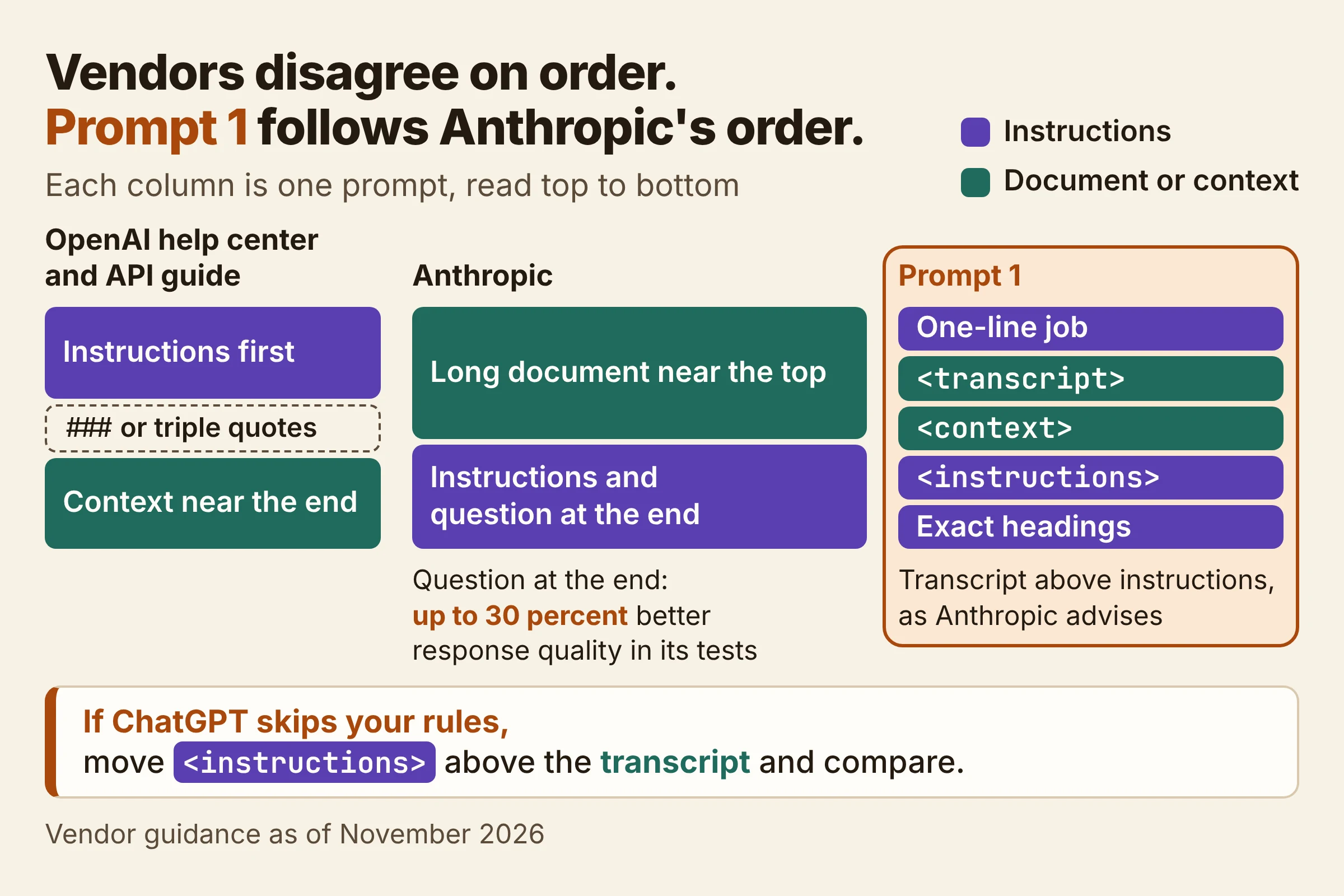
Google's tips for Gemini in Workspace name persona, task, context and format as the four main things to consider in a prompt, and Prompt 1 has all four. The one real disagreement between the vendors is order:
- OpenAI's help center says to put instructions first, split from the context with
###or triple quotes. - OpenAI's API guide (its documentation for developers) says extra context is usually best near the end of the prompt.
- Anthropic says to put long documents near the top, above your instructions. Its long-context tips report that a question at the end can improve response quality by up to 30 percent in tests.
Prompt 1 follows Anthropic's order because Anthropic backs it with a test result. It still opens with a one-line job, so it partly follows the help-center advice too. If ChatGPT ever skips your rules, move the <instructions> block above the transcript and compare.
For Claude: pull quotes first on very long transcripts
Anthropic's long-document advice applies at 20k+ tokens (tokens are the small chunks of text a model reads). For inputs that long, it recommends asking Claude to extract word-for-word quotes before doing the task, which Anthropic says grounds responses in the actual text and helps Claude ignore the rest.
Add this line to the end of Prompt 1 for a very long transcript:
Before writing the notes, copy the word-for-word quotes about decisions, tasks, owners and dates into <quotes> tags. Then write the notes from those quotes only.
For Gemini: Google's one-liner, with the gaps filled
Google's Workspace prompting guide includes this example: "In bullet points, highlight the action items, decisions made, and owners for each item based off of [call transcript]." Prompt 1 is that line with the gaps filled: due dates, a status for each decision, and what to write when nobody took the task.
Google also says to review the output "to ensure clarity, relevance, and accuracy" before acting on it. Prompt 2 and your own spot-check of its quotes cover the accuracy part; clarity and relevance are your call.
Built-in AI notes or a pasted transcript: which should you use?
Use the built-in notes in Microsoft Teams or Google Meet when your meeting meets their conditions. Paste the transcript into a chat assistant with both prompts when it doesn't, or when you need a fixed format and a quote check. As of November 2026, both Microsoft and Google say their summaries can miss things.
| Route | What you get | Limits the vendor states | Best for |
|---|---|---|---|
| Microsoft Copilot in Teams | Key points with who said what, action items, follow-up answers | Needs a transcript. Only for meetings your organization hosts. Best in English. Won't always cover 100% of the meeting. | Internal Teams calls you already transcribe |
| Google Meet's Take notes for me | Summary, Decisions with a status, Next steps | Needs an eligible Workspace edition or Google AI plan. One language at a time. Can be incomplete, inaccurate or not generated. | Single-language Meet calls on an eligible plan |
| Transcript pasted into ChatGPT, Claude or Gemini with both prompts | Notes in your format, plus a quote table | You supply the transcript. The AI can still invent quotes, so spot-check. | Calls hosted by others, other meeting apps, notes people will hold you to |
Still need the transcript itself, without sending audio to a cloud service? See how to transcribe meetings privately with Meetily and Whisper.
Do this after your next meeting
The quickest way to trust these prompts is to run the full loop on a meeting you sat through, so you can judge the notes against your own memory.
- Save both prompts in a note or text snippet you can paste from in seconds.
- Run Prompt 1, then Prompt 2, in the same chat, with the full transcript and one specific line about who reads the notes.
- Ctrl+F two quotes from the check table before you send. If one is missing, fix those lines by hand and run the check again.
Pick the built-in Teams or Meet notes if the meeting qualifies and a short recap is enough. Pick the two-prompt route when the notes will be forwarded, quoted back at you, or used to chase someone for a deadline.
The Copilot and Take notes for me conditions above were checked on Microsoft's and Google's help pages in November 2026; they change often.