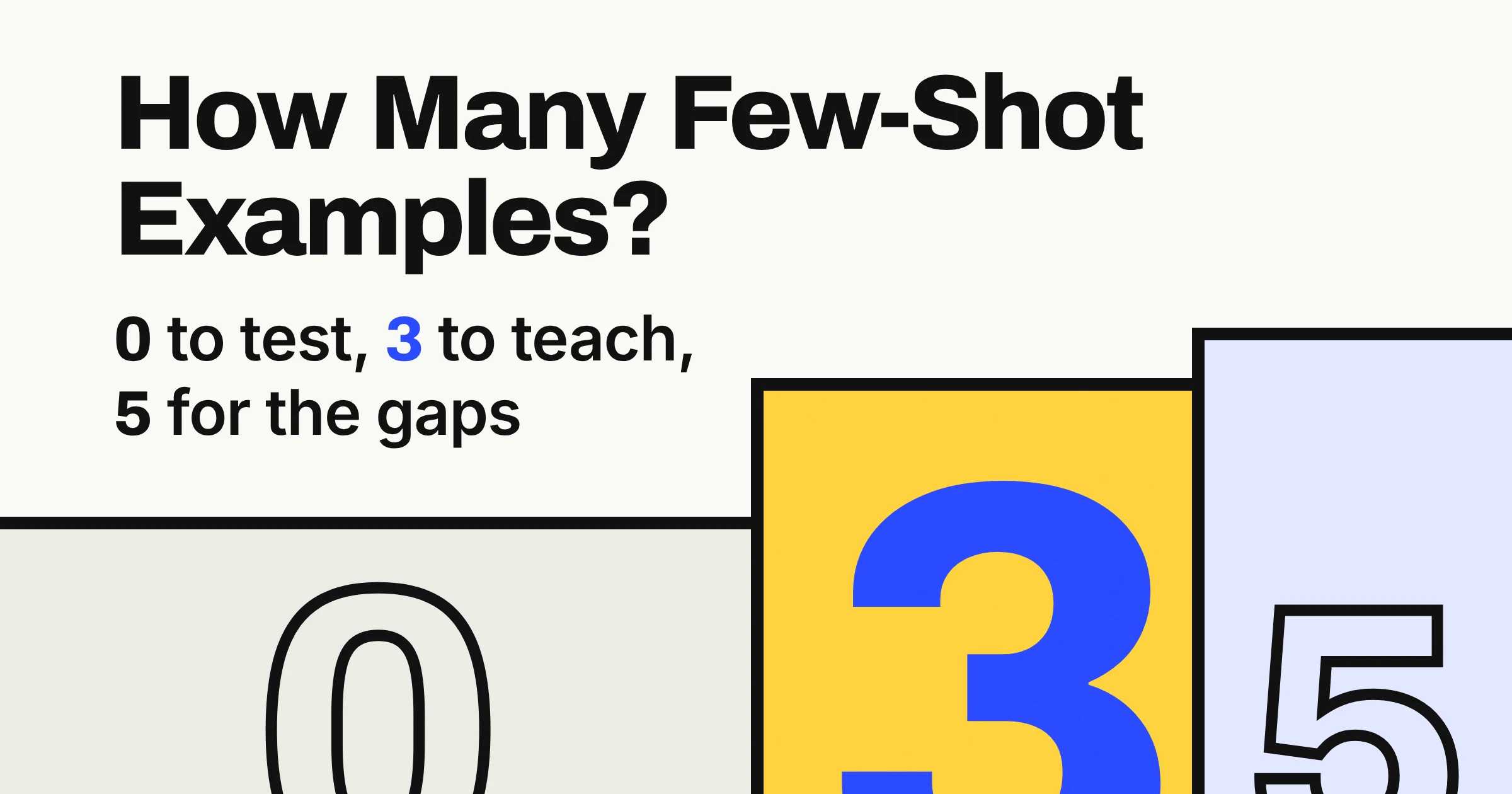
Start with 3 to 5 examples for a few-shot prompt, make them different from each other, and format them exactly alike. That range comes from Anthropic's Claude documentation, the only one of the three big vendor prompting guides that names a number.
Google's Gemini guide says to experiment with how many examples you give. OpenAI says its reasoning models (models built to think a problem through before they answer) often need none at all.
The count is the easy part. The examples you pick, and how alike they look, shape whether the model learns your pattern or just copies your quirks. Below are the three guides side by side, a simple 0-3-5 rule for the count, and a before and after prompt you can paste today.
What is few-shot prompting, with a simple example?
Few-shot prompting means putting a few worked examples inside your prompt so the AI copies the pattern. OpenAI describes it as steering a model toward a new task with a handful of input/output examples in the prompt, rather than fine-tuning (retraining the model on your own data).
Think of a new assistant on day one. You could write them a page of rules for filing receipts, or hand them three filed receipts and say do the rest like these. Few-shot prompting is the second way.
A shot is just an example. Google's Gemini docs call a prompt with a few examples few-shot, and a prompt with none zero-shot.
Here is a tiny one with two examples and an open slot at the end:
Turn these notes into a one-line status update.

Notes: client approved logo, waiting on fonts
Update: Logo approved; fonts still pending.

Notes: invoice sent, payment due Friday
Update: Invoice sent; payment due Friday.

Notes: [your notes]
Update:
Why does this work? Google says the model tries to identify patterns and relationships in your examples, then applies them when it answers. Anthropic goes further and calls examples "one of the most reliable ways to steer Claude's output format, tone, and structure."
All of it happens in the text of your prompt. OpenAI's GPT-3 research paper, Language Models are Few-Shot Learners, gave the model its tasks and examples purely as text, with no fine-tuning at all.
How many examples should you use for few-shot prompting?
Use 3 to 5 examples. As of November 2026, Anthropic's Claude docs recommend 3-5 for best results, the only firm number in the three vendor guides. Google's Gemini docs say to experiment with the number, and OpenAI's prompt engineering guide talks about a handful of examples.
Here is each guide's advice side by side.
| Vendor guide (as of November 2026) | How many examples | How to choose them | How to format them | Best for |
|---|---|---|---|---|
| Anthropic, Claude prompting best practices | 3-5 examples for best results | Relevant to your real use case, diverse enough to cover edge cases | Each example in <example> tags, the set in <examples> tags | Getting a starting number you can use today |
| Google, Gemini prompt design strategies | No number: experiment, and too many examples may cause overfitting | Specific and varied | Identical structure: same XML tags, white space, newlines and splitters | Controlling format, phrasing and scope of answers |
| OpenAI, prompt engineering guide | A handful of input/output examples | A diverse range of inputs, each with the output you want | Usually placed in the developer message of an API request | Teaching a new task without fine-tuning |
| OpenAI, reasoning best practices | Try 0 first, add a few for complex output | Inputs paired with desired outputs | Examples must match your written instructions closely | OpenAI's reasoning models |
None of the three guides suggests piling examples into an everyday prompt, and two of them push back on adding more than you need. Google warns that with too many examples, "the model may start to overfit the response to the examples." Overfitting means the model copies your examples instead of learning the pattern behind them.
The 0-3-5 rule
Turn the three guides into one habit: zero to test, three to teach, five to cover the gaps. It works like seasoning soup: taste it plain, add a little, and add more only where something is missing.
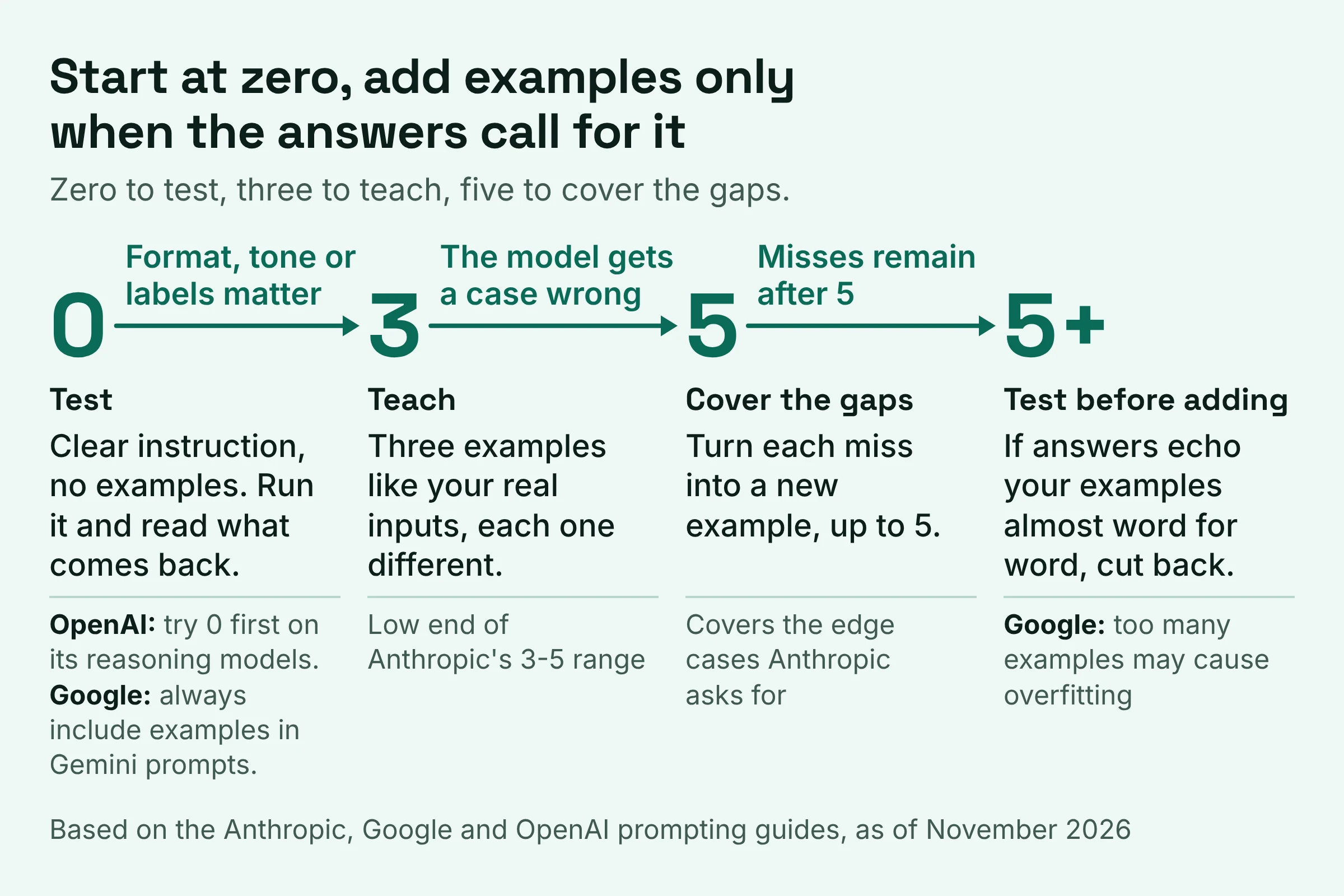
- Start with 0 on a reasoning model. Write a clear instruction, run it, and read what comes back. OpenAI recommends trying its reasoning models without examples first. Google disagrees for Gemini prompts; more on that below.
- Add 3 as soon as format, tone or labels matter. Pick three that look like your real inputs and differ from each other. That is the low end of Anthropic's range.
- Go to 5 only to fix specific misses. Each time the model gets a case wrong, turn that case into a new example. That is one practical way to cover the edge cases Anthropic asks for.
- Past 5, test before you add more. If answers start echoing your examples almost word for word, you may be seeing the overfitting Google warns about. Cut back rather than pile on.
What about hundreds of examples?
Using hundreds of examples is a research setting: none of the three vendor guides suggests it for everyday chat prompts. Google DeepMind researchers used newly expanded context windows (how much text a model can read at once) to test many-shot prompting with hundreds or thousands of examples. They saw significant gains on many kinds of tasks, but note it can be limited by how many human-written examples you have.
Zero-shot vs few-shot: when can you skip the examples?
You can try skipping examples on OpenAI's reasoning models, which OpenAI says often don't need them, but Google recommends always including few-shot examples in Gemini prompts. As of November 2026, that is the clearest split between the vendors.
Both can be right, because they are talking about different models and tasks. Google says prompts without examples are likely to be less effective, and that clear enough examples can even replace some of your written instructions.
OpenAI's advice is aimed at its reasoning models: "Reasoning models often don't need few-shot examples to produce good results." So OpenAI suggests starting without them, then adding a few if your output requirements are complex.
| Approach | What your prompt contains | Vendor advice (as of November 2026) | Best for |
|---|---|---|---|
| Zero-shot | An instruction, no examples | OpenAI: try this first with reasoning models | Plain tasks such as summarise this email in two sentences |
| Few-shot | An instruction plus 3-5 examples | Anthropic: 3-5 for best results. Google: always include examples | Fixed formats, labels, tone or a house style |
| Few-shot for reasoning tasks | Each example shows the problem, the method and the expected answer | Anthropic: examples work with Claude's extended thinking | Multi-step checks where you want the model to follow your method |
A quick test settles it for your own task. Run the prompt once with no examples. If the answer is right but the shape is wrong, examples are the fix.
How should you choose examples for few-shot prompting?
Choose examples that look like your real inputs, differ from each other, and share one identical format. As of November 2026, all three vendor guides ask for varied examples; Anthropic adds realism and clear tags, and Google adds strict formatting. Together they make a checklist to run before any prompt you plan to reuse.
- Real: each example mirrors your actual use case, not a toy version of it (Anthropic). If you sort support emails, use real-looking support emails, typos and all.
- Varied: together they cover different kinds of input, including at least one awkward edge case. All three guides ask for variety. Three examples about login bugs can quietly teach the model that everything is a login bug.
- Identical in format: same structure, same labels, same spacing, newlines and separators every time (Google). If one summary ends with a full stop and the next doesn't, you may get both styles back.
- Clearly marked: wrap each example in
<example>tags and the whole set in<examples>tags (Anthropic's advice for Claude). Tags are simple labels in angle brackets, and they let the model tell examples apart from instructions. - In line with your instructions: if the instruction says one line, every example is one line. OpenAI's reasoning guide warns that discrepancies between examples and instructions may produce poor results.
- Shuffled: even the order of your examples can swing few-shot accuracy, according to the Zhao study covered in the next section. Google also notes that the order of content in a prompt can sometimes change the response, so try a different order if results look lopsided.
- Method shown, for reasoning tasks: present each example as the problem, the method to apply and the expected answer (Anthropic).
Stuck for good examples? Anthropic suggests asking Claude to evaluate your examples for relevance and diversity, or to generate more from the ones you already have.
A good first ask: Check these three examples. Which kinds of customer message do they not cover?
What happens if your few-shot examples are poorly chosen?
Poorly chosen examples can teach the model the wrong pattern, and the model may copy it. In the Calibrate Before Use study, Zhao and colleagues showed how much is at stake. The prompt format, the choice of examples and even their order could swing few-shot accuracy from near chance (no better than guessing) to near state of the art.
Zhao's team traced that instability to models favouring certain answers, such as those placed near the end of the prompt or common in their training data. So if your last two examples are both Billing, that is the kind of setup where this bias can creep in.
When a reused prompt starts misbehaving, match what you see to its likely cause:
| What you see in the answers | Likely cause | Fix |
|---|---|---|
| A pattern you never meant to teach | Examples too alike; Anthropic asks for enough variety to avoid this | Swap one example for a different kind of input |
| Answers in mixed or unwanted formats | Examples formatted differently; Google asks for identical structure | Match labels, spacing and punctuation exactly |
| Weak answers despite a clear instruction | Examples that disagree with the instruction, which OpenAI's reasoning guide says may produce poor results | Rewrite the examples so they obey the instruction |
| A sample answer reappearing nearly word for word | Too many examples; Google says the model may overfit | Cut back and test again |
| One label showing up far too often | Bias toward answers near the end of the prompt (Zhao) | Shuffle the order and rerun |
One finding is more reassuring. Min and colleagues found that randomly replacing the labels in examples barely hurt performance on a range of classification and multiple-choice tasks. The bigger drivers were the overall format, the kind of input text, and the label space (the set of possible answers).
These are results on specific tasks and model generations, not guarantees for today's chat apps. Still, the lesson is useful: the shape of your examples does a lot of the teaching.
ChatGPT few-shot prompt example: what does a good one look like?
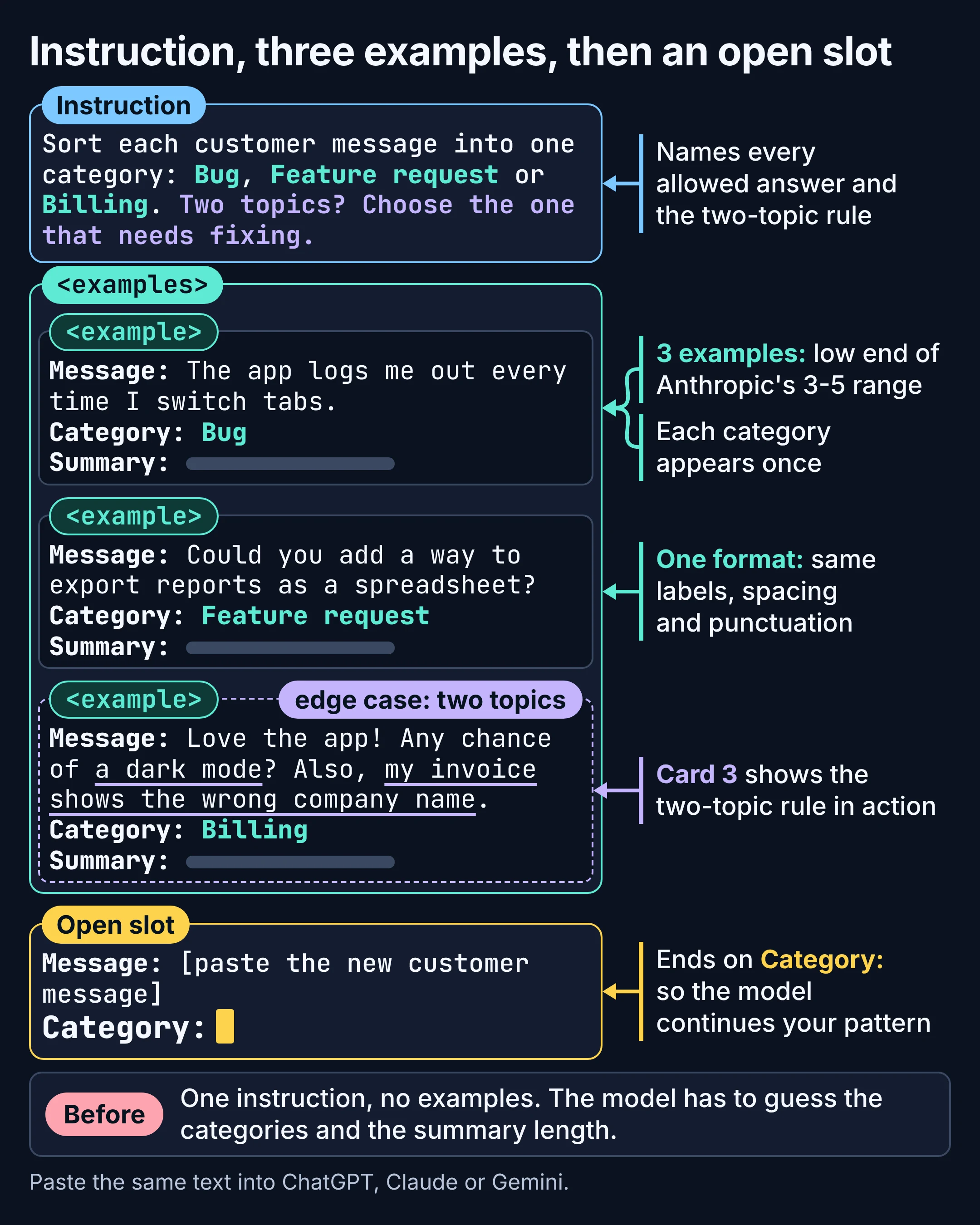
A good ChatGPT few-shot prompt has a clear instruction, three varied examples in one identical format, and an open slot for the new input. The example below sorts customer messages into three categories. Nothing in it is specific to one app, so you can paste the same text into Claude or Gemini.
Before (zero-shot):
Sort these customer messages into categories and summarise each one.
Nothing in that prompt says which categories you use or how long a summary should be, so the model has to guess. It may guess differently on Tuesday than it did on Monday, which hurts if the results feed a spreadsheet.
After (few-shot, three examples):
Sort each customer message into one category: Bug, Feature request or Billing.
Then write a one-line summary. Use exactly the format shown in the examples.
If a message raises two topics, choose the one that needs fixing and mention
the other in the summary.

<examples>
<example>
Message: The app logs me out every time I switch tabs.
Category: Bug
Summary: App logs the user out when switching tabs.
</example>
<example>
Message: Could you add a way to export reports as a spreadsheet?
Category: Feature request
Summary: Wants to export reports as a spreadsheet.
</example>
<example>
Message: Love the app! Any chance of a dark mode? Also, my invoice shows the wrong company name.
Category: Billing
Summary: Invoice shows the wrong company name; also asks for dark mode.
</example>
</examples>

Message: [paste the new customer message]
Category:
Why this version works, choice by choice:
- Three examples, the low end of Anthropic's 3-5 range, because the task is simple.
- Every category appears once. Min and colleagues found the label space is one of the key drivers of performance, so show the model every answer it is allowed to give.
- The third example is the edge case: a happy customer with a feature wish and a billing problem in one message. It demonstrates the two-topic rule from the instruction, so examples and instructions agree, as OpenAI's reasoning guide asks.
- One format, repeated exactly: three lines, same labels, same punctuation, as Google recommends.
- Tags around the examples: Anthropic's advice for Claude. Google's Gemini guide also lists XML tags among the details to keep identical from one example to the next.
- The open slot ends on Category:, so the model's next move is to continue your pattern.
If the model still files a message wrongly, add that message as a fourth example with the right answer rather than rewriting the whole prompt. That is the 0-3-5 rule at work. If one app keeps drifting while another behaves, see how ChatGPT, Claude and Gemini respond differently to the same prompt.
Do this next
Try the 0-3-5 rule on one real task this week, in three steps.
- Pick one task you repeat every week, such as tagging feedback, writing product blurbs or turning notes into status updates. Run it once with no examples and note where it drifts.
- Write three examples from real past work. Make each one different, keep the format identical, and wrap them in tags. Then ask the model which kinds of input they don't cover.
- Grow to five only for misses, then save the prompt so you can reuse it.
Need a solid instruction to sit above your examples? Start from our merged work prompt template for ChatGPT, Copilot and Gemini. Once your examples behave, our prompting techniques ranked by evidence show what to add next.