If you ever clicked "Yes, and don't ask again" on a Bash command in Claude Code, the exact command you approved may be in plain text in .claude/settings.local.json. That includes any password or token you typed into it. Apiiro says this is how Claude Code settings.local.json secrets reach GitHub. It found a real secret in 1,122 of 104,185 public copies of the file.
The fix is a routine, and the order matters more than any single command: find, check history, rotate first, untrack, clean local rules, prevent. Each step below is tied to the Anthropic docs line or Apiiro finding behind it.
One caveat up front: Apiiro sells security products, and these figures come from its own research. Nobody has independently replicated them.
What does "Yes, and don't ask again" save in settings.local.json?
In Claude Code, "Yes, and don't ask again" saves an allow rule to .claude/settings.local.json. For Bash commands, that approval lasts "permanently per repository and command," according to Anthropic's permissions docs. The Hacker News (the security news site) reports that when the saved rule is the exact command, any password or token typed into it is saved too, in plain text.
Apiiro's description is the one to keep in mind. Each entry in the allow list is "a command you approved, with whatever you typed into it." That one-off debugging command from months ago is still there, waiting for a careless git add. Here is an illustrative file:
{
  "permissions": {
    "allow": [
      "Bash(npm run test:*)",
      "Bash(curl -H \"Authorization: Bearer sk_live_abcdefgh\" https://api.example.com/charges)"
    ]
  }
}
The first rule is a harmless pattern. The second is a live API key filed under "permissions", like a spare key taped to the door it opens.
Two details from Anthropic's docs explain why these rules pile up:
- A saved rule covers only what the prompt's option named. If the option named the full command, the full command is what gets stored.
- Compound commands get one rule per subcommand. Claude Code saves a separate rule for each subcommand that needs approval, so a chained command can leave several entries behind.
If permission prompts are new to you, our guide to what Claude Code can do covers the basics first.
Is a secret in your Claude Code settings.local.json right now?
To check for Claude Code settings.local.json secrets, search two places: your GitHub organization and your own disk. Apiiro's first recommended check is to search your GitHub org for both .claude/settings.local.json and .claude/settings.json. In a public repository, each hit is a file anyone can read right now.
On GitHub, run a code search scoped to your org:
org:your-org path:.claude/settings.local.json
org:your-org path:.claude/settings.json
On your machine, find every local copy and grep them all in one pass:
find ~ -path '*/.claude/settings.local.json' \
  -exec grep -inHE 'password|passwd|token|secret|api_key|apikey|bearer|://' {} +
Then read each file by eye anyway. Apiiro says to look for passwords, tokens, keys and connection strings. A connection string like postgres://admin:hunter-pass@db.internal/app hides its password in the middle, and a keyword search can walk right past that kind of value. The scanner section below shows why that matters.
Was settings.local.json ever committed, or is it in git history?
If .claude/settings.local.json was ever committed, deleting it today doesn't remove it from git history. Apiiro's advice is blunt: if history has it, so does every fork and clone. Check each repository's history for the file, even if you deleted it.
# Is it tracked right now?
git ls-files .claude/

# Was it ever committed, on any branch?
git log --all --oneline -- .claude/settings.local.json

# What did those commits contain?
git log --all -p -- .claude/settings.local.json
Don't count on Claude Code to warn you here. Apiiro points out that Anthropic's permissions docs treat a tracked copy as repository-supplied, but the user is not told.
Should you rotate the secret or delete the file first?
Rotate any secret found in settings.local.json first, and clean up second. That is Apiiro's order. The reason: removing a file from your working copy or repository cannot invalidate a credential, and copies may remain in git history or elsewhere.
The Hacker News puts the trap plainly: removing the file from a project does not undo the leak, because older versions stay in git history and in forks. Deleting first feels productive while the key keeps working for whoever copied it.
So for every secret you found:
- Revoke it where it was issued (the database, API provider or cloud console).
- Issue a new one.
- Store the new one somewhere that won't end up inside a command, such as a secrets manager.
Don't assume an old key is dead. Apiiro did not test whether the leaked secrets still work. But one company it notified confirmed its key had been live.
How do you stop git tracking settings.local.json?
To stop git tracking Claude Code's local settings, run git rm --cached .claude/settings.local.json, then add the path to the repository's own .gitignore. That is the fix Apiiro recommends, per The Hacker News.
git rm --cached .claude/settings.local.json
echo ".claude/settings.local.json" >> .gitignore
git add .gitignore
git commit -m "Stop tracking Claude Code local settings"
--cached removes the file from git's index but keeps it on your disk, so your local rules survive. It does not touch history. Rewriting history is a separate decision, and it can't reach forks and clones that already exist, which is exactly why rotation comes first.
Next, clean the local file itself. The Hacker News relays Apiiro's advice: open the file on your own computer, even if it was never committed, and delete every rule that contains a secret. A file that never left your laptop today can still leave in next month's git add ..
Why doesn't the global git exclude protect your project?
Claude Code's global git exclude only protects one machine, and only files git isn't already tracking. According to Anthropic's settings docs, Claude Code adds the local settings file to your global git excludes the first time it writes it, "so the file stays out of your commits in every repository." The docs add that you don't need to gitignore it yourself unless you created it by hand.
That promise has edges. Apiiro says the global ignore does not cover a folder that becomes a repo later, a clone on another machine, or a file someone already committed. The rule also never goes into the repo's own .gitignore, so nothing travels with the project.
| Situation | Protected by the global exclude? | Source | What to do |
|---|---|---|---|
| Claude Code created the file, in a repo on this machine | Yes | Anthropic settings docs | Still add it to the repo's .gitignore |
| You created the file by hand | No, docs say to gitignore it yourself | Anthropic settings docs | Add it to .gitignore |
| Folder that becomes a git repo later | No, per Apiiro | Apiiro | Add it to .gitignore when you run git init |
| Clone of the project on another machine | No, per Apiiro | Apiiro | Commit the .gitignore line so it travels |
| File someone already committed | No, per Apiiro | Apiiro | git rm --cached, then .gitignore |
| Teammates' machines | Nothing travels with the project | Apiiro | Commit the .gitignore line |
Almost every row has the same fix: one committed .gitignore line. The global exclude is a convenience on your laptop. The project-level ignore is the protection.
Will gitleaks or TruffleHog catch passwords in saved commands?
Not reliably. Of the 1,122 settings.local.json files with a real secret, Apiiro reports that gitleaks flagged 564 and TruffleHog 643, and 215 were flagged by neither. Apiiro ran both tools without their verification step.
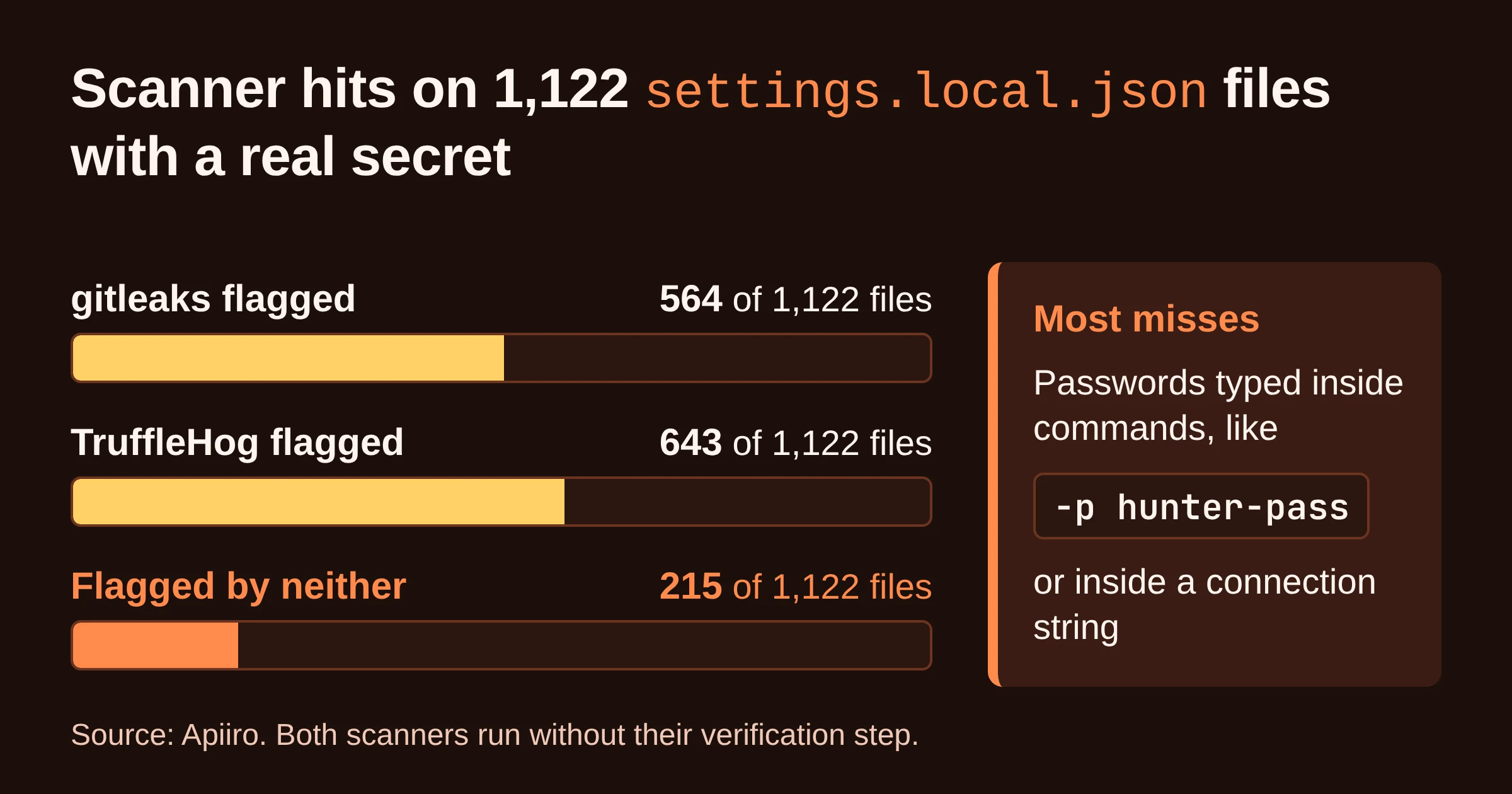
The misses have a pattern. Per The Hacker News, most were passwords typed inside commands. Think -p hunter-pass tucked into a CLI call, or a password in the middle of a connection string.
Anthropic's Claude Code lead recommended turning on the secret scanning that GitHub and other hosts offer. Do it as a backstop, but treat it as a second layer, not a replacement for opening the file and reading it.
How do you approve Claude Code commands without saving secrets?
To approve Claude Code commands without saving secrets, keep the secret out of the command and approve patterns instead of exact commands. Both tips come from Apiiro via The Hacker News.
Reference secrets as variables. Pull the value from a secrets manager into an environment variable such as $DB_URL. The saved rule then holds the variable name, not the secret.
Approve patterns. Use a rule like Bash(npm run:*) instead of approving one full command at a time. Because a saved rule covers only what the prompt's option named, read which option you are clicking before you click it.
| What you run | What the saved rule holds | Leak risk |
|---|---|---|
psql "postgres://admin:hunter-pass@db.internal/app", approved exactly | The full password | High |
psql "$DB_URL", approved exactly | The variable name $DB_URL | Low |
Bash(npm run:*) pattern rule | The pattern, no arguments | Low |
Keep patterns narrow. A pattern trades a little control for convenience, since anything matching it runs without a prompt.
Anthropic's lead also recommended auto mode over permission rules. Check how that mode behaves in the permissions docs before you switch.
What has Anthropic said about fixing this?
As of mid-November 2026, Anthropic's public position is that it is looking into how to prevent secrets landing in Claude Code's settings files. In a comment on the Hacker News forum on November 7, quoted by Apiiro, Anthropic's Claude Code lead wrote: "Historically Claude Code has not done secret scrubbing (there are many good tools for that), but we are looking into what we can do to prevent this."
The two sides disagree on how the files got public:
- Anthropic's lead said the exposed copies were, in his view, created manually and checked in.
- Apiiro traced 1,105 repositories. In 539 of them, a commit listing Claude as co-author changed the file. Apiiro reads that as Claude often committing it, which does not prove Claude introduced every secret.
Apiiro also compared the documentation of 16 coding agents. It says that among them, Claude Code is the only one confirmed to save the full approved command in a project file by default.
For you, the dispute changes nothing. The routine below works whoever pressed commit.
Your clean-up routine, in order
Run this once for every repository that has ever had a .claude folder, and again whenever you start a new project.
- Find. Search your GitHub org for
.claude/settings.local.jsonand.claude/settings.json. Grep, then read, every local copy. - Check history. Run
git log --all -- .claude/settings.local.json. A hit means every fork and clone may have it. - Rotate first. Revoke and reissue every secret you found, before any clean-up.
- Untrack. Run
git rm --cached .claude/settings.local.jsonand commit a repo-level.gitignoreline. - Clean local rules. Delete every rule containing a secret, even in files that were never committed.
- Prevent. Use
$VARIABLESfrom a secrets manager, approve narrow patterns, and turn on host secret scanning as a backstop.
Do this next: run the org-wide GitHub search before anything else, because each public hit is a file anyone can read right now. If you're auditing Claude Code's privacy behaviour more broadly, the same session is a good time to check the email-in-User-Agent issue and its fix.