Yes for quick edits today, but not yet inside your layered project files. As of November 2026, Adobe's connectors let ChatGPT and Claude work on images you upload with Adobe's tools, with no Adobe account needed to start.
The Adobe MCP, which will let your own AI agent work inside real, layered Photoshop, Illustrator, Premiere and After Effects project files, was only announced on November 10, 2026. Adobe says it reaches a private beta in early 2027.
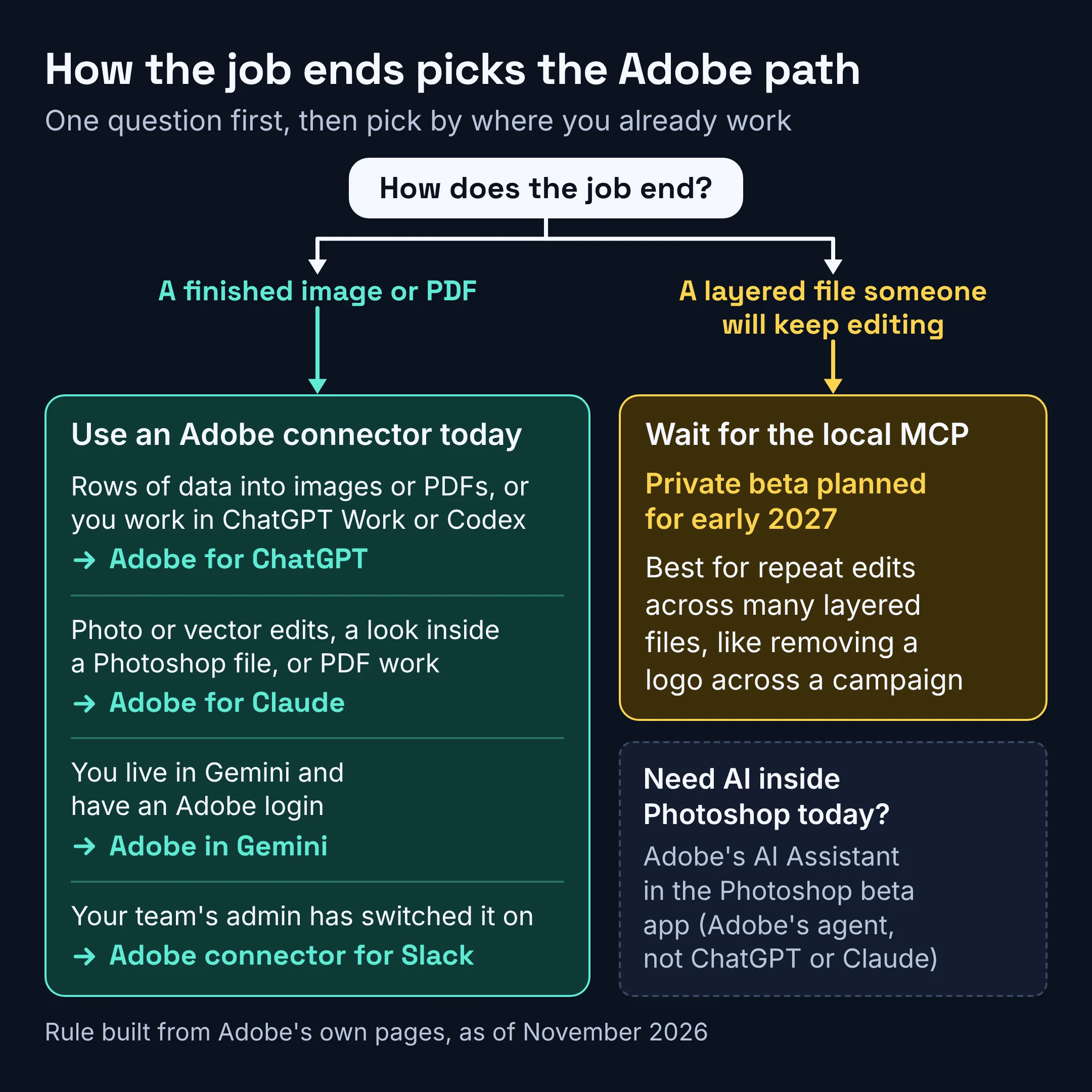
So pick by how the job ends. A finished image or PDF is a connector job you can do today; a layered file someone will keep editing has to wait for the MCP.
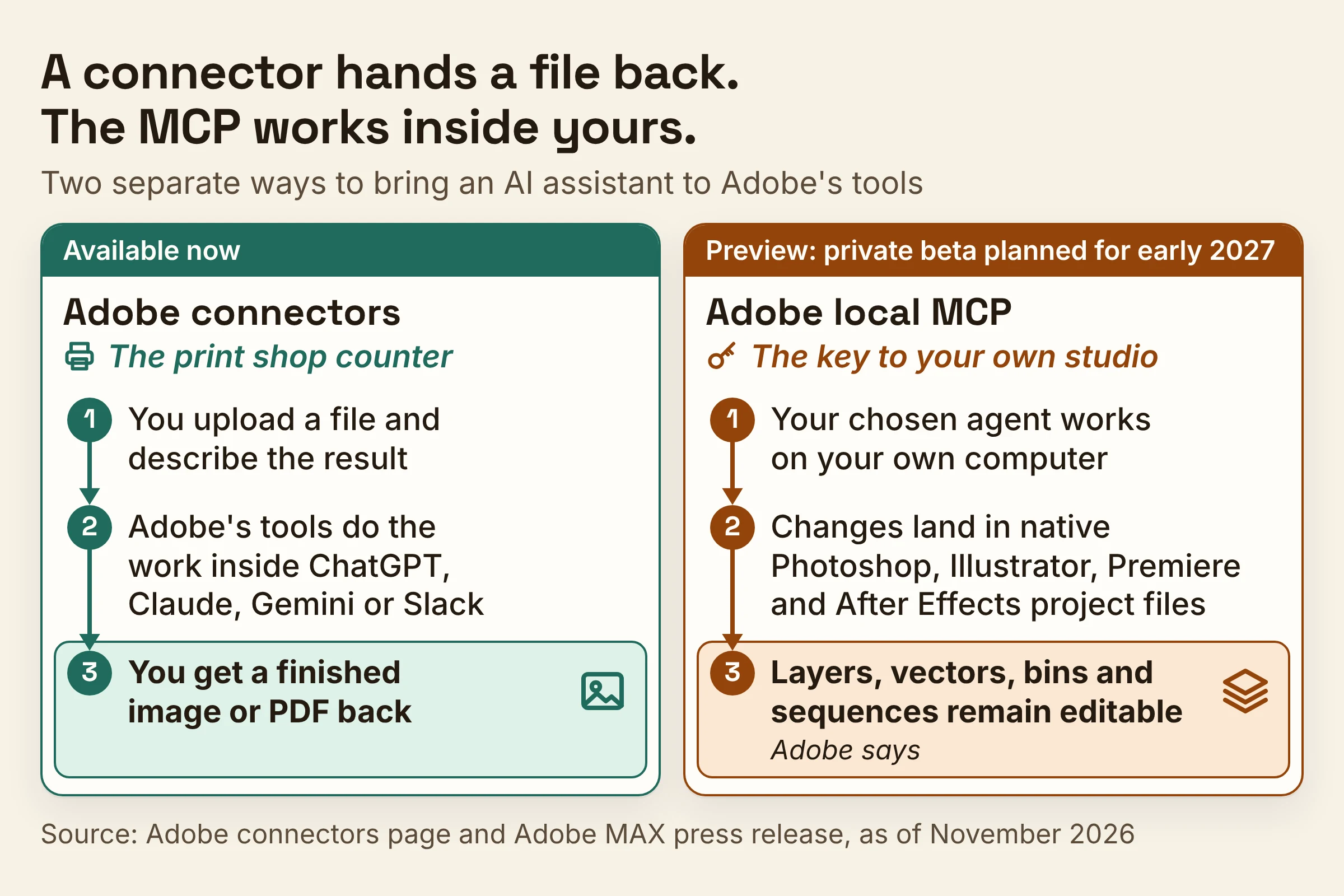
Think of a print shop counter versus a key to your own studio. A connector is the counter: you hand over a file, describe the result, and get a finished image or PDF back. The MCP is the studio key: the agent will work on your actual project on your own computer, and Adobe says your layers stay editable so you can keep working on them.
Is there an Adobe MCP?
Yes. Adobe announced local MCP integrations for Photoshop, Illustrator, Premiere and After Effects at Adobe MAX 2026 on November 10, 2026. As of November 2026 they are a preview, and Adobe says they will be available in private beta in early 2027.
MCP stands for Model Context Protocol, a shared standard that lets an AI app plug into other software and use its features. If the term is new to you, our plain-English explainer on what MCP is walks through how it works.
According to Adobe's MAX press release, the preview will:
- let you direct your preferred third-party agents to work locally in Photoshop, Illustrator, Premiere and After Effects (locally means on your own computer, not on a cloud copy);
- have the agent make changes directly in native project files, the real working files your apps save;
- keep your file's structure intact. In Adobe's words: "Layers, vectors, bins and sequences remain editable."
Which agents will it support? Adobe's release only says "preferred third-party agents." TechCrunch described it as letting chatbots like ChatGPT, Claude or Google Gemini use Adobe features, and the Adobe demo reported by The Next Web used ChatGPT.
On how much the MCP will expose, Adobe executive Deepa Subramaniam told TechCrunch: "We don't have any need or desire to sort of limit what the MCP endpoint can expose."
What Adobe hasn't published yet: a sign-up page or who qualifies for the private beta, a price for the MCP, or how many generative credits any of this uses. Until those appear, treat early 2027 as a target, not a launch date.
How does the Adobe MCP compare with Adobe's ChatGPT, Claude, Gemini and Slack connectors?
As of November 2026, Adobe connectors are available for Google Gemini, ChatGPT, Claude and Slack, while the local MCP is still a preview. The connectors work on files you upload, plus your Creative Cloud files once you sign in. The MCP will work on project files sitting on your own computer.
| Option | Where it runs | What you need to start | What it works on | Status, Nov 2026 | Best for |
|---|---|---|---|---|---|
| Adobe for ChatGPT | ChatGPT web and desktop, including Work and Codex | No Adobe account; sign in for generative tools and Creative Cloud files | Uploaded files, 70+ Adobe tools | Available | Turning rows of data into images or PDFs, plus quick jobs |
| Adobe for Claude | Claude (guest, free and paid plans) and Claude Code | No Adobe account; signing in adds tools and higher usage limits | Uploaded files, Photoshop files it can import and render, PDFs, 80+ Adobe tools | Available; optimized for English, no EDU accounts | Photo and vector edits plus PDF jobs in one chat |
| Adobe in Gemini | Gemini, all plans | An Adobe login | Image edits, template assets, photo resizing, stock licensing | Available; global rollout began September 2026 | Gemini users who already have an Adobe login |
| Adobe connector for Slack | Slack | An admin to enable it | Work and collaboration in Slack, with tools from Photoshop, Illustrator, Premiere, Acrobat, Firefly and more | Available | Teams whose admin has switched it on |
| Adobe local MCP | Your own computer, with your chosen agent | Not published yet | Native Photoshop, Illustrator, Premiere and After Effects project files, layers kept editable | Preview; private beta planned for early 2027 | Repeat edits across layered files you'll keep working on |
Adobe sums up its Gemini connector this way: you describe the outcome you want, and Adobe picks the tools and steps. Adobe's help center says connectors are built for prompt-based and batch workflows. So they suit jobs you can say in one sentence, like brighten these ten product photos the same way.
Adobe also says the capabilities you get depend on the connector you use. That's why no two rows in the table match.
Can ChatGPT Photoshop your images today?
Yes. As of November 2026, ChatGPT can handle quick image jobs through the Adobe for ChatGPT plugin. Adobe's August 2026 launch post says it draws on more than 70 tools across Adobe's creative and productivity suites. It also replaced the earlier Photoshop plugin in ChatGPT, so it's the one Adobe plugin to look for.
It works on images you upload, and on your Creative Cloud files once you sign in with an Adobe account. Adobe's own page is upfront that it does not include every feature from each Adobe app, so a favorite Photoshop trick may simply not be there. Test your must-have edit on a copy before you promise it to a client.
The sleeper feature is batch work. Adobe says it can turn each row of your data into a shareable PDF or image. Picture a cafe owner with a sheet of this week's specials: one request, and every dish gets its own image to post.
When you're done, Adobe says you can continue the work in its apps where you left off. That matters if a designer will polish the result later.
One thing to clear up: the demo where ChatGPT worked inside a layered Photoshop file was the MCP preview, not this plugin. More on that below.
How do you use Adobe in ChatGPT?
To use Adobe in ChatGPT, open ChatGPT, go to Plugins and add the Adobe plugin; that's the one-line setup in Adobe's launch post. As of November 2026, Adobe lists it on ChatGPT web and desktop, including ChatGPT's chat, Work and Codex experiences.
Here's the order that saves you surprises:
- Add the Adobe plugin from Plugins in ChatGPT.
- Try your first job without signing in. Adobe says many tools are available that way.
- Sign in with your Adobe account when you want generative features or your Creative Cloud files.
- Expect some tools to ask for an eligible paid Adobe plan.
A first request can be as plain as turn each row of this sheet into a shareable image with the dish name and price. If ChatGPT Work is new to you, our guide to AI agent modes, ChatGPT Work included shows what it can take off your plate.
Does Adobe work with Claude?
Yes. As of November 2026, Adobe for Claude works for guests and on free and paid Claude plans, with no Adobe account needed to start. Adobe's September 2026 blog says it gives Claude more than 80 tools across Adobe Acrobat, Adobe Express, Photoshop, Illustrator and other Adobe apps.
To start, type /Adobe in the chat. Adobe describes the Claude version as able to edit photos and vectors, design assets and format video, and its image tools can import and render Photoshop files. That last one is handy when a client sends a layered file and you only need to see it.
The September update also added Acrobat tools for working with PDFs, plus a layer-based editor for Express designs where you adjust individual elements by hand. Adobe for Claude is also available in Claude Code.
Signing in with an Adobe account, even a free one, adds more capabilities and keeps your work across sessions, so yesterday's draft is still there today. Adobe's September blog adds that signing in also gets you higher usage limits.
The fine print, from Adobe's help page for Claude: it isn't optimized for enterprise use, doesn't support EDU (education) accounts, keeps Adobe Express features away from enterprise accounts, and is optimized for English.
Phones are murky. Adobe's September blog says the plugin was rolling out on desktop, mobile and web, but the help page, which Adobe updated on September 24, 2026, doesn't mention mobile. Adobe's connector page adds that mobile support depends on the AI platform, so check your Claude app before you plan around it.
Can you use Adobe in ChatGPT or Claude without a subscription?
Yes, at least to start. As of November 2026, Adobe's connectors page says ChatGPT and Claude let you use Adobe capabilities without an Adobe account. Gemini requires an Adobe login, and Slack requires admin enablement.
Here's what each level gets you, according to Adobe:
- No Adobe account: many tools in ChatGPT, and Adobe for Claude works even if you're a Claude guest.
- An Adobe account (a free one works in Claude): more tools and Creative Cloud storage. In ChatGPT that means generative capabilities and your Creative Cloud files; in Claude, higher usage limits and your work kept across sessions.
- An eligible paid Adobe subscription: some Adobe creative capabilities, including some tools in ChatGPT.
- A paid plan for the AI app itself: some AI assistants may require one for certain AI features. Adobe for Claude runs on free Claude plans, and Adobe in Gemini works across all Gemini plans.
Gemini is the odd one out because it needs your Adobe login from the start. To connect it, go to Personal Intelligence, select Adobe under connected apps, and sign in with your Adobe account.
A quick example: a freelancer testing whether Claude can tidy up product shots can do it as a guest today. The moment she wants yesterday's session back, she needs to sign in.
One gap to know about: Adobe hasn't published how many generative credits connector edits use. If you pay for an Adobe plan, keep an eye on your account after a week of experiments.
Can AI agents edit Photoshop layers and Premiere sequences?
Not with your own agent yet. As of November 2026, that is the promise of Adobe's local MCP preview: third-party agents editing layered Photoshop files and Premiere sequences in place. Adobe says it opens as a private beta in early 2027.
The best look so far is an Adobe demo reported by The Next Web. ChatGPT opened a Photoshop file and used the photos and backgrounds already in its layers. The result, per The Next Web: nine editable artboards (separate canvases) in the same file after 9 minutes and 11 seconds of work.
That's one demo from one reporter, so read it as a direction, not a speed guarantee. The same report says people can step in at any moment and finish the work by hand, which keeps you in charge rather than waiting on a black box.
Adobe's own example, as reported by The Next Web, is a campaign clean-up: remove a logo from one asset, then ask the agent to repeat the change across the rest of the campaign. With the MCP, the repeat would be a single request to the agent, and the layers would still be there for your designer.
For video editors, the promise is that bins (Premiere's folders for clips) and sequences (your edited timelines) stay editable after the agent is done, so you can keep cutting by hand.
Want AI inside the apps right now? Adobe's own AI Assistants, powered by the Adobe Creative Agent, are in beta in Adobe's flagship desktop apps. In Photoshop, the assistant is only in the Photoshop beta app, and it's Adobe's agent, not your ChatGPT or Claude.
Which Adobe path fits which creative job?
As of November 2026, the rule is simple: if the job ends with a finished image or PDF, use an Adobe connector today. If it ends with a layered project file someone will keep editing, that's the MCP's job, and the MCP isn't open yet.
Pick your path:
- Adobe for ChatGPT if you have rows of data to turn into a stack of images or PDFs, or you already work in ChatGPT Work or Codex.
- Adobe for Claude if you want photo or vector edits without an Adobe account, a quick look inside a Photoshop file, or PDF work with Acrobat tools in the same chat.
- Adobe in Gemini if you live in Gemini, have an Adobe login, and need resized photos, template assets or licensed stock. Adobe says Acrobat and more creative tools are coming to it.
- Adobe connector for Slack if your team's admin has turned it on.
- Adobe's AI Assistant in the Photoshop beta app if you need help inside Photoshop itself today.
- The local MCP if you repeat the same edit across many layered files, like that logo removal across a campaign, and can wait for the private beta Adobe plans for early 2027.
Your 3-step plan for this week
- Pick one low-stakes real file, say last month's promo graphic, and try it in Adobe for Claude or Adobe for ChatGPT without signing in.
- If you hit a wall, sign in with an Adobe account and see what opens up before paying for anything.
- List the jobs where layers must survive. That list is your reason to apply for the MCP private beta once Adobe says how to join.
Plan rules and availability above come from Adobe's own pages as checked in November 2026, so give them a quick recheck before you build a client project on them.