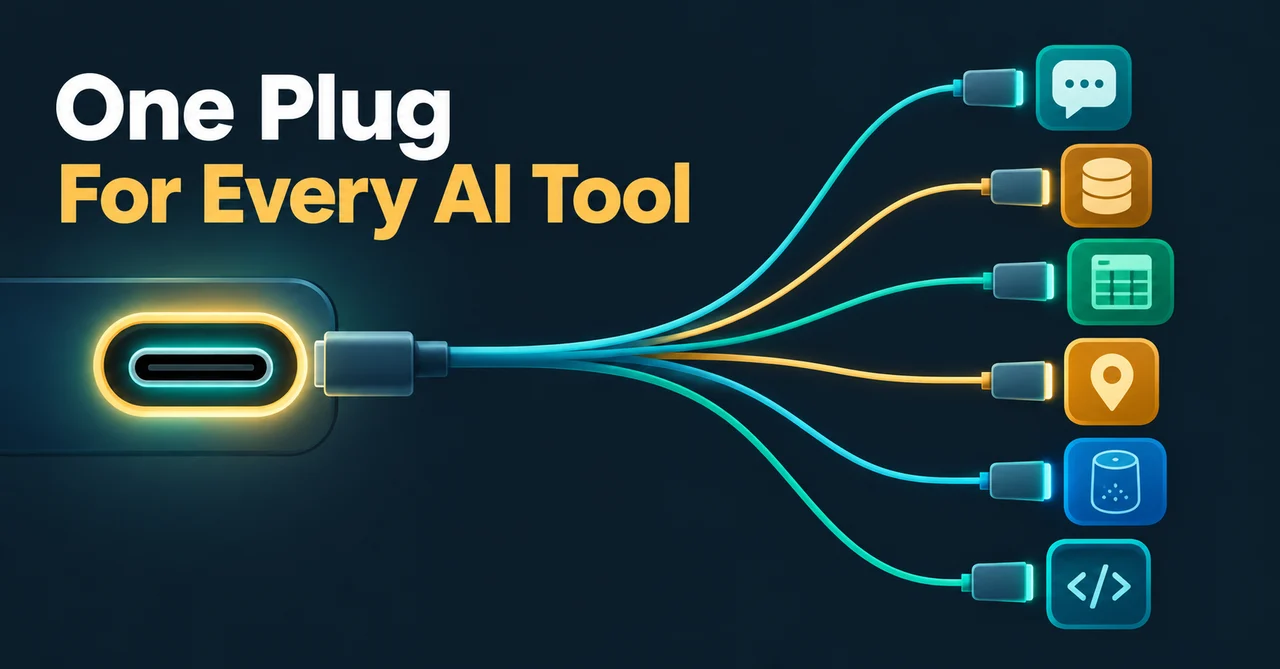
Picture a drawer full of cables: one for your phone, one for your camera, one for your keyboard, and none of them fit anything else. That used to be how AI apps connected to the world. Every assistant needed a custom-built bridge to every tool it wanted to reach, and every tool needed a different bridge for every assistant.
The Model Context Protocol, usually just called MCP, ended the mess. It is an open-source standard for connecting AI applications to external systems: your data, your tools, your workflows. The official documentation gives it a nickname that fits perfectly: "a USB-C port for AI applications." One standard socket, any AI app, any tool. Plug in and go.
Anthropic created MCP and open-sourced it on November 25, 2024. On December 9, 2025, it donated the protocol to the Agentic AI Foundation (AAIF), a directed fund under the Linux Foundation, so today MCP is an industry standard rather than one company's project. By late 2026 it has become the quiet plumbing behind news you may have seen: Meta's WhatsApp Business server, Google's Home server, and thousands more.
By the end of this article you will be able to explain three things to anyone: what MCP is, why it beat the old plugin mess, and what to check before connecting a server.
In short:
- MCP is a free, open standard that lets any AI app talk to any tool in one shared language.
- Think of it as USB-C for AI: one socket, thousands of devices.
- Anthropic started it in November 2024; the Agentic AI Foundation under the Linux Foundation stewards it now.
- Over 10,000 public MCP servers exist, the official SDKs are downloaded more than 97 million times a month, and apps like Claude, ChatGPT, Gemini, Microsoft Copilot, Cursor, and VS Code all speak it.
- The newest chapter is remote servers, which let tools like WhatsApp Business and Google Home plug into your AI agent with just a URL and a login.
What is MCP in plain English?
MCP is an open-source standard for connecting AI applications to external systems, so a model like Claude or ChatGPT can reach your files, databases, apps, and devices through one common interface.
The official MCP site puts it best: think of MCP like a USB-C port for AI applications. Before USB-C, every gadget shipped with its own cable. After USB-C, one cable charges your phone, your earbuds, and your laptop. MCP plays the same role for AI. A server built once, say one that exposes a Postgres database, works with every MCP-capable assistant. And an assistant that speaks MCP can use every server, including servers built long after the assistant shipped.
The numbers show how fast this spread. There are more than 10,000 active public MCP servers. The official Python and TypeScript SDKs together draw over 97 million downloads every month. Claude's connector directory already lists more than 75 MCP-powered connectors.
One governance note, because it matters: Anthropic created MCP and open-sourced it on November 25, 2024, and on December 9, 2025 it donated the protocol to the Agentic AI Foundation, a directed fund under the Linux Foundation that Anthropic co-founded with Block and OpenAI. The maintainers, led by David Soria Parra, stayed the same. So when you hear "MCP," think "community standard with big-company backing," not "an Anthropic product."
Why did we need a protocol at all - what was wrong with plugins?
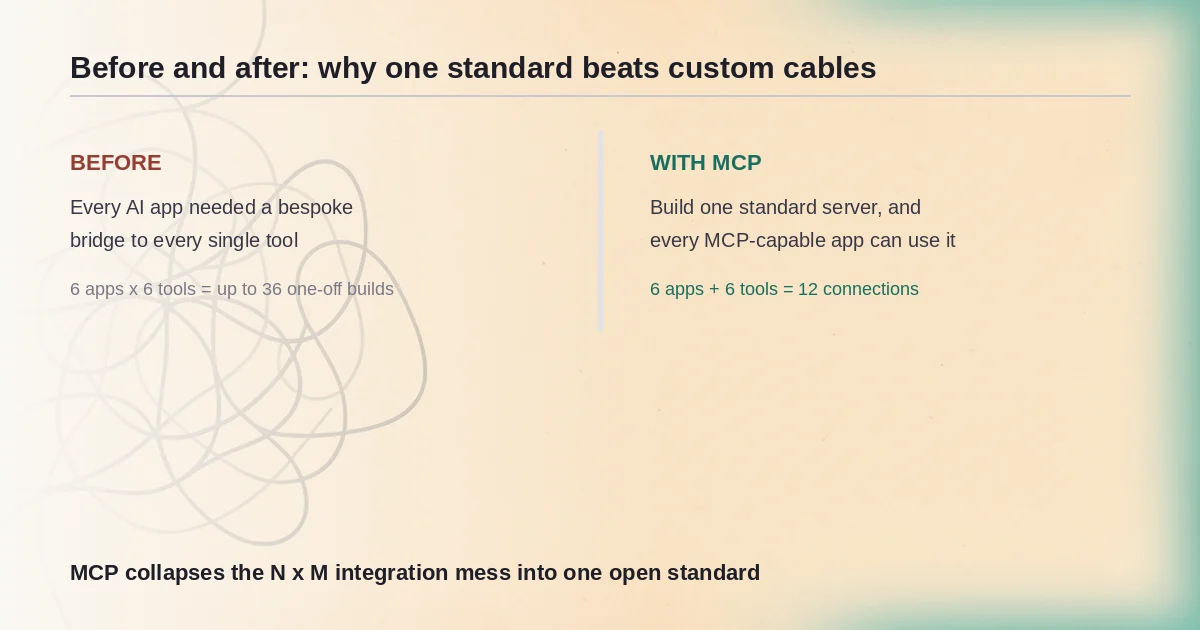
Before MCP, hooking an AI app to a data source meant writing a bespoke integration for that exact pair. Anthropic described the problem plainly when it launched the protocol: "Every new data source requires its own custom implementation, making truly connected systems difficult to scale."
Run the math. Ten AI apps and twenty tools means up to two hundred separate integrations to build, test, and keep alive. Ship one new tool and every app needs another custom bridge. That is why truly connected AI felt stuck for so long.
MCP replaces the maze with one shared language. Build a server once and any MCP-capable client can use it. Build an MCP-capable assistant once and it reaches every server, including future ones.
That is also the real difference from the plugin systems you may remember. A plugin lives inside one app and serves only that app, so a ChatGPT plugin never helps Claude. An MCP server is app-agnostic: the same WhatsApp Business server that works with Claude also works with Codex and ChatGPT, because the server does not care who is calling, only that the caller speaks the protocol. It is the same longing behind no-code automation, where you describe a workflow once and edit it as a diagram instead of wiring every connection by hand.
How does MCP actually work? Client, host, and server explained
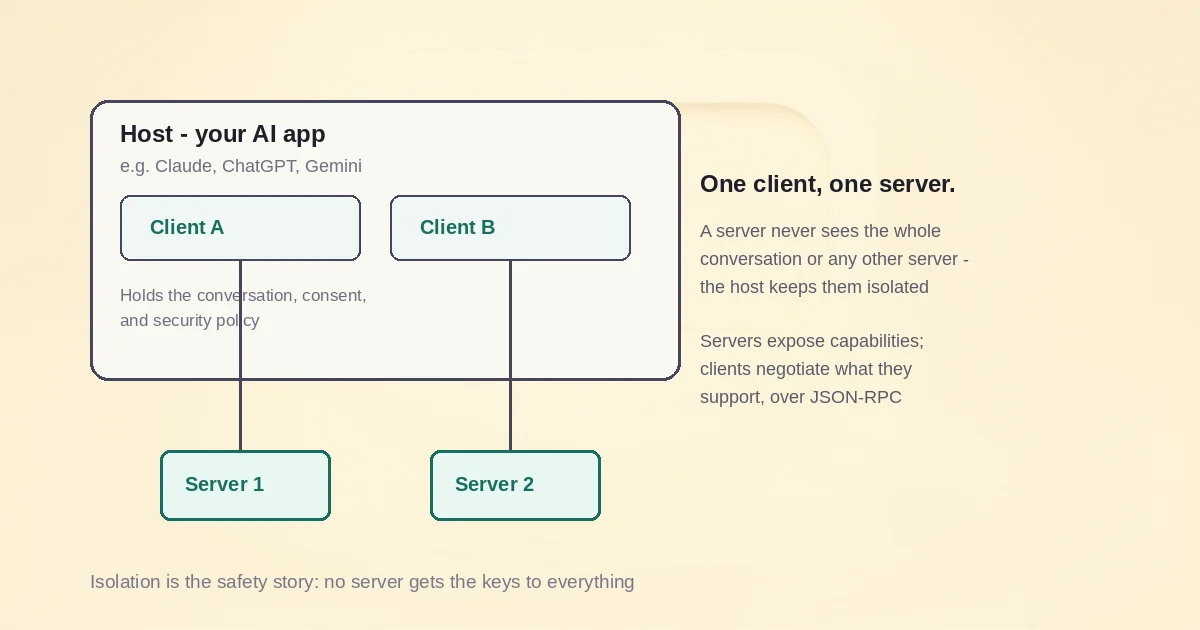
MCP has three parts: a host (the AI app you use), clients (connectors it creates, one per server), and servers (the things exposing tools, data, and prompts). The names are friendlier than they sound.
The host is the AI application you actually use: Claude Desktop, an editor like Cursor, or a custom agent app. The host owns the conversation, asks for your consent, and enforces the security rules. Think of it as both manager and bouncer.
The client is a small connector the host creates. Each client talks to exactly one server. Connect three servers and your host spins up three clients, one private line per server.
The server is the thing with the skills. It exposes capabilities (tools, data, prompt templates) and can run as a small process on your own machine or as a service on the internet.
Under the hood the plumbing is refreshingly boring. Every message travels as JSON-RPC 2.0, a simple request-and-response format, and the two sides negotiate what they support when they first talk. One important detail from the current specification, version 2026-07-28: MCP is stateless. Every request carries its own version and its own capabilities, so there is no sticky session to keep alive between calls. If you read older articles describing MCP as a stateful session protocol, that described the 2025 spec; it has since changed.
The design also has a privacy-friendly consequence: servers cannot read your whole conversation and cannot peek into other servers. Your chat history stays inside the host, and a server only sees the requests sent to it. That one sentence is the foundation of everything in the safety section below.
What are tools, resources, and prompts in MCP?
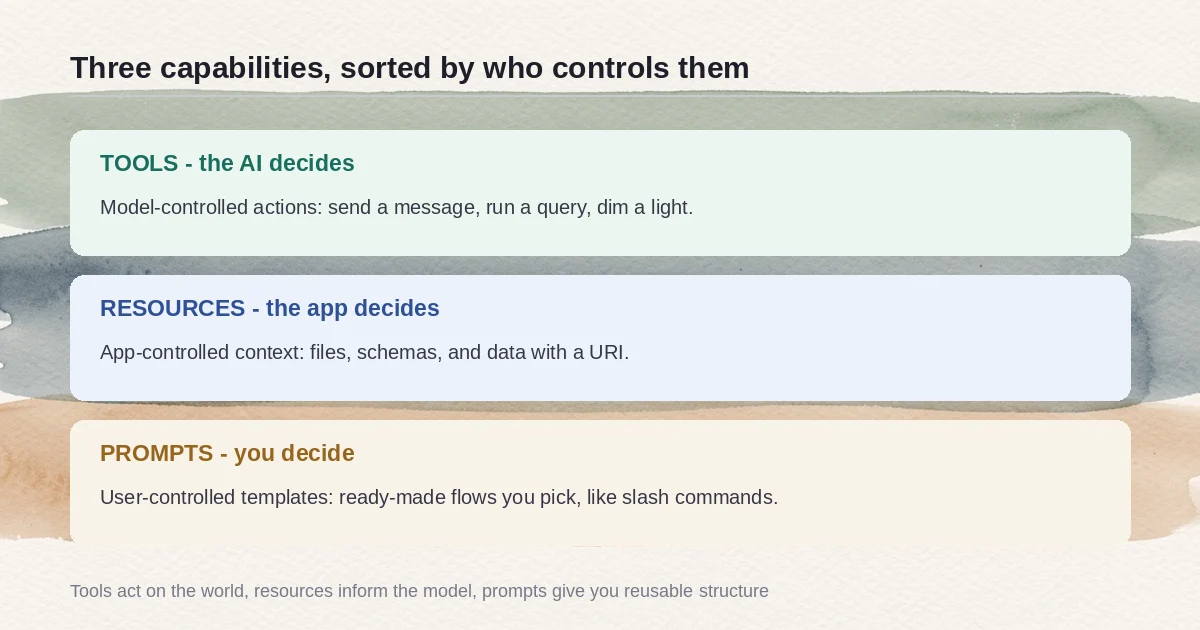
MCP servers offer three kinds of capability: tools, which the AI controls; resources, which the app controls; and prompts, which you control. The easiest way to remember them is by asking who controls each one.
Tools are controlled by the AI. The model decides on its own when to call one: query the database, send the test message, flip the smart light. This is where the real-world magic lives, and also where the risk lives, because the model is acting, not just chatting. The spec is blunt that there should always be a human in the loop who can deny a tool call. Example: Google's Home MCP exposes a tool called run_home_actions, so when you say "turn off the living room lights," your agent actually does it.
Resources are controlled by the app. These are files, schemas, and other context the host application hands to the model, each with an address called a URI, like file:///project/notes.md. The model does not grab them on its own; your app decides what to include, and the spec calls them application-driven. Example: a coding agent's server exposing your project files so the model can read exactly what it needs.
Prompts are controlled by you. These are ready-made templates a server offers, and nothing happens until you explicitly pick one, usually from a menu or with a slash command. The spec defines them as user-controlled. Example: a server that offers a "set up my business account" prompt that walks your agent through a whole checklist in one go.
Tools do things. Resources inform. Prompts are shortcuts you choose. Three lanes, three drivers: the AI, the app, and you.
Local vs remote MCP servers - and why remote changed everything
A local server runs as a process on your own machine, keeping your data on your computer. No web login involved: it pulls credentials from your environment, and your data never has to leave your computer. Great for personal files and databases.
A remote server lives on the internet. You connect with a URL, and even the login is standardized: MCP's authorization follows OAuth 2.1, and on first contact the server answers with a "please sign in" response that points the client to exactly where to authenticate and which permissions to request. No bespoke login screens, no password juggling.
Why did remote change everything? Because local servers meant installing and running things, which kept MCP a developer hobby. Remote servers mean anyone with a URL and a login can connect a real product in about a minute. Cloudflare's CTO Dane Knecht said it plainly: "We've seen an explosion of remote MCP servers, many of them built on and deployed to Cloudflare over the past year."
Two 2026 examples readers just watched:
- Meta's WhatsApp Business Tools MCP launched September 15, 2026. An agent can handle the tedious setup chores: creating a WhatsApp Business Account, verifying the phone number with an OTP, registering the Cloud API, preparing message templates and test messages, wiring webhooks. Meta says it is built for development and testing, not production sending at scale.
- Google's Home MCP is live in Early Access per Google's own developer docs, letting agents inspect your home structure, watch device states, run actions, and read event history, with rate limits and hard blocks on sensitive actions like unlocking doors. Press coverage from TechCrunch and The Verge reported that the rollout began September 16, 2026 for Google Home Premium Advanced subscribers in the US, at a reported $20 per month tier; treat the date and price as press-reported rather than official.
We walk through both setups in more detail: connecting Google Home to AI agents and setting up the WhatsApp Business MCP server.
Is connecting an MCP server safe? What to check first
Connecting an MCP server is safe when you choose servers the way you choose app permissions: thoughtfully. Five checks, all grounded in official guidance:
- Trust the publisher. A server from Meta or Google, or from the vendor who owns the tool, beats a random repository with no name on it.
- Grant the least privilege. Turn on only the tools you need. Claude's Custom Connectors let you toggle individual tools; Google Home simply refuses sensitive actions like unlocking doors.
- Keep a human in the loop. The spec says there should always be a person who can deny a tool invocation, so leave confirmation prompts on and read them before approving.
- Read before you click install. Local servers run with your user's privileges, and clients must show you the exact command and get explicit approval before running it.
- Check that you can revoke. Google Home access can be revoked anytime from the Google Home app or My Accounts; in Claude you can toggle connectors or individual tools off.
A few built-in protections are worth knowing. Token passthrough is explicitly forbidden: a server must not accept tokens that were not issued to it. Meta designed its login scopes so "no tokens land in your prompt history," and it logs every tool invocation, requiring an authenticated person for anything that changes state. And the isolation from the architecture section applies: a server cannot read your whole conversation or see into other servers.
One risk to name honestly: prompt injection, where something your agent reads (a page, a file, a server response) tries to sneak in instructions. This is a general AI-agent risk, not an MCP quirk, and the defenses are the ones above: trusted publishers, least privilege, and a human in the loop. The official MCP Security Best Practices covers the rest of the checklist.
What MCP means for the assistant you already use
If you use ChatGPT, Claude, Gemini, Microsoft Copilot, VS Code, or Cursor, you already use an MCP-capable app. Connector directories are filling up, and the 2026 launches, WhatsApp Business and Google Home, are the first wave of "works with your AI agent" badges that will soon look as normal as "works with Alexa."
So when the next app or device arrives with an MCP badge, you will know exactly what it promises: it speaks the same socket as everything else. The drawer full of cables is finally down to one.
Frequently asked questions
Is MCP only for developers?
No, end-users now touch MCP without writing code whenever they connect a server like Google Home MCP or a WhatsApp Business agent to ChatGPT, Claude, or Gemini: it is mostly point, click, and approve. There is still a seam, though. Some servers need setup that feels developer-ish; Google Home MCP, for example, requires a Google Cloud project. Vendor-run connectors hide most of that, and the trend is toward hiding all of it.
Is MCP owned by Anthropic?
Anthropic created and open-sourced MCP in November 2024, but donated it on December 9, 2025 to the Agentic AI Foundation, a directed fund under the Linux Foundation co-founded with Block and OpenAI, so it is no longer an Anthropic product. The technical side did not change: the same maintainers, led by David Soria Parra, still run the project, with backing from Google, Microsoft, AWS, Cloudflare, and Bloomberg.
Do MCP servers get my passwords or see my whole conversation?
No, a properly built MCP server cannot read your full conversation or peek at other connected servers, because the host app keeps conversation history to itself and enforces isolation between servers. A server only receives the scoped access you grant through OAuth permissions, and the spec explicitly forbids token passthrough. Meta, for one, designs its scopes so "no tokens land in your prompt history."
Can I disconnect or revoke an MCP server after connecting it?
Yes, access is always revocable: for Google Home MCP you can revoke from the Google Home app or My Accounts, and in apps like Claude you can toggle whole connectors or individual tools off. One practical wrinkle: revoking in one client does not typically revoke it everywhere, so if you connected the same server in several apps, plan to repeat the revoke per app.
Do I have to pay to use MCP?
No, MCP itself is free and open-source, and many servers cost nothing beyond your own infrastructure. Some servers sit behind paid products: Google Home MCP requires a Google Home Premium Advanced subscription, which press reports place at about $20 per month in the US, so treat the price as reported rather than official. Developer-oriented servers like Meta's WhatsApp Business MCP are free beyond the platform's own fees.