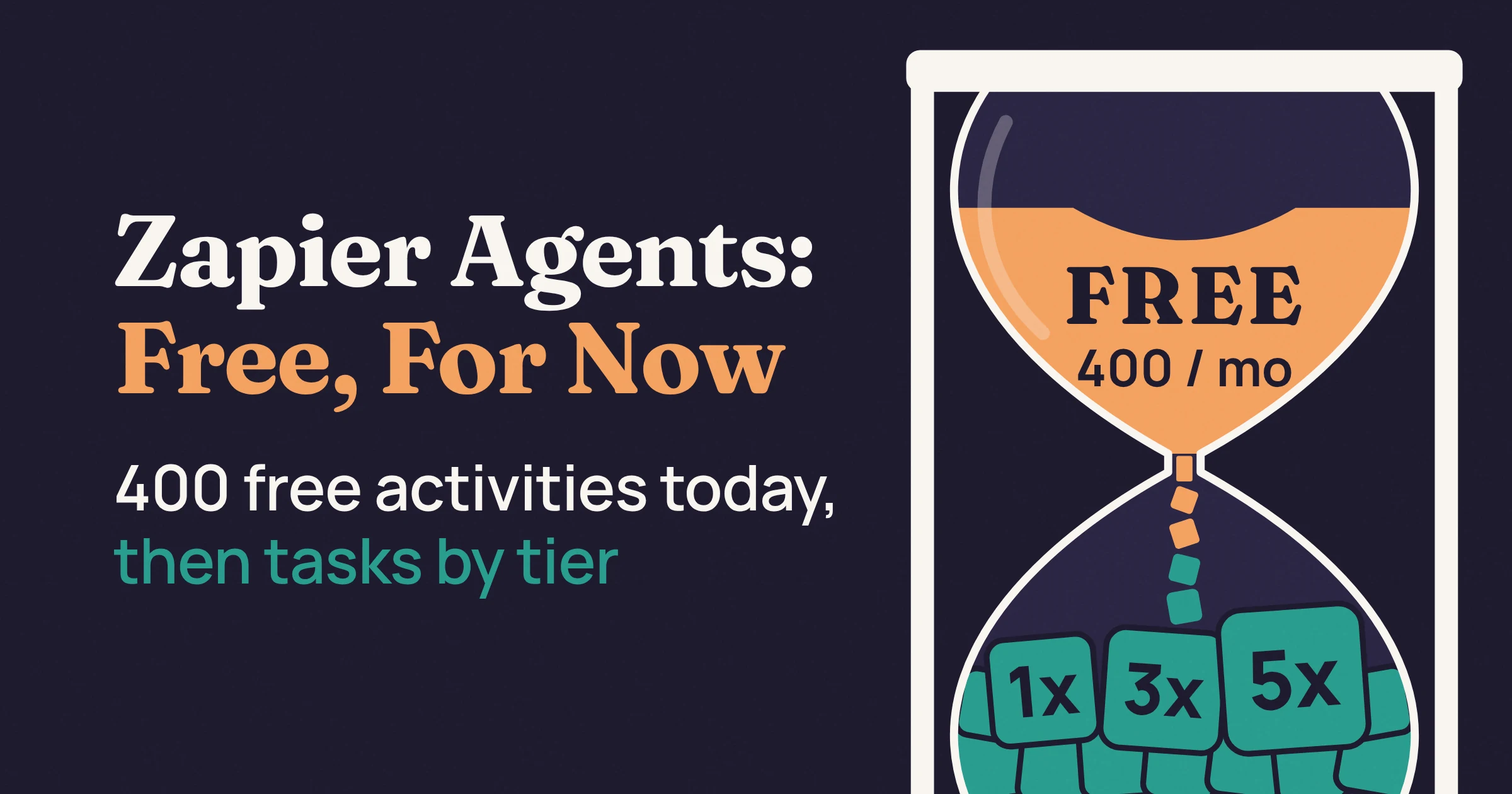
Yes, as of November 2026, Zapier Agents is still free: Zapier's pricing page lists an Agents Free plan as Forever Free, with 400 activities a month. The catch is that Zapier is moving agents into AI by Zapier. There, each agent becomes a step in a Zap (Zapier's name for an automated workflow) that bills as tasks, and on Zapier's Free plan you cannot publish that step.
We priced Zapier's own inbox example both ways. By our estimate, it fits about 100 free runs a month today, but only about 37 runs on a paid Professional plan at AI by Zapier's default tier. If your agent is light, keep it on the free plan for now; if it runs every day, choose your tier before you migrate.
Is Zapier Agents free, and what does the free plan include?
As of November 2026, Zapier Agents is free on the Agents Free plan, which Zapier's pricing page lists as Forever Free with this promise: "Run automated behaviors up to 400 times per month." Zapier's help center counts that usage in activities, and the paid Agents Pro plan raises the allowance to 1,500 a month.
An activity is any billable action your agent takes, like running a web search or an app action. To try it, go to agents.zapier.com and log in with your Zapier account.
| Plan | Activities per month | Activity cap per run | Do tests count? | Price | Best for |
|---|---|---|---|---|---|
| Agents Free | 400 | 10 | Yes | Free | Trying one light agent |
| Agents Pro | 1,500 | 40 | No | $400 billed annually, shown as $33.33/month | Busy agents you are not ready to move yet |
Agents is billed as an add-on to your Zapier account, and the pricing page shows no month-to-month price for Agents Pro. On Team and Enterprise accounts, everyone on the account shares one pool of activities.
What happens when you run out of activities?
When you use up your monthly activities, your agents stop running, but you can still chat with them. Zapier emails you at 80% of your limit and again when you reach it. Now and then an agent goes past the limit to finish a run, and Zapier says you are not charged for those extra activities.
Each run also has its own cap: 10 activities on Free and 40 on paid plans. When an agent hits it, the agent pauses and asks for your input before it continues. Think of it as a fuse that stops one runaway run from burning through the whole month.
What can Zapier Agents do, and what counts as an activity?
As of November 2026, a Zapier agent can react to a trigger, look things up in your connected documents, act in other apps, and browse or search the web. Zapier counts each of those moves as one activity. Zapier describes an agent as four things: a prompt, a set of tools, a trigger, and permission to act.
Zapier's usage help page counts each of these events as one activity:
- The agent uses a trigger, the event that starts it (say, a new email arrives).
- It answers a question using a knowledge source, meaning documents or data you connected to it.
- It runs an action in another app, like adding a card in Trello.
- It browses or scrapes a web page.
- It runs a web search.
- You send it a message through the Chrome Extension.
Zapier's own example shows how fast this adds up. An agent checks your inbox each morning for a keyword (say, invoice), summarizes each matching email, adds each one as a Trello task and sends a Slack message. If it finds one matching email, that run counts as four activities; if it finds two, it counts as seven.
So each extra email added three activities. A busy inbox day is a busy quota day.
If you have not built an agent yet, our guide to building your first AI agent for free walks through the no-code Zapier Agents route.
Why does the free quota run out faster than expected?
If your quota vanishes early, Zapier's help page on unexpected activity usage names the usual culprits:
- Tests count on Free. On the Free plan, every test counts toward your monthly quota. On paid Agents plans, testing an agent does not count.
- Batches multiply. When a trigger returns several records at once, for example 10 new leads, the agent acts on each one.
- Lookups add up. Each knowledge source search, web page visit and search query is a separate activity.
- Loops can run away. If your agent triggers a Zap that updates data the agent watches, you can create an infinite loop.
Zapier's fixes are simple: keep each agent to 3-5 related actions instead of one agent that does everything, and set triggers to pick up only new or updated records, not every existing one.
What changes when Zapier Agents moves to AI by Zapier?
On October 6, 2026, Zapier announced that Zapier Agents is now AI by Zapier, a step you drop into any Zap that bills as tasks instead of activities. The same prompt, tools, trigger and permission now live in that step. As of November 2026, Agents still runs, and Zapier has not set a date to turn it off.
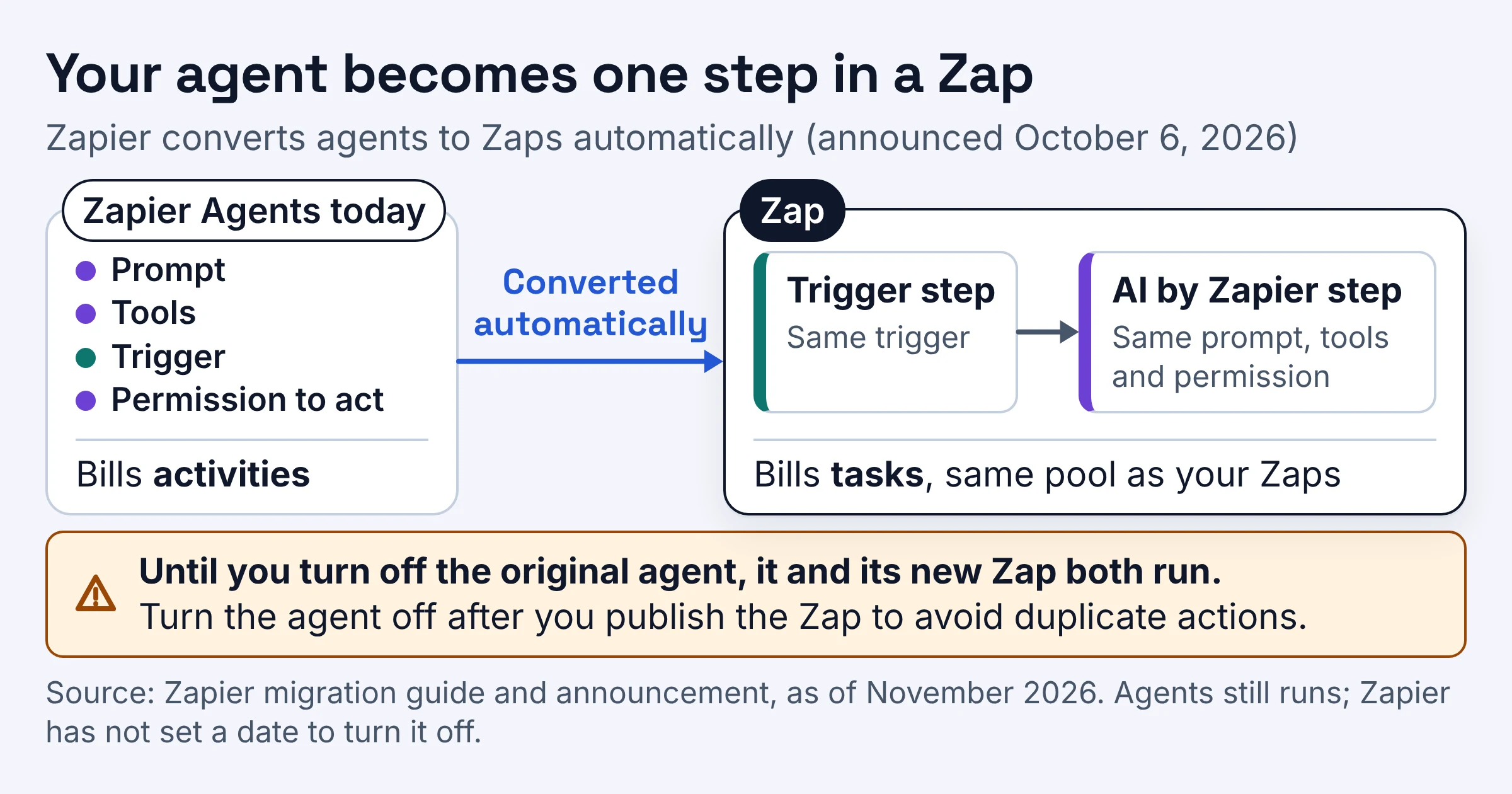
Per Zapier's migration guide, Zapier converts your agents to Zaps automatically. Each one becomes a Zap with a trigger step and a single AI by Zapier step, and Zapier's announcement says an eligible agent shows a banner at the top. Zapier says it will email affected users with enough notice before anything changes.
| Area | Zapier Agents today | AI by Zapier after the move | What it means for you |
|---|---|---|---|
| Billing unit | Activities, kept apart from Zap tasks | Tasks, from the same pool as your Zaps | One budget to watch |
| Subscription | Add-on to your Zapier account | No separate Agents subscription or add-on fees | One less bill |
| Free plan | 400 activities a month | Preview only, Standard tier, no tools, no publishing | A migrated agent cannot go live on Free |
| Tests | Count on Free, free on paid plans | Full-Zap tests use tasks like live runs | Test with a small sample |
| Safety cap per run | 10 activities on Free, 40 on paid | 75 tasks by default, up to 500 | Raise it only for big jobs |
| Trigger sources | Includes HubSpot, Asana, Zendesk, Zoom and Jira | Those five are not yet supported | Hold off if you rely on them |
Zapier also says a few capabilities are still rolling out. One detail catches people out: until you turn off the original agent, the agent and its new Zap both run on their own. Zapier tells you to turn the agent off after you publish the Zap to avoid duplicate actions.
How does Zapier pricing work for AI by Zapier steps?
As of November 2026, AI by Zapier charges tasks per run by model tier: Standard costs 1 task, Advanced 3, Premium 5 and Bring Your Own Key 1. Each successful tool call is charged at the same rate. A task is any successful action that runs in Zapier, and Zap triggers never use tasks.
For a plain Zap, that is simple counting. Zapier's example Zap uploads a file to Dropbox and sends a Slack message, which uses two tasks per run, so ten runs use 20 tasks.
AI steps add a multiplier, using this formula from Zapier's model tier pricing page:
Tasks used per run = (1 × model rate) + (number of tool calls × model rate)
A tool call is any time the step successfully uses an app action or a knowledge source during a run. Picture a taxi with a pickup fee and a fare per stop, where your tier sets the price of both.
| Tier | Tasks for the step and for each tool call | Uses tools? | Best for |
|---|---|---|---|
| Standard | 1 | No | Prompt-only steps, like rewriting a subject line |
| Advanced | 3 | Yes | Everyday agent jobs where cost matters most |
| Premium | 5 | Yes | Harder jobs; it is the default on paid plans |
| Bring Your Own Key | 1 | Yes | Tool-heavy agents, if you have your own AI account |
Zapier's own worked examples match the formula. A Premium step with 2 tool calls uses 15 tasks, an Advanced step with 1 tool call uses 6, and your own AI account with 4 tool calls uses 5.
Watch the default. New AI by Zapier steps on a paid plan start at Premium (5x), and Zapier itself says to expect higher task usage unless you choose a lower tier. On Auto, Zapier uses Claude models: Claude 4.5 Haiku for Advanced and Claude 4.6 Sonnet for Premium.
Each step also has a task limit per run: 75 tasks by default, up to 500. If a live run hits it, Zapier pauses the step and asks you to approve before it continues.
Bring Your Own Key means connecting your own API key (the access code for your own AI provider account) at the user level, which drops the rate to 1 task. Zapier calls this the most cost-effective option for tool-heavy workflows. The model usage then runs on your own AI account, and our breakdown of what an AI agent costs in tokens shows how to price that side.
Zapier Agents vs Zaps: how many runs do you actually get?
Priced with Zapier's own numbers as of November 2026, the one-email inbox run fits 100 times a month on Agents Free and 375 times on Agents Pro. At AI by Zapier's default Premium tier, it fits only about 37 times in a Professional plan's 750 tasks. Switching the step to Advanced or to your own key stretches that to about 62 or 187 runs.
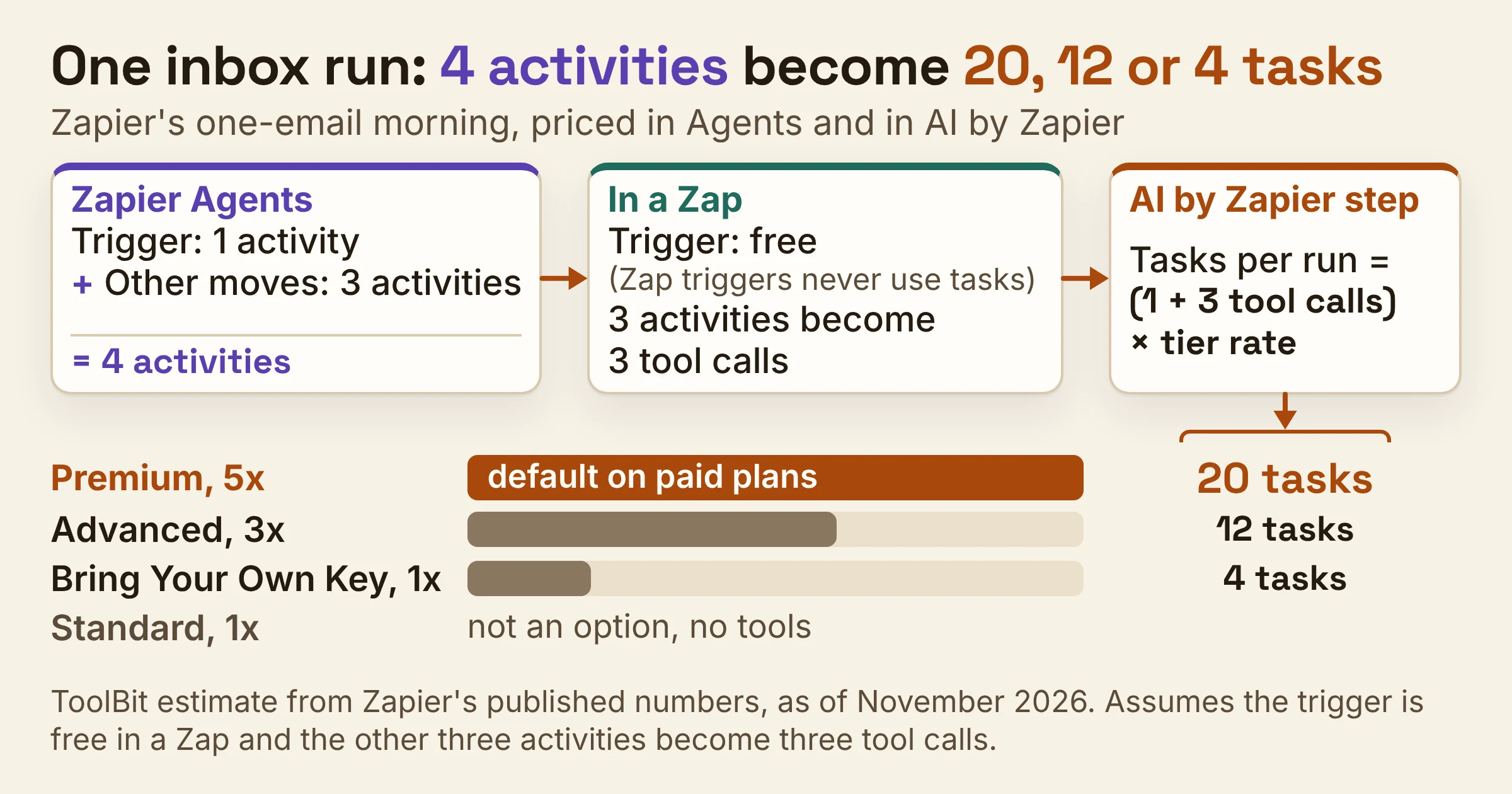
These are estimates from Zapier's published numbers, not Zapier figures, and they rest on three assumptions:
- The run is Zapier's one-email morning, which counts as four activities in Agents.
- The trigger is free in a Zap, so the other three activities become three tool calls. Zapier hasn't published how its example maps to tool calls, so your agent may use more or fewer.
- Nothing else draws on the plan's tasks. In real life, your Zaps, AI steps and Zapier's developer tools (code, MCP and the SDK) all draw from the same task allocation.
The math for one run:
- Premium: (1 × 5) + (3 × 5) = 20 tasks
- Advanced: (1 × 3) + (3 × 3) = 12 tasks
- Bring Your Own Key: (1 × 1) + (3 × 1) = 4 tasks
- Standard: not an option, because it has no tools
| Setup | Cost of one run | Monthly allowance | Runs per month | Price | Best for |
|---|---|---|---|---|---|
| Agents Free | 4 activities | 400 activities | 100 | Free | A light agent you test sparingly |
| Agents Pro | 4 activities | 1,500 activities | 375 | $400 billed annually | High-volume agents not yet migrated |
| AI by Zapier, Premium, on Professional | 20 tasks | 750 tasks | 37 | $19.99/month billed annually | Jobs that need the top tier's default model |
| AI by Zapier, Advanced, on Professional | 12 tasks | 750 tasks | 62 | $19.99/month billed annually | Agents where task cost matters most |
| AI by Zapier, own key, on Professional | 4 tasks | 750 tasks | 187 | $19.99/month billed annually, plus your AI account | Tool-heavy agents |
| AI by Zapier on Zapier Free | Cannot publish | 100 tasks | None | Free | Previewing a prompt only |
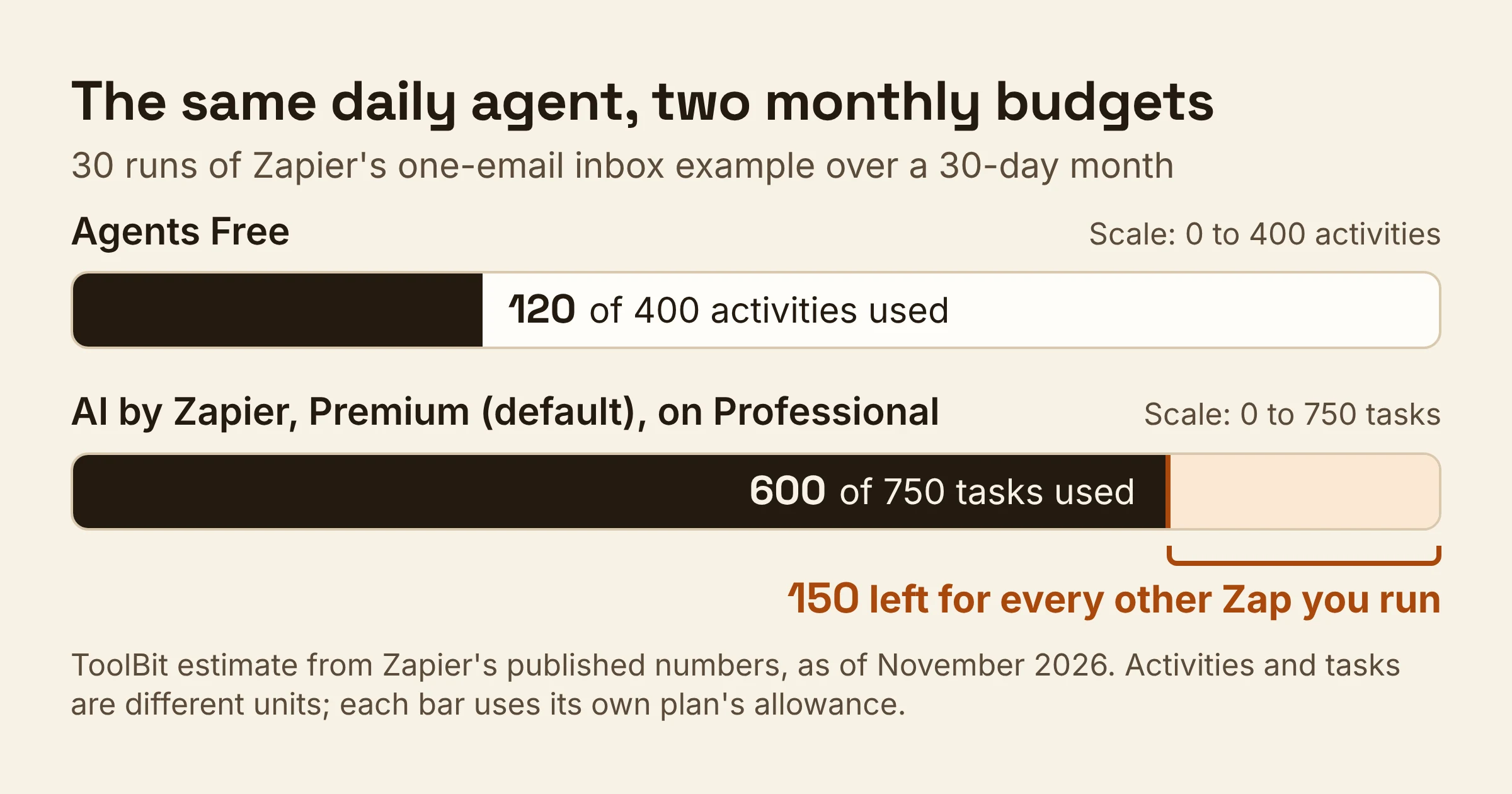
Over a 30-day month, a once-a-morning agent makes 30 runs. On Agents Free that uses 120 of your 400 activities; on AI by Zapier's default Premium tier it uses 600 of Professional's 750 tasks, leaving 150 for every other Zap you run.
Busy days cost more. On a two-email morning Zapier counts seven activities; under the same assumption that is six tool calls, or 35 tasks on Premium.
How do you price your own agent?
Copy this and fill in your own numbers:
tool calls     = app actions + knowledge source lookups in one run
tasks per run  = (1 + tool calls) × tier rate   (Standard 1, Advanced 3, Premium 5, own key 1)
runs per month = (plan tasks - tasks your other Zaps use) ÷ tasks per run
The middle line is Zapier's formula with the rate pulled out. If runs per month comes out below what you need, change the tier before you change the plan.
How much is Zapier a month?
As of November 2026, Zapier's Free plan includes 100 tasks a month, the Professional plan costs $19.99 a month billed annually with 750 tasks, and the Team plan starts at $69 a month billed annually. According to Zapier's pricing guide on its blog, both paid plans are billed after a 14-day free trial.
| Plan | Price | Monthly allowance | Runs an AI agent? | Best for |
|---|---|---|---|---|
| Zapier Free | Free | 100 tasks, with Zaps, Tables and Forms | Preview only, Standard tier, no publishing | Testing a prompt idea |
| Professional | $19.99/month billed annually | 750 tasks | Yes | One person running a daily agent |
| Team | From $69/month billed annually | Not stated on the pages checked | Yes | Several people on one account |
The two Agents plans are counted in activities, not tasks, so they sit in the first table above.
On Professional, Zapier charges for completed tasks over your monthly allowance on a per-task basis, at a higher rate than your plan's included tasks. The exact rate was not published on the pages checked. Once you reach your maximum task limit, your Zaps pause until your next usage period starts.
Is Zapier worth it for your AI agent?
As of November 2026, a light Zapier agent still runs at no cost on Agents Free, while a daily AI by Zapier agent needs a paid plan and a deliberate tier choice. Zapier is worth it when the runs you need fit your allowance at a tier that does the job.
- Stay on Agents Free if your agent fits in 400 activities a month and 10 per run. Zapier hasn't said what happens to Agents Free users when Agents is turned off, so treat it as a trial, not a home.
- Skip Agents Pro if you would only need it for a few months. It is $400 billed annually with no month-to-month price shown, and Zapier hasn't published whether unused time is refunded or credited after migration.
- Move to AI by Zapier on Professional if you want one task budget and a view of exactly which tasks each run used. Set the step to Advanced unless the job truly needs Premium.
- Bring your own key if your agent makes lots of tool calls per run and you already pay for an AI account.
- Wait if your agent starts from HubSpot, Asana, Zendesk, Zoom or Jira, since those sources are not supported in AI by Zapier yet.
If the task math still stings, our Zapier vs Make vs n8n cost comparison prices the same kind of workload on the other two platforms.
What should you do next with your Zapier agent?
If you run a Zapier agent today, three moves protect both your free activities and your future task bill.
- Price one run. List the app actions and knowledge lookups in a typical run, then run the formula for Advanced and Premium.
- Pick the tier before you publish. New steps on paid plans start at Premium, so switch to Advanced if it handles the job in a small test.
- Turn off the old agent. Once the migrated Zap is published, switch the original agent off so the two don't both act on the same records.
Prices, allowances and tier rates here were checked on Zapier's own pages in November 2026, and Zapier changes them often.