Yes - you can build a working AI agent from scratch today, for free, without writing a single line of code. Or with about ten lines of Python, if you want full control of what happens under the hood. Both routes are real, and this guide shows you how to build an AI agent either way, with numbered steps.
There are three honest free paths. Path A is Zapier Agents, a no-code option where you click, connect, and run. Path B is n8n Community Edition, a low-code visual editor you install yourself and keep forever at no cost. Path C is Python with a free framework like the OpenAI Agents SDK or LangChain, paired with the Gemini API free tier so your model calls cost nothing either.
Pick your path in the next section, follow the numbered steps, and you will have a working agent before you close this tab. No history lesson, no buzzword warm-up - just the build.
In Short
- An AI agent is just three things: a model (the brain), tools (the hands it can use), and a loop (keep going until the task is done). Memory and guardrails are optional extras.
- Complete beginners: go with Path A, Zapier Agents. The free plan includes Zapier Agents, with 100 tasks per month and 2-step Zaps.
- OK with installing an app? Path B, n8n Community Edition. Free forever when self-hosted, with a visual editor, real tools, and memory.
- Want code? Path C is an AI agent in Python, built with the OpenAI Agents SDK or LangChain's
create_agent. The frameworks are free; the Gemini API free tier is the honest $0 option for the model. - The number one beginner mistake is over-engineering. If a single LLM call solves your problem, you do not need an agent yet - that is Anthropic's own advice, not just ours.
What an AI Agent Actually Is (The 30-Second Version)
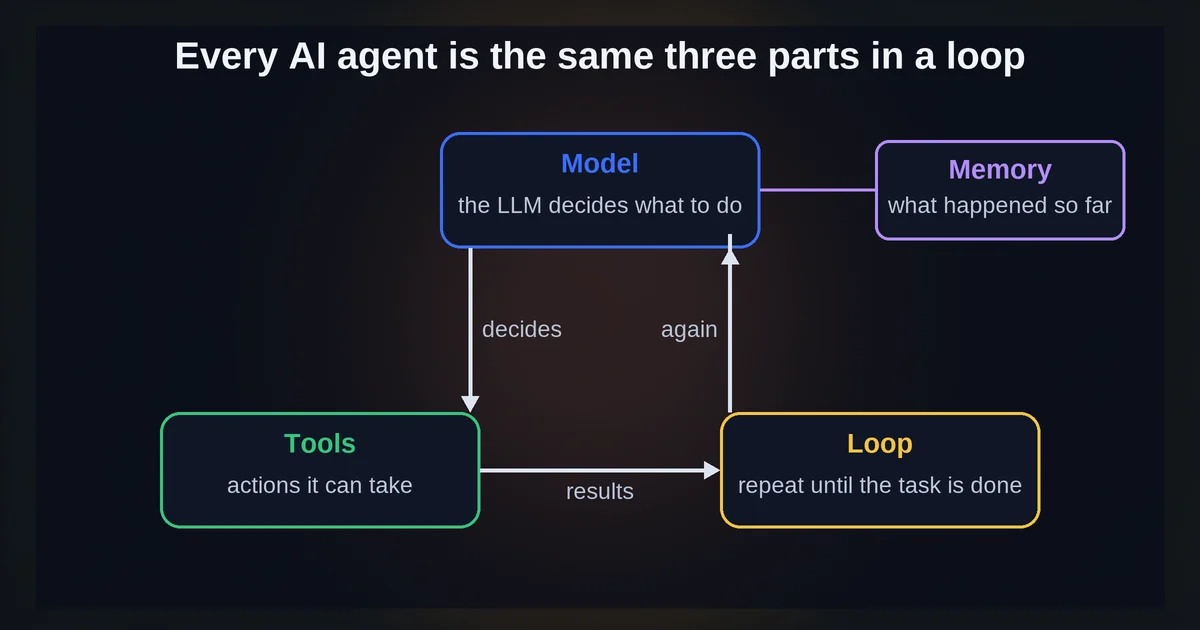
Strip away the hype and an AI agent has four parts, and one of them is optional:
- Model. A large language model - the brain. It reads your request and figures out what to do.
- Tools. LLM tools - functions the model can call when it needs real-world capability: send an email, fetch a page, query a sheet. Anthropic's tool-use overview puts it plainly: the model decides when to call a tool based on your request and the tool's description. So the description you write is doing real work.
- Loop. The part that makes it an agent instead of a chatbot. The agent loop acts, observes the result, decides the next step, and repeats until the task is done. The OpenAI Agents SDK describes this as "a built-in loop that continues until the task is complete."
- Memory (optional). Context that sticks around across turns, so the agent remembers what you told it five minutes ago.
And one distinction worth memorizing: Anthropic's "Building effective agents" guide separates agents, which direct their own process and choose their own tools, from workflows, which follow predefined code paths. If the steps are always the same, you want a workflow - and that is a smaller, cheaper thing to build.
Step 1: Pick Your Path (No-Code, Low-Code, or Python)
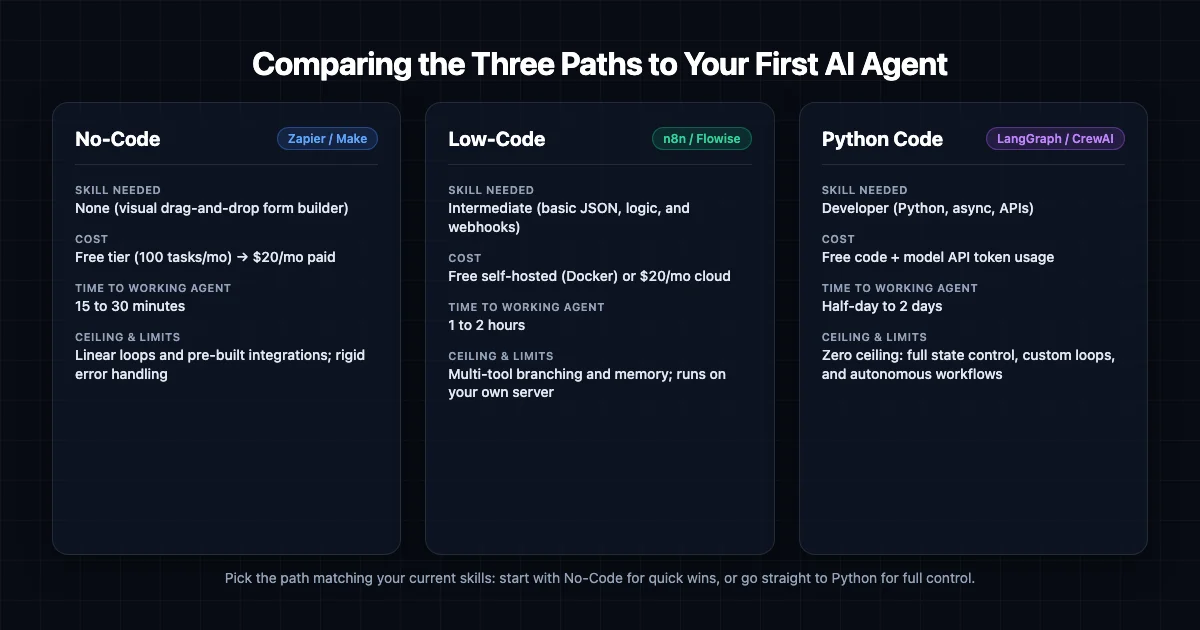
Building an AI agent for beginners starts with one rule: the best first agent is the simplest one that works. Anthropic's guide says it better than we can: find the simplest solution possible, and only add complexity when it is genuinely needed. So pick your path by what you need, not by what sounds impressive:
- Path A - Zapier Agents (no-code, $0). You want a working agent this afternoon, with zero installs. Click, connect a tool, run.
- Path B - n8n Community Edition (low-code, $0 software). Your agent needs to touch several apps and services, and you are OK installing one app to get a real visual editor, tools, and memory.
- Path C - Python plus a free framework (free code, free model possible). You need custom logic, custom tools, or full control of the loop itself.
If you read that list and realized your task actually has fixed, predictable steps - "every new email gets summarized into a doc" - you may not need an agent at all; a simple automation fits that job better and we have a separate walkthrough for building your first AI automation without code.
Step 2: Build It - Path A, No-Code with Zapier Agents
This is the fastest route from zero to a running agent. Every limit below comes from Zapier's official Free plan article.
- Create a free Zapier account. The free plan includes free versions of Zapier Agents and Zapier Chatbots, and new signups get a 14-day trial of premium features - nice, but do not build your plan around the trial.
- Open Zapier Agents and create a new agent. Give it a name and a clear instruction, like "Summarize incoming emails and post the summary to Slack." This instruction is your agent's system prompt - the same thing Python builders write in code.
- Connect one tool - Gmail or Slack are good first picks. Authorizing a tool here is the no-code equivalent of defining a function the model can call.
- Give it a real first task and run it. Not "test test" - an actual job you have today. Watch it call the tool, read the result, and finish.
- Check your task usage. The free plan gives 100 tasks per month, single user, and 2-step Zaps only (one trigger plus one action). Polling triggers run at a 15-minute interval.
Know the walls before they surprise you: 100 tasks/month, 2,500 table records, 10 form pages, and multi-step Zaps are paid. None of that stops you from building a real first agent - it just sets the ceiling.
Step 3: Build It - Path B, Low-Code with n8n (Free Self-Hosted)
n8n is the sweet spot for many first-time builders: real tools, real memory, no code - just an app to install. n8n's pricing page confirms the route: the Community Edition is a standard, self-hosted version, available on GitHub, free forever. (n8n Cloud is a separate paid thing - more on that at the end.)
- Install n8n Community Edition. Free and self-hosted, via npm, Docker, or the desktop app. Pick whichever feels least scary; this is not a DevOps project.
- Open the visual editor and create a new workflow. Add an AI Agent node - that node is your model-plus-loop in one box.
- Pick a model by adding your model credential. This is where "free" gets honest: with n8n self-hosted you bring your own API keys, so the model is whatever you already have or choose. Code-inclined readers can point a Gemini free-tier key here; others can use credentials they already hold from a supported provider.
- Add one or two tools to the agent node - an HTTP request node or an app node works. In n8n, tools are nodes the agent can decide to call, exactly like the anatomy section described.
- Add memory. This is why Path B beats Path A for many builders: per n8n's docs, agent nodes can use memory while chains cannot.
- Run it once in the editor with test input before activating. Watch each node light up in order. If something misbehaves, you can see exactly where.
Step 4: Build It - Path C, Python with a Free Framework
Ten lines of Python, and you can see the whole loop from the anatomy section running live.
- Install a framework.
pip install openai-agentsfor the OpenAI Agents SDK, orpip install langchainfor LangChain. LangChain frames it nicely: "Agent = Model + Harness" - the harness is the prompt, the tools, and the middleware wrapped around the model loop. Both frameworks are free. - Get a model key - and be honest about cost. The OpenAI API is not free: new accounts use prepaid billing with a $5 minimum purchase, and purchased credits expire after one year. The Anthropic API is not free either - Claude Haiku 4.5 runs $1 per million input tokens and $5 per million output. Do not count on OpenAI free trial credits for new accounts; they are no longer guaranteed.
- For a genuinely $0 path, use the Gemini API free tier. Google's pricing page confirms free input and output tokens on limited models (gemini-3.8-flash is one), and it works with LangChain via the
google_genai:provider. One caveat in plain sight: on the free tier, your content is used to improve Google products. Do not pipe anything sensitive through it. - Write the ten lines. Create the agent with a system prompt and one small tool - the LangChain quickstart pattern is a
get_weatherfunction passed tocreate_agent. Then invoke it with a message. - Watch the loop. The agent decides, calls your tool, reads the result, and answers. Model, tools, loop - live, in your terminal.
Step 5: Test It (Before You Trust It)
An agent that worked once has proven nothing. Run this checklist:
- Fixed input, expected output. Run the same task twice and compare. Wildly different results mean your prompt needs tightening.
- Force a tool call. Ask something the agent can only answer with its tool, and verify the tool result actually changes the answer - not the model bluffing a plausible reply.
- Check the trace for loop count. The OpenAI Agents SDK has built-in tracing to visualize and debug agent flows; LangChain's observability shows traces, tool calls, state transitions, and latency. A trace with 15 loops is a runaway agent telling on itself.
- Test memory across two or more turns - if your path has it. n8n agents do; n8n chains do not.
- Test the edges. Empty input, nonsense request, out-of-scope ask. You want a graceful refusal, not a hallucinated tool call.
On Zapier, the free plan includes custom test records, so you can try your Zap with different data without waiting for real events.
The 5 Mistakes That Break First Agents
Most first agents break for one of five reasons: building an agent when a single LLM call would do, no stop condition, vague tool descriptions, heavy frameworks too early, and no budget awareness.
- Building an agent when a single LLM call would do. Anthropic's guide is blunt: for many applications, optimizing single LLM calls is enough. Start simple; add agentic complexity only when the simple version fails.
- No stop condition. The loop continues until the task is complete - and an agent with no clear completion state can loop forever. Define what "done" means, and use guardrails: the OpenAI Agents SDK's input and output validation exists precisely to fail fast on bad inputs.
- Vague tool descriptions. The model picks tools from your request and the tool's description. A vague description means wrong tool calls. Write descriptions like you are briefing a literal-minded new hire.
- Heavy frameworks too early. Extra abstraction layers "obscure the underlying prompts and responses, making them harder to debug" (Anthropic again). If you cannot see what your agent actually sent, you cannot fix it.
- No budget awareness. Zapier's free plan hard-stops at 100 tasks per month. On OpenAI prepaid billing, an exhausted balance triggers
credit_balance_exhaustederrors - and access "may not stop immediately," so a negative balance is possible. Set limits before you need them, not after.
If you want the wider angle, several of these overlap with the most common AI automation mistakes we see businesses make - same root causes, bigger scale.
What "Free" Really Costs (and What Might Change)
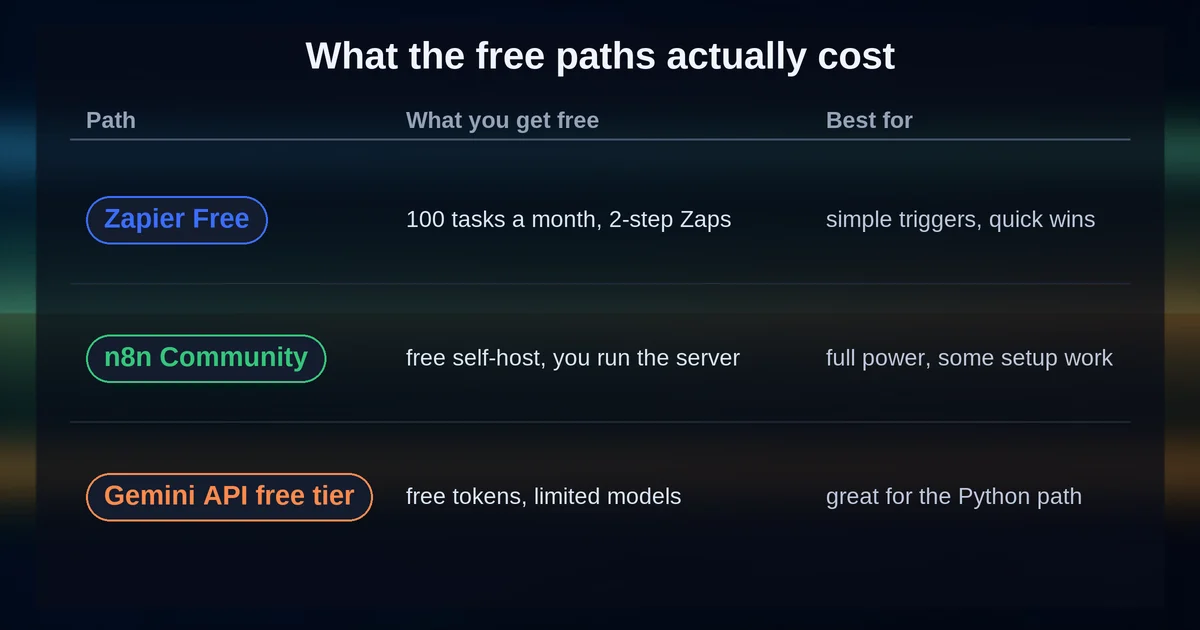
All three free paths are genuinely free: Zapier Agents (100 tasks/month, 2-step Zaps), n8n Community Edition (self-hosted, all integrations), and the Gemini API free tier (free tokens on limited models).
| Path | What's free | The catch | Best for |
|---|---|---|---|
| Zapier Free | Zapier Agents, 100 tasks/mo, 2-step Zaps | Tight task and step limits; single user | Zero-install, working today |
| n8n Community Edition | Full self-hosted app, all integrations, GitHub | You install and run it; you bring model API keys | Touching many apps, no code |
| Gemini API free tier | Free input and output tokens on limited models | Content used to improve Google products | The $0 Python model |
And for contrast, the paid side is cheap but not free: OpenAI's GPT-5.4 mini is $0.75 per 1M input tokens and $4.50 per 1M output, and Claude Haiku 4.5 is $1/$5 per million tokens. A first Python agent on a paid model costs cents to try - just do not call it $0.
Pricing and plan details are as published by the vendor around September 2026 and can change - confirm on the official site.
FAQ
Is the OpenAI API free for new accounts? No. New API accounts use prepaid billing with a $5 minimum credit purchase, and purchased credits expire after one year. Free trial credits for new signups are no longer guaranteed, so do not plan around them.
Can I build an AI agent without any coding? Yes. Zapier Agents on the free plan needs zero installs and zero code, and n8n Community Edition gives you a visual editor with tools and memory - you only install an app, never write code.
Is n8n really free? Yes - the Community Edition is genuinely free: self-hosted, available on GitHub, all integrations included. n8n Cloud is the paid version - the Starter plan runs €20/month billed annually.
Which free LLM can I use for my first Python agent?
The Gemini API free tier. You get free input and output tokens on limited models like gemini-3.8-flash, it plugs into LangChain via the google_genai: provider, and the trade-off is that free-tier content is used to improve Google products.
That is the whole recipe: a model, some tools, and a loop - plus one path that fits you and a checklist before you trust the thing. Give your agent one real task this week, watch it work, and add one more tool at a time. You do not need permission, a budget, or a bootcamp - just a task worth automating and about an afternoon.