The best AI automations aren't complicated. They're small, boring, repeated tasks quietly handed off to something that never gets tired of doing them. You don't need a developer, a budget, or a computer science degree to build one. You need about twenty minutes and a task you're sick of doing by hand.
Quick Answer
- AI automation tools now connect apps AND make decisions, not just move data between them, the big shift from a few years ago
- Three tools dominate this space in 2026: Zapier (easiest, most integrations), Make (best visual control for the price), and n8n (most powerful, but not truly beginner-friendly)
- Your first automation should take under an hour to build, using a trigger, an AI step, and an action, nothing more
- The no-code and low-code market is projected into the $50 billion+ range in 2026, roughly four times its size in 2020, so this skill is becoming a genuinely mainstream one, not a niche hobby
- Start with one workflow, not a whole system. The most common beginner mistake is trying to automate an entire process on day one
What "AI Automation" Actually Means
Strip away the buzzwords and it's three parts, always in the same order:
-
A trigger - something happens (a form gets submitted, an email arrives, a row gets added to a spreadsheet)
-
An AI step - a model reads, summarizes, categorizes, drafts, or decides something based on what triggered it
-
An action - the result gets sent somewhere (a Slack message, a new spreadsheet row, an email draft, a task created)
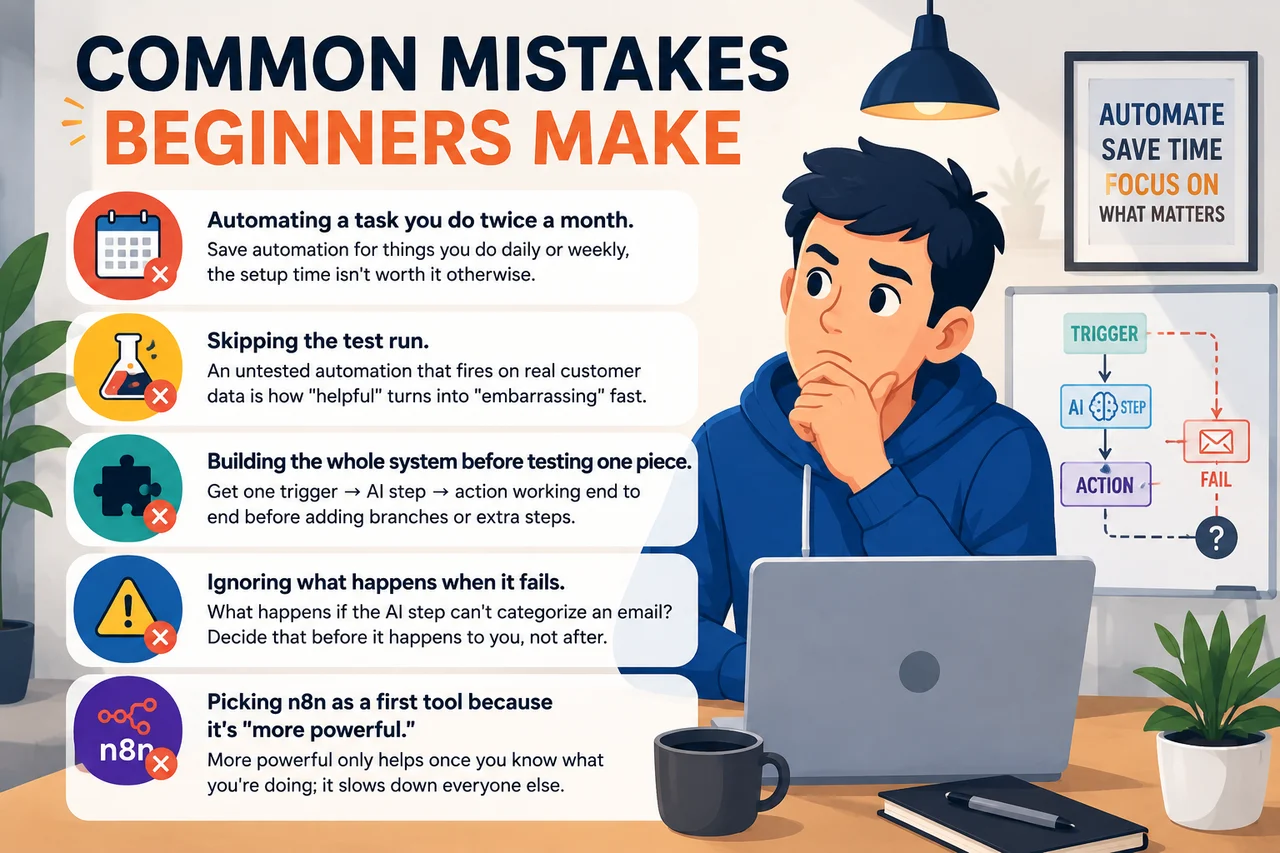
That's the entire shape of it. Every automation you'll ever build, simple or complex, is some version of trigger → AI step → action.
Picking Your Tool
The three platforms that matter here solve different problems, and picking the wrong one for your skill level is the single biggest reason beginners quit halfway through.
| Zapier | Make | n8n | |
|---|---|---|---|
| Best for | All beginners | Visual builders who want more control | Technical users, regulated data |
| Learning curve | 30–60 minutes | A few hours | 4–10 hours for your first real workflow |
| App integrations | 7,000–9,000+ | Similar range | 500+, plus any API via HTTP requests |
| Free tier | 100 tasks/month, 2-step Zaps only, plus a separate pool of 400 free Zapier Agent activities/month | 1,000 operations/month, multi-step scenarios allowed, capped at 2 active scenarios | Self-hosted Community Edition, unlimited executions, free forever |
| Starting paid price | $19.99/mo billed annually for 750 tasks ($29.99/mo, month-to-month) | ~$9/mo for 10,000 credits | €20/mo for 2,500 executions on n8n Cloud |
| How usage is counted | Per task (every action step) | Per operation/credit | Per workflow run, regardless of steps |
| Self-hostable | No | No | Yes |
That last row matters more than it looks. Zapier counts every single action as a task, so a 5-step automation running 100 times burns 500 tasks. n8n counts one full run as one execution no matter how many steps it has, which is the real reason it can end up dramatically cheaper for anything beyond a simple 2-step Zap.

If this is genuinely your first automation, start with Zapier or Make. n8n is the most powerful of the three, but it expects you to understand JSON data structures before you build anything beyond the simplest workflow, that's a second-automation problem, not a first one.
Build Your First One: A Real Walkthrough
Here's a genuinely useful starter automation: turning a messy customer email into a clean, categorized task, something almost every small business or freelancer deals with daily.
Step 1: Pick your trigger. Connect your email inbox (Gmail, Outlook) as the trigger. Set it to fire whenever a new email arrives in a specific folder or label.
Step 2: Add the AI step. Insert an AI action that reads the email content and does two things: writes a one-sentence summary, and assigns a category (e.g., "billing," "support," "sales lead") based on the content.
Step 3: Add the action. Send the summary and category to wherever you actually track work, a new row in a spreadsheet, a card in a project board, or a message in a Slack channel.
Step 4: Test it with a real email. Send yourself a test message and watch the whole chain fire. This is the step beginners skip and regret, always run one real test before turning an automation loose.
Step 5: Turn it on and forget about it. That's genuinely the whole workflow. No code, no server, no maintenance beyond checking in occasionally.
Which AI Actually Does the Work?
All three platforms plug into the same underlying models, you're not locked into one AI provider:
- Zapier: "AI by Zapier" ships with OpenAI and Google models built in, swappable from a dropdown; using your own API key runs at standard task cost, the built-in option costs more per task
- Make: dedicated AI modules for OpenAI, Anthropic Claude, and Google Gemini
- n8n: the AI Agent node supports OpenAI, Claude, Gemini, Mistral, and free local models via Ollama if you're self-hosting
Practical takeaway: the platform is just the wiring. The model doing the actual reading and writing is the same GPT, Claude, or Gemini you might already use directly, you're just skipping the copy-paste.
What to Automate First
If you're not sure where to start, these are genuinely good first projects, each one is the trigger → AI step → action shape from earlier, just applied differently:
- Meeting notes → action items. Trigger: a new recording or transcript. AI step: extract action items and owners. Action: create tasks automatically
- Customer reviews → sentiment tags. Trigger: new review comes in. AI step: classify as positive, neutral, or negative. Action: route negative ones to a Slack alert
- Job applications → first-pass screening. Trigger: new resume submitted. AI step: summarize experience against your job requirements. Action: add to a ranked spreadsheet
- Social media mentions → draft replies. Trigger: your brand gets mentioned. AI step: draft a reply in your brand voice. Action: save as a draft for a human to approve before sending
Notice none of these fully remove the human. The AI step drafts, categorizes, and summarizes, a person still makes the final call on anything that matters. That's not a limitation, it's the right way to build your first few automations.
Where to Go From Here
Once your first automation has run reliably for a week or two without you babysitting it, that's your signal to build a second one, not to make the first one more complicated. Automation compounds: five small, reliable workflows are worth more than one fragile, ambitious one. Pick the next most annoying repetitive task on your list, and repeat the same trigger → AI step → action shape you just learned.
Pricing and free-tier limits for Zapier, Make, and n8n change frequently, always check each platform's official pricing page before committing to a plan.