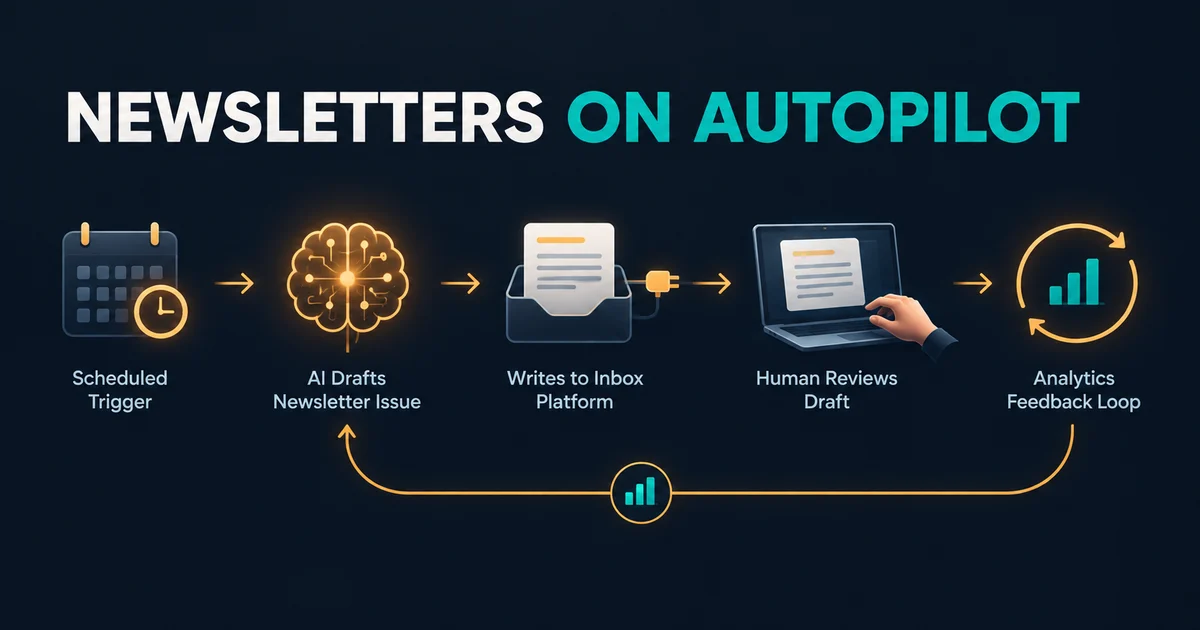
Yes - you can automate roughly 80% of your newsletter with a five-part pipeline: a scheduled trigger (n8n), Claude drafting the issue from your curated sources, the Beehiiv MCP writing it into beehiiv as a draft, a mandatory human review gate (publishing stays app-only by design), and a read-only analytics loop that feeds last issue's performance back into the next prompt. Total new spend for an operator already on a paid plan: about three cents per issue in Claude API calls.
Before you start, you need any paid beehiiv plan (write access via MCP requires it; the free Launch plan is read-only), the connector URL https://mcp.beehiiv.com/mcp, an n8n instance (the self-hosted Community Edition is free) or a Make account, and an Anthropic API key. If you are on the free plan you can still build the analytics feedback loop, since reads work on every plan. And to set expectations up front: publish, schedule, and send stay manual in the beehiiv app. That is a design boundary, not a gap.
In short:
- The pipeline: Schedule Trigger -> Claude draft -> beehiiv MCP write -> human review in the app -> metrics read-back into the next prompt.
- Cost floor: $49/mo beehiiv paid plan (includes unlimited sends) plus roughly $0.03 per issue on Claude Sonnet 5, less on Haiku 4.5.
- MCP write works on any paid plan; the API send route needs Max/Enterprise - MCP is the cheap programmatic route for small operators.
- Draft-only by design: beehiiv keeps publish/schedule/send app-only, so a human quality gate is built into the architecture.
The pipeline you are building (five moving parts)
The whole system is one loop with five layers:
- Trigger: an n8n Schedule Trigger fires weekly (or whatever cadence you publish on).
- Generation: an AI Agent node with an Anthropic Chat Model drafts the issue from your curated source links.
- Draft write: the Beehiiv MCP writes that draft into your beehiiv account as a saved post.
- Human gate: you get a notification, review the draft in the beehiiv app, and publish or schedule it there.
- Read-back: after the issue goes out, a second scheduled MCP call reads performance metrics and injects them into the next generation prompt.
The division of labor is the point: automation does drafting and data. You keep judgment. The Model Context Protocol (MCP) is the connective tissue - it is the open standard that lets an AI tool talk directly to your beehiiv account, the same way it talks to many other servers. If you want the plain-English primer on how MCP works before you build anything, read What Is MCP? The AI Protocol Explained in Plain English first.
What the Beehiiv MCP can and can't do (and which plan you need)
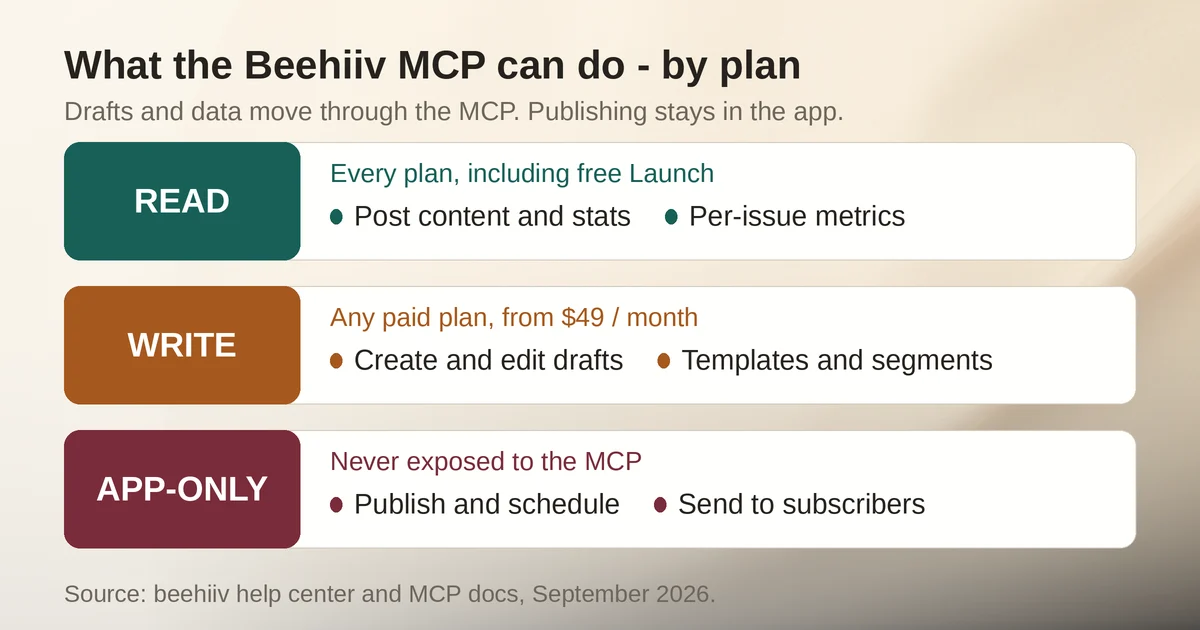
Beehiiv launched its MCP server in March 2026 as a read-only window into your account, then switched on write access for all paid plans on June 16, 2026. The current state, straight from the official help center and the beehiiv product blog:
Reads work on every plan, free included. The MCP can read your content, subscriber info, performance metrics, podcasts, automations, products, surveys, polls, referrals, website analytics, and more.
Writes need any paid plan. On a paid plan (from $49/mo) the MCP can create and edit post content, manage post templates and content tags, build segments and condition sets, manage subscriber tags and custom fields, build signup flows and subscribe forms, manage products and tiers, and even build (not activate) automation workflows.
Some things stay manual everywhere. Publishing or scheduling posts, activating automations, and sending posts are app-only - the MCP cannot do them on any plan. Editing website page body content is off-limits too (metadata only), and Stripe billing data is never exposed.
| Capability | Free (Launch) | Paid (from $49/mo) | Max/Enterprise |
|---|---|---|---|
| MCP read (analytics, subscriber data) | Yes | Yes | Yes |
| MCP write (drafts, templates, segments, automations build) | No (read-only) | Yes | Yes |
| Publish/schedule post | App only | App only | App only |
| Send via MCP | Not available | Not available | Not available |
| Send API + Create post endpoint (API) | No | No | Yes |
| Unlimited email sends | Yes | Yes | Yes |
Step 1: Connect the Beehiiv MCP
This part is the shortest step of the build. Beehiiv publishes official setup guides for Claude, Claude Code, Cursor, and Codex, plus an "Other" option for any tool that can reach a remote MCP server. In your client of choice, add a custom connector with:
- The endpoint URL:
https://mcp.beehiiv.com/mcp - A browser-based OAuth flow: you sign in to beehiiv and approve the connection
- Nothing else - no API keys, no tokens to copy
The permissions model is worth knowing: the MCP inherits your workspace user roles. If you cannot see a piece of data in the beehiiv app, the MCP cannot see it either, and Stripe payment data is excluded outright. So connect with the same account you would trust to read your dashboard.
Step 2: Build the drafting workflow in n8n
Here is the node-by-node chain, using real n8n node names. The MCP Client node documentation covers every parameter below if you want the full reference.
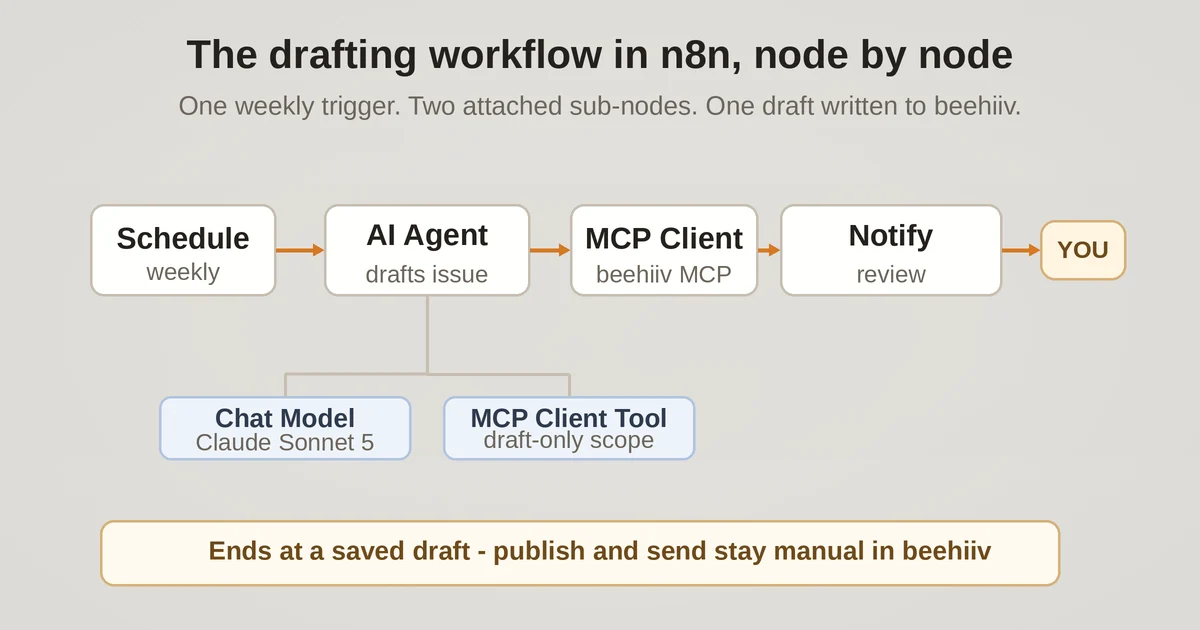
- Schedule Trigger - set it to fire weekly, a few days before your send day.
- Source payload - feed in your curated links for the issue: an RSS mix, a saved-items sheet, whatever holds the raw material.
- AI Agent node - the drafting brain. Attach two sub-nodes:
- Anthropic Chat Model - pick your model (Sonnet 5 for quality, Haiku 4.5 for cost), set max tokens and sampling temperature.
- MCP Client Tool - this sub-node exposes beehiiv's MCP tools to the agent. In its "Tools to Include" setting, scope the list down to the draft/content tools only. More on why in the guardrails section.
- MCP Client core node - the hands. Set MCP Endpoint URL to
https://mcp.beehiiv.com/mcp, choose OAuth2 authentication, and the tool list auto-fetches from the server. Use Manual or JSON input mode to pass the drafted content into a create-draft tool call. - Notify - a Slack or email node pings you that a draft is waiting.
The prompt is where quality lives. Two patterns from beehiiv's own docs work well together. First, tone matching: tell the agent to "use my most recent five posts to match my tone" - the MCP can read them, so the agent has real examples to imitate. Second, house style: since post templates are MCP-manageable, have the workflow pull your template so every draft lands in the right structure instead of generic markdown.
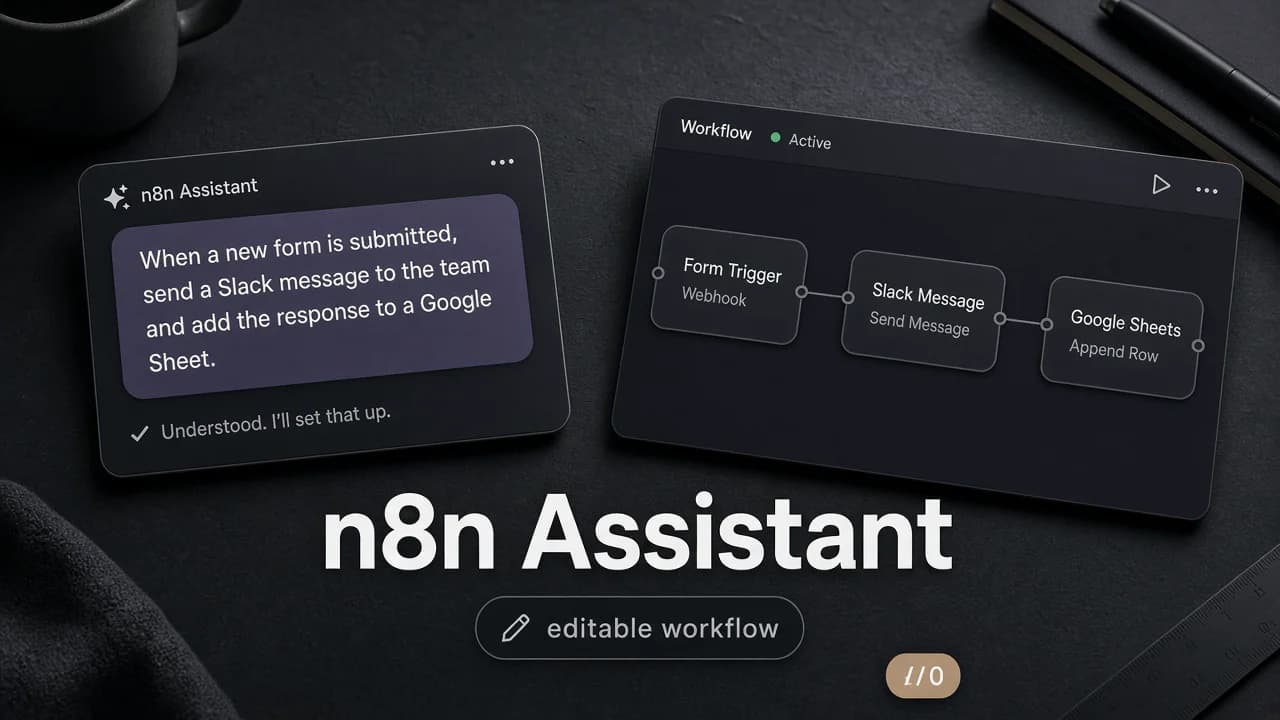
One shortcut worth knowing: n8n Assistant can build this entire workflow from a plain-language description and leave you a normal, hand-editable workflow to review. If that sounds better than wiring nodes by hand, read n8n Assistant: describe an automation, get a workflow you can still edit.
Step 3: The human quality gate (why you can't skip it)
The pipeline ends at a saved draft and a notification to you. Publishing or scheduling happens in the beehiiv app, by you, every time. You cannot skip this step, and you should not want to: it is the feature, not the limitation. An AI-drafted issue that goes straight to your subscribers without a read-through is a reputation experiment you did not sign up for.
There is a production-grade alternative for teams that eventually want fully automated sends: the Send API and Create post endpoint. But those sit on Max and Enterprise plans only, two tiers above where MCP write access starts. Beehiiv's own guidance is explicit that the API, not the MCP, remains the route for production sends - the MCP is deliberately adaptive and non-deterministic, which is perfect for drafting and analysis, less perfect for guaranteed formatting on tens of thousands of inboxes.
Step 4: Close the loop with read-only analytics
After each issue goes out, a second scheduled MCP Client call reads performance metrics - opens and clicks per post, subscriber data - and writes a compact summary into the same place your source payload lives. Next cycle, your generation prompt includes a line like: "Last issue's top post was X; subject lines with Y performed best; lean into that."
This loop works on every plan, including free, because reads have always been open. Beehiiv's own example prompts make good archetypes: have the agent identify your most-engaged free subscribers, or rewrite the subject lines of your last 10 posts, or (their canonical example) pull revenue every Monday at 8am and post a digest to Slack. The subject-line rewrite loop is the natural next automation after this one.
Prefer Make? The same pipeline in Make
n8n is not the only orchestrator that can drive this. Make AI Agents can attach external MCP servers as agent tools, so the beehiiv MCP slots in the same way. For the generation layer, Make has a verified, Make-maintained Anthropic Claude app with a Simple Text Prompt module that needs no Anthropic account or API key at all - on free plans and trials it supports Claude Haiku 4.5 only, which for a weekly newsletter draft is genuinely fine.
Budgeting differs, though. Make charges per operation, and each model converts operations into credits at its own rate: Claude Sonnet 5 consumes 452 input tokens or 90 output tokens per credit, while Haiku 4.5 consumes 904/181. On n8n self-hosted you pay only the raw API bill; on Make you pay the credit math. If you have not picked your automation platform yet, the Zapier vs Make vs n8n comparison walks through which fits your team.
What it actually costs per month
The math for a typical weekly issue is refreshingly small. Assume a 1,500-word draft: roughly 6,000 input tokens (sources, recent posts, prompt) and 2,000 output tokens. At Claude API pricing, Sonnet 5 runs $2 per million input tokens and $10 per million output tokens - and that is now the standard rate; the increase previously scheduled for September 2026 was canceled.
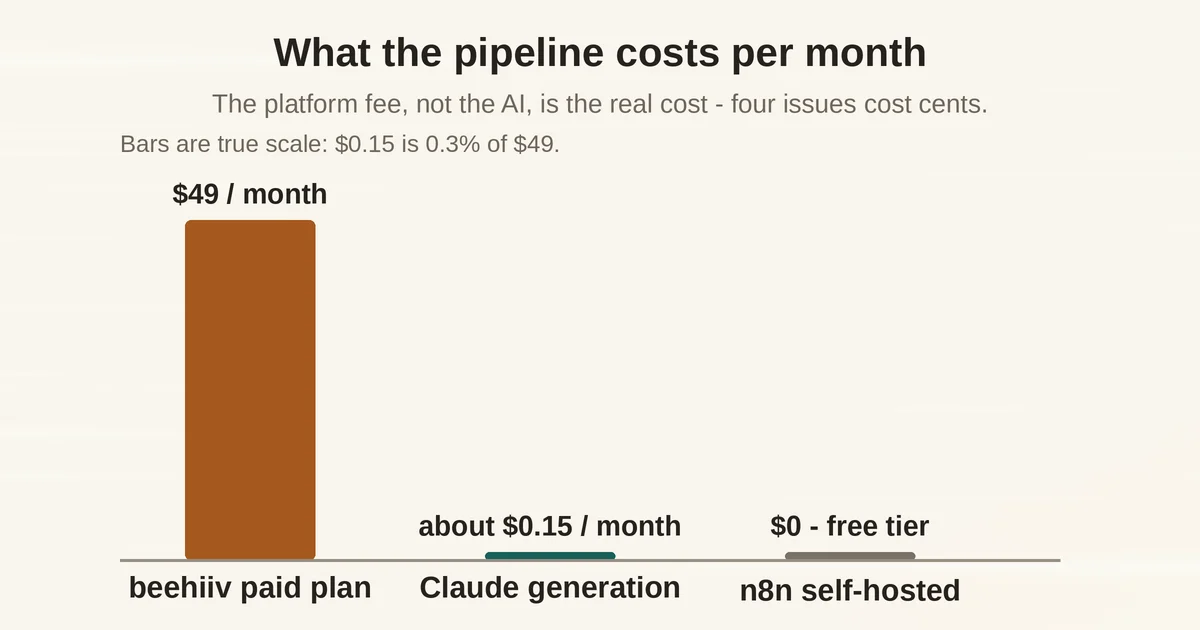
- Sonnet 5 per issue: $0.012 input + $0.02 output = about $0.03
- Haiku 4.5 per issue: about $0.016
- Four issues per month: roughly $0.13-$0.15 in generation on Sonnet 5
- Orchestration: $0 self-hosted n8n Community Edition, or n8n cloud Starter with 2,300 AI credits/mo
- The real floor: your $49/mo beehiiv plan, which includes unlimited email sends
Look at that stack: the platform fee towers over the AI cost by two to three orders of magnitude. Orchestration, not AI, is the real cost of newsletter automation - and the AI part is nearly free. If volume grows, Batch API and prompt caching are the two official levers that push generation costs down further.
Guardrails: tool scoping, tone, and data responsibility
Four guardrails keep this pipeline safe to run on a real audience:
- Scope the tools. In the MCP Client Tool sub-node, use "Tools to Include" filtering to expose only the draft/content tools. The agent then physically cannot call destructive actions like segment deletion, no matter what your prompt says.
- Guard the tone. The "use my most recent five posts to match my tone" pattern gives the agent concrete style anchors, which matters more than any abstract instruction like "write like me."
- Restrict the role. MCP permissions inherit workspace user roles, so if your workspace supports restricted roles, connect with one that has the minimum access the pipeline needs.
- Own the compliance. Subscriber data flowing through third-party tooling is your legal responsibility, per beehiiv's own terms. Route the workflow so it touches only what the draft actually needs.
One honesty note: you will not find open-rate or CTR benchmarks for MCP-driven newsletters here, because none are verifiable from primary sources. The only vendor numbers in this post are prices.
Where this goes next
The pipeline compounds: every issue you publish feeds the analytics read-back, which sharpens the next prompt, which drafts a better issue. Once the weekly draft loop feels boring - which is the goal - the natural next builds are the subject-line rewrite loop and the Monday-morning Slack digest. Both use the exact same MCP connection and read-only access you already have in place.
Prices are as of September 2026 (beehiiv pricing page, Anthropic platform pricing docs, Make app docs) and may have changed since publication.
Frequently asked questions
I run two beehiiv publications. One MCP connection or two?
Neither duplicate accounts nor workarounds: beehiiv's official method is to append a unique query parameter to the connector URL - https://mcp.beehiiv.com/mcp?account=1 and ?account=2 - and OAuth each connection separately. The parameter value is arbitrary; it just has to differ per connection. Both then stay connected in the same tool.
Should I use the MCP or the Beehiiv API for my automation?
Beehiiv's own guidance frames it: the API is a versioned, stable contract for production integrations; the MCP is adaptive and built for AI tools. For small operators there is also a pricing angle the body does not dwell on - the API's Send API and Create post endpoint need Max/Enterprise, while MCP write needs any paid plan from $49/mo. Until you need guaranteed production sends at scale, the MCP is the only affordable programmatic route.
Do I have to use Claude specifically?
No. The connector is client-agnostic - beehiiv publishes setup guides for Claude, Claude Code, Cursor, and Codex, plus any remote-MCP-capable tool - and in n8n the chat-model sub-node is swappable. This post uses Anthropic's models for the documented tone-matching strength and because the price math in the costs section is Anthropic's own.
What to do next
If you want a newsletter that mostly runs itself, start small. Pick one recurring section of your newsletter and automate only that with n8n and Claude. Let it run for two weeks and check every draft before it goes out. When the quality holds, add the next section. Keep the publish button in human hands, at least until you have sent fifty automated issues without a miss.
You can find the tools in this pipeline, and hundreds more, on Toolbit.ai. We publish practical automation guides on this blog every week.