Pick Zapier if nobody on your team writes code, Make if you want a visual builder with a generous free tier, and n8n if engineers will own the workflows. The deciding factor is the billing unit: Zapier counts tasks, Make counts credits and n8n counts whole workflow runs. The same 10,000 runs of a five-step workflow come to 40,000 Zapier tasks but only 10,000 n8n executions.
Quick verdict:
- Pick Zapier if you want the largest app catalog and a no-code start. Zapier says it connects 10,330+ apps.
- Pick Make if you want a visual builder and a free plan with 1,000 credits a month.
- Pick n8n if you run high volumes or multi-step workflows, or need to self-host for data control.
- No all-rounder: decide by your team's skill and your monthly volume, not by feature lists.
| Axis | Zapier | Make | n8n | Winner |
|---|---|---|---|---|
| AI agents | Zapier Agents, MCP on all plans | AI Agents app with modules, scenarios, MCP tools | Agents, memory, MCP, your choice of LLM provider | n8n for control |
| Easiest start | 10,330+ apps, Free plan | 3,500+ apps, Free plan | 2,367 integrations, more setup | Zapier |
| Cost at 10,000 runs | $289/mo (Pro, annual) | Unverified | 50 EUR/mo (Pro, annual) | n8n over Zapier (Make unverified; USD vs EUR) |
| Self-hosting | - | - (Make pages don't mention it) | Community edition | n8n |
How we compared
We read each vendor's pricing page, integrations page and AI docs on October 21, 2026, and did not run the tools.
We scored four axes that decide this choice: AI agent features, how easy it is to start, cost at a fixed workload and self-hosting. For cost, we priced one sample workload: 10,000 runs a month of a five-step workflow (one trigger plus four actions). Make did not show paid prices to our checks. Its paid tiers are marked unverified.
Which has the best AI agents? n8n for control, Zapier for reach
n8n gives engineers the most control, while Zapier reaches the most apps. All three now ship agent features, but they meter them differently.
- Zapier: Zapier Agents bills "activities", not tasks. The Free plan includes 400 activities a month and Pro 1,500. Zapier MCP is on all plans, and Zapier's pricing page gives an example of an MCP tool call costing two tasks. Zapier's agents page says agents work "across 9,000+ apps". That is fewer than its apps page lists.
- Make: the Make AI Agents app lets you "create, configure, and manage AI agents with instructions, knowledge, and tools". Tools can be modules, scenarios or MCP tools. Some AI Content Extractor modules use 2 or 10 credits per operation instead of one.
- n8n: the n8n docs describe AI workflows "with LLM providers, agents, tools, memory, and MCP servers". Providers include OpenAI, Anthropic and Google. Self-hosted n8n keeps workflow execution on your servers, though calls to a hosted LLM provider still leave them.
None of the three vendor pages labels its agent product beta or generally available. If you want a governed setup, see our guide to governed n8n and Claude workflows.
Which is easiest to start? Zapier, on app reach
Zapier is the easiest start for non-technical teams because it has the largest catalog. Zapier lists 10,330+ apps, Make says 3,500+ and n8n lists 2,367 integrations. Each figure comes from the vendor's own page.
The free plans differ more than the catalogs. Zapier Free gives 100 tasks a month, two-step Zaps only, 15-minute polling and one seat. Make Free gives 1,000 credits a month, and by default one operation equals one credit. n8n's free option is the self-hosted community edition, which means you install and maintain it.
Pricing: which costs least at 10,000 runs?
n8n costs less than Zapier for multi-step workflows because it bills a whole workflow run as one execution, "regardless of complexity". Zapier bills each successful action as a task, and Make bills each operation as a credit. Prices below are annual billing, per month, checked October 21, 2026.
| Plan | Zapier (USD) | n8n (EUR) | Make |
|---|---|---|---|
| Free | 100 tasks | Self-host community edition | 1,000 credits |
| Entry paid | Pro: from $19.99 (smallest task tier); $49 for 2,000 tasks | Starter: 20 for 2.5K executions | Core: check vendor page |
| Mid | Pro: $129 for 10,000 tasks | Pro: 50 for 10K executions | Pro: check vendor page |
| Higher | Pro: $289 for 50,000 tasks | Business: 667 for 40K executions | Teams: check vendor page |
| Top | Pro: $489 for 100,000 tasks (Team and Enterprise are separate plans) | Enterprise: contact sales | Enterprise: check vendor page |
Zapier's monthly billing costs more: $73.50, $193.50, $433.50 and $733.50 for the same four Pro tiers. Overage runs at 2.5x the base rate on monthly plans and 1.25x on annual ones. Usage stops at 3x the subscription.
The sample workload works out like this:
| Tool | Billing unit | Units for 10,000 runs x 5 steps | Plan that fits |
|---|---|---|---|
| Zapier | Task per successful action (trigger free) | About 40,000 tasks | Pro 50,000 tasks, $289/mo annual |
| n8n | Execution per workflow run | 10,000 executions | Pro, 50 EUR/mo annual |
| Make | Credit per operation | 50,000 credits if each module uses one | Price unverified |
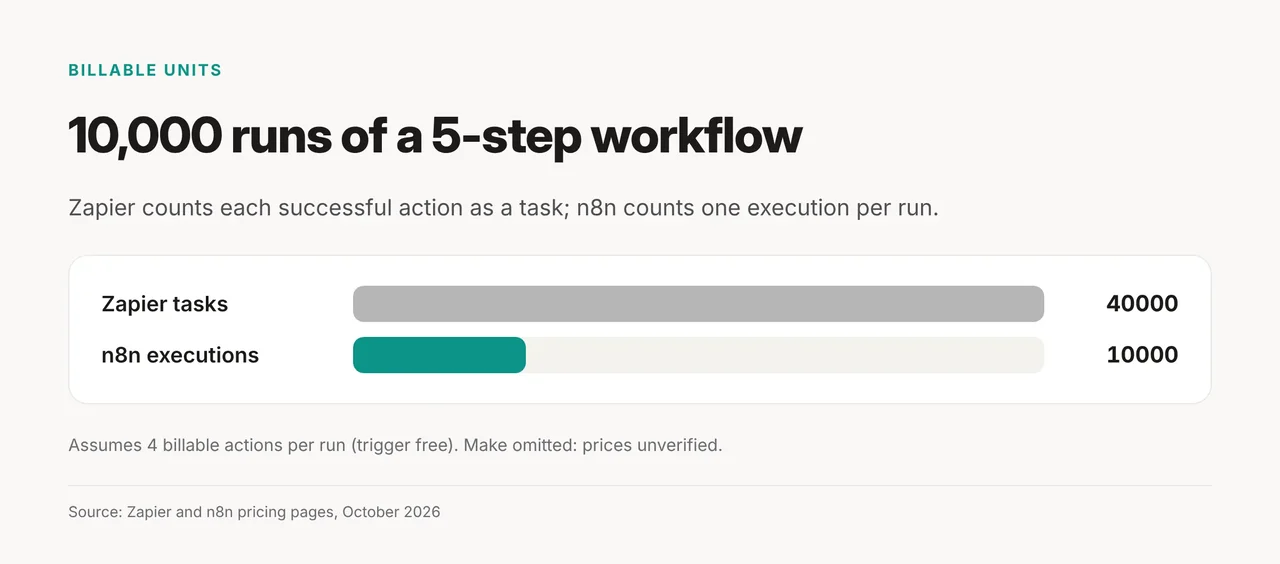
The same 10,000 runs are 4x more billable units on Zapier than on n8n. The Zapier count assumes all four actions are billable. Formatter, Paths and failed steps don't count as tasks, while some AI steps cost more than one. Check current Make prices on the Make pricing page, and confirm the others on Zapier's pricing page and n8n's pricing page.
Which should you pick? Decide by skill, then by volume
Start with who will build and maintain the workflows, then check your monthly volume against the tables above.
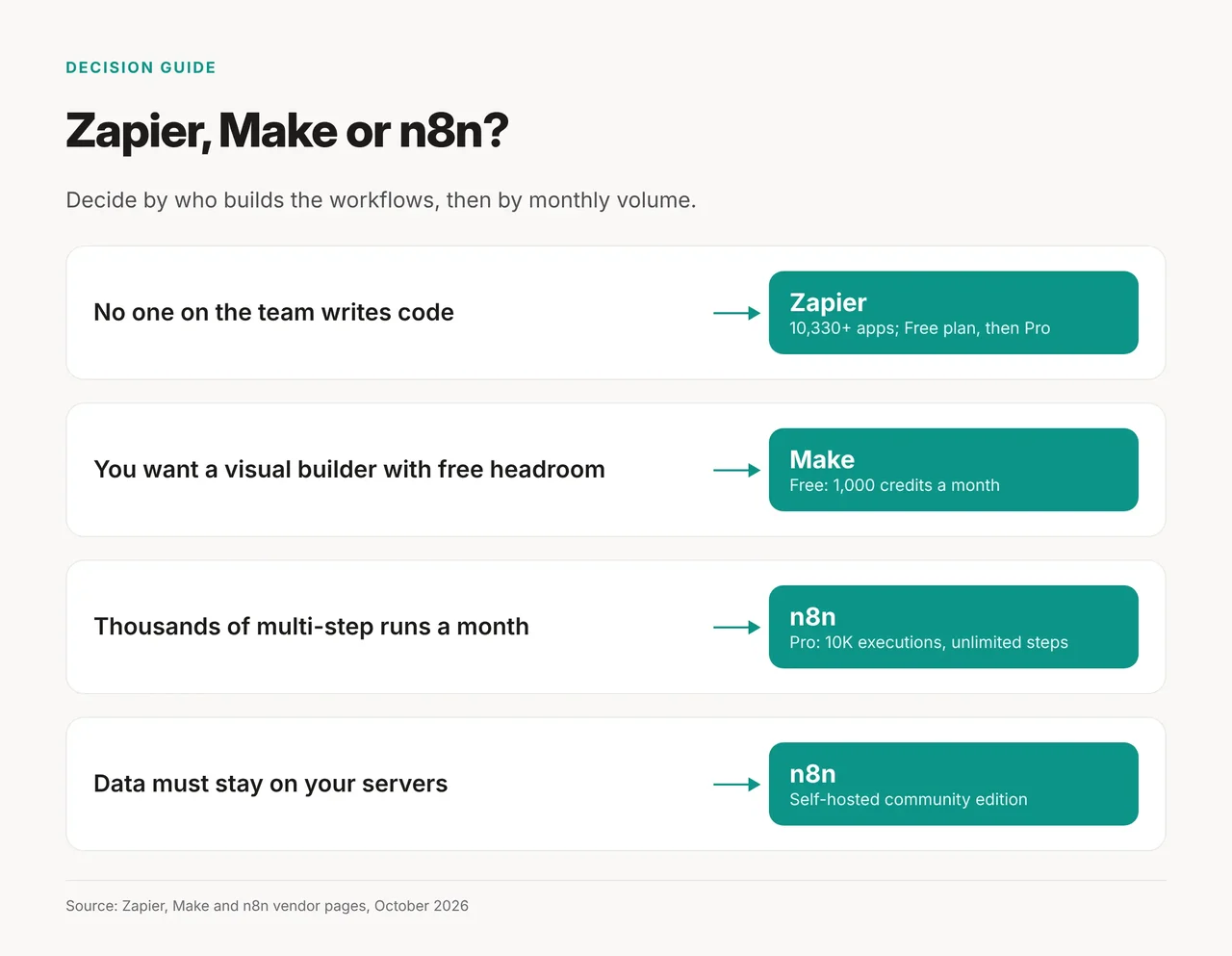
- No one writes code: start on Zapier Free, then move to Pro when you need multi-step Zaps, webhooks or premium apps.
- You think in flowcharts and want more free headroom: try Make Free, then check its paid tiers on the vendor page.
- You run thousands of multi-step runs a month: n8n Pro covers 10K executions with unlimited steps.
- Data must stay on your servers: self-host n8n's community edition, if engineers can own it.
The rule in one line: Zapier when skill is the constraint, n8n when volume or data control is.
Pick none of the three if...
Some teams are better served elsewhere, or by checking license limits first.
- You plan to resell or distribute self-hosted n8n: its license allows use "only for your own internal business purposes" or non-commercial use.
- You need SSO or Git on free self-hosted n8n: the community edition excludes SSO (SAML and LDAP), Git version control, environments and workflow sharing.
- You want to learn agents before buying a platform: start with our guide to build your first AI agent free.