Somewhere in your company right now there is a spreadsheet that a real human updates every Monday morning. Paste the CRM export into the first tab, fix the broken lookup, google the three new leads, type what you found into column F, hit save. Nobody enjoys this. Everybody does it anyway.
That ritual is the market Gumloop and Paradigm are both fighting over, and they are two of the more interesting contestants in the spreadsheet agent space. But they come at the problem from opposite directions. Gumloop grew out of the no-code automation world: you build flows that move data between your tools, and the spreadsheet is often just one stop along the way. Paradigm attacks the spreadsheet itself: it replaces the static grid with a workspace where every cell can be a small research agent.
Both companies are alive and actively shipping as of September 2026, which is worth saying out loud in a category that has already buried a few tools. Both also publish current pricing, so this comparison can stay grounded in real numbers rather than launch-year hype. Here is what each one actually does, where each one wins, and how to pick between them.
What a spreadsheet agent actually does
First, a distinction that matters more than any feature list. A chat-with-data tool, like Copilot in Excel, answers questions about data you already have. "Summarize this column." "Write a formula for weighted pipeline." Useful, but passive: nothing changes unless a human types.
A spreadsheet agent does per-row work at scale. Three patterns show up again and again in real teams:
- Extraction: pulling data into the sheet from web pages, PDFs, databases, or other tools, so nobody pastes anything by hand.
- Enrichment: for every row, look something up. Company revenue, a decision maker's email, the latest funding round, a hiring signal. A 500-row enrichment task that eats an analyst's week becomes a job you kick off and walk away from.
- Pipeline transformation: on a schedule, clean incoming data, dedupe it, join it with something else, compute a score, and push the result into the system of record.
That is the difference between an assistant and a worker. It also makes the Gumloop versus Paradigm question much easier, because each tool embodies a different half of the job.
| Gumloop | Paradigm | |
|---|---|---|
| Core model | Node-based flows plus AI agents | Agentic spreadsheet, agents in cells |
| Where the work lives | A canvas of connected nodes | The grid itself |
| Strongest at | Cross-system pipelines and scheduled jobs | Row-by-row research and enrichment |
| Data reach | Web scraping nodes, 35+ AI models, MCP support, SaaS connectors | Live web research, licensed data sources, uploads, connectors |
| Entry price | $37/month Pro, plus 8% orchestration fee | $200/month Individual, billed annually |
| Included credits | 20,000 per month | 20,000 per month |
| Free option | 14-day trial, no permanent free plan | None published, demo on request |
| Team setup | Unlimited seats and teams | Individual is solo, Business adds unlimited members |
Gumloop: pipelines that connect your stack
Gumloop started life as a no-code AI workflow tool, and you can still see those roots. You drag nodes onto a canvas and connect them: this node scrapes a page, this one cleans the text, this one calls a language model, this one writes the result to Google Sheets or your CRM. On top of that canvas it now runs agents you can chat with, and its own pricing page lists the original workflows under a "Legacy" label, which tells you where the product is heading. The company calls itself a multiplayer AI agent builder, has raised a $50M Series B led by Benchmark, and lists Shopify, Instacart, and Ramp among its customers.
For spreadsheet work specifically, Gumloop's strength is when the spreadsheet is one stop in a longer journey. A typical build: a form submission triggers a flow, the flow dedupes the lead, an agent researches the company, another node scores it, the result lands in a Google Sheet, and a Slack message pings the sales lead. The sheet is a destination, not the workplace. If your repetitive work is mostly "get data from A, transform it, drop it in B," this is the shape of tool you want.
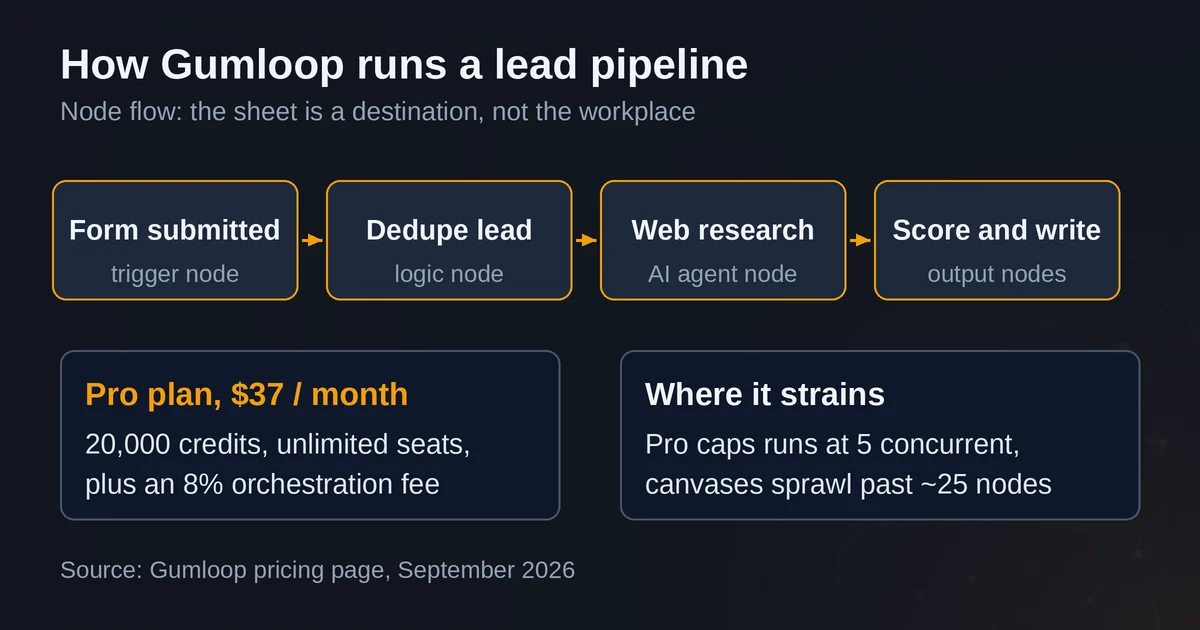
Where it strains: canvases get unwieldy once a flow passes a couple dozen nodes, the Pro plan caps you at 5 concurrent workflow runs, and analysts who think in rows and columns tend to find a node graph alien. This is infrastructure for operations people more than a place to do analysis.
Paradigm: agents that live in the grid
Paradigm, founded by Anna Monaco out of Y Combinator's Winter 2024 batch and backed by $7M in total funding including a General Catalyst-led seed, was covered by the Wall Street Journal as a new entrant in the race to dethrone Excel. The product is a spreadsheet where cells take instructions instead of values.
The mechanics are simple to describe and genuinely different to use. Type a prompt into a column, and every row in that column executes it. One column can pull each company's headquarters and revenue estimate from live web research, the next can score deal fit, the next can draft a summary. A workflow in Paradigm terms is just a set of columns working together: one researches, one scores, one summarizes. You upload your existing data or generate a list from its sources, then watch cells fill in one by one. The docs also cover signal tracking, webhooks, and outbound email campaigns from the sheet, which points at sales and sourcing teams as the core audience.
The market map is the canonical demo: a 500-company competitive landscape that used to take a consulting team a week gets assembled in an afternoon, with per-cell results you can inspect. That is exactly the category of work chat-with-data tools handle worst, because the data does not exist in the sheet yet. The agent has to go get it.
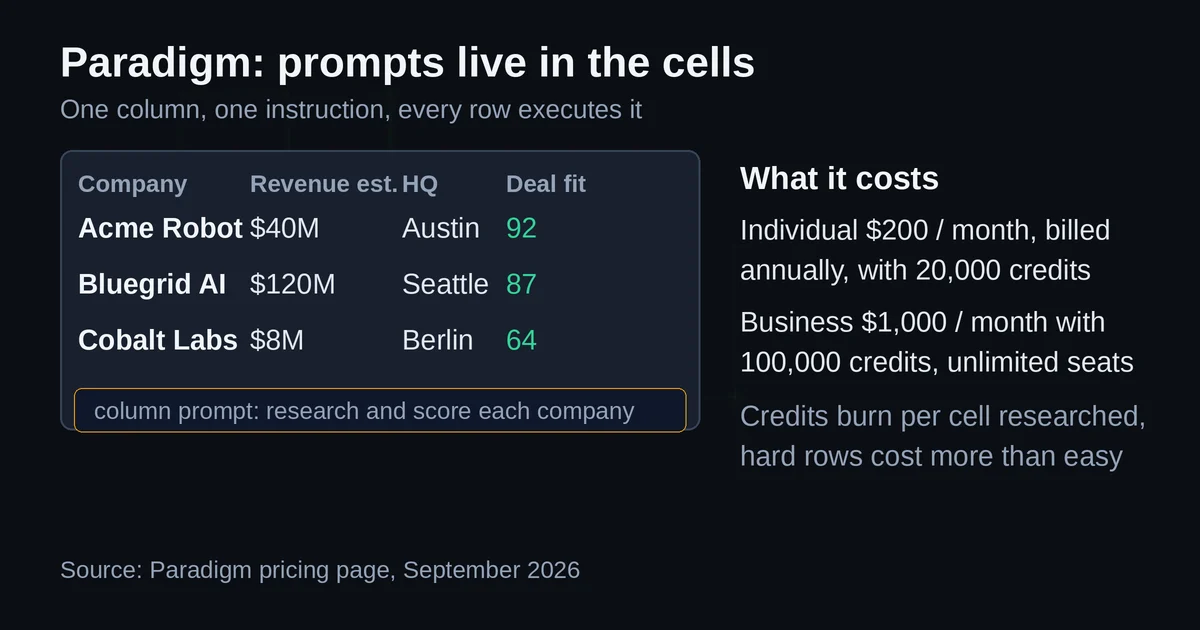
Where it strains: cost scales with rows times research depth, so a big list is a real budget line. It is a destination more than a connector; if your end state is "update the CRM and notify three systems," you still need to get the data out. And it is a young company building fast, so expect the surface to keep changing.
Where each one breaks
Gumloop breaks when the sheet is the product. If your team lives in the workbook, interrogates rows, and iterates on prompts, a node canvas forces you to leave your natural habitat. Paradigm breaks when the sheet is just a stop. If the deliverable is a CRM update plus notifications, you will hit its edges quickly and end up hand-copying data anyway.
Both break on cost predictability, in opposite ways: Gumloop's bill scales with pipeline volume plus the 8% fee, Paradigm's with rows times research depth. Neither breaks on ambition. Both genuinely do the extraction, enrichment, and transformation loop they advertise.
How to choose
The decision rule is short. If the repetitive work is moving data between systems on a schedule, and the spreadsheet is an input or an output, choose Gumloop: $37 to start, flows that connect your tools, unlimited teammates. If the repetitive work is row-by-row research, enrichment, and monitoring, and the spreadsheet is where your team actually works, choose Paradigm: agents in the grid, results you can inspect per cell, $200 per month to start.
If your version of the problem is lightweight, say a weekly 40-row cleanup, neither tool justifies the spend. That is a job for the built-in AI in Sheets or Excel. For more context on the tooling landscape before you commit, our guides on AI agents versus AI automation, the Zapier vs Make vs n8n comparison, and building your first AI automation without code cover the same ground from the automation side.
Pricing and plan details are as published by the vendors around September 2026 and can change, so confirm on the official sites before you buy.
Two quick questions
Is Gumloop or Paradigm better for automating Excel specifically? Neither automates the Excel file in place the way a Copilot add-in does. Gumloop automates the work around your spreadsheets; Paradigm replaces the spreadsheet with an agentic one. If you must stay inside a .xlsx file, Excel's own Copilot is the more honest answer.
Do Gumloop or Paradigm have free plans? Gumloop no longer offers a permanent free tier, only a 14-day trial. Paradigm publishes no free plan, though you can request a demo.