The average small business owner loses about eight hours a week to admin. A March 2026 survey of 167 UK owner-operators put it at 384 hours a year, ten full working weeks, and found that 83% of them had never once calculated what that time costs. Almost half do their admin in the evenings, after the actual work is done.
That eight-hour number is worth sitting with, because most of it is not deep strategic work. It is invoice chasing, inbox triage, writing up processes for a new hire, recapping meetings, and pulling numbers together for a Friday report. Every one of those tasks now has an AI tool that claims to handle it. The question that matters is not whether the tools exist, it is whether a stack of them can run a real week without creating a second job: managing the AI.
So let's do this properly. Below is one real owner's week, hour by hour, with a specific tool slotted into each admin block, the actual setup effort each one takes, and the real monthly cost at September 2026 prices. Then the honest total, including what I would deliberately leave manual.
The week we're automating
Meet Priya. She runs a four-person marketing consultancy, bills clients monthly, and does most of her own admin in the gaps between client work. Her admin week, before any AI, looks roughly like this:
- Monday morning: two hours in the inbox, deciding what deserves a reply, drafting replies, filing the rest.
- Tuesday: invoicing day. Create and send the month's invoices, chase the three that are overdue, update the bookkeeping.
- Wednesday: she has to document the client-onboarding process because a new hire starts next month. She has been putting this off for six weeks.
- Thursday and Friday: five client calls across the two days, each needing a recap email and a note in the project tracker.
- Friday afternoon: the monthly numbers. What's outstanding, what came in, what the retainer clients are worth versus the project work.
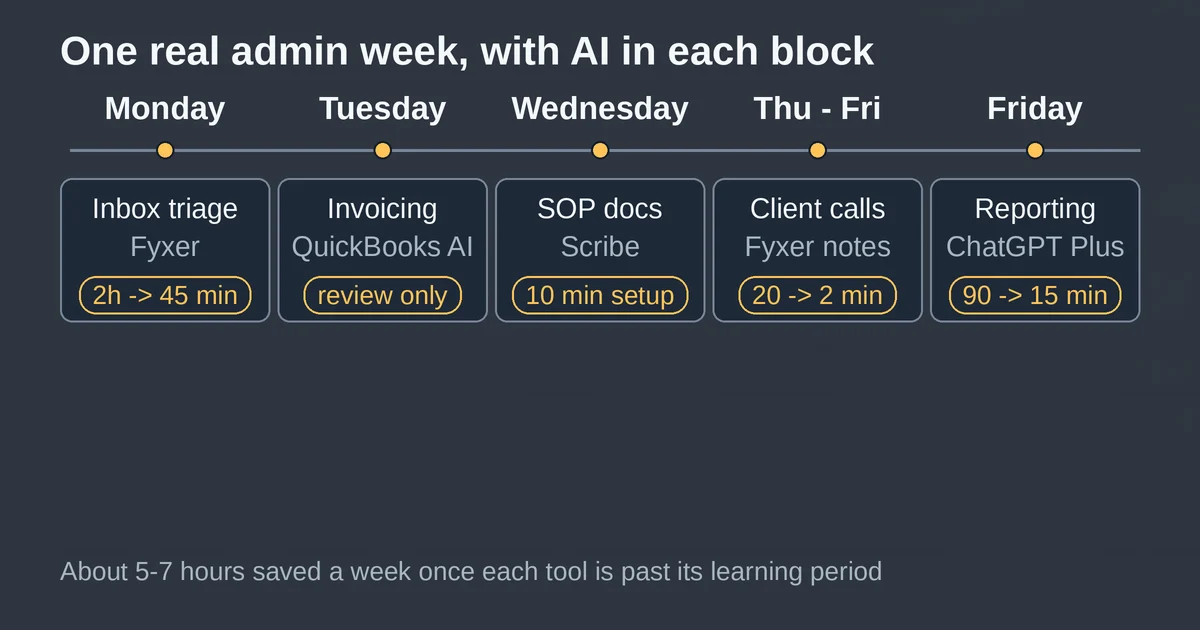
Total: roughly ten hours of admin on a good week, twelve on a bad one. Sound familiar? Here is each block with an AI tool attached, and what it actually takes to get working.
Monday: the inbox, at $22.50 a month
Priya's Monday two hours is the classic triage grind: read, sort, reply, file. The AI-native email assistants now handle all four steps. For this stack I'd put her on Fyxer Starter, which costs $30 a month or $22.50 if billed annually. It organizes one inbox and calendar, files mail into buckets like "To Respond" and "FYI", and drafts replies in her voice that she edits rather than writes. The first week or two involves real correction effort: you re-categorize what it files wrong, and it learns from the corrections. After that, Monday's two hours compresses to roughly 45 minutes of review-and-send.
Fyxer is a pick, not a verdict. Superhuman's Starter plan is the same idea at $25 a month billed annually, with its AI drafting and split inbox; Shortwave is the third serious option. If you want the full head-to-head with all the trade-offs, we've already done that comparison in our guide to AI email triage tools, so I won't rehash it here. Any of the three does the job; the point for the stack math is that solid AI inbox help now costs $22 to $30 a month, not the $30-plus it did a year ago, and setup is an afternoon, not a project.
One honest caveat: none of these tools should auto-send anything yet. The time saving comes from review speeding up, not from removing you from the loop.
Tuesday: invoicing, with $0 of new AI spend
Invoicing is the task small business owners most want automated, and for once the economics are weirdly good, because if Priya already uses QuickBooks Online, the AI is already in her subscription. Intuit has shipped AI agents across QuickBooks since late 2024, standard in every account since September 2025: a Payments agent that drafts and sends invoices, and drafts escalating reminder emails for overdue ones, with you reviewing before anything goes out. QuickBooks' own reported numbers claim AI-drafted reminders get businesses paid about 45% faster, roughly five days sooner. Treat that as the vendor talking, but even at half that, chasing the late three stops being a Tuesday task.
The bigger 2026 news is where invoicing AI now lives. In July, Intuit expanded the QuickBooks connector in Claude and the plugin in ChatGPT so you can run the whole quote-to-cash loop conversationally: create, send, and update invoices, manage recurring invoices, send overdue reminders, issue payment links, even add a new customer and catalog items, all by asking. The official announcement on Intuit's blog walks through the details. Priya's Tuesday shrinks to a quarterly-hour of reviewing a Business Feed of auto-drafted invoices, reminders, and cash-flow alerts, approving what's right.
So why the asterisk on "$0"? The AI costs nothing extra, but the QuickBooks Online subscription it rides on is not free. Simple Start runs $38 a month after Intuit's August 2026 price adjustment, and that adjustment raised Essentials, Plus, and Advanced far more sharply while leaving Simple Start untouched. If Priya is already paying for accounting software, the AI delta really is zero. If she is choosing accounting software right now, the AI features should factor into which tier earns the fee.
Wednesday: SOPs, at $0 to start
Priya's Wednesday task, documenting onboarding for the new hire, is the one she has dodged for six weeks, because writing step-by-step documentation by hand is miserable. This is the cheapest slot in the stack: Scribe's free Basic tier. Install the browser extension, click record, run the process the way you normally would, and it produces a step-by-step guide with screenshots and written instructions, ready to share by link.
The free tier has real limits, to be clear: it only captures web apps, and there are no PDF exports or your-own-branding. If Priya's process involves desktop software, or she wants polished client-facing documents, Pro Personal is $25 a month billed annually. But for internal onboarding docs built from browser tools, free genuinely covers it. Setup effort: about ten minutes, plus the length of the process you're recording. This is the highest time-saved-per-dollar item on the whole list.
Scribe is not the only option here, Tango and Guidde both auto-generate process documentation, and which one fits depends on whether you want static guides, interactive walkthroughs, or video. We compared all three in our AI SOP generator guide, so check that before committing.
Thursday and Friday: meetings, at $0 or $10 a month
Five client calls a week each generating a recap email and a tracker note is the most automatable thing in this entire week, because meeting notetakers are the most mature category of AI ops tool. Two paths for Priya:
Since she is already on Fyxer for email, she gets the notetaker bundled: Fyxer Starter includes a notetaker that joins her calls and takes notes. For a consultancy that just needs recaps, that alone may close this block at no additional cost.
If she wants searchable transcripts and CRM-grade extras, Fireflies.ai is the standalone pick. Its free plan is unusual: unlimited transcription on every tier, with the catch that Free only stores 400 minutes per team and blocks downloads. A four-person shop holding five calls a week will outgrow that in about a month. Pro is $10 a seat a month billed annually, $18 if you pay monthly, and adds 8,000 minutes of storage per seat plus unlimited integrations. One gotcha worth knowing before you upgrade: Pro carries the same 20 monthly AI credits as the free plan, so paying for Pro buys you storage and recording, not more AI processing. The credits only increase on Business.
Recap emails go from 20 minutes each to two minutes of review. Thursday and Friday reclaim roughly 90 minutes a week.
Friday afternoon: reporting, at $20 a month
The last block is the one people forget to automate: turning a month of invoices, expenses, and notes into "here's where the business stands." This is where a general AI assistant earns its subscription. ChatGPT Plus is still $20 a month in 2026, and the relevant shift this year is that the QuickBooks plugin means Priya can ask about her actual outstanding invoices, cash position, and retainer-versus-project revenue split inside the same chat where she drafts the client update.
The practical workflow: export the P&L and aged receivables from QuickBooks, upload to ChatGPT (or query the plugin directly), and ask for the three-paragraph owner's summary plus the two anomalies worth investigating. What used to be a 90-minute Friday slog becomes 15 minutes of sanity-checking numbers the assistant assembled. If Priya ran her whole operation in Notion instead, the equivalent is Notion's Business plan at $20 a member a month, which is now the cheapest tier with the full Notion AI suite included; the old standalone AI add-on was retired in 2025.
Two guardrails for this block. First, sanity-check every number against the source before it goes in front of anyone; assistants mis-transpose digits more confidently than spreadsheets do. Second, don't connect your accounting data to an AI tool that trains on customer data by default. Intuit states its connector doesn't use your data to train foundation models, and ChatGPT's team tiers default to no training, but it is your client list, so verify the setting yourself.
The honest total
Here's the stack on one line, using annual billing where the vendor offers it:
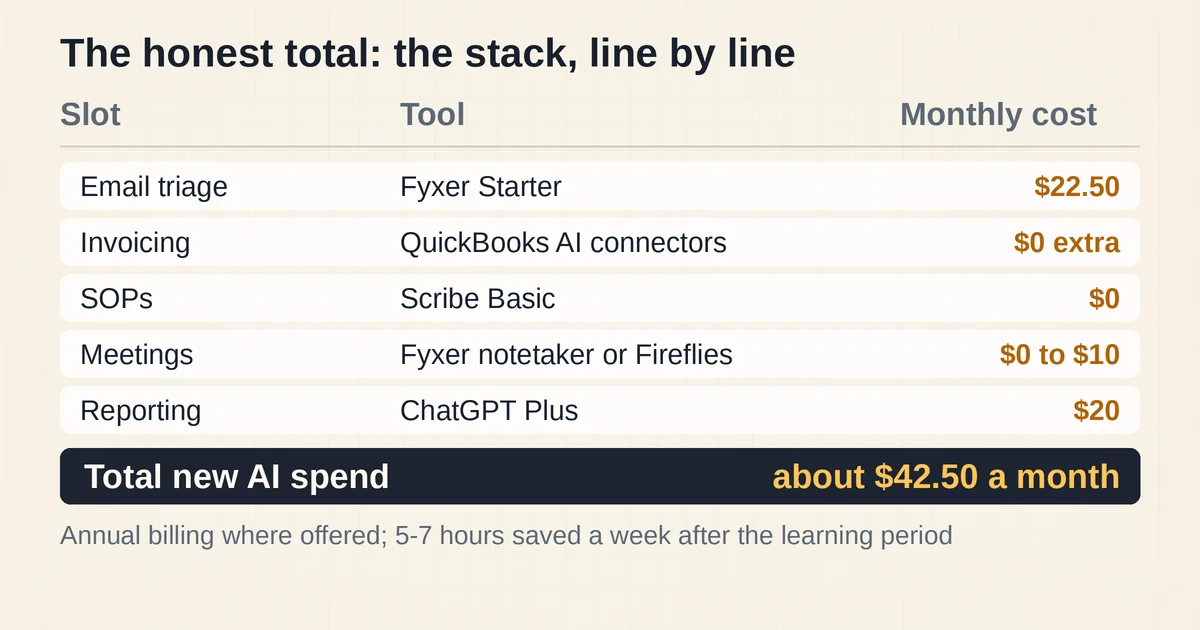
| Slot | Tool | Monthly cost | Setup effort |
|---|---|---|---|
| Email triage | Fyxer Starter | $22.50 | One afternoon, two weeks of corrections |
| Invoicing | QuickBooks AI (Claude/ChatGPT connector) | $0 extra on an existing QBO plan | Under an hour |
| SOPs | Scribe Basic | $0 | 10 minutes |
| Meetings | Fyxer notetaker (or Fireflies Pro) | $0 to $10 | 10 minutes |
| Reporting | ChatGPT Plus | $20 | An hour of prompt tuning |
Total new AI spend: about $42.50 a month on the lean version, roughly $52.50 if meetings need Fireflies Pro. Pay month-to-month instead of annually and it's closer to $68. Add the underlying QuickBooks Simple Start subscription if she doesn't have it, and the all-in figure is about $80 a month.
Hours saved: realistically five to seven a week once each tool is past its learning period, not the ten the "automate everything" pitch implies. The first two to four weeks will save almost nothing while you correct the email assistant's filing and rebuild trust in the invoice drafts. That correction work is the actual price of the stack, and anyone who tells you otherwise is selling something.
At a modest $50-an-hour value on owner time, five hours a week is $1,000 a month returned for $50 spent. Even with the learning-curve tax, the stack pays for itself by the second Tuesday.
Pricing and plan details are as published by the vendor around September 2026 and can change, confirm on the official site.
What I would not automate yet
The stack above stops at the edge of the genuinely risky work, on purpose.
Supplier invoice data entry. QuickBooks' AI reads receipts fine, but it does not extract line items from the vendor invoices you receive into payable bills; that still needs third-party capture tools, most of which still want a human checking every extraction. If you receive fewer than a few dozen supplier invoices a month, keep it manual.
Anything that moves money. Approving payments, running payroll, reconciling the bank feed to the point where you stop looking: keep a human in that loop. The error cost is dollar-weighted, so an automation that is right 95% of the time is not good enough when the 5% writes real checks. Intuit's payroll actions inside Claude and ChatGPT are designed as done-for-you drafts you review, and that is the correct posture.
Glue automations, before the manual version works. If you find yourself in Zapier or Make before a workflow has run smoothly by hand for a month, you will automate the confusion, not the process. We've written about the hidden cost of AI automation and the mistakes that kill automation projects before, and the pattern is always the same: the stack that works starts small, stays boring, and keeps a person at every decision that matters.
Two questions people actually ask
Can I build this stack in a weekend?
The accounts can all be created in a weekend, but the stack can't. Budget two to four weeks of light correction work, mostly on the email assistant, before the five to seven saved hours a week show up. Scribe and the notetaker are useful on day one; the inbox and invoice drafts need to earn trust.
What if I only do one thing?
Start with invoicing. It is the task owners most want automated, the AI is likely already inside accounting software you pay for, and it is the only block where the payoff is cash arriving faster, not just hours. Everything else in the stack saves time; invoice chasing is the one that moves money.