Every operations team has the same dusty folder. It is called "SOPs" and nobody has opened it since the last person who knew the process left. The documents inside were written years ago, probably by someone describing the process from memory, and they describe a version of reality that no longer exists. Step 3 says "click the settings gear" and the app no longer has a gear. The doc is fiction with a header.
Here is the uncomfortable reason why. An SOP written from memory, or generated by asking a chatbot to "write me an SOP for refund processing," is a description of an imagined process. It can be fluent, well-structured, and completely wrong in the details, because neither the human nor the model watched the actual clicks. We have covered before why AI models hallucinate even when they sound confident, and an SOP is exactly the kind of output where fluent wrongness is worse than no document at all. A wrong step in a refund procedure gets executed against a real customer account.
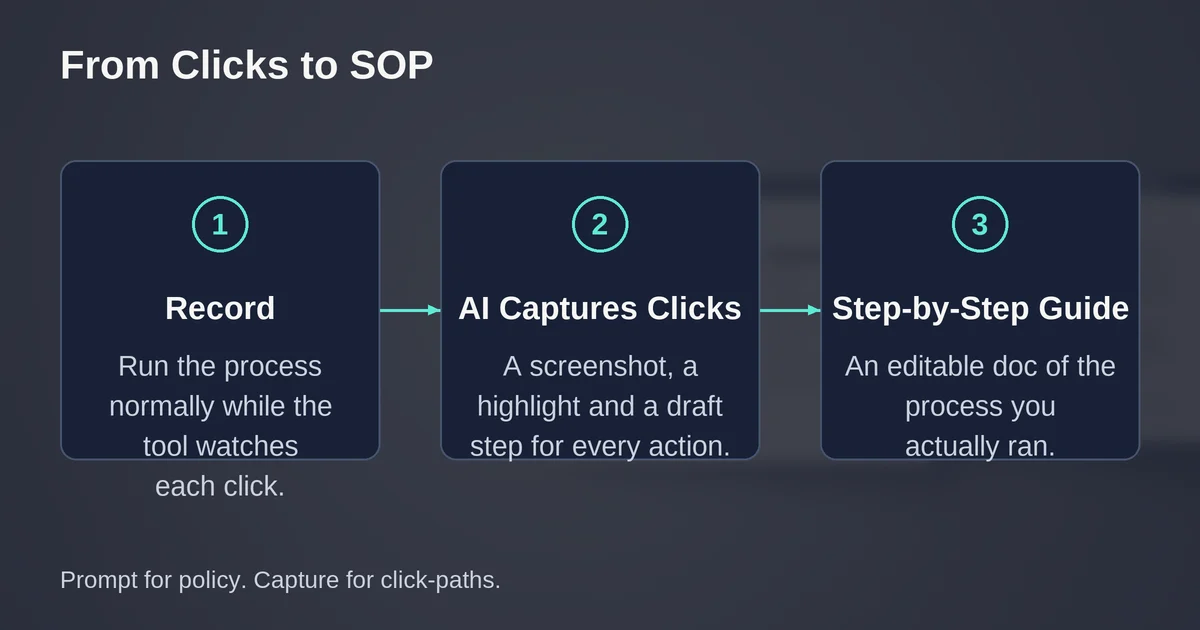
The alternative is to stop writing the SOP and start capturing it. A new category of tools, AI SOP generators that work by capture, records your screen while you perform the process normally, then assembles the recording into a structured, step-by-step document with screenshots, click highlights, and written instructions. You do the work once. The tool watches. The doc describes the process you actually ran, not the one you think you ran.
The difference between writing and capturing
An AI SOP generator can mean two very different products in 2026, and the marketing blurs them together.
The first kind is a chatbot with a template. You describe a process in words, and it returns a well-formed document with sections, roles, and numbered steps. This is fine for policy ("all refund requests over $500 require manager approval") because a policy is genuinely made of words. The moment you need procedure ("in Stripe, open the Payments tab, filter for the invoice, scroll to the bottom and click Refund"), the chatbot is improvising. It will name buttons that do not exist, skip the modal that appears only for partial refunds, and invent a navigation path that was retired in a redesign. The output reads beautifully. That is the problem: it is the same confident hallucination you would run into asking a model about anything it cannot see, except now the fiction has your company logo on it.
The second kind of AI SOP generator captures. You hit record in a browser extension or desktop app, perform the process exactly as you normally would, and stop. The tool logs every click, takes a screenshot at each meaningful action, crops and highlights the relevant UI element, and writes a short instruction sentence for each step. Then AI does the useful parts: it drafts the step text, cleans up titles, detects when you repeated yourself, and lets you regenerate or translate descriptions. The AI is an editor of evidence, not an author of imagination.
The practical rule: use a prompt for policy and intent. Use capture for anything with a click-path. Most of what teams actually call "SOPs" are click-paths.
The three tools, one test
The honest way to compare these tools is to run the same procedure through each and compare three things: how complete the generated doc is, how much correction it needs, and how long the whole thing takes. Here is a protocol you can run in an afternoon:
- Pick a real, mildly annoying process, ideally 8 to 12 clicks across two or three screens. Something like resetting a user's permissions in your admin panel.
- Run it once in each tool, timed, doing the process identically each time. Use a sandbox or demo account with fake data, for reasons covered below.
- Score each output on: steps captured correctly, screenshots usable, step text requiring edits, and time from record to shareable doc.
- Then do the second, more revealing run. Deliberately make a mistake and backtrack. This is where the tools differ sharply: Scribe and Tango let you delete the stray steps easily; Guidde requires more editing because the video narrative has already been rendered around your detour.
One warning before you run it. Your admin panel, CRM, and support inbox show customer names, emails, invoice numbers, and sometimes worse. When you record your screen, all of that lands in screenshots. None of the three tools reliably protects you here on a non-Enterprise plan, which is the single most important fact in this comparison for any team handling customer data.
Scribe: the written guide specialist
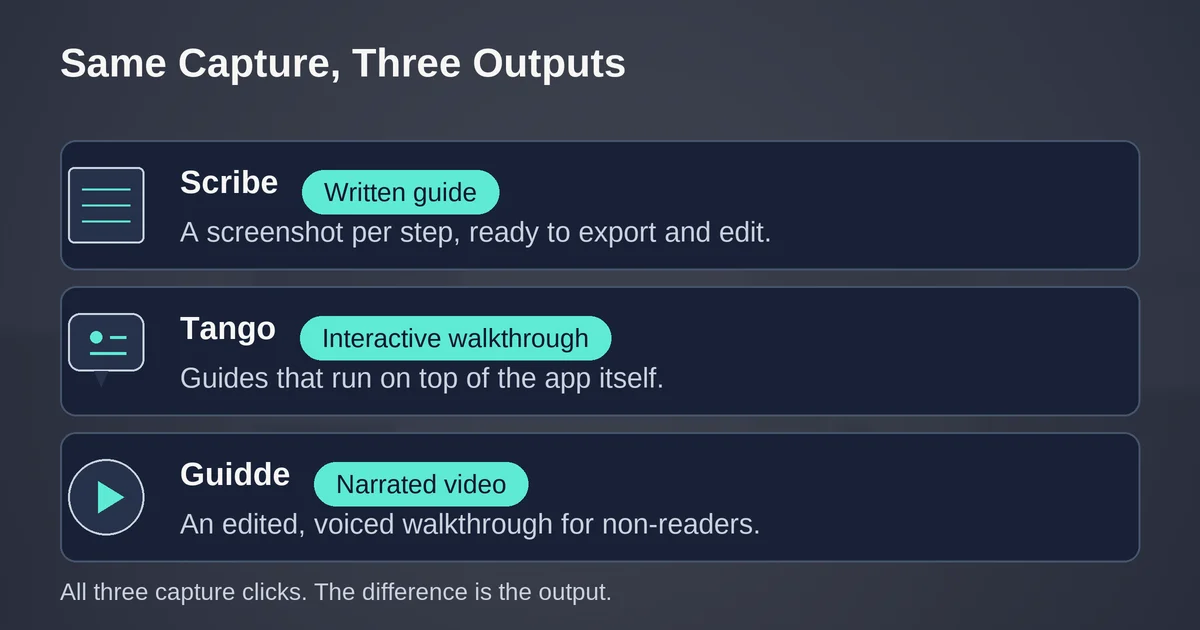
Scribe is the most focused of the three: its output is a clean written guide with a screenshot per step, and everything in the product serves that format. Install the browser extension (or the desktop app for non-browser software), click through your process, and Scribe produces an editable document where each step shows the click target, the typed input, and a one-line instruction.
What Scribe is genuinely good at:
- Speed to a shareable text doc. The step text usually needs light editing rather than rewriting, and export to PDF, HTML, and Markdown is included from the Pro tier, which matters if your knowledge base lives in Notion, Confluence, or plain files.
- Manual redaction built into editing. Scribe's paid plans include edit-and-redact tools for screenshots, so you can blur a customer email before the guide leaves the building.
- Assembling bigger SOPs from small captures. Scribe's Pages feature, announced on their own site, combines multiple captured guides into one longer document with your own text, headers, and embedded video between them. That is how you turn a pile of one-off captures into an actual onboarding manual. Caveat: Scribe's help center lists Pages as a Pro and Enterprise feature, so it is not available on the free plan.
Where Scribe is weaker: its free tier is browser-capture only with no exports, and its team pricing has a cliff. Per Scribe's pricing page, Pro Personal is $25 per seat per month on annual billing ($35 monthly) starting at one seat, but Pro Team is $13 per seat per month with a five-seat minimum. A three-person team either pays for two seats nobody uses ($65/month annual floor) or pays the solo rate for each person. That five-seat minimum is the single most important number to check before you buy.
There is also an interactive side to Scribe: Guide Me turns a captured guide into a walkthrough that runs inside the actual application, so a new hire follows the steps with live guidance instead of reading a PDF in one window and clicking in another. It is a genuinely useful capability for training, though it requires the viewer to have the extension installed.
Tango: capture plus walkthroughs plus analytics
First, a September 2026 status check, because this question comes up: Tango, the SOP tool (tango.ai, previously tango.us), is alive and operating. Its public status page showed all services online as of mid-September 2026, with near-perfect uptime over the previous 90 days. If you saw "Tango shut down" headlines, those were about Tango Gameworks, the Microsoft-owned game studio, which is an entirely different company.
Tango's capture flow feels similar to Scribe's at first: record in the browser, get a step-by-step guide with screenshots and highlights. The differences show up at the edges:
- Manual blurring is on Pro, automatic PII detection is Enterprise. Tango's Pro plan includes screenshot annotation and blurring; the automatic "detect and redact before anyone sees it" capability sits on the Enterprise tier.
- Voice transcription while capturing. On Pro you can narrate as you work and Tango transcribes the narration into step context, which is faster than writing "why" paragraphs afterward.
- Viewership insights. Tango shows who viewed a workflow, how far they got, and where they dropped off. For training-heavy teams this is the killer feature: it tells you which SOP step confuses people, or which guide nobody finishes.
- Guide Me walkthroughs (Enterprise tier for the full in-app guidance system) push guides into the app as interactive overlays rather than links people are supposed to open.
Pricing as of September 2026, per Tango's pricing page: the free plan is now capped at 5 shared workflows with browser capture only and up to 10 users per workspace, with no exports. Pro is $22 per user per month on annual billing ($26 monthly) for workspaces of one or two people, and drops to $15 per user ($20 monthly) once you have three or more users. Every creator or editor needs a paid seat; viewers are free. Enterprise is quote-only, and it holds the features regulated teams actually want: automatic PII redaction, workflow translation, SSO, and 365-day version history.
The shape of Tango's pricing is friendlier than Scribe's for small teams (three creators at $15 beats Scribe's five-seat floor of $65/month total) but scales linearly, so a 20-creator org should run the math before committing.
Guidde: when the SOP should be a video
Guidde starts from a different premise: some audiences will not read. New hires on day one, customers in a support queue, partners you cannot train directly. For them, Guidde records your click-path and produces a narrated, edited video: each step becomes a slide with a zoom on the relevant part of the screen, an auto-generated script, transitions, and an AI voiceover.
The core trade-off is structural. A video is better for showing motion, timing, and "what it should look like when it works." It is worse for reference: you cannot Ctrl+F a video, you cannot copy a URL from frame 12, and updating one step means re-rendering the narrative around it. Guidde mitigates this by also generating the written steps alongside the video, but the video is the product.
Guidde's plan ladder has one trap that catches most evaluators, and it is worth stating plainly because the marketing does not. Per Guidde's pricing page: the Pro plan at $19 per creator per month on annual billing ($29 monthly) gives you unlimited videos, watermark removal, a brand kit, exports, and manual blur. But it does not include the AI voiceover, and it does not include desktop capture. Both arrive on the Business plan at $39 per creator per month ($59 monthly), which also adds analytics, PDF/PPT-to-video conversion, and up to five creators. If you are drawn to Guidde because of the voiceover, budget for Business from day one; a Pro subscription is a screenshot-video tool with your own voice.
The free tier is genuinely usable for evaluation: up to 25 how-to videos from browser capture, with your own recorded voiceover and shareable links. Twenty-five videos is enough to learn whether your team actually consumes video SOPs before you pay anything.
On security, Guidde publishes a SOC 2 Type 2 attestation with AES-256 encryption in transit and at rest on their security page, which is worth checking if your docs will describe internal systems. Their automatic PII detection, branded Magic Redaction, is an Enterprise feature; lower tiers get manual blur only, same pattern as the other two.
Side by side: pricing and gates as of September 2026
All three vendors published these numbers on their pricing pages in September 2026, annual billing shown first, monthly in parentheses.
| Scribe | Tango | Guidde | |
|---|---|---|---|
| Free tier | Web capture, link sharing | 5 shared workflows, browser only | Up to 25 videos |
| Solo paid | $25/seat ($35) | $22/user ($26) | $19/creator ($29) |
| Team rate | $13/seat ($17), 5-seat min | $15/user ($20) at 3+ users | Business $39/creator ($59) |
| Export to PDF/MD/HTML | From Pro | From Pro | PDF/PPT from Pro; video always |
| Desktop capture | From Pro | From Pro | Business only |
| AI voiceover | Not offered | Not offered | Business only |
| Manual redaction tools | From Pro | From Pro | From Pro |
| Automatic PII redaction | Enterprise | Enterprise | Enterprise |
| Interactive walkthroughs | Guide Me feature | Guide Me, Enterprise tier | Broadcast, Enterprise tier |
Three patterns worth noticing. First, all three gate automatic PII redaction behind Enterprise, which tells you the vendors see compliance buyers as their enterprise wedge. Second, every team tier bills per creator, so your cost is a function of how many people document, not how many people read. Third, the feature that separates them is the output format: Scribe optimizes the written doc, Tango optimizes the interactive guide, Guidde optimizes the video.
Which one depends on your audience more than on the tools. Text-first readers in ops and support: Scribe. Training and enablement teams who need to prove people completed the material: Tango. Customer-facing or day-one onboarding content where narration carries the explanation: Guidde. If you are genuinely unsure, our guide to picking AI tools by job role has a broader frame for this decision, and the same discipline applies here as when choosing between Zapier, Make, and n8n: the cheapest list price is rarely the cheapest outcome.
The redaction step you cannot skip
Here is the part most comparisons leave out, and it is the one that can end careers.
Capture tools record your screen. Your screen, in a support or ops context, routinely contains customer names, emails, phone numbers, invoice amounts, health data, or payment details. When you capture a process in a live system, every one of those screenshots now contains customer data, and it lives in your documentation tool, syncs to whoever you share the guide with, and often gets exported to PDF and dropped into a shared drive.
The verified September 2026 reality is that none of these tools will automatically protect you on a standard plan:
- Scribe: manual edit-and-redact from Pro; automatic PII and PHI redaction is Enterprise.
- Tango: manual annotation and blur from Pro; automatic PII detection is Enterprise.
- Guidde: manual blur from Pro; Magic Redaction of PII is Enterprise.
So the process for capturing safely looks like this:
- Capture in a sandbox. Use a demo account, a staging environment, or a workspace seeded with obviously fake data ("Test McTestface", [email protected]). This is the single highest-leverage habit: it makes redaction almost unnecessary because there is nothing real to leak.
- If you must capture live, redact before sharing. Do not share or export the guide until every screenshot has been blurred. Treat the un-redacted draft the way you would treat an un-redacted customer export.
- Check what your plan actually does. If you are on Pro or Business tiers and think "we have redaction," you have manual blur tools, not a safety net. The gap between "I can blur" and "the tool blurs for me" is exactly the gap a busy person falls through on a Friday afternoon.
The same instinct applies to anything you feed an AI tool. Capture tools are not an exception to data hygiene just because they feel like screenshots.
How the doc stays true: maintenance beats capture
Capture solves authoring, not survival. A captured SOP is still a snapshot of software that changes, and the second-most-common way an SOP dies (after never being written) is being right at creation and wrong by the next quarter. The tool cannot fix this for you, and the hidden cost of letting processes drift shows up here the same way it does in automation work.
What actually keeps captured docs alive:
- A named owner per doc. Not "the ops team," a person. When the UI changes, someone gets pinged.
- A review date on every guide. A captured guide takes two to five minutes to re-capture when a process changes. That is the entire maintenance budget. Set a quarterly review for high-traffic guides and let low-traffic ones be re-captured on demand rather than maintained.
- Link the doc to the process, not the folder. Embed guides where the work happens: Notion, Confluence, the internal wiki, or via the interactive walkthrough features all three vendors now offer in some form. A guide discovered at the moment of confusion gets fixed; a guide found in a folder gets ignored.
- Watch the usage signals. If your tier includes viewership insights (Tango Pro, Guidde Business), a guide with zero views is not a success just because it exists. Zero views means the doc is undiscoverable or the process is no longer run. Both are findings.
The teams that get lasting value from these tools are not the ones that capture the most. They are the ones that assign the maintenance, because a capture tool makes refreshing a doc so cheap that "re-record it" is finally a realistic answer to "the button moved."
Quick answers: Scribe vs Tango vs Guidde
Which AI SOP generator is best in 2026? There is no overall winner, which is the boring and true answer. Scribe wins on price for teams of five-plus creators who want written guides with exports. Tango wins for training-heavy teams that need viewership analytics and interactive walkthroughs. Guidde wins when the audience needs narrated video. All three have functional free tiers for testing, so an hour of capture with your real process answers this better than any review.
Is a prompt-written SOP ever good enough? Yes, for policy and intent: approval thresholds, escalation rules, definitions of done. No, for any software click-path, where a prompt-written step is a guess about a UI. Use a prompt for the "why," capture for the "how."
Can I turn an existing screen recording into an SOP? Partially. Guidde can convert an existing MP4, PDF, or PPT into a video guide on higher tiers, which is the closest any of the three gets to "turn a Loom into an SOP." But a video recorded without capture metadata lacks the click-by-click structure these tools generate natively, so expect to do the step structuring manually.
Are these tools safe with customer data on screen? Not without a redaction step on non-Enterprise plans. Automatic PII redaction is an Enterprise feature at Scribe, Tango, and Guidde alike. Capture in a sandbox with dummy data whenever possible, and if you must capture live systems, blur every screenshot before the guide is shared or exported.
What does a small team actually pay? As of September 2026 list prices, annual billing: three creators on Tango Pro is $45/month. Scribe Pro Team is $13 per seat but with a five-seat minimum, so $65/month regardless of headcount until you hit five creators. Guidde Pro is $19 per creator for video without voiceover, or Business at $39 per creator if you need the AI narration and desktop capture.
Pricing and plan details are as published by the vendor around September 2026 and can change, confirm on the official site.