Yes, Claude can join meetings, but as of November 2026 it only joins Google Meet calls, not Zoom or Microsoft Teams. Claude Meetings, a beta that Anthropic is rolling out on Team and Enterprise plans, adds Claude to a call as a visible participant that takes notes, answers questions and builds docs, whiteboards and slides while you talk. It saves a transcript, a summary and screen descriptions but no audio, and its notes and transcripts are free during the beta.
The catch is in the settings. Team plans get the feature switched on by default, outside guests trigger their own rules, and Anthropic asks you to get everyone's okay before Claude starts transcribing. If you lead a team, the checklist near the end is what to settle before anyone turns on auto-join.
Can Claude join Zoom, Teams or Google Meet meetings?
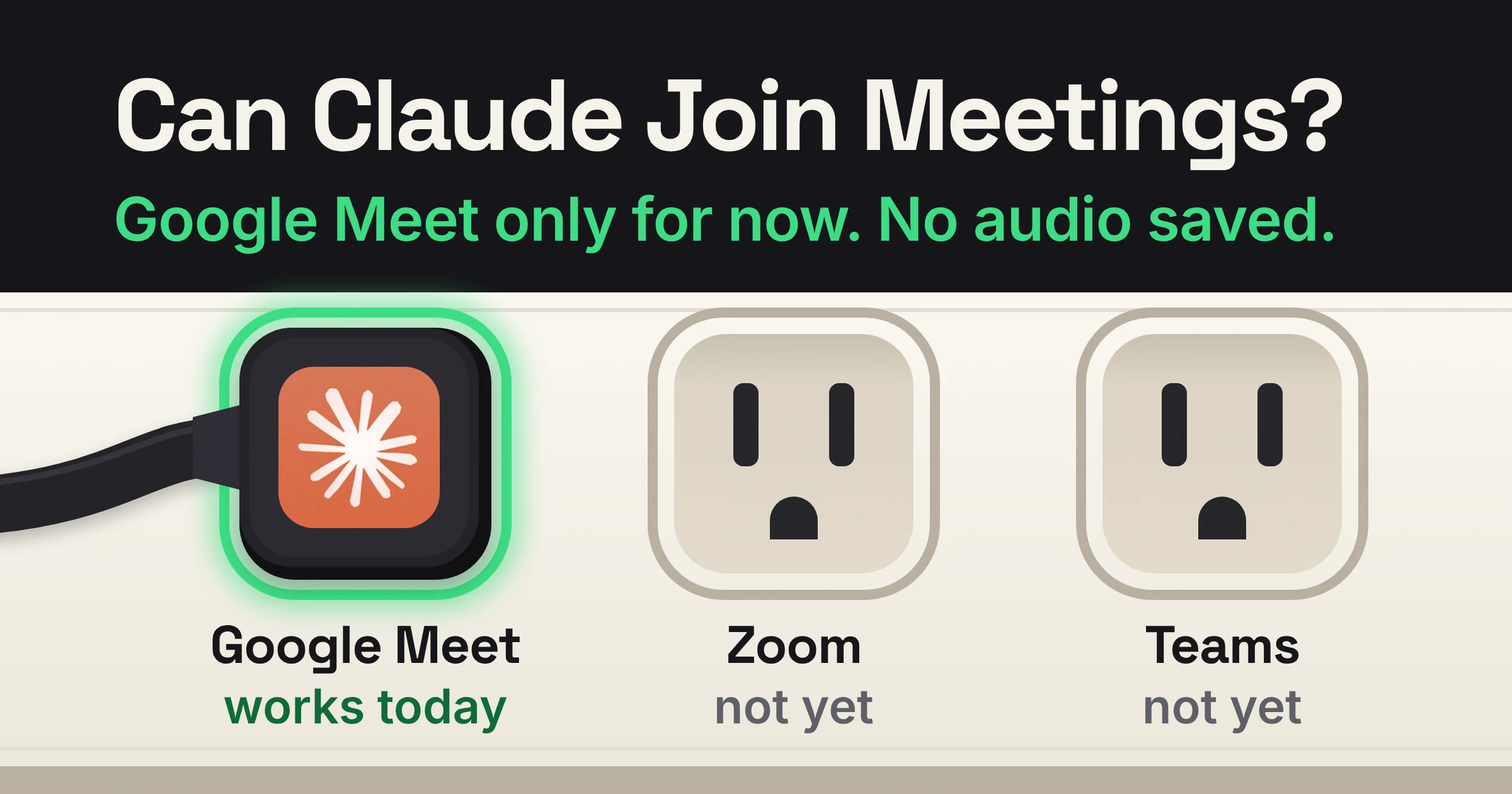
As of November 2026, Claude Meetings joins Google Meet calls only. Anthropic says other video platforms are coming soon, but its own pages don't name Zoom or Microsoft Teams or give a date.
Microsoft Teams has one extra signal. An Anthropic spokesperson told Computerworld that Claude Meetings will be available on Google Meet and Microsoft Teams, but that came in pre-launch coverage with no date attached. Zoom has no such signal.
| Platform | Can Claude join? (November 2026) | What Anthropic has said | What to do now |
|---|---|---|---|
| Google Meet | Yes, in beta | The only supported platform today | Connect Google Calendar and try it on an internal call |
| Microsoft Teams | Not yet | A spokesperson told Computerworld it will come to Teams; no date given | Keep your current notetaker and wait for a dated announcement |
| Zoom | Not yet | Not named; only "other platforms coming soon" | Don't plan a rollout around it yet |
So if your Monday sales call runs on Zoom, Claude can't sit in on it today. You either move that call to Google Meet or wait.
Can Claude summarize meetings and answer questions during the call?
Yes. As of November 2026, Claude Meetings takes notes and answers questions during a Google Meet call, and it saves a summary along with the transcript. According to Anthropic's release notes, it can also build artifacts such as docs, whiteboards and slides while the call is running. Claude also adds a separate page for each meeting in claude.ai that holds the notes, the transcript and anything it built.
Your team can ask Claude questions out loud or in the call's chat. By default Claude answers in writing, and an answer posted in the call's chat is visible to everyone on the call. For now, when someone asks out loud, Claude asks each time to confirm who's speaking, so expect a short back-and-forth.
Here is what that looks like in practice. Halfway through a planning call, someone types Claude, sketch the onboarding flow we just agreed on a whiteboard, and the whiteboard is waiting on the meeting page for colleagues on the invite to edit.
After the call, you can open a regular chat and ask Claude about past meetings you have access to. Think What did the client push back on in Tuesday's call? instead of scrolling a transcript.
Can Claude use your connected tools in a meeting?
Anthropic says Claude can use your connected tools in a meeting with your permission: it asks the first time, and a yes applies going forward.
Owners also get a separate switch, Members' connectors in meetings, that decides whether Claude can use members' connected tools during meetings at all. Keep that switch in mind, because answers that use connected tools are where the costs start.
Does Claude record or transcribe meetings?
As of November 2026, Claude Meetings transcribes your calls but doesn't save audio. Anthropic's help article says it saves "a transcript, summary, and screen descriptions, not audio", so there is no sound file to replay later.
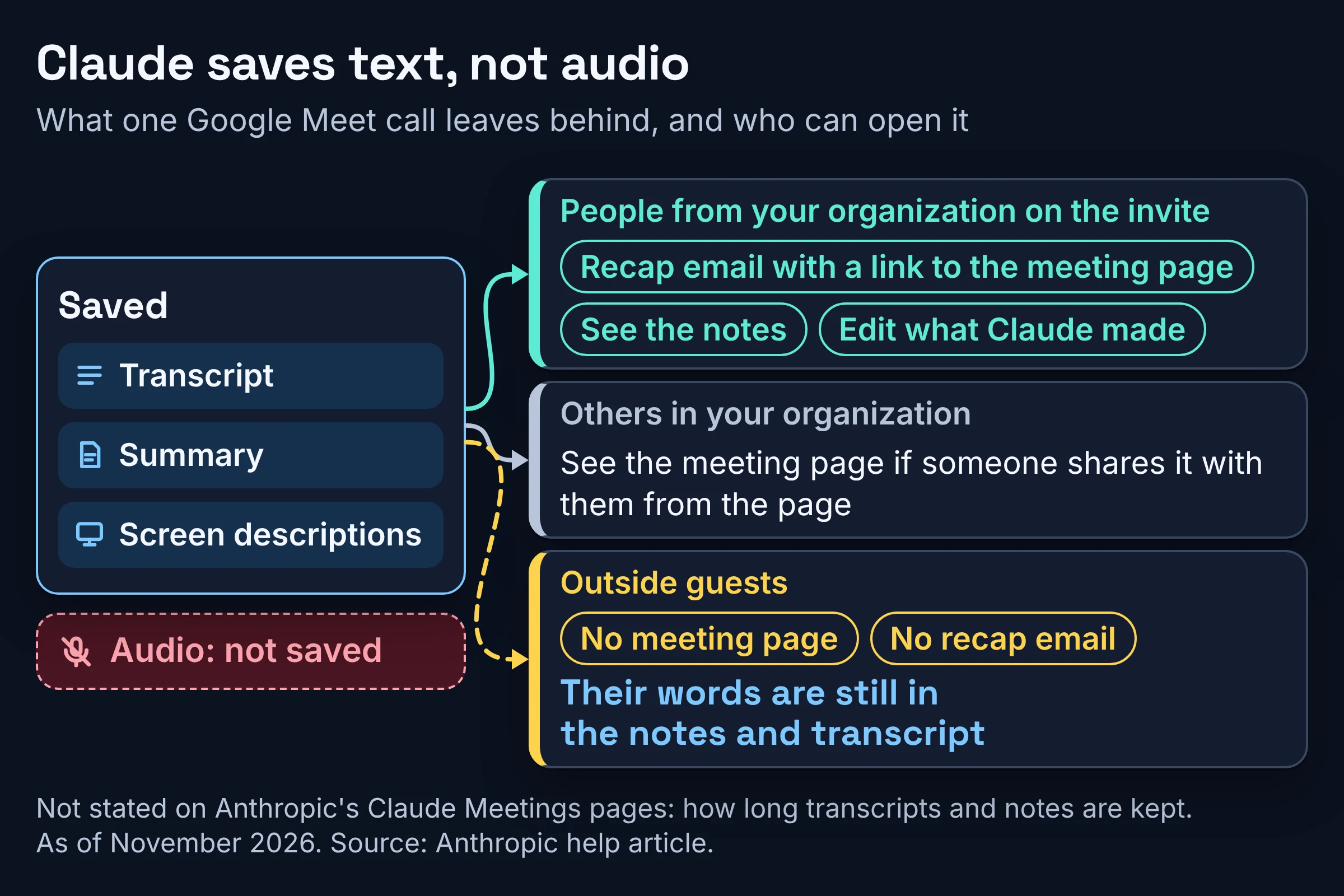
Here is who gets to see the results:
- People from your organization on the invite get a recap email with a link to the meeting page. They can see the notes and edit what Claude made.
- Others in your organization can see the page if someone shares it with them from the page itself.
- Outside guests don't get the meeting page or the recap email, but what they say is still included in the notes and transcript.
Anthropic's Claude Meetings pages leave two gaps: how long transcripts and notes are kept, and which languages Claude can transcribe. If your legal team needs a retention answer, ask Anthropic before you switch on auto-join. For what Claude keeps outside meetings, see our guide on how to delete what ChatGPT, Claude and Gemini remember.
Is Claude Meetings free?
Claude Meetings is mostly free during the beta, on top of a paid Team or Enterprise plan. As of November 2026, Anthropic's launch post says Claude's notes and transcripts are free on Team and Enterprise plans during the beta, and so are its answers in your calls, unless an answer uses one of your connected tools.
Docs, whiteboards and other artifacts Claude makes in a call are free through February 10, 2027. What happens after that is an open question: VentureBeat reports that Anthropic hasn't disclosed what it will charge for the documents, whiteboards and other materials.
| Part of Claude Meetings | Cost during the beta | Free until | Watch out for |
|---|---|---|---|
| Notes and transcripts | Free on Team and Enterprise | While the beta lasts | No post-beta price published |
| Answers in the call | Free | While the beta lasts | Not free if the answer uses a connected tool |
| Answers that use connected tools | Count toward your own usage | Not part of the free offer | Can lead to charges for your organization |
| Docs, whiteboards, slides and other artifacts made in a call | Free | February 10, 2027 | Later price not disclosed |
The real entry fee is the plan. According to Anthropic's pricing page, the Team plan is for teams of 2 to 150, and a standard seat costs $20 per seat per month billed annually, or $25 billed monthly. Enterprise is US$20 per seat per month, billed annually, with a 20-seat minimum, and Anthropic notes that usage cost scales with model and task.
Here is a worked example. A five-person agency on Team standard seats pays $100 a month on annual billing, or $125 a month on monthly billing. During the beta, Claude's notes, transcripts and plain answers add nothing on top; answers that reach into connected tools do count toward usage.
Who can turn on Claude Meetings, and who is left out?
As of November 2026, Claude Meetings is on by default on Team plans and off by default on Enterprise plans. Owners and Primary Owners manage it in Organization settings > Products > Claude Meetings (beta).
Some organizations can't use it at all while it's in beta, including those with zero data retention (ZDR), a HIPAA-ready configuration (set up for US health-privacy rules) or customer-managed encryption keys (CMEK).
Anthropic's release notes list the beta under November 12, 2026, for Claude and Claude Desktop; the mobile apps aren't mentioned. The rollout is only starting, so it may not have reached your workspace yet.
| Setting | Team plan | Enterprise plan | Who changes it |
|---|---|---|---|
| Claude Meetings for the organization | On by default; an owner can turn it off | Off by default; an owner turns it on for everyone, or for part of the organization through custom roles | Owners and Primary Owners |
| Claude on calls with outside guests (organization level) | Allowed by default; an owner can turn it off | An owner must allow it first | Owner |
| Members' connectors in meetings | Default not stated | Default not stated | Owner |
| Meetings with external guests (personal) | Default not stated | Default not stated | Each person, in Settings > Capabilities > Meetings |
| Auto-join | Personal choice | Personal choice | Each person only; owners can't set it for you |
If you're weighing Claude's other betas at the same time, our breakdown of Claude Sheets limits, plans and defaults lays out the Team and Enterprise admin defaults for Sheets and Whiteboards.
What happens when someone outside your company is on the call?
As of November 2026, Claude is set by default to stay out of calls when someone from outside your organization is invited, and to leave if an outsider joins partway through, including another company's notetaker bot. Two more settings sit alongside that default, so check both before a client call.
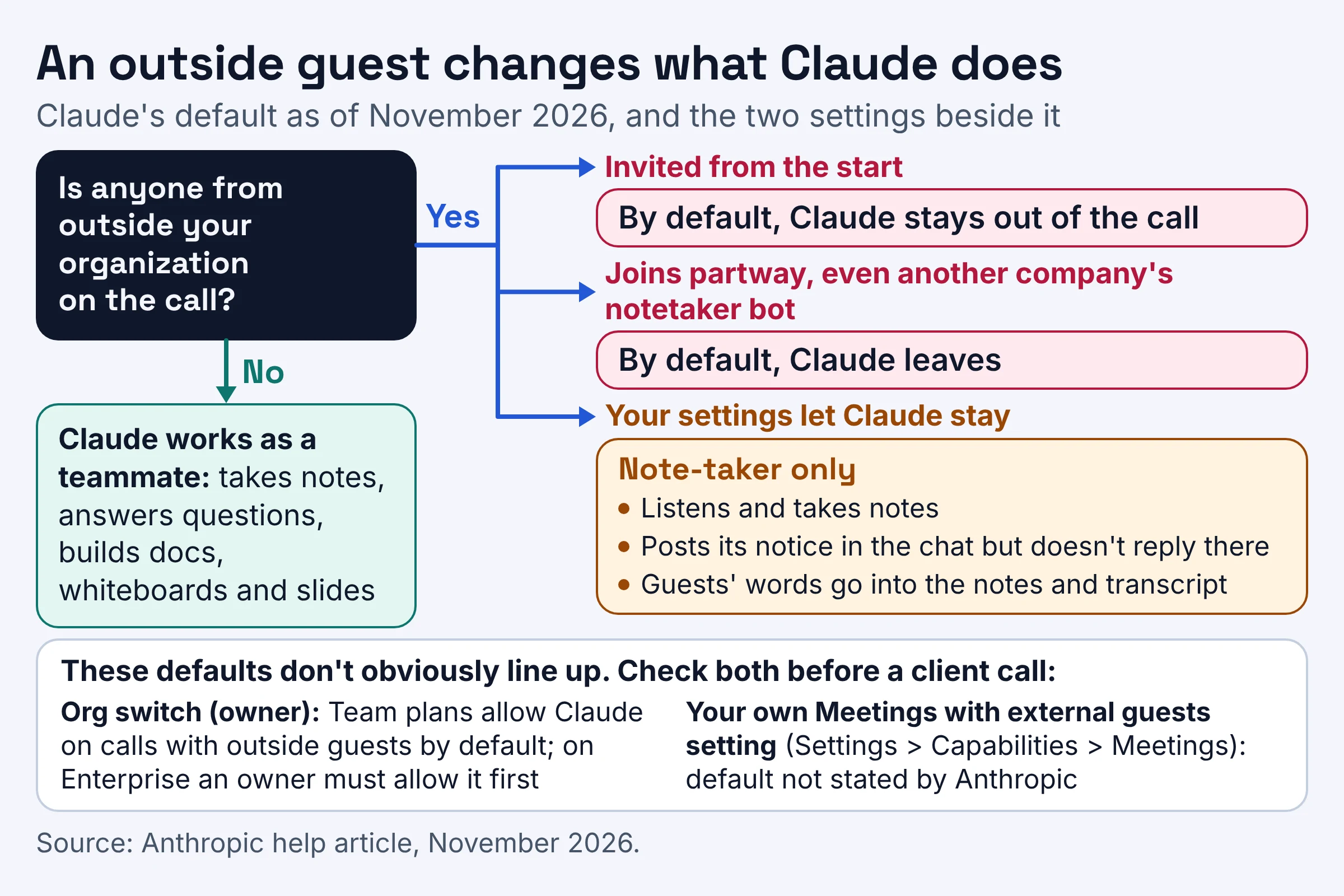
- The organization switch. Anthropic's help article says Team plans allow Claude on calls with outside guests by default, and an owner can turn this off. On Enterprise plans, an owner must allow it first.
- Your personal setting. Each person also has their own Meetings with external guests setting in Settings > Capabilities > Meetings, and Anthropic doesn't state its default.
Those defaults don't obviously line up, so check the org setting and your own rather than assume.
When Claude does stay in a call with guests, it shifts from teammate to note-taker, a bit like a new hire sitting in on a client meeting:
- It listens and takes notes.
- It posts its notice in the call's chat but doesn't reply there.
- What guests say goes into the notes and transcript, and guests don't get the meeting page or the recap email.
Picture a freelance designer joining your weekly stand-up. Depending on the settings, Claude skips the call, leaves when she arrives, or stays quietly taking notes. In that last case her words end up in a transcript she can't see, so talk it through with her first.
How do you add Claude to a meeting, pause it or remove it?
You add Claude after connecting your Google Calendar, either one meeting at a time or with auto-join. As of November 2026, Claude joins a meeting when someone adds it or has auto-join on, and it can stay for up to eight hours.
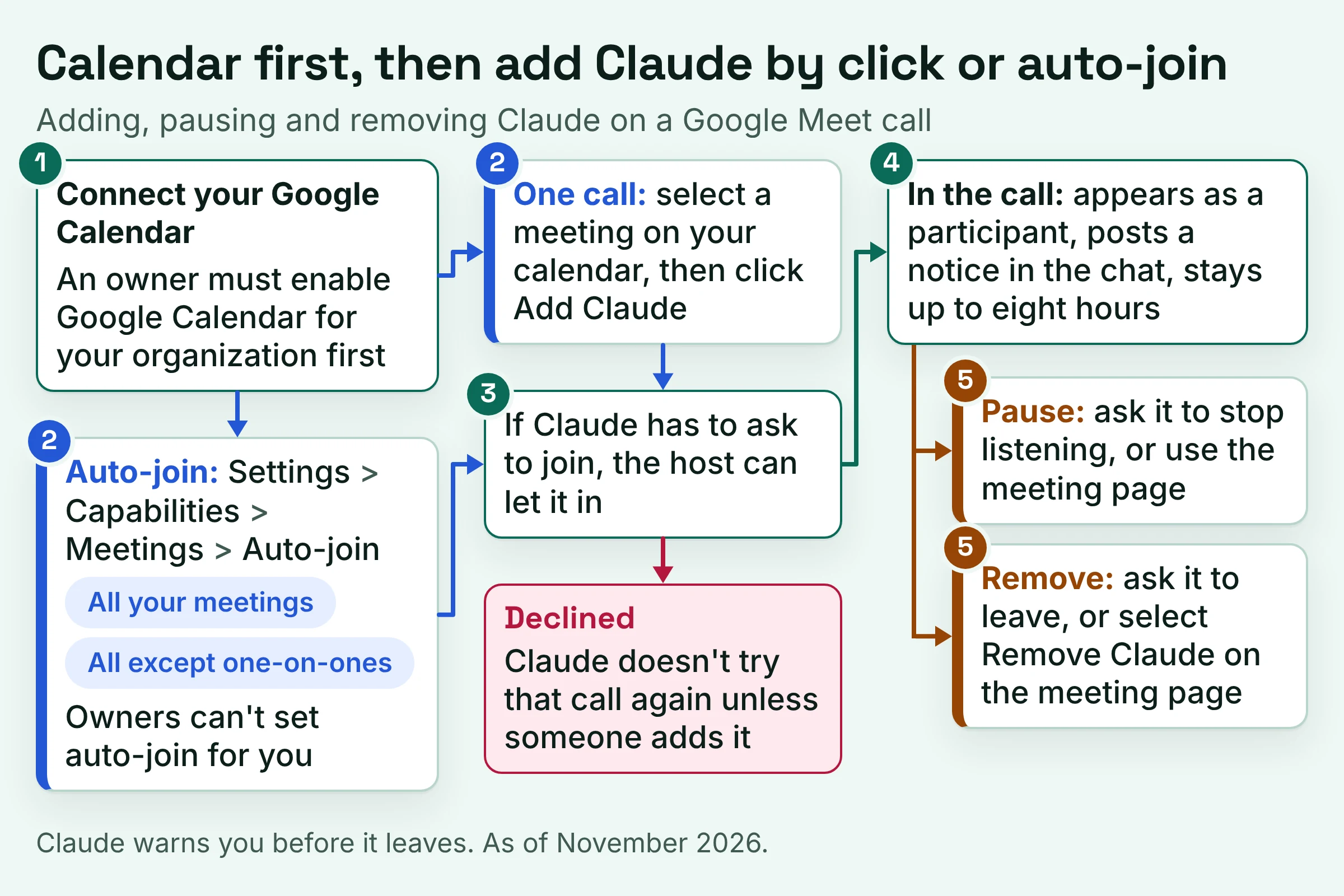
- Connect your Google Calendar. An owner must enable Google Calendar for your organization first.
- Add Claude to one call. Select a meeting on your calendar, then click Add Claude.
- Or turn on auto-join. Go to Settings > Capabilities > Meetings > Auto-join and choose all your meetings, or all your meetings except one-on-ones. Owners can't set auto-join for you.
- Get let in. If Claude has to ask to join, the host can let it in. If the host declines, Claude doesn't try that call again unless someone adds it, and you'll see that it was declined.
Once Claude is in, it appears as a participant and posts a notice in the call's chat. To pause it, ask it to stop listening or use the meeting page. To make it leave, ask it to leave or select Remove Claude on the meeting page.
Claude warns you before it leaves, and its eight-hour limit is longer than most people's patience for an all-hands.
What should a team lead settle before turning on auto-join?
Before anyone turns on auto-join, a team lead should settle five things: whether the team can use it, which calls Claude joins, what people agree to, who sees what it saves, and what it will cost after February 10, 2027. Anthropic says to "make sure everyone on your call is okay with being transcribed" before you add Claude or turn on auto-join.
Craig Durr, chief analyst at The Collab Collective, puts it at the company level: he told Computerworld that "IT, legal, and HR should agree on when Claude is allowed into a meeting before it's rolled out."
Can your team use it at all?
- Check eligibility. You need a Team or Enterprise plan, and the beta excludes ZDR, HIPAA-ready and CMEK organizations.
- Check the platform. Only Google Meet calls qualify; your Zoom and Teams calls stay Claude-free for now.
Which calls should Claude join?
- Decide the org switch. On Team plans it's already on, so turn it off until this list is done if you need time. On Enterprise, choose everyone or only roles that include Meetings.
- Set the outside-guest rule. Decide whether Claude may join client, candidate or vendor calls, then check both the org setting and each person's Meetings with external guests setting.
- Agree an auto-join norm. Auto-join is personal and owners can't set it, so agree on a team default, such as all meetings except one-on-ones.
What are people agreeing to?
- Write a consent line for invites. Something like Claude will join to take notes and a transcript; no audio is saved. Reply if you'd rather it didn't. Durr also notes that recording and consent rules vary by jurisdiction and by company policy, so run the wording past whoever handles legal.
- Teach the exits. Everyone should know they can say Claude, stop listening or Claude, leave, or use the meeting page.
Who sees what Claude saves?
- Remind people the chat is public. An answer posted in the call's chat is visible to everyone on the call, so nobody should ask Claude to pull up a colleague's review notes mid-meeting.
- Agree who sees the page. Invitees from your organization get the recap email and can edit what Claude made; others in the organization can see it if the page is shared with them.
- Ask about retention. Anthropic's Claude Meetings pages don't say how long transcripts and notes are kept, so get an answer if your policy needs one.
What will it cost later?
- Decide on connectors. Choose whether Members' connectors in meetings is on, knowing connected-tool answers count toward usage and can lead to charges.
- Mark the free-until date. Docs and whiteboards are free through February 10, 2027, so book a cost review before then.
Should your team turn on Claude Meetings now?
Turn on Claude Meetings now if your team runs on Google Meet, mostly meets internally and wants drafts and answers during the call, not just notes afterwards. Wait if your calls live on Zoom or Microsoft Teams, if your organization uses ZDR, HIPAA-ready or CMEK settings, or if most of your calls include clients.
A Gartner report quoted by Computerworld calls Claude Meetings "a beta entrant in a mature market", which is a fair way to read it: useful today, not finished.
- Pick Claude Meetings if you're on a Team or Enterprise plan, your calendar is Google Calendar, and you want live docs and whiteboards built during the call.
- Pick Google Meet's built-in Take notes for me if you only need meeting notes organized in Google Docs. Google says it requires an eligible Google Workspace edition or Google AI plan.
- Keep your current notetaker if you're on Zoom or Teams. Anthropic says it is working with partners like Gong, Attention, Granola, Fireflies.ai, Otter and Plaud, so you'll soon be able to send a meeting's transcript to the tools your team already uses. That's announced, not shipped.
Do this next:
- Today: open Organization settings > Products > Claude Meetings (beta) and decide on the org switch and the outside-guest rule.
- This week: work through the checklist above and add your consent line to the next internal Google Meet invite.
- Before February 10, 2027: review what Claude built in your meetings and whether Anthropic's post-beta pricing, once published, fits your budget.
Seat prices, free-until dates and beta rules were checked against Anthropic's own pages in November 2026. Betas move quickly, so give them a fresh look before you budget.