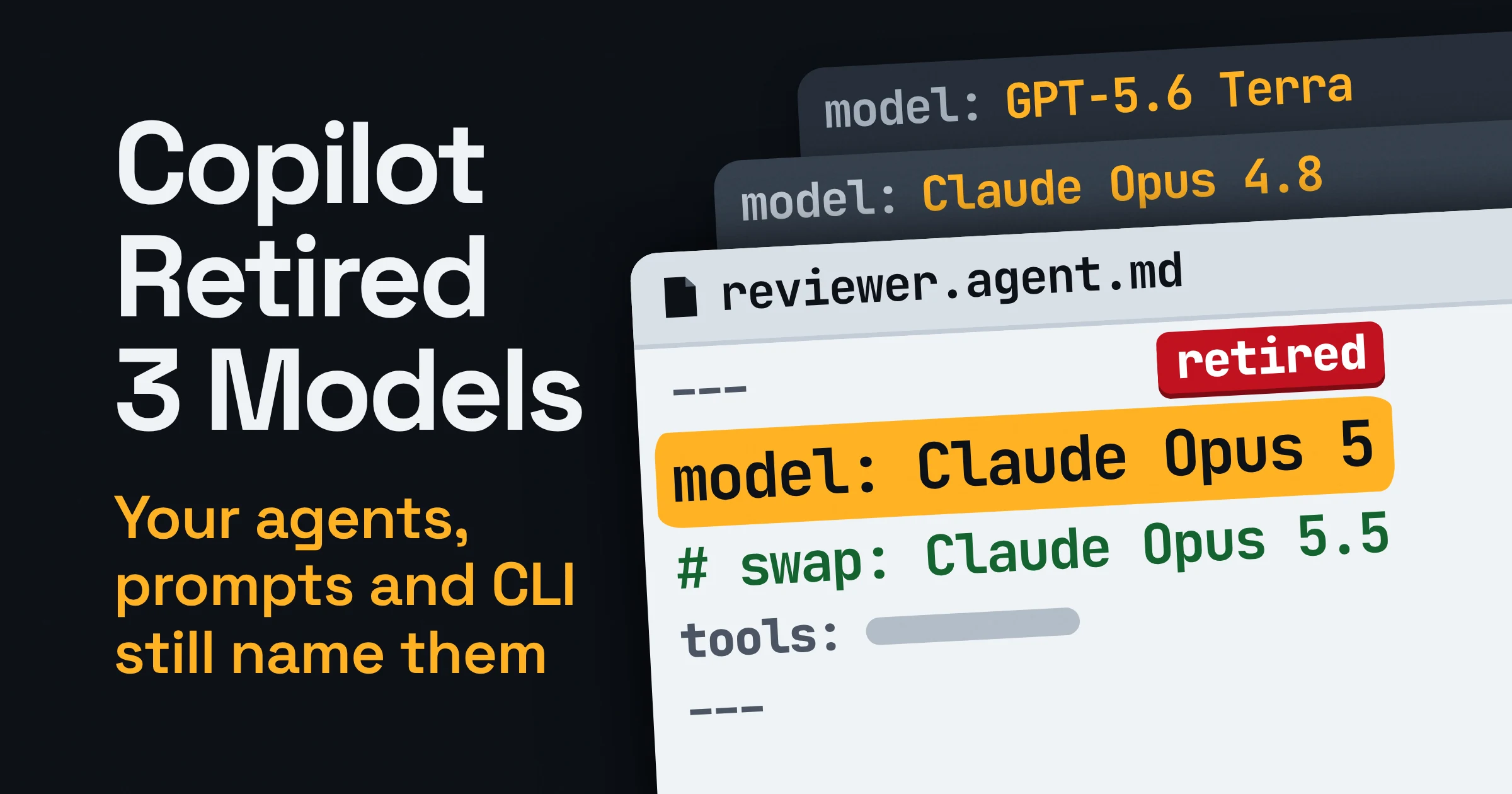
On November 16, 2026, GitHub deprecated Claude Opus 4.8, Claude Opus 5 and GPT-5.6 Terra across most GitHub Copilot experiences, though individual subscribers on annual plans keep Claude Opus 4.8. Fixing this GitHub Copilot model deprecation is a re-pin: Claude Opus 5.5 replaces both Opus models, and GPT-6.1 Sol or GPT-6 Luna replaces Terra.
Swap the old names wherever you typed them: custom agent and prompt file frontmatter (the settings block at the top of the file), Copilot CLI flags and settings files. Admins should also confirm the replacements are switched on in the organization's model list. The bill is the easy part: per GitHub's pricing page, no replacement charges a higher per-token rate than the model it replaces.
What happens after a GitHub Copilot model deprecation?
As of November 16, 2026, GitHub has deprecated Claude Opus 4.8, Claude Opus 5 and GPT-5.6 Terra across most Copilot experiences, including Copilot Chat, inline edits, ask and agent modes, and code completions, according to GitHub's confirmation changelog. Your own files don't change with them: every agent, prompt and script that names a retired model keeps naming it.
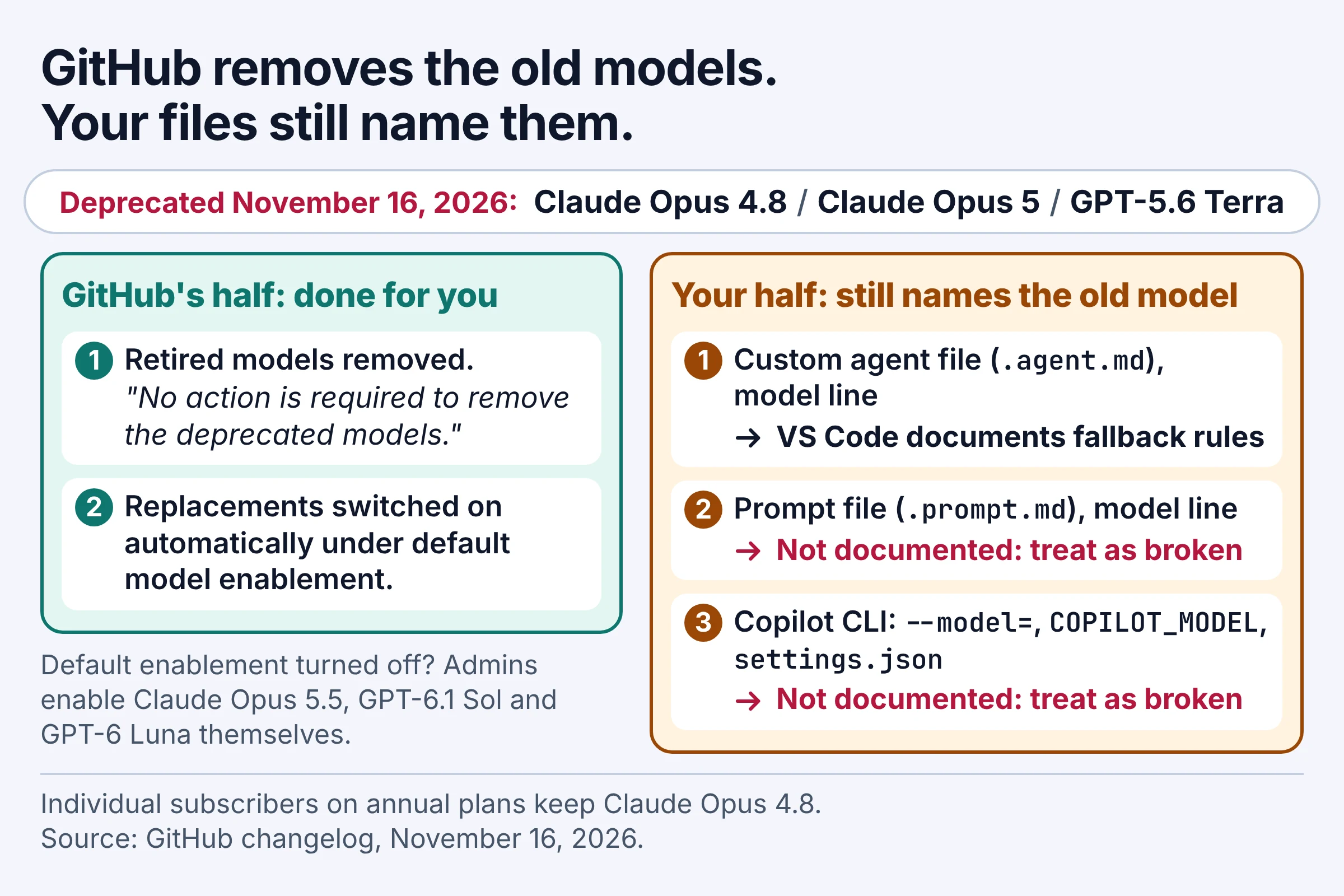
GitHub handles its half. Its October notice said "Under default model enablement, the suggested alternatives are automatically enabled", and the November confirmation adds that "No action is required to remove the deprecated models." Your half is everything you typed: GitHub asked users to "update your workflows and integrations to use the supported models before this date", and that date has passed.
What happens next depends on where the old name sits. Visual Studio Code documents fallback rules for custom agents, but neither VS Code nor GitHub documents what a prompt file or a Copilot CLI command does when it names a retired model. Treat those as broken until you change them.
Three details are easy to miss:
- Annual plans: Claude Opus 4.8 is still available to individual Copilot subscribers on annual plans, per GitHub's confirmation. GPT-5.6 Terra gets no such exception.
- Claude Opus 5: GitHub says it "has been removed from the model picker but remains available for runtime refusal fallback through existing authorized access." You can't pick it any more, so treat any pin to it as stale.
- Conflicting docs: when we checked on publication day, GitHub's supported-models and pricing pages still listed all three models as generally available. Trust the changelog date over those tables.
This retirement is Copilot's own. If your code also calls OpenAI or Anthropic models through their APIs directly, our OpenAI and Anthropic API shutdown calendar tracks those dates.
Which model replaces Claude Opus 5, Opus 4.8 and GPT-5.6 Terra?
As of November 2026, GitHub names Claude Opus 5.5 as the replacement for both Claude Opus 5 and Claude Opus 4.8, and offers GPT-6.1 Sol or GPT-6 Luna in place of GPT-5.6 Terra. GitHub's confirmation changelog lists all three with the same deprecation date, November 16, 2026.
| Retired model | Suggested replacement | Replacement's GitHub category | Copilot CLI ID | Best for |
|---|---|---|---|---|
| Claude Opus 5 | Claude Opus 5.5 | Powerful | claude-opus-5.5 | Multi-step agent work, large refactors, tricky debugging |
| Claude Opus 4.8 | Claude Opus 5.5 | Powerful | claude-opus-5.5 | The same jobs; individual annual-plan subscribers can keep 4.8 |
| GPT-5.6 Terra | GPT-6.1 Sol | Powerful | gpt-6.1-sol | Agents and prompts where Terra did real reasoning |
| GPT-5.6 Terra | GPT-6 Luna | Lightweight | gpt-6-luna | High-volume chores where Terra was overqualified |
The Terra swap is the only real decision, and GitHub's own labels make it easier: Terra sat in the Versatile category, while Sol is filed under Powerful and Luna under Lightweight. Pick GPT-6.1 Sol for a debugging agent or a code review prompt. Pick GPT-6 Luna for commit messages, docstrings and renaming a variable across a file.
For what changed between the two Opus generations beyond the rate card, our Claude Opus 5 guide with the Opus 5.5 changes covers effort levels and defaults.
Do the new Copilot models cost more premium requests?
No, not per token: as of November 2026, every rate GitHub publishes for Claude Opus 5.5, GPT-6.1 Sol and GPT-6 Luna is equal to or lower than the matching rate of the model each one replaces. And unless you're on a legacy annual Copilot Pro or Pro+ plan, you pay in AI credits rather than premium requests, because GitHub moved Copilot to usage-based billing on June 1, 2026.
Under that system, GitHub's models and pricing page says the cost of an interaction depends on the model and the number of tokens consumed. Token costs are converted into AI credits, where 1 AI credit equals $0.01 USD.
| Model | Status, November 2026 | GitHub category | Input ($ per 1M tokens) | Cached input ($ per 1M) | Cache write ($ per 1M) | Output ($ per 1M) | Best for |
|---|---|---|---|---|---|---|---|
| Claude Opus 5 | Deprecated Nov 16, out of the picker | Powerful | $5.00 | $0.50 | $6.25 | $25.00 | Nothing now: move to Opus 5.5 |
| Claude Opus 4.8 | Deprecated Nov 16, except individual annual plans | Powerful | $5.00 | $0.50 | $6.25 | $25.00 | Annual-plan holders who keep it (billed by premium request multiplier, see below) |
| Claude Opus 5.5 | Available | Powerful | $4.00 | $0.20 | $5.00 | $20.00 | Complex agent work at a lower rate than Opus 5 |
| GPT-5.6 Terra | Deprecated Nov 16 | Versatile | $2.00 | $0.20 | $2.50 | $12.00 | Nothing now: move to Sol or Luna |
| GPT-6.1 Sol | Available | Powerful | $2.00 | $0.10 | $2.50 | $10.00 | Terra's input price with cheaper output |
| GPT-6 Luna | Available | Lightweight | $0.10 | $0.01 | $0.125 | $0.50 | Bulk, simple jobs |
The GPT rates above cover requests up to 272K input tokens. Above that line, the long-context rates keep the same pattern:
| Model, over 272K input tokens | Input ($ per 1M) | Cached input ($ per 1M) | Cache write ($ per 1M) | Output ($ per 1M) |
|---|---|---|---|---|
| GPT-5.6 Terra (deprecated) | $4.00 | $0.40 | $5.00 | $18.00 |
| GPT-6.1 Sol | $4.00 | $0.20 | $5.00 | $15.00 |
| GPT-6 Luna | $0.20 | $0.02 | $0.25 | $0.75 |
A worked example
Take one made-up afternoon of agent work: 2M fresh input tokens and 200K output tokens, no caching, every request at or under 272K input tokens. Here is the bill at GitHub's published rates:
| Model | 2M input tokens | 200K output tokens | Total | AI credits |
|---|---|---|---|---|
| Claude Opus 5 or 4.8 | $10.00 | $5.00 | $15.00 | 1,500 |
| Claude Opus 5.5 | $8.00 | $4.00 | $12.00 | 1,200 |
| GPT-5.6 Terra | $4.00 | $2.40 | $6.40 | 640 |
| GPT-6.1 Sol | $4.00 | $2.00 | $6.00 | 600 |
| GPT-6 Luna | $0.20 | $0.10 | $0.30 | 30 |
Cached context changes the totals but not the direction, since each replacement is equal or cheaper on every line. The catch is volume: a model that writes longer answers or takes more agent turns for the same job can still cost more overall.
Still on a legacy annual plan? Premium request multipliers apply only to Copilot Pro and Pro+ subscribers on an existing annual plan, and there Claude Opus 4.8 carries a premium request multiplier of 27. GitHub's annual-plan page lists no multiplier for Claude Opus 5.5 and warns that users on legacy annual plans "will not receive access to new models and features." If that's you, check your model picker before rewriting agents around Opus 5.5.
One line item you won't see on a usage-based bill: GitHub says code completions and next edit suggestions are not billed in AI credits.
Where can a model be pinned in your Copilot setup?
As of November 2026, a Copilot model name can be pinned in custom agent files and their subagents and handoffs, in prompt files, in Copilot CLI flags, environment variables and settings files, while your organization's model policies control which models are enabled at all. The map below shows where each one lives and what is documented when its model disappears.
| Pin location | Where it lives | Documented behaviour if the model is gone | Fix |
|---|---|---|---|
| VS Code custom agent | model in an .agent.md file in .github/agents or ~/.copilot/agents | The first available model in the list is used; with model-policy: required and none available, sending is blocked | Replacement first, fallback second |
| Local subagent | The same model field | Part of the subagent's model selection order | Same edit as its agent |
| Handoff | Qualified name like [model name] (copilot) | Not stated | Rewrite the name |
| Old chat mode | A .chatmode.md file | Not stated; VS Code says to rename it | Rename to .agent.md, move it, fix model |
| GitHub custom agent | model in the agent configuration | Not stated for retired models; unset means it inherits the default model | Swap or delete the line |
| Prompt file | model in a .prompt.md file | Not stated; no model means the picker's model | Delete the line or swap it |
| CLI per run | --model= flag or COPILOT_MODEL variable | Not stated | Edit scripts, CI jobs and shell profiles |
| CLI user default | settings.json in ~/.copilot or $COPILOT_HOME | Not stated | Re-pin with the CLI's config commands |
| CLI repo default | .github/copilot/settings.json | Not stated | Re-pin with --repo |
| Org model list | Settings, then Copilot, then Models | Replacements turn on automatically under default enablement | Enable them yourself if default enablement is off |
This search finds most of them in one pass. Run it from each repo root; it also checks your Copilot home folder.
# Retired model names in agents, prompts, settings, scripts and CI
grep -rniP --exclude-dir=.git --exclude-dir=node_modules \
  'opus[ ._-]?(4[._-]?8|5)(?![._-]?\d)|5[._-]?6[ ._-]?terra' \
  . "${COPILOT_HOME:-$HOME/.copilot}"

# Default models exported from shell profiles
grep -n 'COPILOT_MODEL' ~/.bashrc ~/.zshrc ~/.profile 2>/dev/null
The -i flag matters because Copilot CLI model IDs are case-insensitive and the canonical ID is what gets saved, so one model can show up in different casing across scripts and settings. GitHub's CLI reference doesn't list the IDs the retired models used, so the pattern matches name fragments such as opus-5, Opus 4.8 and 5.6-terra while skipping opus-5.5 and terraform.
Expect a few false positives in changelogs and READMEs; a noisy list beats a missed pin in a nightly job. Individual annual-plan subscribers who still use Claude Opus 4.8 can ignore those particular hits.
How do you specify the model in a Copilot custom agent?
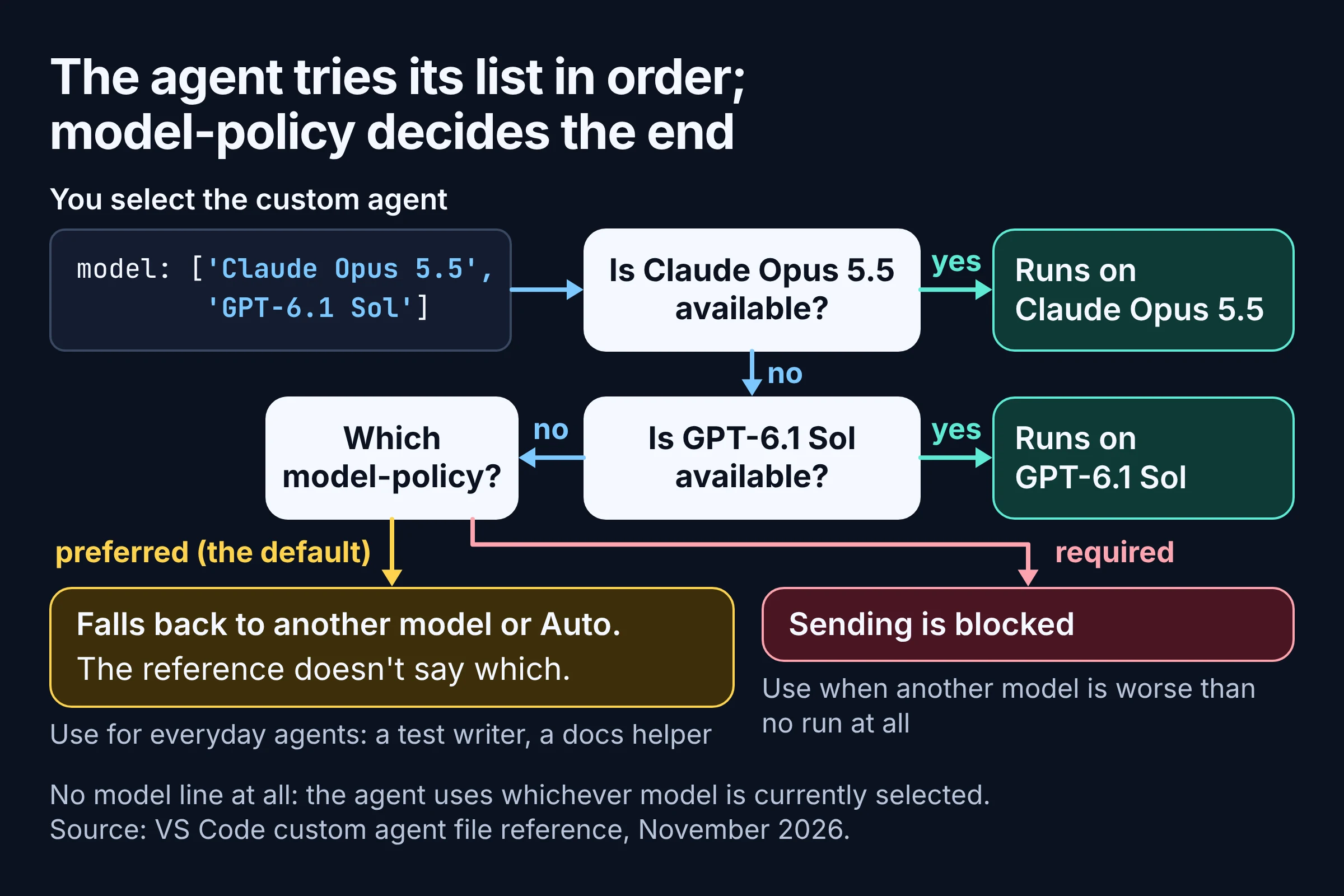
In a VS Code custom agent file, the model field takes a preferred model or an ordered list of alternatives, and selecting the agent uses the first available model, according to VS Code's custom agent file reference as of November 2026. A list is the cheapest insurance you can buy against the next retirement.
---
model: ['[Claude Opus 5.5 model ID]', '[GPT-6.1 Sol model ID]']
model-policy: preferred
---
Use the exact IDs your setup offers; the reference writes the shape as model: ['<preferred model ID>', '<fallback model ID>']. Leave model out entirely and the agent uses whichever model is currently selected, which suits agents that don't care.
The model-policy field decides what happens when nothing on the list is available. preferred is the default; under required, VS Code says "If none are available, sending is blocked instead of falling back to another model or Auto." The reference doesn't spell out which model a preferred agent lands on once its whole list is gone.
Think of it as ordering with a backup: Opus 5.5, or Sol if the kitchen is out. required is the diner who would rather leave hungry than eat something else, so use it sparingly:
- Keep
preferredfor everyday agents like a test writer or a docs helper: a run on another model beats a dead button. - Use
requiredwhen a different model is worse than no run at all, such as a bulk-labelling agent you pinned to GPT-6 Luna to keep credits low.
Three neighbours of the agent file need the same treatment:
- Subagents. Local subagents also use the
modelfield as part of their model selection order, so a subagent can hold on to a retired name after you fix its parent. - Handoffs. A handoff names its model in the qualified format
[model name] (copilot), a different spelling from the ID list, so check it separately. - Old chat modes. VS Code says to rename
.chatmode.mdfiles to.agent.mdand place them in a supported custom agent location such as.github/agentsor~/.copilot/agents.
On GitHub's side, the custom agents configuration reference defines model as the model to use when the agent executes, inheriting the default model if unset. GitHub deduplicates agents between levels by file name (minus .md or .agent.md), so if one agent name exists at several levels, fix every copy.
What is the Copilot prompt file format, and is its model line safe?
A Copilot prompt file is a Markdown file with the .prompt.md extension whose optional model field sets the language model used when the prompt runs; leave it out and the model currently selected in the picker is used, per VS Code's prompt file docs (November 2026). Neither VS Code nor GitHub documents what happens when that field names a retired model.
---
model: [GPT-6 Luna model ID]
---
Turn the selected commit messages into a customer-facing changelog entry.
For most prompt files, the safest edit is to delete the model line. A prompt like summarize this diff for the release notes runs fine on whatever you have picked, and a file with no pin gives the next retirement nothing to break.
Keep a pin only when the prompt depends on one model, and swap in the replacement from the table above. If a prompt still misbehaves, VS Code's troubleshooting advice is to "confirm that configured agents, models, and tools are available".
How do you change the model in Copilot CLI?
In Copilot CLI, you choose the model per run with --model=MODEL or the COPILOT_MODEL environment variable, switch mid-session with the /model slash command, and pin a default in a settings.json file, according to GitHub's CLI command reference as of November 2026. Each of those can still hold a retired name.
Defaults live in two places:
- Your user settings:
settings.jsonin~/.copilot, or in$COPILOT_HOMEwhen set. The CLI's config commands use this file by default. - The repository:
--repo(or--local) pins the default model in repository settings instead, and--repouses.github/copilot/settings.json.
The CLI reference lists these replacement IDs:
claude-opus-5.5: "Recommended, high-capability complex tasks".gpt-6.1-solandgpt-6-luna: both "Recommended, opt-in (not the automatic default)", so name them explicitly if you want them.auto: lets Copilot pick the best available model automatically.
# One run
[your copilot command] --model=gpt-6.1-sol

# Every run in this shell, or in a CI job's environment
export COPILOT_MODEL=claude-opus-5.5

# Let Copilot choose
[your copilot command] --model=auto
What the CLI does when a script passes a retired ID isn't documented. The risky spots are the unattended ones, like a CI workflow or a cron script with COPILOT_MODEL set in its environment, so check those before your own terminal.
For custom agents you run from the CLI, the pin to check is the agent file's own model line. Per GitHub's custom agents configuration reference, an agent that leaves it unset inherits the default model, so it has nothing of its own to fix.
What do Copilot admins need to change in model policies?
Often nothing, as of November 2026: under default model enablement, GitHub turns on the suggested Copilot alternatives automatically, and no action is required to remove the retired models. If your organization turned default enablement off, enable Claude Opus 5.5, GPT-6.1 Sol and GPT-6 Luna yourself through their model policies in Copilot settings.
- Open your organization's Settings.
- In the sidebar, under Code, planning, and automation, click Copilot, then Models.
- Next to each replacement, open the dropdown and choose Enabled.
An organization owner can enable or disable a model when the enterprise owner has delegated it to organizations, so if a replacement isn't yours to switch on, ask your enterprise owner. These controls cover members with Copilot Business or Copilot Enterprise seats. On individual plans you use models directly without managing policies, and Copilot Free and Copilot Student only have access to auto model selection.
Enabling a model doesn't edit anyone's files. An agent that requires GPT-5.6 Terra stays blocked until someone changes it, however many replacements you switch on.
Your three-step fix for this week
To clear a GitHub Copilot model deprecation, find every pinned name, swap each one for its replacement with a fallback, then run what you changed. Go one repo at a time.
- Find. Run the search above in every repo that holds agents, prompt files or CLI scripts, plus your Copilot home folder and CI workflows. Tag each hit with its row from the map table so you know which fix applies.
- Swap, with a fallback. Claude Opus 4.8 and Claude Opus 5 become Claude Opus 5.5; GPT-5.6 Terra becomes GPT-6.1 Sol for real work or GPT-6 Luna for chores. Give agents a two-model list, delete
modellines from prompts that don't need them, and update CLI flags,COPILOT_MODELand your user and repository settings files. On an individual annual plan, check your picker for Opus 5.5 first. - Confirm. Admins check the Models page, and everyone runs each changed agent and scripted CLI job once. Then watch your AI credit usage for a week, in case a replacement takes more turns than the old model did.
If this round has you questioning the tool itself, our Copilot vs Cursor vs Claude Code comparison lays out the plans side by side.
Token prices and plan rules here come from GitHub's pricing and billing docs, checked in November 2026; they change often, so recheck before you budget a team's credits.