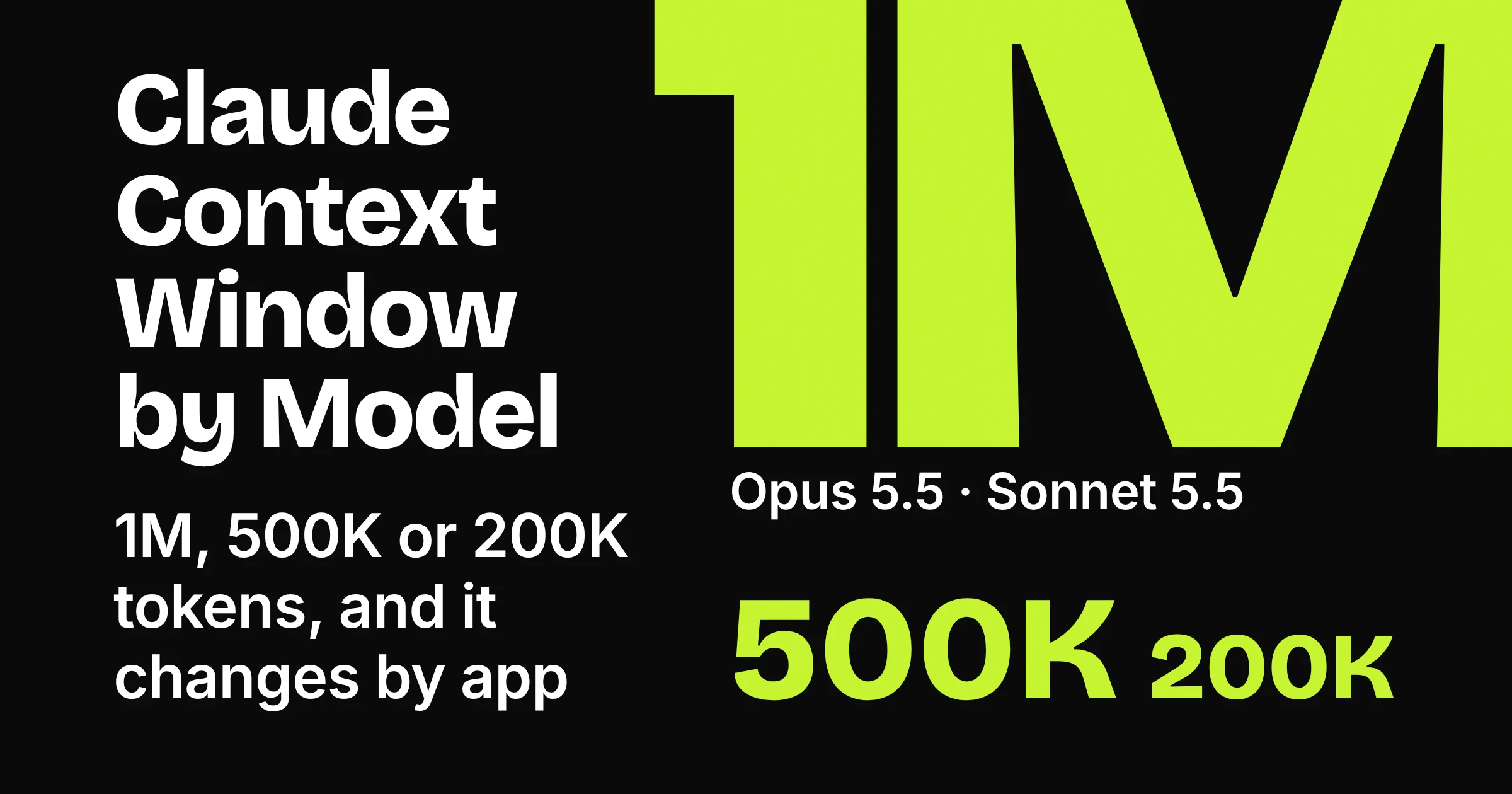
On paid Claude plans, the Claude context window depends on the model: 1M tokens on Claude Opus 5.5, Claude Sonnet 5.5, Claude Haiku 5.5 and four other recent models, 500K on models such as Claude Opus 4.8 and Claude Sonnet 4.6, and 200K on every other model. Anthropic puts 200K at about 500 pages of text or more. Two catches: the same model can get a different window in Claude Code or Cowork, and a long chat only keeps going on its own when code execution is switched on.
A context window is how much Claude can read and keep in mind at once; Anthropic compares it to Claude's working memory. Your messages, Claude's replies and attached files all take up space in it. That space is counted in tokens, the unit behind every size below.
If you only chat in the Claude app, the first table is all you need. If you also work in Claude Code or Cowork, check the second table too.
Which Claude models get 1M, 500K or 200K tokens?
As of November 2026, seven Claude models get a 1M-token context window when you chat on a paid plan: Claude Fable 5.2, Claude Fable 5.1, Claude Opus 5.5, Claude Opus 5, Claude Sonnet 5.5, Claude Sonnet 5 and Claude Haiku 5.5. Five more get 500K, and any model not on Anthropic's list gets 200K.
Here is the full list from Anthropic's help page on paid-plan context windows, grouped by size so you can find your model in seconds.
| Window in chat (paid plans) | Models | Best for |
|---|---|---|
| 1M tokens | Claude Fable 5.2, Claude Fable 5.1, Claude Opus 5.5, Claude Opus 5, Claude Sonnet 5.5, Claude Sonnet 5, Claude Haiku 5.5 | Marathon chats and stacks of long files in one conversation |
| 500K tokens | Claude Fable 5, Claude Opus 4.8, Claude Opus 4.7, Claude Opus 4.6, Claude Sonnet 4.6 | Long working sessions with a few big documents |
| 200K tokens (about 500 pages of text or more) | Every model not listed above | Everyday chats and one long report at a time |
Anthropic's usage and length limits article sums it up the same way: "On paid plans, the newest models support up to a 1M token context window, while others support 500K or 200K tokens." Only the 200K window gets a page estimate from Anthropic. None of the Anthropic pages we read give one for 500K or 1M, so read those as a lot more room, not as a page promise.
Why do some pages still say 200K for everything?
Another Anthropic help page, on maximum prompt length, still says the window is 200K or more for all models and plans, with two exceptions. The model-by-model page is more specific, and the usage and length limits article quoted above matches it, so go by the table. If someone on a forum insists Claude tops out at 200K, that page may be where they got it.
Not sure which model suits your kind of work? Our guide to what Claude is and which model does what walks through the line-up.
Does Claude's context window change in Claude Code and Cowork?
Yes. As of November 2026, Anthropic lists separate context window figures for Claude Code and Claude Cowork, so the same Claude model can get more or less room depending on where you use it. Claude Opus 4.6 shows the spread best: 500K in chat, 1M in Claude Code once you pick its long-context option, and 200K in Cowork.
If Cowork is new to you, our comparison of AI agent modes shows what it does.
| Model | Chat (tokens) | Claude Code (tokens) | Cowork (tokens) | Best for |
|---|---|---|---|---|
| Claude Opus 4.8 | 500K | 1M | 1M | Big jobs in Claude Code or Cowork |
| Claude Opus 4.7 | 500K | 1M | 1M | Big jobs in Claude Code or Cowork |
| Claude Fable 5 | 500K | 1M | 1M | Big jobs in Claude Code or Cowork |
| Claude Opus 4.6 | 500K | 1M with claude-opus-4-6[1m] | 200K | Chat and Claude Code, not long Cowork jobs |
| Claude Sonnet 4.6 | 500K | 1M with claude-sonnet-4-6[1m] | 200K | Chat and Claude Code, not long Cowork jobs |
| Claude Haiku 5.5 | 1M | 1M | 500K | Long chats and Claude Code sessions, still roomy in Cowork |
| Claude Sonnet 5 | 1M | 1M | 1M, compacts at 500K | Long work in all three apps |
| Claude Haiku 4.5 | 200K | Not listed | 200K | Short jobs in chat or Cowork |
Not listed means Claude Haiku 4.5 does not appear in Anthropic's Claude Code table at all. If your model is missing from this table, check the Claude Code or Cowork section of Anthropic's help page linked above before a big job. The chat figure does not always carry over: Claude Haiku 5.5 has 1M in chat but 500K in Cowork.
Two of those Claude Code figures need an extra step from you:
- Claude Opus 4.6: select
claude-opus-4-6[1m]with the/modelcommand. On the Pro plan, you must turn on usage credits first. - Claude Sonnet 4.6: select
claude-sonnet-4-6[1m]the same way. Usage credits must be enabled unless you are on a usage-based Enterprise plan.
We did not check what those usage credits cost. Claude Sonnet 5 in Cowork also works a little differently: Anthropic notes that it automatically compacts the conversation at 500K tokens, even though its Cowork window is listed as 1M.
Why this matters: say you review a long policy pack with Claude Sonnet 4.6 in chat, then hand the same job to Cowork. You had 500K tokens of room in chat but only 200K in Cowork, so files that fitted before may not fit now.
Do free Claude users get the same context window?
Free Claude users may not get the same window. As of November 2026, Anthropic publishes no fixed figure for the free plan and says the context window and usage limit of free Claude plans can vary depending on current demand.
The 1M, 500K and 200K figures above are Anthropic's paid-plan figures. Free users also should not count on automatic summarising, which the next section explains. Anthropic's paid-plan context window article describes it for paid plans with code execution turned on, even though code execution itself is available on every plan, Free included.
On paid plans, the model matters more than the tier. Anthropic's page covers Pro, Max, Ultra, Team and Enterprise together and lists its chat figures by model, not by plan, so moving from Pro to Max does not buy you a bigger chat window on those figures.
What happens when a Claude chat gets too long?
As of November 2026, if you are on a paid plan with code execution enabled, Claude summarises earlier messages as the conversation nears its context window limit. Anthropic says this lets conversations continue indefinitely in most cases. Without it, a long chat can fill up and stop with the length error covered below.
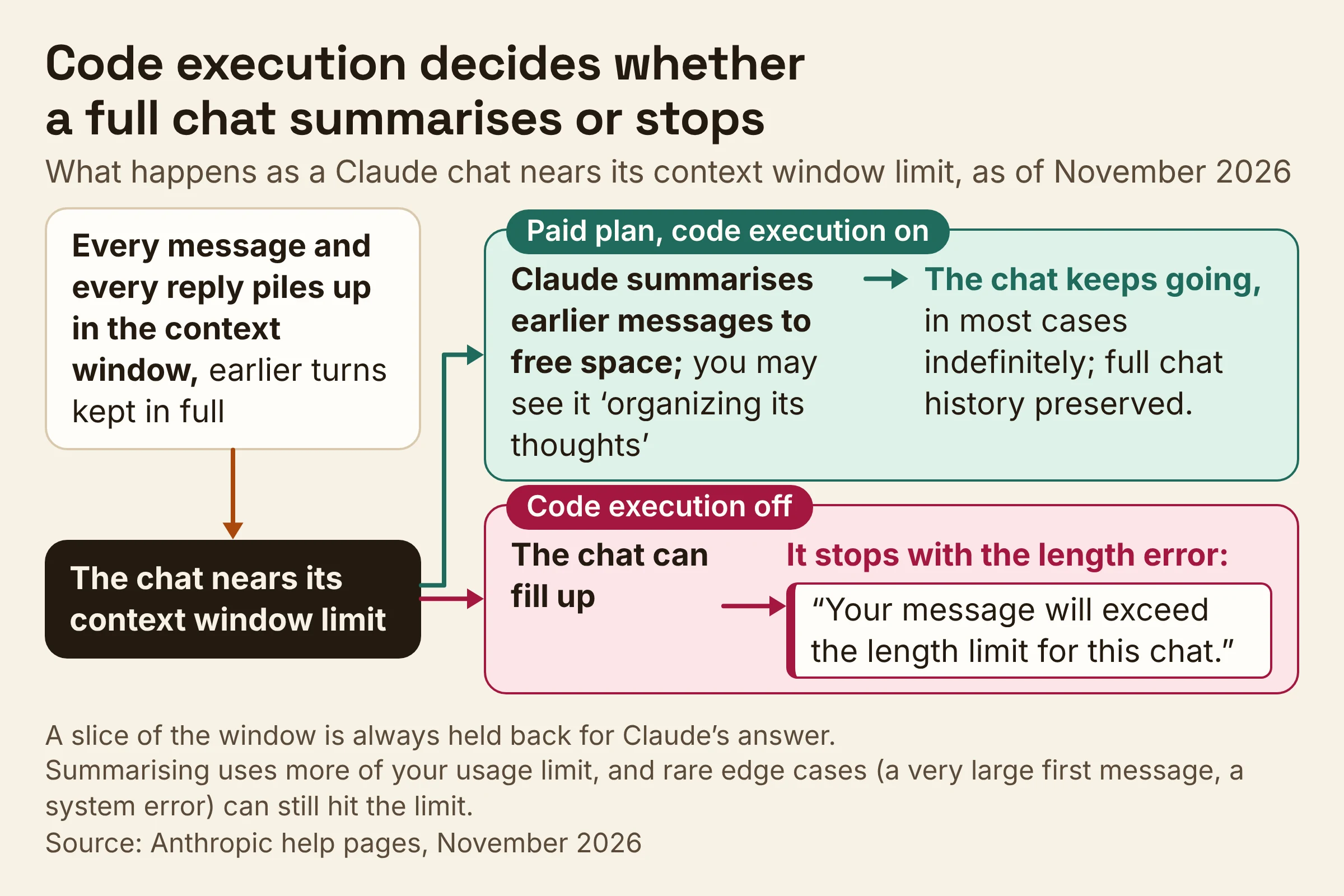
Chats fill up because every turn piles on. Anthropic's developer docs say each of your messages and each of Claude's replies builds up in the context window, with earlier turns kept in full. Anthropic's usage and length limits article adds that a slice of the window is always held back for Claude's answer, so the longest possible chat is a little shorter than the headline number.
Here is what automatic summarising does, in plain terms:
- It makes room. As the chat nears the limit, Claude summarises earlier messages to free space for new ones.
- It keeps your history. Anthropic says the full chat history is preserved, so Claude can still refer back to it after the summary.
- It shows a sign. If you see that Claude is "organizing its thoughts" during a long chat, that is the summarising at work.
- It costs usage. Longer conversations that trigger it use more of your usage limit.
- It is not bulletproof. In rare edge cases, such as a very large first message or a system error, you can still hit the limit.
Picture a meeting-room whiteboard. When it fills up, Claude writes a tidy summary in the corner, wipes the rest and keeps a photo of the old board in case you ask about it.
One gap to know about: none of the Anthropic help pages we read describe a token counter inside claude.ai chats. That leaves the organizing message and the length error as your main clues that a chat is filling up.
How do you turn on automatic summarising in Claude?
As of November 2026, automatic summarising in Claude depends on code execution: switch on the Code execution and file creation toggle in Settings, under Capabilities. Anthropic says automatic context management only works when code execution is enabled, and its paid-plan context window article describes the feature for paid plans.
In the newer Settings layout, the same toggle may show up as Create and edit files. Code execution and file creation is available on Free, Pro, Max, Ultra, Team and Enterprise, but do not assume it is already on. Check it yourself:
- Open Settings, then Capabilities.
- Find Code execution and file creation, or Create and edit files in the newer layout.
- Turn it on.
Picture a sales manager on a paid plan who pastes a fresh pipeline report into the same chat every Monday. With the switch on, that chat can summarise its older weeks and keep going. With it off, the same chat can run out of room.
What should you do when Claude says the chat is too long?
As of November 2026, when Claude warns that your message will exceed the length limit for a chat, the fix is to send less, free up space, or move to a fresh conversation, roughly in that order. This is the message you will see:
"Your message will exceed the length limit for this chat. Try attaching fewer or smaller files or starting a new conversation."
Work down this checklist, built from Anthropic's guide to Claude error messages and its usage and length limits article.
- Check when it happened. If the error shows up on your very first message, the paste or file is too big for one go. Anthropic suggests breaking the content into smaller chunks and processing them separately, summarising or pulling out the key sections first, or using Claude to first identify the most relevant parts of your content.
- Attach less. As the error itself says, fewer or smaller files help. Send the two chapters you need, not the whole manuscript.
- Switch off tools you are not using. Anthropic says tools and connectors are token-intensive, so keeping fewer of them active leaves more room for your work. A calendar connector does nothing for a blog edit except eat space.
- Check the code execution switch. On a paid plan, it is what lets Claude summarise and keep going (see the steps above).
- Start a fresh chat with a handover note. Ask Claude to summarise the chat, then paste that summary into a new conversation. Anthropic also suggests a new conversation when a longer chat is pushing you toward your usage limit.
- Move reference files into a Project. On paid plans, Projects switch on RAG (retrieval augmented generation, a way for Claude to look things up in your project files) automatically when they approach or exceed the context window limit. Anthropic's RAG for projects page says this lets you store up to 10x more content, and its usage and length limits article adds two tips: keep project instructions short and clear out files you no longer use.
- Pick a bigger window next time. If your model sits in the 200K or 500K row of the first table, choose a 1M model for the next long job.
Here is a handover prompt you can copy for step 5:
Summarise this chat so I can continue in a new conversation.
Include: my goal, the decisions we made, any facts or figures we agreed on,
the open questions, and the very next step. Keep it short enough to paste.
If you use Claude Code
Anthropic's rule of thumb is to start a new session whenever you start a new task. Inside a session, compacting asks the model to summarise the conversation so far and then replaces the history with that summary. That frees space, but the summary is all Claude keeps, so compact at a natural break, not halfway through a bug hunt.
Can you increase Claude's context window?
No. As of November 2026, Anthropic says you cannot increase the fixed context window size for your Claude plan. What you can do is move to a model or tool with more room, and make the room you have go further.
- Pick a 1M model in chat. Moving from Claude Opus 4.8 to Claude Opus 5.5, for example, takes you from 500K to 1M tokens.
- Use the long-context options in Claude Code. Claude Opus 4.6 and Claude Sonnet 4.6 reach 1M there with the extra step described above.
- Let a Project carry the reference material. On paid plans, RAG takes over as a project fills up (step 6 above).
Bigger is not automatically better, though. Anthropic's developer docs say that as the token count grows, accuracy and recall degrade, which Anthropic calls context rot. It is like a desk: a bigger one holds more paper, but you can still lose the receipt under the pile, so a focused fresh chat can beat a giant one.
Is Claude's context window the same as your usage limit?
No. As of November 2026, Anthropic treats them as two separate limits: usage limits control how much you can use Claude across all your conversations, while length limits control how long any single conversation can become. Your context window is what sets that length limit.
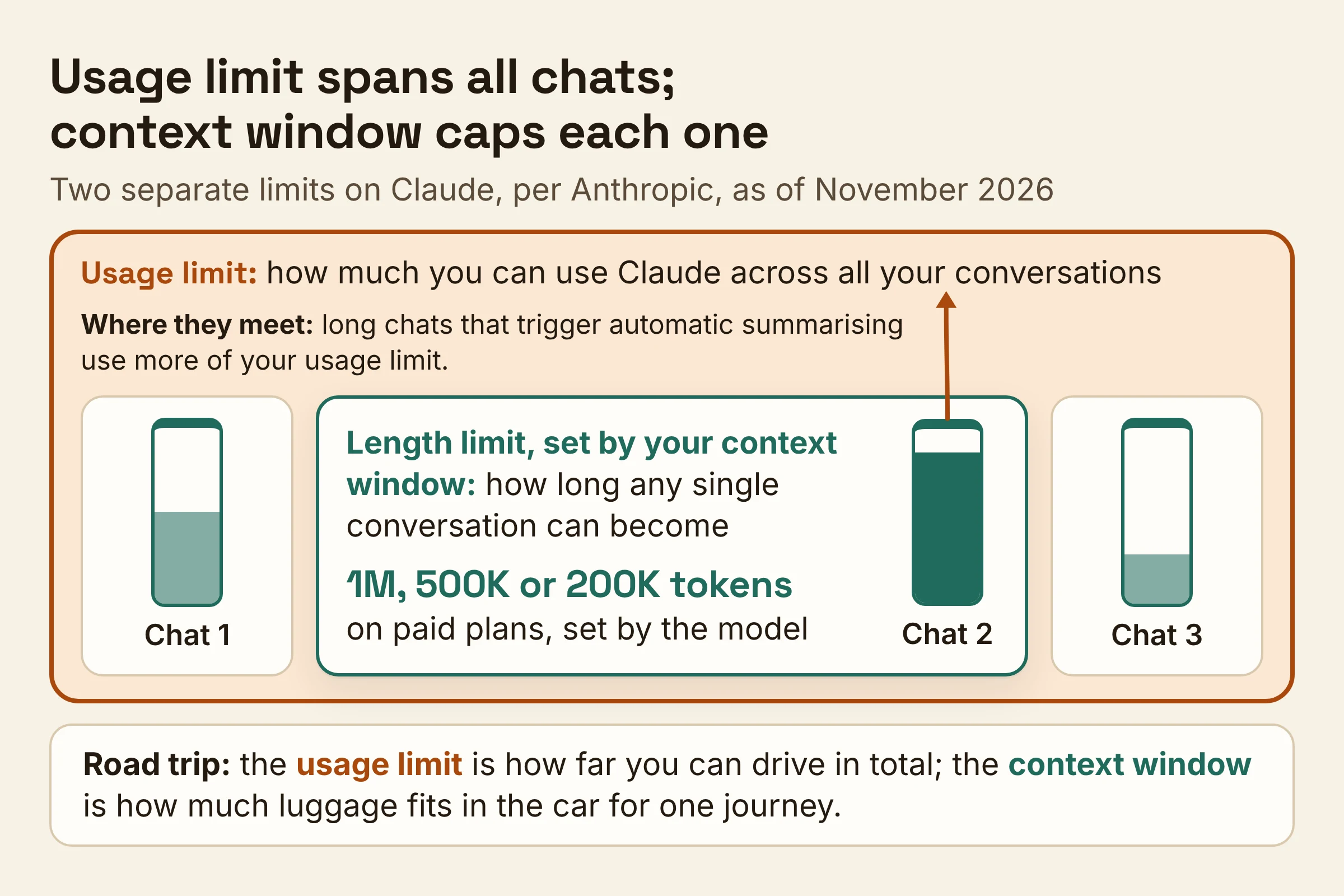
Think of a road trip: the usage limit is how far you can drive in total, and the context window is how much luggage fits in the car for one journey.
The two do meet. Per Anthropic's usage and length limits article, longer conversations that trigger automatic context management use more of your usage limit, and it suggests starting a new conversation if you are approaching your usage limit in a longer chat. For what each plan gives you, see our Claude Pro vs Max vs Ultra plan guide.
Do this next
Pick a 1M model such as Claude Opus 5.5, Claude Sonnet 5.5 or Claude Haiku 5.5 if your work means long reports, many files or chats that run for days. If your chats are short, the model you have is fine, so just start fresh more often. Then take these three steps:
- Find your model in the first table, and in the second one if you also use Claude Code or Cowork. For long Cowork jobs, skip Claude Opus 4.6 and Claude Sonnet 4.6, which get 200K there.
- Check the switch in Settings, under Capabilities, and turn on code execution if you are on a paid plan.
- Save the handover prompt somewhere handy and use it the moment a chat drags or the length error appears. In Claude Code, start a new session for each new task.
These context window figures were checked on Anthropic's help pages in November 2026, so recheck them before you plan a big project around one.