Yes, Gemini Gems are going away. Google Gemini is replacing them with skills, and your deadline depends on the account you use:
- Personal Google account (18 or over): Gems turned read only today, November 17, 2026, and are removed on December 17, 2026. Download your Gem files before then.
- Workspace business and enterprise: Gems still work. They stop no sooner than March 1, 2027.
- Workspace education: Gems still work. They stop no sooner than June 1, 2027.
Below is one dated checklist: what to rebuild, where, and by when. It includes the easy-to-miss catch: skills don't sync between the Gemini app and Workspace apps.
What happened to Gemini Gems on November 17, 2026?
On November 17, 2026, Gemini Gems on personal Google accounts became read only, while on Google Workspace accounts they moved into the Settings panel of the Gemini app and kept working. Same date, two very different mornings.
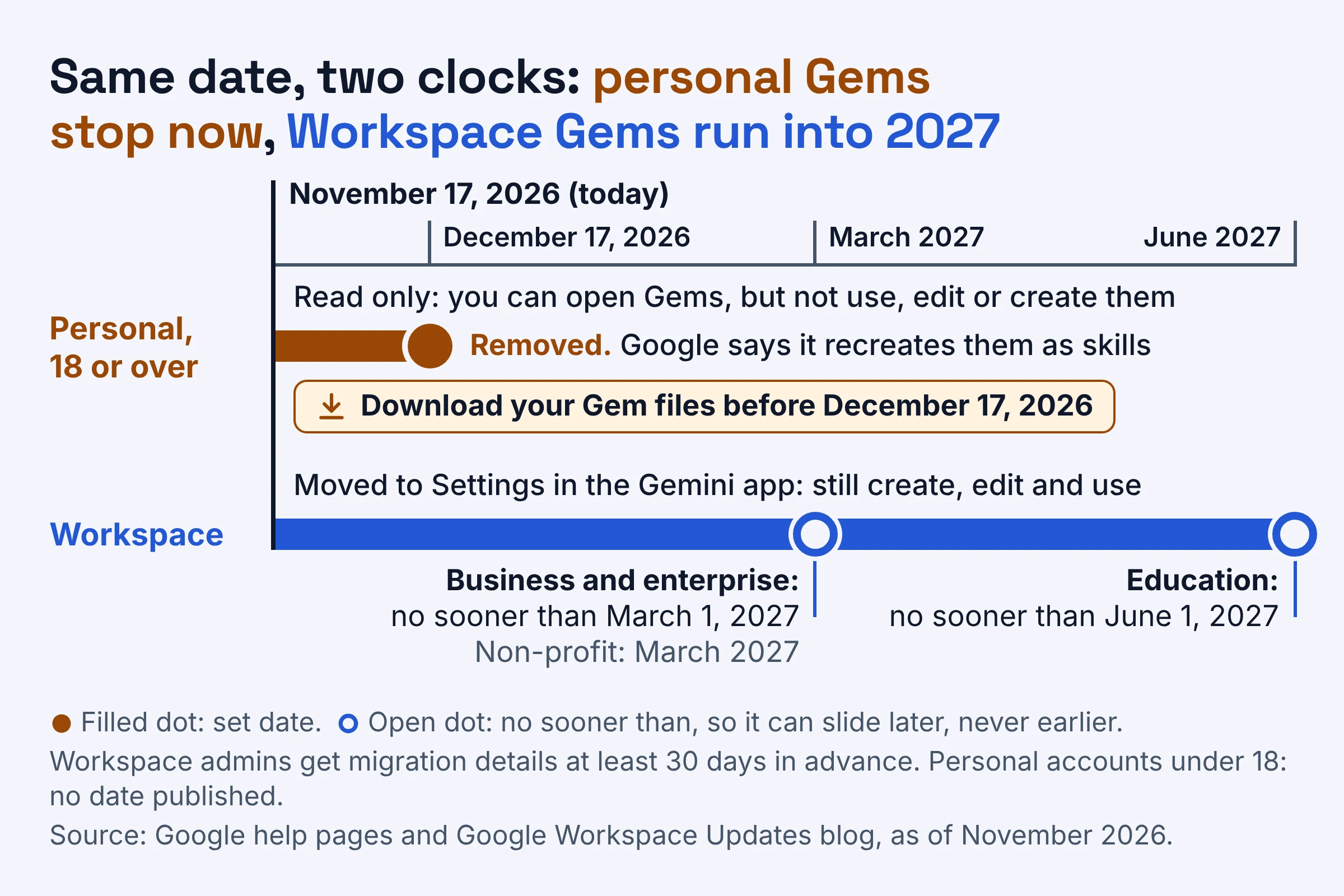
On a personal account, Google's help page on the switch says you can still access your Gems, but you can't use or edit them or create new ones. Think of a glass display case: you can see everything inside, but you can't take anything out for a spin.
On a Workspace account (a work or school Google account that your organization manages), nothing breaks yet. Your Gems now live in Settings, and you can still create, edit and use them.
Two more products end this month. Google says Opal, its experiment for building mini apps, and Gems by Google Labs go away at the same time in November. Google's Keyword blog adds that Gems by Google Labs will not migrate into skills, so save anything you need from them now.
When are Gemini Gems going away for your account?
As of November 2026, Gemini Gems shut down on different dates by account type. Personal accounts (18 or over) can no longer use them, and Google removes them on December 17, 2026; Workspace business and enterprise accounts keep them until no sooner than March 1, 2027 (June 1, 2027 for education). Find your row, then plan backwards from the last column.
| Account type | What changed on November 17, 2026 | When Gems stop working | Where automatic skill copies land | Your deadline |
|---|---|---|---|---|
| Personal, 18 or over | Gems became read only | Already stopped; removed on December 17, 2026 | Google says it will recreate Gems as skills when it removes them | Download Gem files before December 17, 2026 |
| Personal, under 18 | Gems move to skills at a later date | No date published | No details published | Watch for Google's notice |
| Workspace business and enterprise | Gems moved to Settings in the Gemini app; still usable | No sooner than March 1, 2027 | Inactive draft skills, Gemini app only | Before March 1, 2027 |
| Workspace non-profit | Moved to Settings; still usable | March 2027, per Google's help page | Inactive draft skills, Gemini app only | Before March 2027 |
| Workspace education | Moved to Settings; still usable | No sooner than June 1, 2027 | Inactive draft skills, Gemini app only | Before June 1, 2027 |
No sooner than is a one-way promise: those dates can slide later, but not earlier. Google also says it will share auto-migration details with Workspace admins at least 30 days in advance, so your IT team should hear before anything moves.
Not sure which row is yours? If you sign in with an address your employer or school gave you, you're most likely on Workspace. Otherwise, use the personal rows.
Gemini Gems vs skills: what works differently?
As of November 2026, a Gemini skill is a saved set of instructions, plus optional reference files, that you call by typing / in a chat. Once it's activated, Gemini can also pick it up on its own when your task fits. Gems held the same ingredients (a name, a description, instructions and knowledge files), so your recipe survives; it's the kitchen around it that changes.
| Feature | How skills work, as of November 2026 | What it means for you |
|---|---|---|
| Calling it | Type / (or @ with the updated shortcut) in a Gemini chat and pick the skill; in Workspace, type @ and the skill name | Your old Gem becomes something you call from inside a chat |
| Automatic use | Gemini can use activated skills on its own, based on the context and intent of your task | An activated skill can kick in without being asked |
| Combining | You can include multiple skills in a single task | Pair brand-voice with proposal-format in one request |
| Built-in tools | Most default Gem tools don't work with skills yet, including Create video, Create music, Canvas, Deep research and Guided learning | A Gem that leaned on Deep research loses that part for now |
| Files | Up to 100 MB of files per skill, such as plain text documents, PDFs and images | Bulky Gems may need trimming |
| Format | Built on the open, Markdown-native SKILL.md standard | Skills made on other platforms can be copied in |
| Where skills work | Only the Gemini mobile app, the Gemini app on Mac and gemini.google.com, for now | Check the app you actually use |
| Cost and age | No Google AI subscription needed; you must be 18 or over | Adults on free accounts qualify |
Markdown here just means plain text with simple formatting marks, and SKILL.md is the instruction file a skill is built around. The open format makes skills portable: skills you've created on other platforms can be copied into the Gemini app and Workspace apps.
Still deciding where your saved assistants should live? Our comparison of Claude Projects, ChatGPT Projects and Gemini Gems walks through the trade-offs.
One limit to keep in mind: a skill shapes how Gemini behaves, but it doesn't add abilities. Google's Workspace help page gives the example that a skill can't make a tool create images if the tool can't already.
What carries over when Gems move to skills?
Google's Workspace admin guide says Gemini Gems converted to skills keep their original names, descriptions, custom instructions and uploaded knowledge files, and that sharing permissions carry over automatically, as of November 2026. What gets left behind is a specific list of file types, plus most of the built-in Gem tools.
| Part of your Gem | Moves to the skill? | What to do |
|---|---|---|
| Name, description, instructions | Yes | Nothing, unless you rebuild by hand (see the naming rule below) |
| Plain text documents, PDFs and images | Yes, up to 100 MB per skill | Over the limit? Pick the files that matter most |
| Old Office files: .doc, .xls, .ppt | No | Re-save as PDF or plain text, then upload |
| Archives: .zip, .tar, .7z, .rar, .gz, .tgz | No | Unpack and upload the files inside |
| GitHub files, audio files and video files | No | Upload a text summary or transcript instead |
| Create video, Create music, Canvas, Deep research, Guided learning | Not for now | Plan to use these outside the skill |
| Sharing settings and Google Drive permissions | Yes | No need to reshare |
| Workspace Studio flows with Ask a Gem steps | Existing flows keep working for now | Swap in Ask Gemini steps before automated migration |
| Gems by Google Labs | No | Save what you need this month |
Say you run a small bakery, and your Wholesale Quotes Gem holds a PDF price sheet, a .doc with delivery terms and a .zip of product photos. The PDF moves across, but the .doc and the .zip get left behind, so save the delivery terms as a PDF and upload the photos as plain images.
How do you migrate a Gemini Gem to a skill before the deadline?
You can let Google recreate your Gemini Gems as skills automatically, or rebuild them yourself now by copying each Gem's name, description and instructions into a new skill, as of November 2026. For any Gem you use every week, rebuild it yourself. Personal-account Gems have already stopped working, and Workspace copies arrive as inactive drafts you must review anyway.
| Way to move a Gem | Effort | The catch | Best for |
|---|---|---|---|
| Let Google recreate it | None | Unsupported files are dropped; no published finish date for personal accounts; Workspace copies land as inactive drafts in the Gemini app only | Gems you rarely use |
| Copy and paste into a new skill | Low | You download knowledge files one at a time, then upload them | Gems you rely on every week |
| Create with Gemini | Low | Gemini helps you build it, so check what it produces | Long or messy Gem instructions |
| Upload a SKILL.md file | Medium | To change its files later, you re-upload the whole skill | Skills you keep as files or built on another platform |
Checklist for personal Google accounts (18 or over)
- Today, November 17, 2026: list your Gems and sort them into rebuild now, let Google copy and let go.
- This week: open each rebuild now Gem and copy its name, description and instructions into a new skill. Read-only Gems can still be opened, so you can copy from them today.
- Before December 17, 2026: download each Gem's knowledge files one at a time and upload them to the matching skill. Swap out any .doc, .xls, .ppt or .zip files first.
- Test it: in a chat, type / and pick the skill, then give it a real job, like last Friday's customer email.
- After December 17, 2026: check your Skills page for Google's automatic copies and delete any duplicates of skills you rebuilt. Google hasn't published when the copies finish, and deleting a skill can't be undone, so check which is which first.
Checklist for Workspace accounts
Deadline: no sooner than March 1, 2027 for business and enterprise, March 2027 for non-profit, and no sooner than June 1, 2027 for education.
- Now: delete test, one-off and unused Gems in the Gemini app. Google asks admins to have users do this before automated migration.
- Now, if you own flows: in Google Workspace Studio (where you build automated flows), replace Ask a Gem steps with Ask Gemini steps. Existing flows keep working for now, but you can't build new ones with an Ask a Gem step.
- When your admin hears (at least 30 days ahead): put the migration date in your calendar.
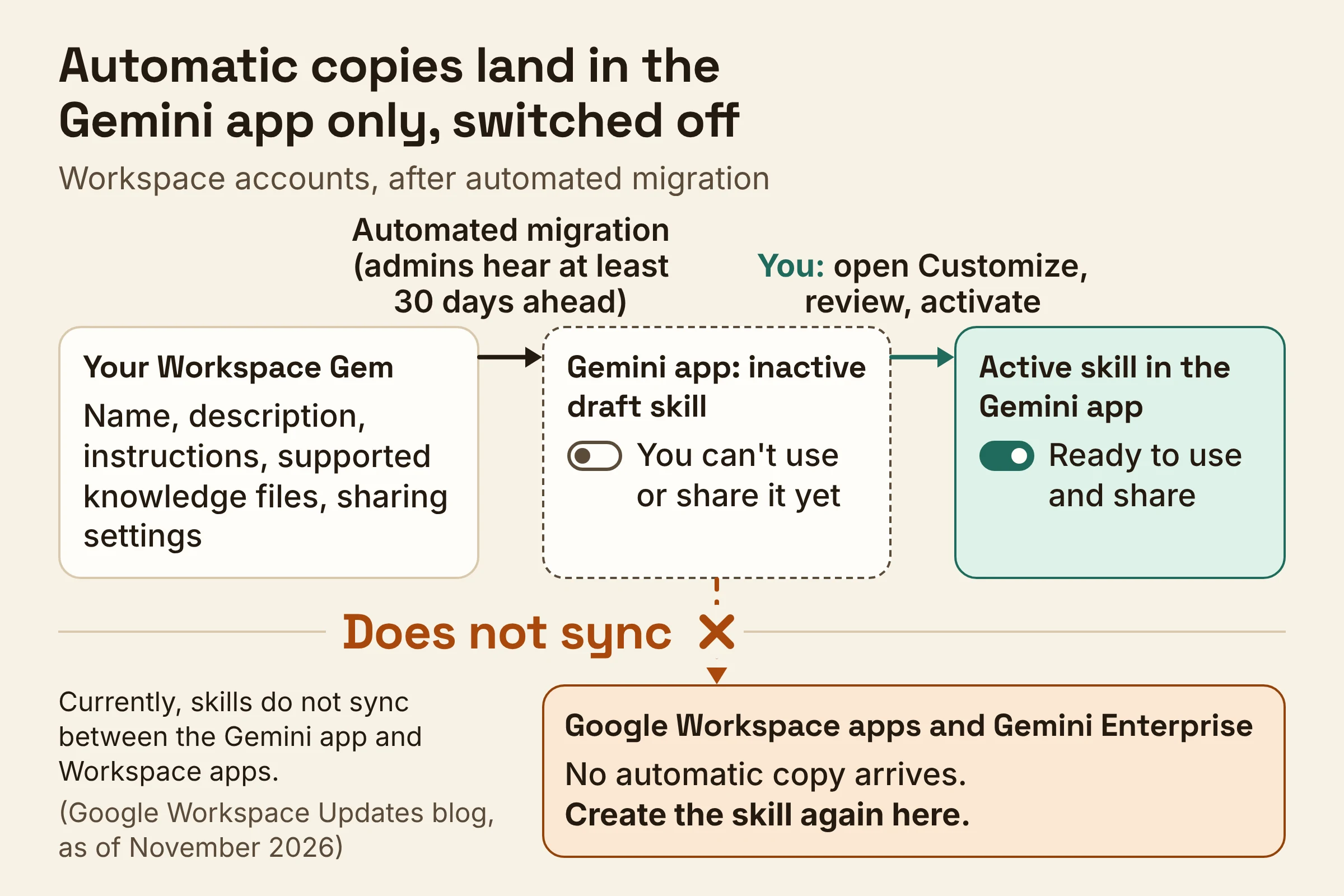
- After migration: open Customize in the Gemini app's left navigation menu, review each inactive draft skill and activate it. Until you do, you can't use or share it.
- If you also want the skill in Workspace apps: create it again there.
That last step is easy to skip. Google's Workspace update explains why: "Currently, skills do not sync between the Gemini app and Workspace apps."
The automatic copies only land in the Gemini app, not in Google Workspace or Gemini Enterprise. In Workspace Studio, you also can't attach local or reference files to a skill directly, so paste the key details into the instructions instead.
How do you create a Gemini skill from scratch?
As of November 2026, you create a Gemini skill on the Skills page in the Gemini app: click Create, then Create with Gemini, or upload a ready-made SKILL.md file. The name must be all lowercase with hyphens between words, so a Gem called Client Update Writer becomes client-update-writer.
Create with Gemini is the easiest start. Give it a filled-in version of this:
Help me turn my old Gem into a skill.
Skill name: [lowercase-words-with-hyphens]
What it does: [one sentence from the Gem's description]
Instructions: [paste the Gem's instructions]
Use it when I ask for: [a few typical requests]
Files I'll attach: [your PDFs, text files or images]
The Use it when line earns its place. Gemini can pick activated skills on its own based on the context and intent of your task, so spell out the requests you have in mind.
If you'd rather upload, Google accepts a SKILL.md file, or a folder or .zip file with a SKILL.md file in its main folder. That doesn't clash with the table above: a zipped skill is fine to upload, but a .zip sitting inside a Gem's knowledge files won't carry over.
Three rules to know before you build:
- Scripts that need internet access aren't supported in skills.
- To update a skill's files, you upload the entire skill with its reference files again.
- Deleting a skill can't be undone, and a downloaded copy leaves out any Google Drive files and notebooks, so keep your originals somewhere safe.
Can you share Gemini skills like you shared Gems?
Yes: as of November 2026, sharing permissions carry over automatically from a Gemini Gem to its new skill, so you don't need to reshare it. For now, sharing and managing access to skills only works in the Gemini web app at gemini.google.com, not in the mobile or Mac apps.
Gems that colleagues or friends shared with you appear on your Skills page under All, marked inactive, after the transition. If a teammate's Gem seems to have vanished, look there first.
On Workspace, skills are available on Business Starter, Standard and Plus, and on Enterprise Starter, Standard and Plus. Your admin controls whether you can use skills at all and whether you can share them outside your organization. So before you send a proposal-format skill to a client, check that your admin allows sharing outside the company.
If a colleague says your shared skill isn't working, check that you've activated it. Google's admin guide says creators must review and activate each migrated skill before they can use or share it.
What should you do this week?
This week, sort your Gemini Gems, rebuild the ones you rely on as skills, and decide where each skill should live. Do it in this order:
- Find your row in the deadline table. On a personal account, rebuild your key Gems and download their files before December 17, 2026. On Workspace there's no rush yet, but delete unused Gems and replace Ask a Gem steps now.
- Rebuild your most-used Gems by hand with the template above, converting any .doc, .xls or .ppt files and unpacking any .zip files on the way.
- Decide where each skill lives: the Gemini app, Workspace apps, or both. If both, build it twice, because they don't sync.
Dates and limits checked on Google's help pages and the Google Workspace Updates blog in November 2026. The blog's Workspace dates are no sooner than dates, so they can still slide later.