



Makelanding

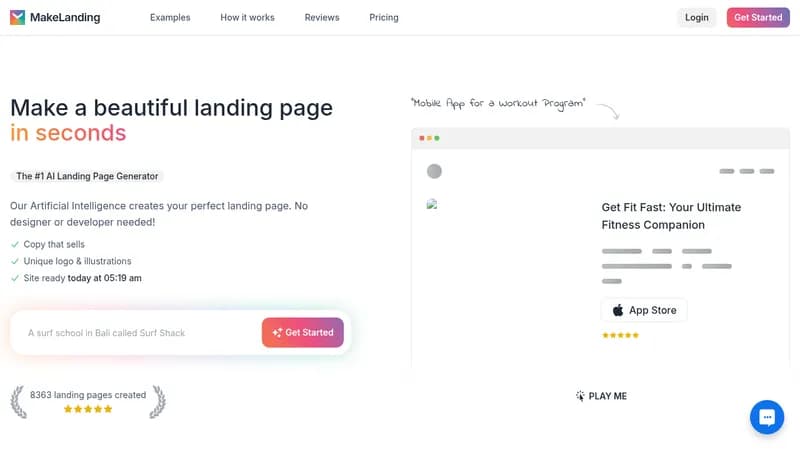
Generate custom landing pages with AI in minutes

Monthly Visits: 15.1K
Tiered
API Available
Visit Website
Makelanding

What is Makelanding?

Makelanding lets anyone create professional landing pages without design or coding skills. The AI writes persuasive copy, generates unique logos/illustrations, and delivers a ready-to-use site in under 3 minutes. Ideal for testing business ideas quickly or launching products, it offers customizable templates and multilingual support. Saves hundreds compared to hiring designers.

Key Features of Makelanding

  1. 1

    AI-Generated Copy

    Writes converting headlines in 50+ languages automatically

  2. 2

    Smart Branding

    Creates matching logos & illustrations in 6 art styles

  3. 3

    Rapid Deployment

    Full landing page ready in <3 minutes

  4. 4

    Custom Domains

    Pro plans allow using your own website address

  5. 5

    API Access

    Premium users can generate pages programmatically

Makelanding AI Tool Use Cases

  • πŸ“±
    Promote mobile apps
  • πŸŽ“
    Launch online courses
  • πŸ’Ό
    Showcase SaaS products
  • πŸ–ΌοΈ
    Build portfolio sites
  • πŸ“ˆ
    Validate business ideas

FAQs from Makelanding

Do I own the content I create?

Yes, you retain full ownership and can even resell AI-generated content

What if I need to make changes?

Editor allows changing copy, images, colors, and adding/removing sections

Is there a money-back guarantee?

No refunds, but unused credits can be applied to future usage

Pros & Cons of Makelanding

Pros (4)

  • Faster than traditional website builders
  • No design skills required
  • Multilingual content generation
  • Commercial rights to AI-generated assets

Cons (3)

  • No free trial - requires paid plan to edit
  • Lower-tier plans limit monthly page creations
  • No built-in ecommerce features

Makelanding's Pricing Plans

Starter

monthly
$19

Features

  • 10 pages/month
  • Unlimited logos
  • Basic editor
  • Shared link

Pro

monthly
$49

Features

  • 50 pages/month
  • Custom domain
  • Analytics
  • Priority support

Premium

monthly
$99

Features

  • 150 pages/month
  • API access
  • Team collaboration
  • Advanced analytics
For the latest pricing info, pleaseΒ visit the official website

More Info About Makelanding

Who is using makelanding?

This tool is best for:

  1. Solo entrepreneurs
  2. Digital marketers
  3. Small business owners
  4. Startup founders

Makelanding's Tags

Explore more niche AI tool websites by clicking on a tag* (works only if it has enough tools).

#NoCodeWebsite #SoloEntrepreneurTools#AILandingPageGenerator#LandingPageDesign

Website Analytics of Makelanding

Makelanding Website Traffic & SEO Analysis:

Recent data shows that Makelanding has 15.1K monthly visits (-39.6% decrease from the previous month), 39.0% bounce rate, and average 2.54 pages per visit.
Traffic is primarily driven by 6 different sources, with users from 5 countries worldwide, led by United States contributing 32% of total traffic. SEO performance is shown by 5 tracked keywords, with "makelanding" being the top-performing keyword with 210 monthly searches. See below for more info.

Monthly Visits

15.1K

(-39.6%)

Pages per Visit

2.54

Bounce Rate

39.0%

Average Time on Site

15s

Traffic Trend(Apr 2025 - Oct 2025)

Loading chart...

Top Keywords

SEO KeywordVolumeCPC
makelanding
210-
ai landing page generator
3.1K$1.20
award winning landing pages 2025
0-
product landing page genrator ai
50-
how to create a sales page for my ebook with ai
100-

Traffic Sources Distribution

Traffic Share by Source

Loading chart...

Source Breakdown Details

SourceTraffic Share
Direct
40%
Search
41%
Social
6%
Referrals
12%
Paid Referrals
1%

Global Traffic Distribution

Traffic Share by Country

Loading chart...

Geographic Breakdown Details of top 5 countries

Country NameTraffic Share
United States32%
Vietnam15%
India13%
France7%
Germany6%
Analytics data is estimated (from third-party analytics providers) and for reference only.

πŸš€ Makelanding Launch Badge

Promote your Toolbit Launch by using the badge on your website. It can be inserted on your home page or footer easily.

How to use: Simply copy and paste the embed code into your homepage or footer HTML to display it instantly and build community support.

ToolBit badge

Reviews for Makelanding