Powerpresent AI

Automate professional presentation design in minutes

Monthly Visits: 6.0K
Usage-Based
Free Version
Visit Website
Powerpresent AI

What is Powerpresent AI?

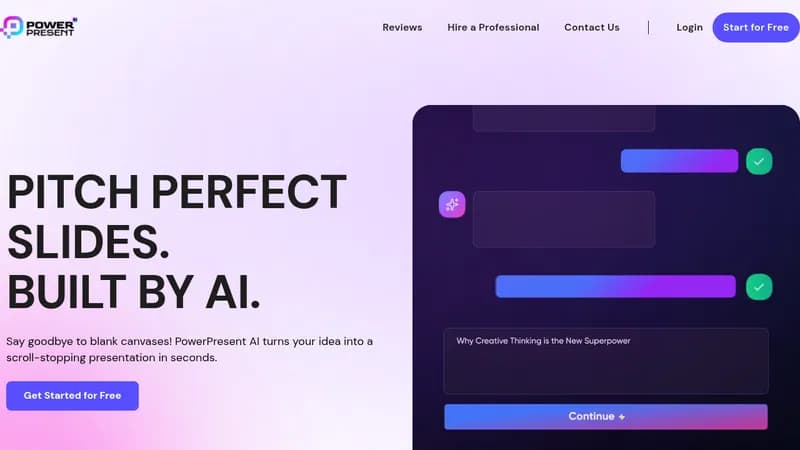
Transform text into polished presentations instantly using AI. No design skills required - just input your topic and choose from 8+ visual styles. Export directly to Google Slides or PowerPoint for easy editing and sharing.

Key Features of Powerpresent AI

  1. 1

    AI-Generated Content

    Transforms text input into complete presentation decks automatically

  2. 2

    Style Customization

    8+ visual themes including Cyberpunk and Realism

  3. 3

    Cloud Export

    One-click export to Google Slides and PPTX formats

  4. 4

    Zero-Skill Design

    Eliminates need for graphic design expertise

Powerpresent AI Tool Use Cases

  • πŸ“ˆ
    Create business pitch decks
  • πŸŽ“
    Develop academic presentations
  • πŸ“Š
    Design marketing proposals
  • πŸ‘”
    Build training materials

FAQs from Powerpresent AI

Can I edit the AI-generated presentations?

Yes, exports to Google Slides and PPTX allow full editing in familiar tools

What art styles are available?

8+ options including Cyberpunk, Realism, and Anime styles

How long does presentation generation take?

Instant creation after text input and style selection

Pros & Cons of Powerpresent AI

Pros (4)

  • 10x faster than manual presentation creation
  • Beginner-friendly interface requiring no design skills
  • Direct integration with popular slide platforms
  • Multiple art styles for visual variety

Cons (2)

  • Limited customization beyond template options
  • Credit-based system may require frequent purchases for heavy users

Powerpresent AI's Pricing Plans

Starter

one-time
$9

Features

  • 50 slides
  • PPTX export
  • Basic support

Pro

one-time
$29

Features

  • 200 slides
  • Google Slides export
  • Priority support

Business

one-time
$99

Features

  • 1000 slides
  • Team collaboration
  • Dedicated support
For the latest pricing info, pleaseΒ visit the official website

More Info About Powerpresent AI

Who is using powerpresent ai?

This tool is best for:

  1. Business professionals
  2. Educators
  3. Marketing teams
  4. Startup founders

Powerpresent AI's Tags

Explore more niche AI tool websites by clicking on a tag* (works only if it has enough tools).

Integrate Powerpresent AI With These Apps

Powerpresent AI can be integrated with these apps and services:

  • Google Slides
  • Microsoft PowerPoint

Powerpresent AI Social Media

Visit Powerpresent AI on social media to stay updated with the latest news and features.

Website Analytics of Powerpresent AI

Powerpresent AI Website Traffic & SEO Analysis:

Recent data shows that Powerpresent AI has 6.0K monthly visits (7.3% increase from the previous month), 35.0% bounce rate, and average 3.42 pages per visit.
Traffic is primarily driven by 6 different sources, with users from 4 countries worldwide, led by United States contributing 36% of total traffic. SEO performance is shown by 5 tracked keywords, with "ai presentation maker with prompts for free" being the top-performing keyword with 220 monthly searches. See below for more info.

Monthly Visits

6.0K

(+7.3%)

Pages per Visit

3.42

Bounce Rate

35.0%

Average Time on Site

27s

Traffic Trend(Apr 2025 - Oct 2025)

Loading chart...

Top Keywords

SEO KeywordVolumeCPC
ai presentation maker with prompts for free
220-
powerpresent ai
200-
ai ppt maker
58.4K$0.21
free ai powerpoint generator
4.0K$2.87
presentation
195.0K$1.07

Traffic Sources Distribution

Traffic Share by Source

Loading chart...

Source Breakdown Details

SourceTraffic Share
Direct
47%
Search
35%
Social
5%
Referrals
11%
Paid Referrals
1%

Global Traffic Distribution

Traffic Share by Country

Loading chart...

Geographic Breakdown Details of top 4 countries

Country NameTraffic Share
United States36%
India34%
Pakistan21%
France9%
Analytics data is estimated (from third-party analytics providers) and for reference only.

πŸš€ Powerpresent AI Launch Badge

Promote your Toolbit Launch by using the badge on your website. It can be inserted on your home page or footer easily.

How to use: Simply copy and paste the embed code into your homepage or footer HTML to display it instantly and build community support.

ToolBit badge

Reviews for Powerpresent AI