You can now ask a database a question in plain English and get an answer in a few seconds. The catch nobody puts on the landing page: sometimes that answer is quietly wrong, and nothing about it looks wrong. No error, no warning, no red underline. Just a confident number that came from a query that joined the wrong tables, ignored a column full of NULLs, or only saw the rows your permissions allow.
Text-to-SQL got dramatically better over the last two years, that part is true and measurable. But the failure modes didn't disappear, they moved. The best AI SQL tools in 2026 are the ones that admit this and build guardrails around it, and the best users are the ones who know where to look before trusting a number.
Where text-to-SQL genuinely shines
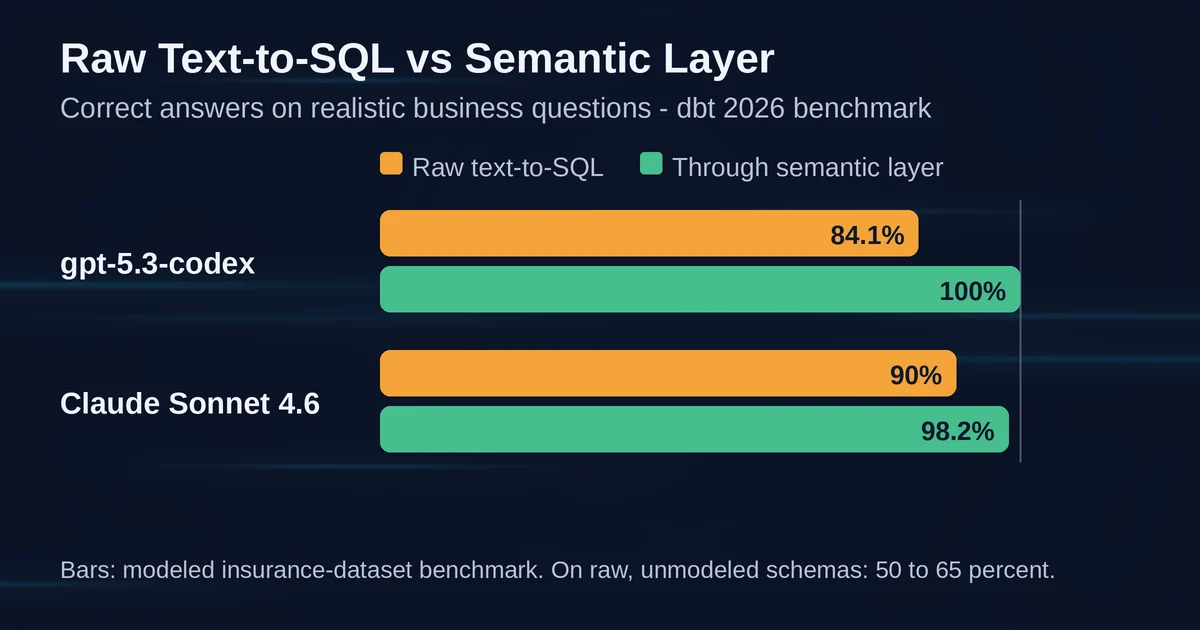
The dbt team reran a benchmark in 2026 that they had first run in 2023, comparing raw LLM-written SQL against a structured semantic layer. The headline result is worth knowing: with current frontier models, direct text-to-SQL answered 84 to 90 percent of realistic business questions correctly on a semi-complex insurance dataset. Claude Sonnet 4.6 scored 90 percent writing SQL from scratch.
Three years ago that number was a joke. Now it is genuinely useful, and there is a real reason the dbt Labs benchmark still recommends raw text-to-SQL for ad hoc exploration and smaller datasets.
The scenarios where it works well have a shape:
- Exploring a dataset you don't know yet. "What tables even exist here, and what does revenue look like by quarter?" The model reads the schema, writes plausible SQL, and you learn the shape of the data fast. If it is slightly wrong, your next question corrects it.
- One-off questions with a verification path. You ask "how many customers signed up last week," you get a number, and you can sanity-check it against something you already know.
- Analyst acceleration, not analyst replacement. Tools like Hex and Julius generate SQL or Python in a notebook where you can read the query, edit a join, and rerun it. The AI writes the first draft; a human who knows the data reviews it. That workflow is fast and mostly safe.
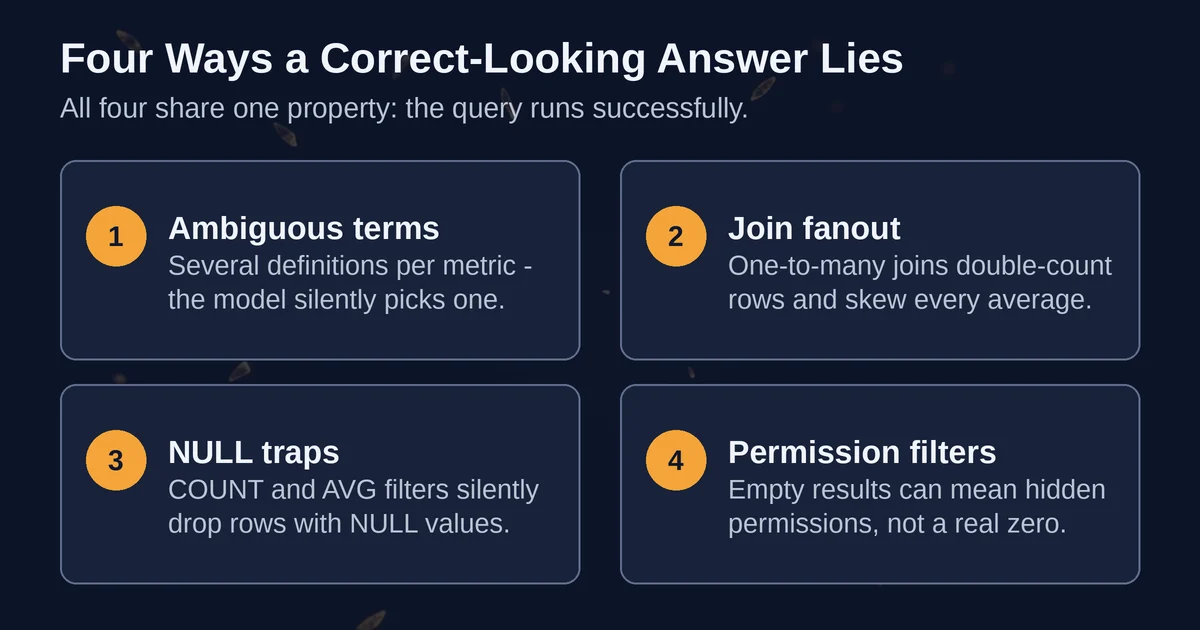
The failure modes all share one property: the query runs successfully. A syntax error is annoying but honest. A wrong join that returns a plausible-looking number is the actual danger, and it is what the rest of this article is about.
Four ways a correct-looking answer lies to you
1. Ambiguous business terms
"What was our revenue last quarter?" is not one question. It is at least four: gross or net, booked or recognized, with or without refunds, in which currency and at which exchange rate. A human analyst asks a clarifying question. A text-to-SQL model picks an interpretation, and dbt's own writeup of the failure mode is blunt: the model infers semantics from structural clues like table and column names, and there is no guardrail between the question and the generated SQL.
The result comes back as "Revenue: $4.2M" with no footnote saying "I used gross_booking_amount including refunds." If your finance team's definition differs, you now have a wrong number in a slide deck, wearing the credibility of an AI system.
2. Join fanout
This one bites even experienced SQL writers, and it scales with how much the model does for you. Say the model joins an orders table to an order_events table to answer "average order value by customer segment." One order has twelve events, so every order row appears twelve times. The AVG now weights twelve-event orders twelve times more than one-event orders, and the number is confidently, silently wrong.
The model did nothing that looks like a mistake: it wrote a valid join, the query executed, the result is well-formed. Multiply this by a schema with 400 tables and no one can eyeball the damage.
3. NULL traps
SQL has an old habit of quietly dropping rows that AI tools inherit without complaint. WHERE status != 'cancelled' excludes rows where status is NULL, which are often the newest, not-yet-processed records. COUNT(column) counts only non-NULL values while COUNT(*) counts everything, and the difference between them is exactly the data you cared about. AVG skips NULLs entirely, which can make a support-response-time average look heroic by ignoring every unanswered ticket.
None of this produces an error. The LLM writing the SQL does not know which rows are NULL or why, because the schema it sees says status STRING, not status STRING, NULL for 3% of rows, and those are your VIP signups still in onboarding.
4. Permission-filtered data
The subtlest one, because the tool is working exactly as designed. Modern data platforms enforce row-level security: you only see the rows you are allowed to see. Databricks is explicit about this in its Genie Agents documentation: generated queries run under the end user's identity, row filters and column masks from Unity Catalog are enforced automatically, and "any question about data a user cannot access returns an empty response."
Read that again. Not an error. Not "you lack permission for the EMEA region." An empty response, or a partial result, indistinguishable from "the data shows nothing."
Now imagine a regional manager asking an AI analyst "why did our churn spike in September" and getting a coherent answer built from the 30 percent of customers they can see. The analysis of that slice can be flawless, the aggregate conclusion can be completely wrong, and no SQL validator on earth will catch it, because the SQL is correct for the data the user could access.
This is a cousin of the general problem that models answer confidently from incomplete context, the same reason a chatbot can fabricate a citation without blinking. If you want the full taxonomy of that confidence problem, we cover it in how AI hallucinations actually happen.
The semantic layer: the boring fix that actually works
The most important finding in the dbt 2026 benchmark is not that text-to-SQL improved. It is what happens when you stop asking the LLM to write SQL at all.
A semantic layer, like the dbt Semantic Layer, is a codified set of definitions: here is the metric "net revenue," here are its dimensions, here is how it joins. The LLM's job shrinks from "write a query" to "pick the right metric and dimensions." The actual SQL is generated deterministically by MetricFlow, which means the model cannot produce a bad join or a subtly wrong aggregation. If it picks the right metric, the query is guaranteed correct.
The benchmark gap is not subtle: gpt-5.3-codex went from 84.1 percent writing raw SQL to 100 percent through the semantic layer. Claude Sonnet 4.6 went from 90 to 98.2. And on raw schemas, before any modeling, text-to-SQL accuracy ranged from 50 to 65 percent depending on the model and reasoning effort.
The trade-off is coverage: the semantic layer can only answer questions that were modeled in advance. That is why dbt's own recommendation is a split: raw text-to-SQL for ad hoc exploration, semantic layer for the numbers that go in front of executives and auditors.
The whole 2026 tool landscape quietly converged on this:
- Snowflake Cortex Analyst requires a semantic model in YAML, and its documentation is explicit about why: schemas lack business-process definitions and metrics-handling context.
- Databricks Genie Agents lean on Unity Catalog metadata, curated knowledge stores, and certified metric views.
- Amazon Quick (the 2025 evolution of QuickSight and Q) inherited "semantic intelligence" from existing catalogs like AWS Glue, Unity Catalog, and Collibra rather than inferring relationships from scratch, per the June 2026 AWS announcement.
- Even Julius, a consumer-shaped AI analyst, builds a semantic layer of your warehouse schema as you query it, so it is not brute-forcing thousands of tables per question.
- Microsoft is retiring Power BI's older Q&A natural-language feature in February 2027 and pointing everyone at Copilot in Power BI, which answers against the governed semantic model rather than raw tables.
If you are evaluating tools, this is the single best question to ask a vendor: "do you write SQL against raw tables, or do you go through a governed semantic layer?" The answer predicts most of your future incident reports.
The tool landscape in September 2026
The market sorted itself into four rough tiers, and knowing which tier you are buying matters more than brand names:
Warehouse-native agents. Snowflake Cortex Analyst and Databricks Genie Agents (formerly Genie Spaces). Genie queries are always read-only and run on the author's compute, while data access is evaluated per end user, a clean security model. Amazon Quick sits here too, with the caveat that its lineage (QuickSight, then Q, then Quick Suite, then Quick) is confusing enough that you should check the current AWS docs before writing the name in a deck. These are the safest defaults if your data already lives in the warehouse and your team can invest in metadata and semantic models.
Analyst-facing chat tools. Julius and DataLab: upload a file or connect a warehouse, ask questions, get charts. Julius is alive and actively developed, with data connectors to Snowflake, BigQuery, Postgres, and others, SOC 2 Type II compliance, and per-plan limits like 32 GB of working memory. These are the best fit for individual analysts and small teams without a data platform, and the worst fit for enterprise metrics that need one official definition.
Notebooks with AI built in. Hex leads this category, and its 2026 positioning is telling: the marketing leads with trust, semantic models, endorsed tables, and agent observability, not with "ask anything." That is what user demand did to this category. DataLab from DataCamp covers similar ground for learning-oriented workflows.
Open source and self-built. A cautionary tale lives here: Vanna, a 23,800-star open-source text-to-SQL library, was archived by its owner in March 2026 with the repository now read-only. The project survives as a commercial product, but teams that pip-installed a free library woke up to a frozen dependency. Open source text-to-SQL is absolutely viable to build on, but check archive dates and commit activity before making it load-bearing.
One name from older "AI analytics" roundups that you should not chase: Askdata was acquired by SAP back in 2022 and no longer exists as a standalone tool. Any 2026 listicle recommending it was written by someone who did not check.
For a broader map of which AI tools fit which roles, including where data analyst tools sit next to general assistants, see our role-by-role AI tool guide.
A verification checklist that takes ninety seconds
You do not need to distrust AI SQL tools, you need to check them the way you check a junior analyst: quickly, every time, on the specific things that commonly go wrong.
- Read the generated SQL. Every serious tool shows it. If the tool hides the query, stop using that tool. You are looking for two things in under a minute: which tables it joined, and whether the aggregation happened before or after any one-to-many join.
- Ask the question two different ways. "Revenue last quarter" and "sum of order_value where order_date in Q3, excluding refunds." If two phrasings return materially different numbers, you found an interpretation problem while it was still free.
- Check the row count, not just the aggregate. A quick
COUNT(*)against the filtered table catches silent row-dropping: NULL filters, permission masks, date-boundary drift. If the model says 40,000 rows matched and the count says 31,000, something is excluded that you have not accounted for. - Confirm the scope of your own access. Ask the tool what tables and rows it can see, or better, ask your data platform admin what row-level policies apply to your account. A correct answer over the wrong slice is the most dangerous failure mode precisely because it is internally consistent.
- Watch for the empty result. An empty response or a suspiciously thin result is often a permission boundary, not a business fact. Treat empties as a signal, not an answer.
- Pin critical metrics to a semantic layer. The five numbers your CEO quotes in every all-hands should come from governed definitions, not from an ad hoc query an LLM generated at 11pm. Everything exploratory can stay loose; the numbers of record should not be.
None of this is specific to one vendor, which is the point. These are properties of SQL and of delegated reasoning, not of any particular model. They are the same class of silent failure that shows up whenever agents act on your behalf without showing their constraints, a pattern we dig into in the real risks of AI agents.
A note on pricing and plan details for the tools named here: figures like Julius's free tier and paid plans are as published by the vendor around September 2026 and can change, so confirm on the official site before budgeting.
FAQ
Is text-to-SQL accurate enough for production use? For exploration, yes: the dbt 2026 benchmark shows current frontier models writing correct SQL 84 to 90 percent of the time, which is fine when a human reviews results. For numbers that drive decisions, route through a governed semantic layer, where the same benchmark measured 98 to 100 percent accuracy.
Can an AI SQL tool leak data someone should not see? The mature platforms enforce the user's own permissions in the database layer, so the bigger risk is the reverse: the tool silently showing you a partial slice while you read it as the whole picture. Empty results are usually permission boundaries, not business facts, and the right fix is asking what row-level policies apply to you.