You said something careful, and the internet heard something reckless.
Maybe it was: "AI will replace most junior roles, but only after tooling catches up, which could take years." The clip finder hands you a 42-second vertical. It opens on "AI will replace most junior roles" and hard-cuts to the next thought. The two conditions that made the sentence safe are on the editing room floor. The captions look fantastic. The hook is punchy. And you now hold an opinion you do not hold.
That is the real failure mode of every AI clip maker, and almost nobody warns you, because it is caused by the very thing the tools advertise loudest: their ability to find the "best moment" in a long video.
This is a field guide to the three tools most people choose between, Opus Clip, Descript, and Submagic, with one test: does the clip still say what you said?
The misquote problem
Every automated clipper selects moments using roughly the same recipe: find a self-contained burst of speech with a strong opening, low hesitation, and a clear payoff. Then trim to fit a target length and punch up the first three seconds, because that is where viewers bail.
Notice what is absent from that recipe: your intent. The model does not know that "but only after tooling catches up" is load-bearing. It only knows that a clip starting with a bold claim retains better than one starting with a hedge, so the hedge gets treated as dead air.
Three cuts account for most of the damage in practice:
- The dropped qualifier. "It's a great tool for beginners, though I wouldn't run a client project on it." The second clause costs nothing to cut and changes the recommendation completely.
- The fused sentences. A clip ends on your setup and opens on someone else's punchline. Multi-speaker podcasts are especially exposed, because a cut point between two voices is statistically quiet, so it looks like a safe place to slice.
- The invented boundary. The auto hook rewrites or re-frames your opening line for punchiness, and a stronger first three seconds can quietly become words you never said in that order.
None of this is a bug the vendors will fix next quarter. It is what optimizing for watch time does to nuance. And a virality score does not warn you either: a clip that misquotes you often scores better than the honest version, because certainty retains better than caveats.
Finding a clip is not styling a clip
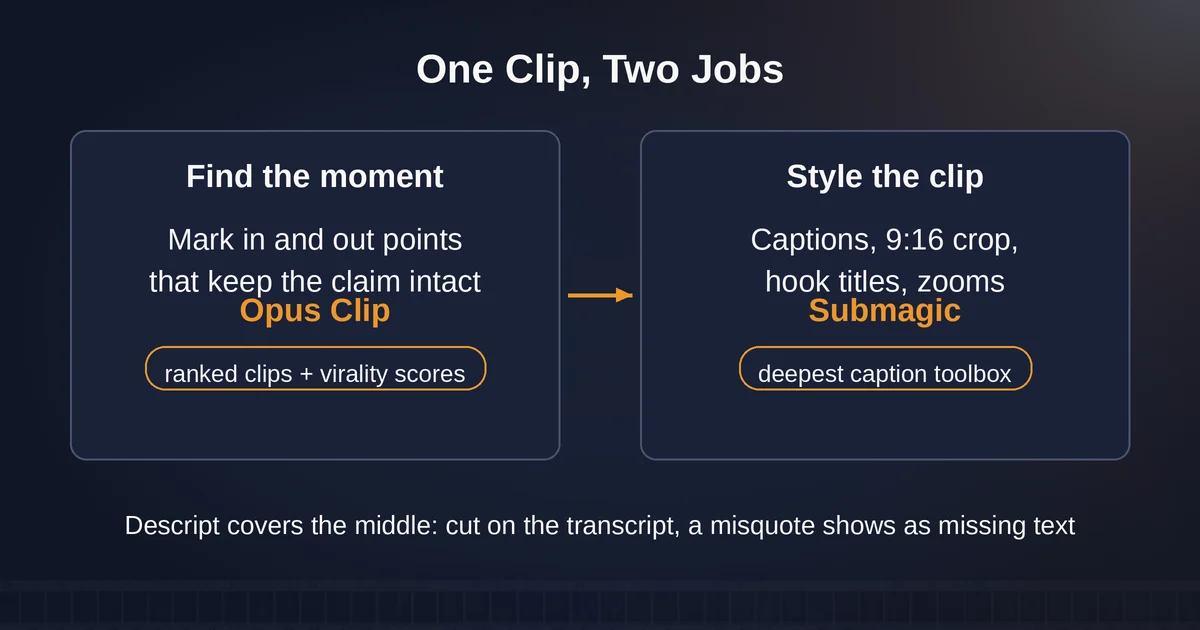
Here is the mental model that makes choosing between these tools almost easy. "Turn a long video into shorts" is actually two jobs wearing one trench coat:
Job one: find the moment. Listen to 47 minutes of webinar, figure out which 40-second stretches are worth anyone's time, and mark clean in/out points that do not mutilate the argument. This is a judgment problem, and it is where the misquote risk lives, because the cut points are the claim.
Job two: style the clip. Captions, crop to 9:16, b-roll, hook title, zooms, audio cleanup, export. This is a craft problem, and it is largely solved: every tool here does it well.
The mistake is buying one tool for both jobs when your risk is concentrated in only one of them. If a tool styles beautifully but you would not trust it to find a clip, use it as a styler and find the moments yourself. If it finds moments well but captions look generic, find with it and style elsewhere.
With that split in mind, the tools are different answers, not competitors.
Opus Clip: the moment-finder that needs a chaperone
Opus Clip is the most clip-first of the three. You hand it a long video, it returns a ranked batch of candidate clips with virality scores on the paid tiers, auto-generated hooks, animated captions, and a 9:16 reframe. The Pro plan adds custom clip lengths from under a minute up to 10-15 minutes, plus export straight to Premiere Pro or DaVinci Resolve.
The useful part for the misquote problem is the AI copilot: on any paid tier you can constrain the timeframe and the clip length before it runs, and re-prompt to refine results. That is not a cosmetic control. If you know your pricing argument is safe between minutes 12 and 18, bounding the search is the single most effective thing you can do, because the model can only mangle what you let it touch. The virality score itself is best treated as a triage heuristic, "look at this one first," never as a quality guarantee. Its bias runs toward confident, quotable moments, which is precisely the shape of a misquote.
The caution list: the free plan watermarks captions, expires exports in three days, and limits you to 9:16, so treat it as a trial, not a workflow. Starter at $15/mo removes the watermark but media still expires after 29 days. The auto hook, the feature that rewrites your opening for punch, is the piece most likely to put words in your mouth: check the first five seconds of every clip word for word.
Use it when you have hour-plus source material and no time to scrub it. Do not use it unreviewed, ever.
Descript: the misquote check built into the edit
Descript is not really a clip finder. It is a text-based video editor where you edit the transcript and the video follows, plus an AI co-editor called Underlord and a Create Clips feature that proposes highlights from your recording, included from the Hobbyist plan ($16/person/month billed yearly, with 10 media hours and 400 AI credits) onward.
The structural difference is that the transcript is the cutting surface. When a clip proposal omits your caveat, you see it as missing text in what is effectively a document, no timeline scrubbing required. Deleting "but only after tooling catches up" from a paragraph is a visibly catastrophic edit in a way that the same deletion rendered into video is not. The misquote check stops being a step you remember to do and becomes the medium you work in.
Costs and limits: media hours meter your uploads (10 on Hobbyist, 30 on Creator at $24, 40 on Business at $50), and AI features draw from a separate credit pool, so heavy AI use adds up. The styling side, captions and punch, is thinner than the dedicated stylers. Descript is a general editor that happens to make clips, not a shorts factory.
Use it when the source is a podcast or interview you already edit, when cut accuracy matters more than caption flair, or when the recording needs a full edit and not just shorts.
Submagic: the styler, with a catch on input length
Submagic runs the opposite direction: it is a caption-first shorts editor that added clip generation, not a long-form ingester that added captions. Its styling toolbox is the deepest here: premium caption templates, AI zooms, hook titles, b-roll, audio cleanup, automatic removal of silences and bad takes, caption translation, and built-in publishing and analytics.
The catch is the input cap. Per Submagic's pricing, videos are limited to 2 minutes on Starter ($19/mo, 15 videos), 5 on Pro ($39/mo, 40 videos), and 30 on Business ($69/mo, 100 videos). A 90-minute webinar does not fit even the top self-serve tier. In practice Submagic's clip generator works on short-to-medium sources, or on clips you already found elsewhere, which is exactly why it pairs so well with the two-jobs model: find the moment in a tool that ingests long video, style it here, where the captions look better than anything the finders produce.
The automatic silence and bad-take removal deserves the same suspicion as any watch-time optimizer: it cannot tell a dramatic pause from a mistake. Review what it removed.
Use it when you already know your moments, or your sources are short, and the job is making them look beautiful.
One line on Captions.ai: if you want both jobs in a single mobile app, Captions' Max plan ($24.99/mo, 500 credits) will "turn a long video into a batch of post-ready clips" and style them with 100+ caption templates. One caveat: the vendor notes those prices reflect iOS plans only, so check your platform.
The publish check
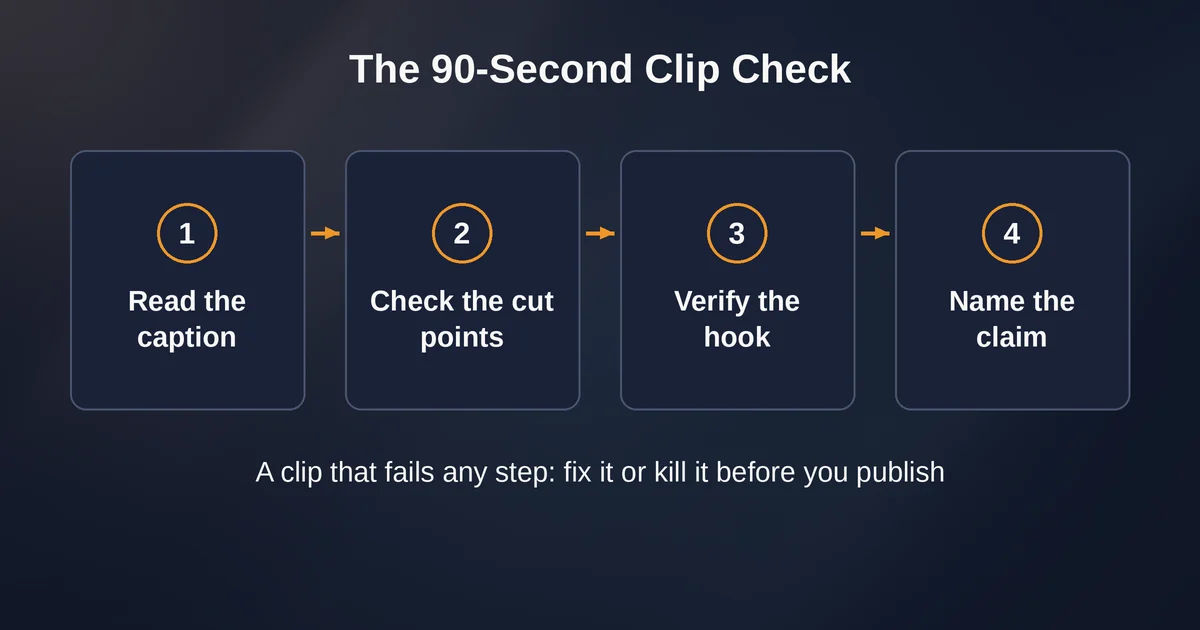
Whatever mix you run, the test that catches misquotes takes about 90 seconds per clip:
- Read the caption, not the video. Read the clip's transcript as plain text, cold. Would you sign your name under that paragraph? If the text misrepresents you, nothing else matters.
- Check both cut points against the full transcript. What came in the five seconds before the clip starts, and after it ends? Most misquotes live there.
- Verify the hook is yours. If the tool rewrote your opening, either revert it or make sure the rewrite is still true.
- Name the claim. Say aloud, in one sentence, what a viewer will now believe. If that sentence is not something you would say on stage, fix the clip or kill it. This is also the honest way to use a virality score: high score on a clip that survives step four is a signal; high score on one that fails it is a warning.
The payoff for that discipline is bigger than avoiding embarrassment. A clip that cuts off your caveats attracts an audience that showed up for the extreme version of you, the one without conditions, and those viewers churn the moment they meet the real thing. Accurate clips recruit the audience you actually want.
A short verdict
- Mostly a finder problem (long podcasts, webinars, keynotes): Opus Clip to surface candidates, bounded with the copilot controls, then a strict transcript review. Descript instead if the recording needs a real edit.
- Mostly a styling problem (you know your moments, sources under 30 minutes): Submagic, hands down, for the best-looking captions and fastest polish.
- Both jobs, one app, mostly on a phone: Captions.ai Max is a defensible pick.
- Any of them, unsupervised: no. The tools are good at finding watchable moments. What they cannot do is notice that your "unless" was the whole point. That part stays your job.
Pricing and plan details are as published by the vendor around September 2026 and can change; confirm on the official site.
Before you build the rest of the pipeline, decide how these tools fit your broader stack. Our guide to the most common automation mistakes covers the failure patterns, and how to build your first AI automation without code shows how to wire the publish step together.
FAQ
Do AI clip makers misquote you on purpose? No. There is no intent involved. The models pick cut points that maximize retention, and caveats lower retention, so qualifiers get cut as a side effect of the optimization target. The result misquotes you all the same, which is why the transcript review is non-negotiable.
What is the cheapest way to test all three? All four tools have a free tier. Opus Clip's free plan watermarks captions and expires exports in three days, but it shows how it finds moments on your material. Descript's free plan includes text-based editing and basic AI tools. Run one 10-minute video through each and flag any clip that changes your claim. That result, not a feature list, tells you which tool to trust with your words.