Speculative decoding in vLLM speeds you up when two things hold: your workload is what vLLM's docs call medium-to-low QPS (queries per second) and memory-bound, and the target model accepts enough of the drafted tokens. As concurrency climbs, the extra verification work shrinks the gain and can flip it into a slowdown. With vLLM's standard rejection sampler you give up no accuracy in theory, because the output distribution stays the target model's up to the precision limits of hardware numerics.
The short version:
- Pick a method by workload: MTP or an EAGLE-3 draft for one user chatting with a reasoning model, a small draft model for a big target, n-gram or suffix for code edits and agent loops.
- Turn it on with a single
--speculative-configflag onvllm serve. - Keep it only if mean acceptance length sits clearly above 1.0 and inter-token latency drops at the concurrency you actually serve.
How does speculative decoding work?
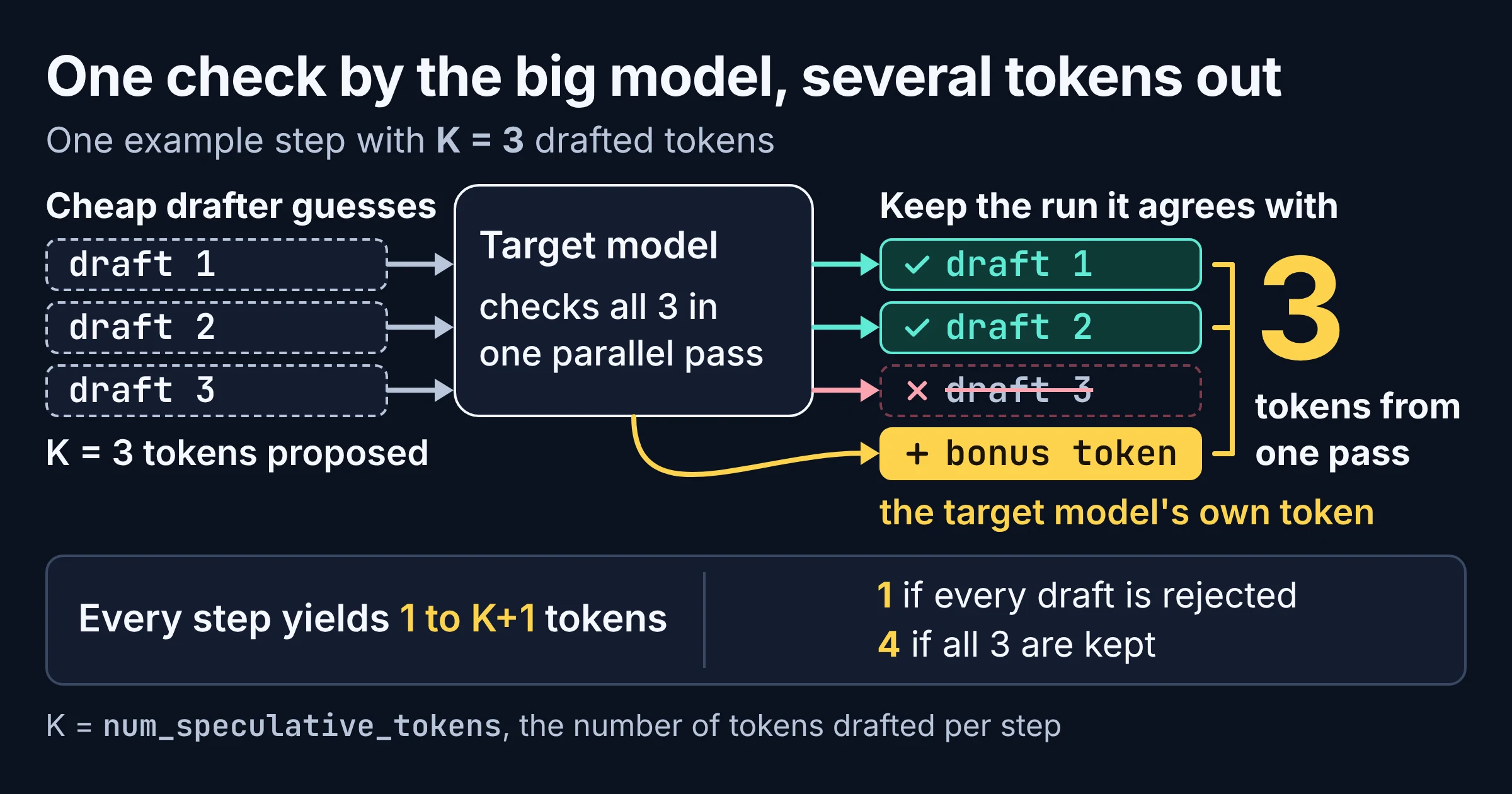
Speculative decoding pairs your big target model with a cheap drafter: the drafter guesses the next few tokens, and the target model checks all of them in parallel, keeping the run it agrees with. Leviathan, Kalman and Matias introduced it as a way to sample from autoregressive models faster "without any changes to the outputs, by computing several tokens in parallel".
Picture a junior colleague typing ahead in a shared doc. You read their suggestion once, keep every word up to the first one you would change, then type that word yourself. One read, several words: that is the whole trick.
In vLLM, each check is a verification step. It always emits at least one token, which vLLM counts as the bonus token, plus however many drafted tokens survived, so one step yields between 1 and K+1 tokens. K is num_speculative_tokens, the number of tokens drafted per step.
The drafter can be a separate small model, an EAGLE draft model, the target's own multi-token prediction capability, or plain pattern matching on text you already have. As of November 2026, vLLM's docs list draft_model, ngram, suffix, mtp, eagle3 and dflash as common values for the method field.
Why is speculative decoding faster, and when does it stop helping?
Speculative decoding is faster because the target model checks several drafted tokens in parallel instead of producing every token one step at a time. As of November 2026, vLLM's docs aim the feature at reducing inter-token latency, the gap between streamed tokens, "under medium-to-low QPS (queries per second), memory-bound workloads". The advantage shrinks as batches grow, because every drafted token adds verification work.
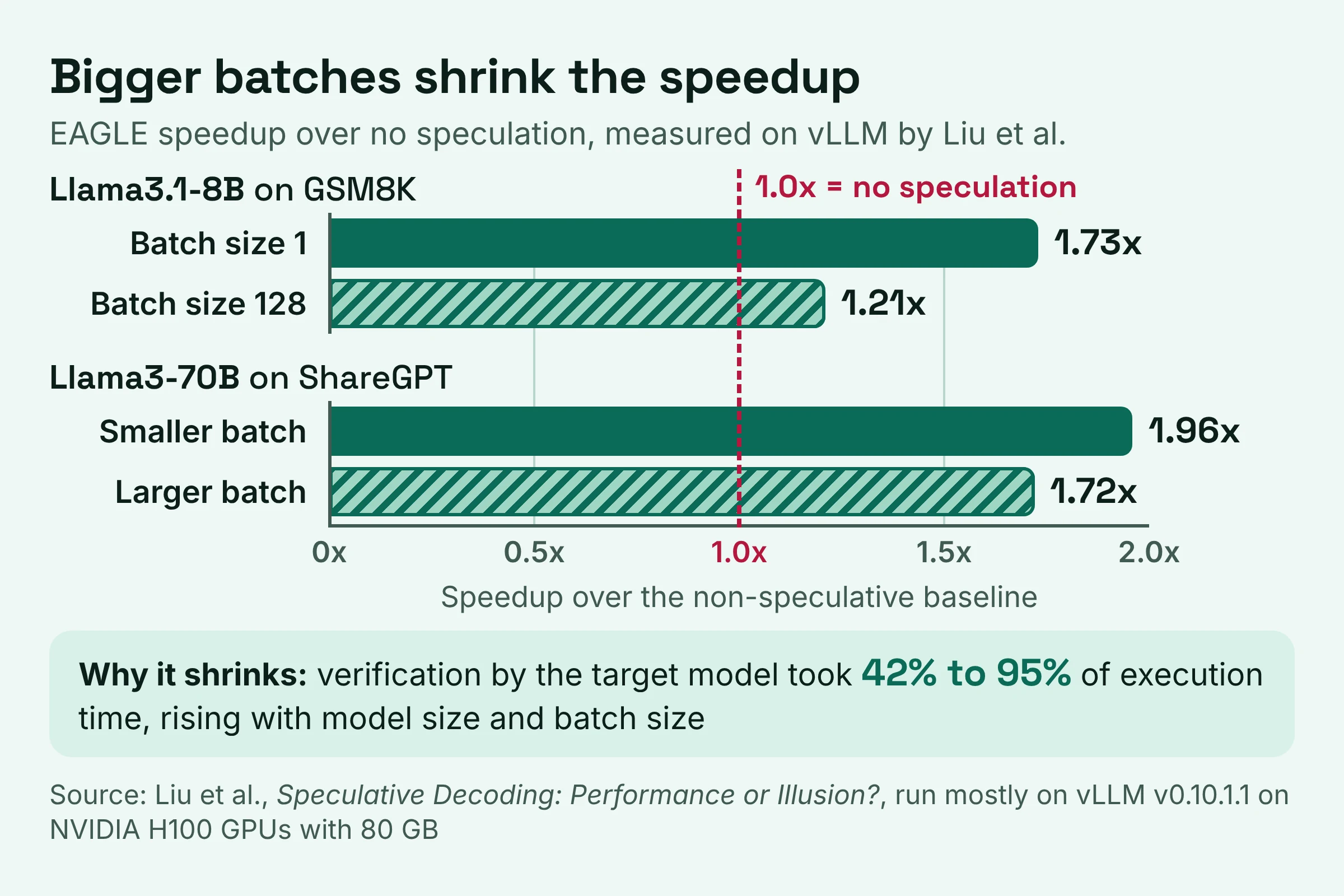
Back to the colleague typing ahead. Checking one person's suggestions is quick. When the whole team types ahead at once, the pile to check is suggestions times people, and checking becomes the slow part.
vLLM's dynamic speculative decoding page spells out that pile-up. Each sequence must verify K tokens, so the effective batch becomes batch size times K, which raises the compute needed for verification. Once that effective batch passes a critical batch size, speculation hurts decode speed, measured as TPOT (time per output token).
What a study on vLLM itself measured
Liu, Yu, Park, Stoica and Cheung tested this on vLLM in Speculative Decoding: Performance or Illusion?, which they describe as the first systematic study of speculative decoding on a production-grade engine. They found larger batches give higher absolute throughput but lower relative speedup:
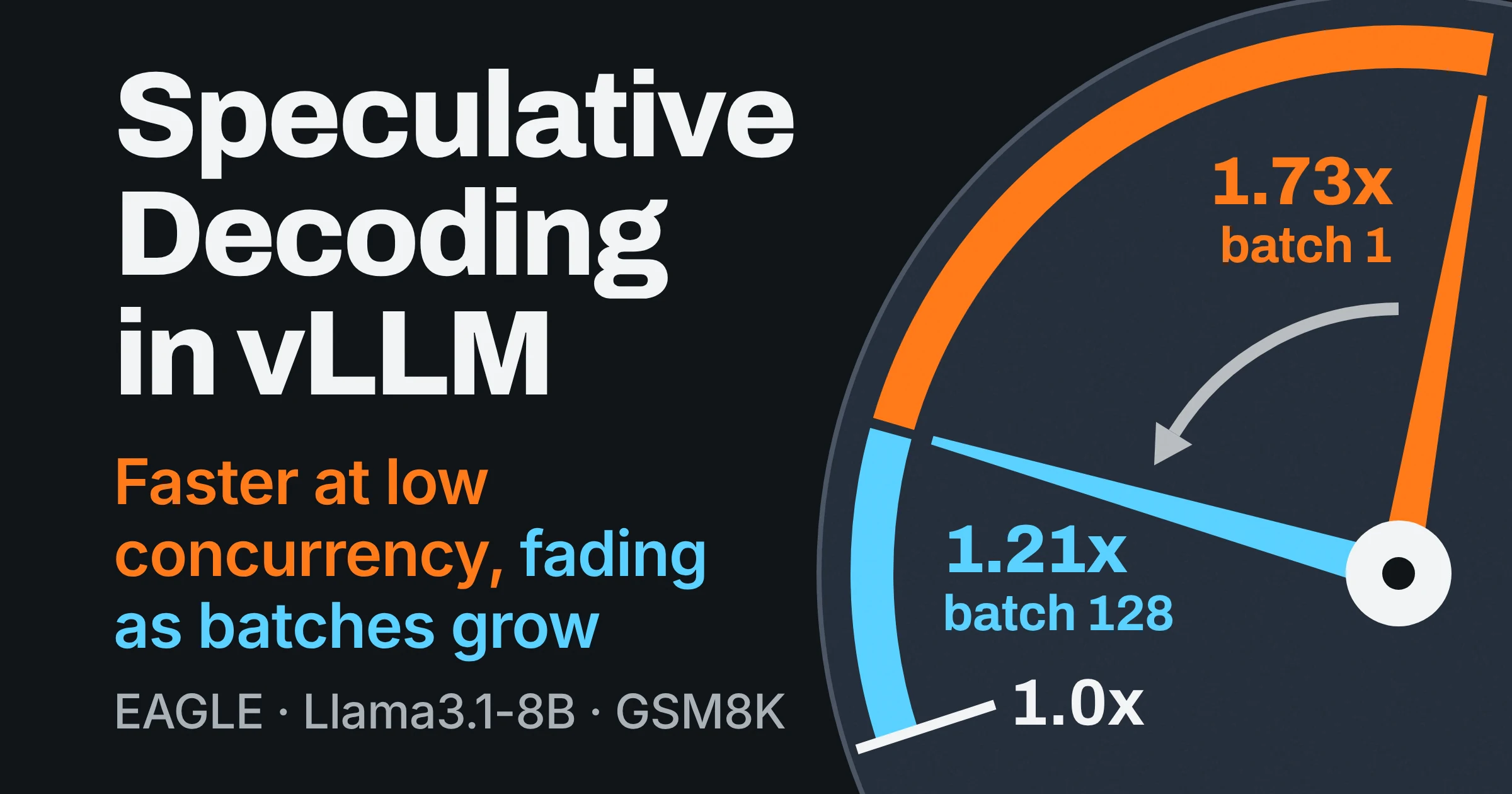
- For Llama3.1-8B on GSM8K, EAGLE's speedup over the non-speculative baseline fell from 1.73x at batch size 1 to 1.21x at batch size 128.
- For Llama3-70B with EAGLE on ShareGPT, the speedup dropped 14.0%, from 1.96x to 1.72x, as batch size rose.
- Verification by the target model took 42% to 95% of execution time, rising with model size and batch size.
So in their runs verification, not drafting, took the largest share of time. That makes the number of tokens that survive each verification pass the figure to watch.
Two caveats keep this honest:
- Their headline result is still a gain. Liu et al. write that every speculative variant still beat the no-speculation baseline across all workloads, so their headline finding is a gain that shrinks with batch size rather than one that flips.
- No universal cutoff. vLLM publishes no universal critical batch size: where speculation stops paying depends on your model and hardware.
Is speculative decoding lossless, and can it reduce accuracy?
Speculative decoding in vLLM is lossless in distribution, though not guaranteed bit-exact. As of November 2026, vLLM's docs say its sampling "is theoretically lossless up to the precision limits of hardware numerics", a guarantee that applies to the standard rejection sampler. In plain terms, a weak drafter costs you speed, not answer quality, because the target model decides every token that is kept.
The original paper backs this up: on T5-XXL it showed a 2x to 3x acceleration with identical outputs. Here is exactly what lossless does and does not promise, according to vLLM's speculative decoding docs:
| Question you might ask | Short answer | What vLLM's docs say |
|---|---|---|
| Same output distribution as the target model alone? | Yes, in theory | Lossless up to the precision limits of hardware numerics, with the standard rejection sampler |
| Bit-for-bit match with speculation turned off? | Not guaranteed | Floating-point errors might cause slight variations in output distributions |
| Identical text for the same request every run? | Not guaranteed | vLLM does not guarantee stable logprobs, so the same request can give different outputs across runs |
| Same logprobs at any batch size? | Not guaranteed | Batch size changes may shift logprobs and output probabilities |
| Still lossless with FLy verification turned on? | No | FLy deliberately relaxes verification and is not distribution preserving |
What that means for your evals:
- Small text diffs are not automatically a speculation bug. The logprob caveat is worded as a limitation of vLLM in general.
- Hold concurrency fixed between the with and without runs when you compare logprobs, since batch size changes may shift them.
- Stay on the standard rejection sampler and leave FLy verification off if you need the guarantee.
Which vLLM speculative decoding method fits your workload?
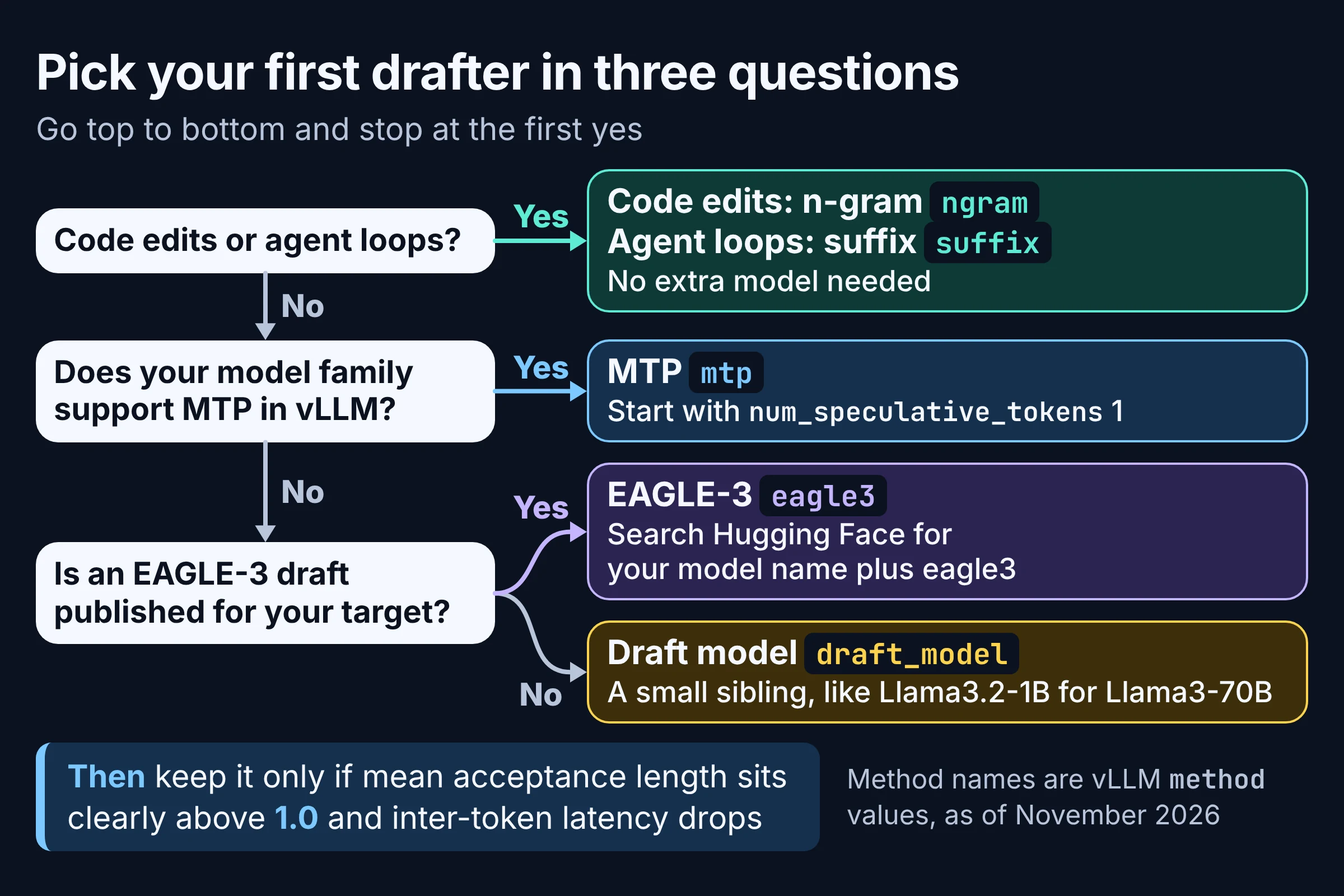
As of November 2026, vLLM's docs say model-based methods (EAGLE, MTP and draft models) give the best latency reduction, while n-gram and suffix decoding give modest speedups without increasing workload during peak traffic. Pick by two things: how repetitive your outputs are, and which drafters exist for your model.
The measured column comes from Liu et al., who ran mostly on vLLM v0.10.1.1 on NVIDIA H100 GPUs with 80 GB of memory. Treat their numbers as direction, not a promise for your stack.
| Method | method value | What drafts the tokens | Best for | Measured on vLLM (Liu et al.) | Watch out for |
|---|---|---|---|---|---|
| Draft model | draft_model | A smaller model you choose | Large targets with a tiny, cheap drafter | Beat EAGLE on Llama3-70B (drafted by Llama3.2-1B) in most settings | Gains are largest when running the drafter is relatively cheap |
| EAGLE-3 | eagle3 | A separate EAGLE-3 draft model | Models with a published EAGLE-3 draft, at low concurrency | Led on Qwen3-8B-Thinking at 1.64x to 1.80x | You need a draft checkpoint for your target |
| MTP | mtp | The target model's native multi-token prediction | Supported model families, with no separate draft model to supply | 1.3x to 1.8x on GLM-4.5-Air (GPQA-Main) | Liu et al. found reuse of a single MTP head across drafted tokens limited performance |
| N-gram | ngram | Matching n-grams in the prompt | Code edits and outputs that repeat the prompt | Its own best speedups came on repetitive code-editing; 1.50x to 1.58x on Qwen3-8B-Thinking | Heavy-tailed, unstable acceptance outside repetitive tasks |
| Suffix | suffix | Pattern matching on the prompt, the output and earlier responses | Agentic loops, code-editing, RL rollouts | No figure in the study; vLLM says it can do better on high-repetition tasks | vLLM rates the speedup as modest |
Matched to the traffic you actually serve:
- One user chatting with a reasoning model: start with MTP if your model supports it, otherwise EAGLE-3 if a draft exists for your model.
- A big model with a small sibling: try a draft model. Liu et al. paired Llama3-70B with Llama3.2-1B and Qwen3-8B with Qwen3-0.6B.
- Rewriting a function you pasted in: the output mostly repeats the prompt, so n-gram, which needs no extra model, is an easy first try. A self-hosted coding assistant like the one in our air-gapped local coding stack guide can produce this kind of traffic.
- An agent that loops the same tool-call scaffolding: suffix decoding, because it also matches against earlier responses and uses frequency counts to propose likely continuations.
- Traffic that spikes hard: n-gram or suffix, which vLLM says do not increase workload during peak traffic, or a model-based method with dynamic K, covered below.
What is EAGLE-3 speculative decoding?
EAGLE-3 is an EAGLE (Extrapolation Algorithm for Greater Language-model Efficiency) method that its authors report improves on EAGLE-2, and in vLLM it means serving your target with method set to eagle3 plus a separate EAGLE-3 draft model. As of November 2026, vLLM's EAGLE page notes a variety of EAGLE draft models are available on the Hugging Face hub.
So the practical question is whether someone has published a draft for your exact target. Search Hugging Face for your model name plus eagle3 or speculator. vLLM's own example pairs gpt-oss-20b with RedHatAI/gpt-oss-20b-speculator.eagle3 and drafts 3 tokens per step.
Read the headline numbers carefully:
- Author claim: the EAGLE-3 paper reports a speedup ratio up to 6.5x, about 1.4x better than EAGLE-2. That is the authors' best case.
- Different engine: the same paper reports a 1.38x throughput improvement at batch size 64, measured in SGLang, not vLLM.
- Independent vLLM run: Liu et al. saw EAGLE-3 lead on Qwen3-8B-Thinking at 1.64x to 1.80x on GPQA-Main and AIME22-24.
An author's best case of 6.5x and an independent 1.80x on vLLM come from different setups, and that gap is the whole reason to measure on your own traffic.
Speculative decoding vs multi-token prediction: what is the difference?
Multi-token prediction (MTP) is not a rival to speculative decoding: in vLLM it is one speculative method, and the target model must include native multi-token prediction capability. As of November 2026, it only works for model families that support MTP in vLLM, so check vLLM's MTP page for the exact config for your model.
Think of MTP as built-in sat-nav and a draft model as a phone clipped to the dashboard. The built-in kind only ships with certain cars, so check yours before you plan around it.
What vLLM and the research say about MTP as of November 2026:
- Starting depth: vLLM says a small
num_speculative_tokensvalue like 1 is a good default to start with. - Measured result: Liu et al. found MTP on GLM-4.5-Air beat n-gram but fell short of the theoretical upper bound, at 1.3x to 1.8x on GPQA-Main. They say MTP is limited by reusing a single MTP head across drafted tokens.
- No MTP support: vLLM's advice is to use another method, such as EAGLE or a draft model.
How do you turn on speculative decoding in vLLM?
You enable speculative decoding in vLLM by passing a JSON --speculative-config to vllm serve, with a method and, for methods that cannot infer it from model metadata, a num_speculative_tokens value. The examples below use field names from vLLM's latest speculative decoding docs as of November 2026; they can change between releases.
# Draft model: vLLM's example drafts a 4B target with a 0.6B model
vllm serve Qwen/Qwen3-4B-Thinking-2507 \
  --speculative-config '{"model": "Qwen/Qwen3-0.6B", "num_speculative_tokens": 5, "method": "draft_model"}'

# EAGLE-3: vLLM's example for gpt-oss-20b, run across two pipeline stages
vllm serve openai/gpt-oss-20b \
  --pipeline-parallel-size 2 \
  --speculative-config '{"method": "eagle3", "model": "RedHatAI/gpt-oss-20b-speculator.eagle3", "num_speculative_tokens": 3}'
N-gram and suffix need no extra model, and MTP needs a target with native multi-token prediction; all three take the same flag:
# N-gram: drafts by matching n-grams in the prompt
--speculative-config '{"method": "ngram", "num_speculative_tokens": 4, "prompt_lookup_min": 2, "prompt_lookup_max": 5}'

# Suffix: also matches earlier responses, with frequency counts
--speculative-config '{"method": "suffix", "num_speculative_tokens": 8, "suffix_decoding_max_tree_depth": 24}'

# MTP: method and starting depth only; take your model's exact config from vLLM's MTP page
--speculative-config '{"method": "mtp", "num_speculative_tokens": 1}'
The docs' list of common methods also includes dflash, which is not covered here.
How do you know if speculative decoding is paying off?
Speculative decoding pays off in vLLM when mean acceptance length sits clearly above 1.0 and inter-token latency drops at the concurrency you actually serve. If either fails, change method, lower K, or switch drafting off for busy periods. vLLM's acceptance metrics page defines the numbers to watch, as of November 2026:
- Mean acceptance length: tokens emitted per verification step, including the bonus token, calculated as 1 + accepted draft tokens divided by verification steps. It ranges from 1.0 (nothing accepted) to K+1.
- Draft acceptance rate: the fraction of proposed draft tokens that were accepted.
Both come from three server-wide Prometheus counters at /metrics, and vLLM also documents per-request acceptance fields as their individual-request counterpart.
# Mean acceptance length (1.0 means every draft was rejected)
1 + rate(vllm:spec_decode_num_accepted_tokens_total[5m])
  / rate(vllm:spec_decode_num_drafts_total[5m])

# Draft acceptance rate (share of proposed tokens kept)
rate(vllm:spec_decode_num_accepted_tokens_total[5m])
  / rate(vllm:spec_decode_num_draft_tokens_total[5m])
A quick worked example: with the EAGLE-3 setup above, drafting 3 tokens per step, mean acceptance length can range from 1.0 to 4. Treat 4 as the ceiling on tokens per target-model pass, before you pay for the draft. Liu et al. found substantial gaps between measured speedups and theoretical upper bounds, so expect your real speedup to land below that ceiling.
Acceptance also varies markedly across token positions, requests and datasets, per the same study. Measure over a day of real traffic, not one demo prompt.
The go or no-go rule
Benchmark inter-token latency with and without speculation at both your typical and your peak concurrency, then read the result off this table:
| What you see | Verdict | What to do next |
|---|---|---|
| Acceptance length clearly above 1.0, latency lower at typical and peak load | Go | Keep it; re-measure after any model, hardware or traffic change |
| Latency lower at typical load, worse at peak | Go with limits | Add dynamic K so drafting shrinks or stops at peak |
| Acceptance length close to 1.0 | No-go for this method | Try a different drafter from the method table |
| Acceptance length fine, acceptance rate low | Tune | Lower num_speculative_tokens, since each extra draft token adds verification compute |
| Latency worse even at low concurrency | No-go | Turn it off for this model and hardware |
That last row is not a failure on your part: vLLM says real gains depend on your model family, traffic pattern, hardware and sampling settings. Changing temperature or top-p counts as a new experiment; our guide to LLM temperature, top-p and top-k settings explains what each one does.
Dynamic K for traffic that swings
Dynamic speculative decoding tunes K by concurrency so you keep the benefit at low load without paying for it at high load. You enable it by adding num_speculative_tokens_per_batch_size, a list of lists, to your method's config.
The docs' example schedule looks like this:
| Concurrent requests | K in vLLM's example |
|---|---|
| 1 to 64 | 3 |
| 65 to 128 | 1 |
| 129 to 512 | 0, no draft tokens produced |
Copy the shape, not the numbers. vLLM's guidance is that K decreases as concurrency increases, but where your steps belong depends on your own model and hardware.
What should you try first?
Your first speculative decoding test in vLLM should use the cheapest method that matches your traffic, judged by acceptance counters and inter-token latency rather than by headline speedups.
- Record a baseline. Measure inter-token latency without speculation at your typical and peak concurrency.
- Turn on one method. For code-editing or agent loops, start with n-gram or suffix, since they need no extra model. Otherwise use MTP if your model family supports it in vLLM (exact config from vLLM's MTP page), then an EAGLE-3 draft if one exists for your target, then a small draft model.
- Decide with the counters. Run the PromQL above on real traffic, apply the go or no-go table, and add dynamic K if peak hours turn the win into a loss.
Pick speculative decoding if you serve latency-sensitive traffic at modest concurrency and your drafts get accepted. If your GPUs run near full batch around the clock, skip it, or keep only n-gram, suffix or dynamic K.