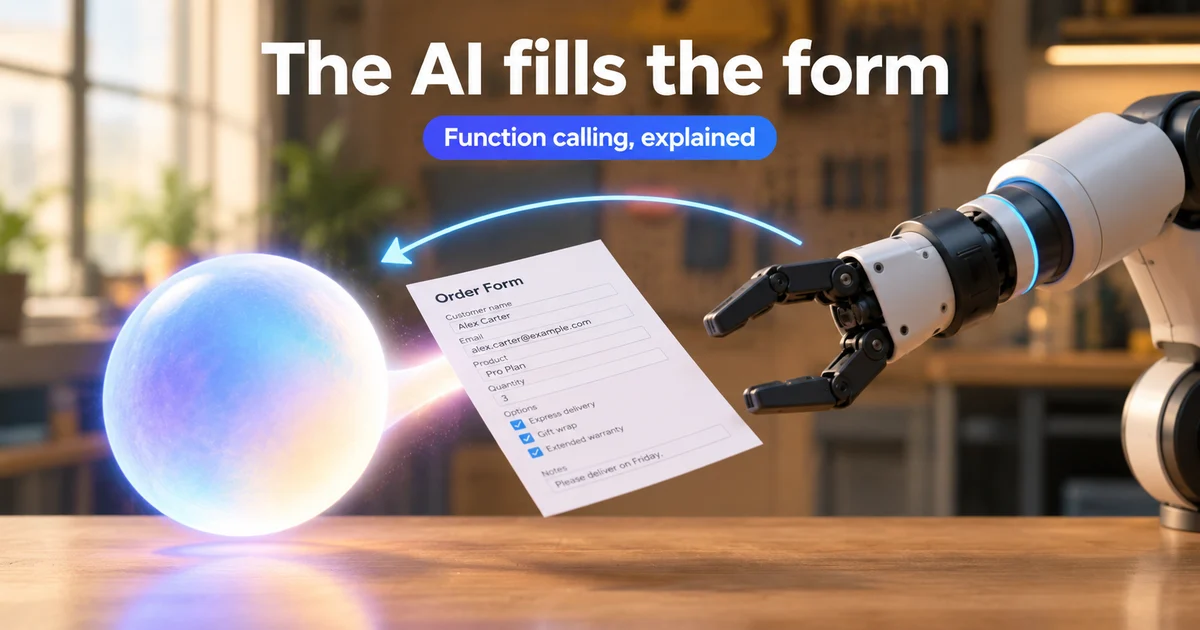
Function calling (also called tool use) is the pattern where an LLM returns a structured request to run a named tool with arguments, your application - or a vendor-hosted tool - executes that request, and the model uses the result to finish answering. The model proposes; something else runs the side effect.
That split is the whole mental model. Once you see the loop, schemas, parallel calls, RAG, and "agents" stop feeling like competing buzzwords and start looking like layers.
In short
- Definition: the model emits a tool call (name + args); code you trust executes it; the result goes back into the conversation.
- Who executes: for tools you define, your app runs the handler. Vendor "server" or built-in tools may run on their infrastructure instead.
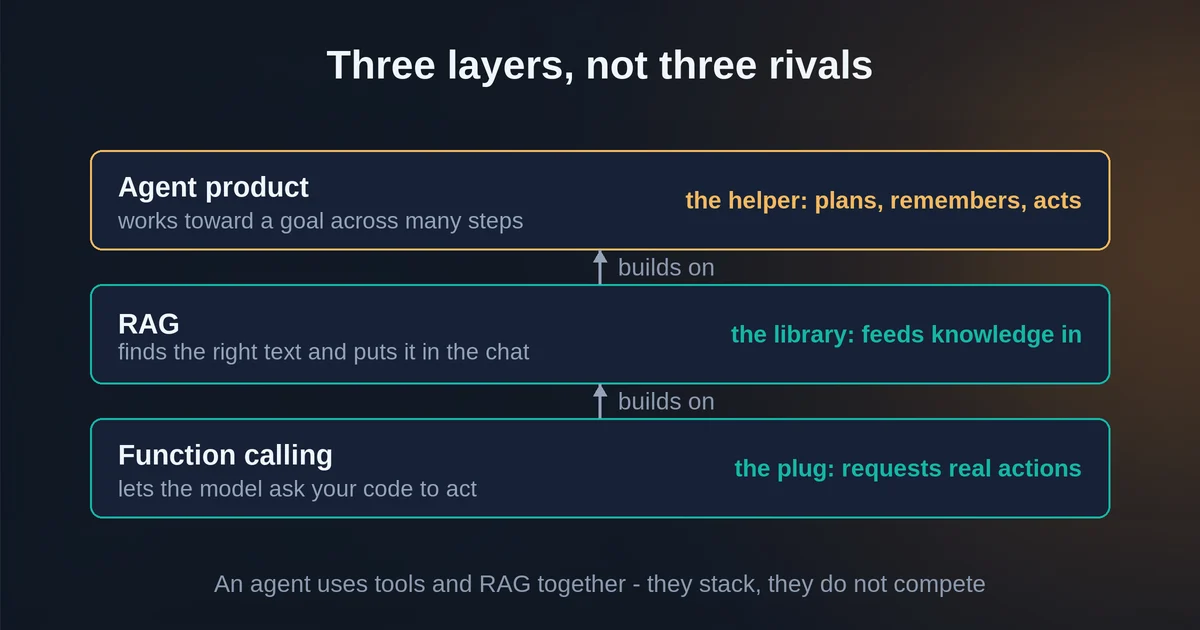
- Not RAG: RAG pulls documents into context. Tools call APIs, databases, or actions. You often combine both.
- Not a full agent product: agents add goals, memory, product UX, and longer autonomy. Tool use is the I/O contract underneath.
- Safety defaults: allowlist tools, re-validate args, enforce auth in your handlers, cap loops, and confirm irreversible actions.
The five-step tool loop
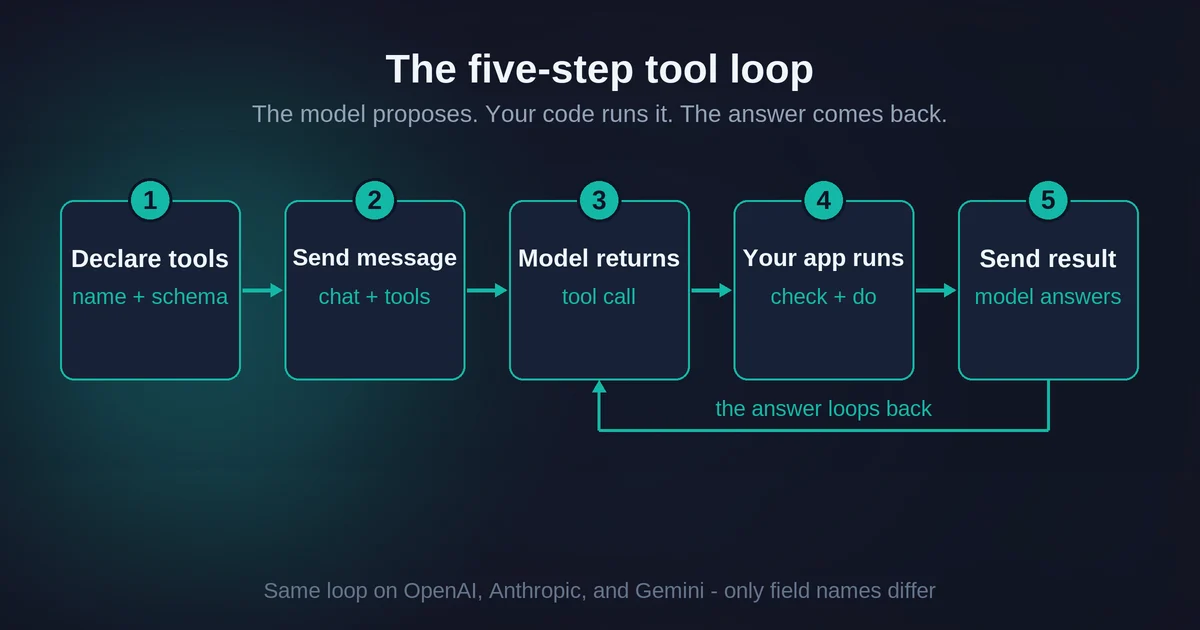
Across OpenAI, Anthropic, and Gemini, the conversational shape is the same even when field names differ.
- Declare tools in the request: name, description, and a JSON schema for arguments.
- Send the user message (plus history) with those tools available.
- Receive a model turn that may include text, one tool call, or several tool calls.
- Execute on the application side (unless it is a vendor server tool): parse args, authorize, run the handler, capture output or a clear error string.
- Return results tied to the call id, then ask the model again - it either answers or requests more tools.
OpenAI describes this as a multi-step conversation: request with tools, receive a tool call, execute in your app, send tool output, receive a final response or more calls. Anthropic's client-tool path returns tool_use blocks and expects matching tool_result blocks. Gemini states plainly that the model does not execute the function itself - your application does.
Treat call ids as receipts. Every result you send back should point at a specific prior call so the model can stitch the right outputs to the right requests.
A tiny weather example (conceptual)
You register get_weather(location: string). The user asks for Paris. The model returns a tool call with location: "Paris". Your code calls a weather API, returns {"temp_c": 18, "conditions": "cloudy"}, and only then does the model write a sentence a human can use.
Nothing magical happened. The model chose a tool and filled a form. Your code still owns networking, secrets, and side effects.
Schemas, parallel calls, and strict mode
Schemas are the contract
A function definition is usually:
- name - stable identifier your router switches on
- description - when to use it (and often when not to)
- parameters - JSON Schema: types, required fields, enums, nested objects
Write descriptions like API docs for a sharp intern. Vendors train models to follow those descriptions; vague tools get vague calls. OpenAI's best-practice guidance is blunt: keep initially available functions relatively small for accuracy, offload known values in your code instead of asking the model to re-type them, and use clearer enums over boolean pairs that allow illegal states.
Parallel tool calls
Models can emit multiple tool calls in one turn - for example weather in two cities plus a send-email. That is useful when calls are independent. It is dangerous when order matters (create user, then charge user) or when one call's output should feed the next.
Controls exist on major APIs:
- OpenAI:
parallel_tool_calls: falseto force zero or one tool per turn on supported flows - Anthropic:
disable_parallel_tool_useinside tool choice settings - Gemini: parallel calling for independent tools, plus compositional calling when steps must chain
Default to parallel only when handlers are safe to run concurrently and results do not depend on each other.
Strict mode helps - it is not a trust boundary
OpenAI recommends strict: true so arguments adhere to the schema (with structured-output constraints such as additionalProperties: false and required fields listed). Anthropic documents strict: true on custom tools for the same idea. Gemini exposes modes that push the model toward schema-valid calls.
Use strict mode. Still validate in your code. Schema adherence reduces malformed JSON; it does not prove the user is allowed to refund order 123, that location is a real city you support, or that the model should have called the tool at all.
Function calling vs RAG vs shipping an agent
These three get mashed together in pitch decks. Keep them separate when you design.
| Pattern | Job | Side effects |
|---|---|---|
| RAG | Retrieve relevant text into the prompt so the model can ground answers | Retrieval only; model still just generates text |
| Function calling / tool use | Let the model request structured API/DB/actions | Handlers (or vendor server tools) perform the action |
| Agent product | Pursue a goal across turns with memory, planning, and UX | Your product runtime - often built on tools + RAG |
Use RAG when the missing piece is knowledge sitting in docs, tickets, or a corpus - see What Is RAG? explained in plain English. Use tools when the missing piece is live data or an action (create invoice, query inventory, trigger a workflow). Use an agent product when users need multi-step autonomy, durable sessions, and product-level guardrails - the free path into that product thinking is covered in How to build your first AI agent, which is a different layer than this explainer.
A practical combo: RAG finds the policy paragraph; a tool creates the ticket. Same conversation, different jobs.
Client tools vs server / built-in tools
Not every "tool" runs in your process.
- Client / custom tools: you define the schema; you execute; you return results. This is the default learning path.
- Server / built-in tools: the vendor runs search, code execution, fetch, or similar on their side and returns results in the same response flow. Anthropic documents client vs server tools explicitly. OpenAI separates function tools you implement from platform built-ins (web search, code, MCP, and more). Gemini mixes custom function declarations with built-ins such as Google Search and remote MCP servers.
If you connect tools through a protocol layer like MCP, you are still doing tool use - the discovery and transport change, not the core loop. For the protocol itself, see What Is MCP?.
For a first production integration, start with one or two client tools you fully control. Add vendor built-ins only when you accept their execution model, billing, and data path.
Safety defaults for first production wiring
Treat the model as an untrusted planner that speaks JSON.
- Allowlist - register only tools you intend to run. Do not expose a generic "run any SQL" tool without a hard sandbox and read-only defaults.
- Re-validate arguments in your handlers even with strict mode on.
- Authorize in code - check the signed-in user, tenant, and role before deletes, refunds, emails, or purchases. The model is not your IAM system.
- Least privilege - pass the minimum secrets a handler needs; keep master API keys out of prompts and tool results when you can.
- Confirm irreversible actions - human-in-the-loop or explicit confirmation tools for money movement and outbound messages.
- Cap the loop - max tool rounds, timeouts, and a clear path when the model spins.
- Return honest errors - structured failure strings beat silent success; the model can retry or explain.
- Log with call ids - tool name, sanitized args, latency, outcome. You will need this the first time production misbehaves.
- Constrain parallelism when sequencing matters.
Anthropic also notes a practical failure mode: if required parameters are missing, some models may ask - others may invent a plausible value (for example, guessing a city for weather). Your validators and required-field UX matter more than hoping the model always asks.
FAQ
Does the model execute my function code?
No - not for tools you define. The model returns a structured call; your application runs the handler and sends back a result. The exception is vendor server or built-in tools, which execute on the provider's infrastructure and return results without your handler.
When should I use function calling instead of RAG?
Use function calling when you need live data or a side effect (API, database write, ticket create). Use RAG when you need to ground the model in documents or knowledge that should appear as context. Many products do both in one flow.
Is tool use the same thing as an AI agent?
No. Tool use is the structured call-and-result contract. An agent is a product (or long-running system) that pursues goals across steps, usually with memory, planning, and UX - often implemented using tool calls underneath.
If I turn on strict mode, do I still need to validate arguments?
Yes. Strict mode improves schema adherence. It does not enforce business rules, authentication, or whether the tool should have been called. Validate and authorize in your code.
When should I disable parallel tool calls?
Disable or constrain parallelism when tools must run in order, share mutable state, or are unsafe to execute concurrently. Keep parallel calls for independent read-only lookups.
Do tool definitions cost tokens?
Yes. Tool names, descriptions, and schemas are part of the model context and count toward input usage on major APIs. Keep descriptions tight and avoid loading huge tool catalogs on every turn when you can defer or search tools later.
Vendor APIs, model names, and tool-calling details change. Confirm behavior on the official OpenAI, Anthropic, and Gemini docs before you ship - treat this guide as a durable mental model, not a frozen SDK reference.