Pre-Employment Testing ToolsEducational Assessment PlatformsExam Management Software

Assess

Deliver secure, adaptive testing for high-stakes exams

Monthly Visits: 81.7K
Free Version
Visit Website
Assess

What is Assess?

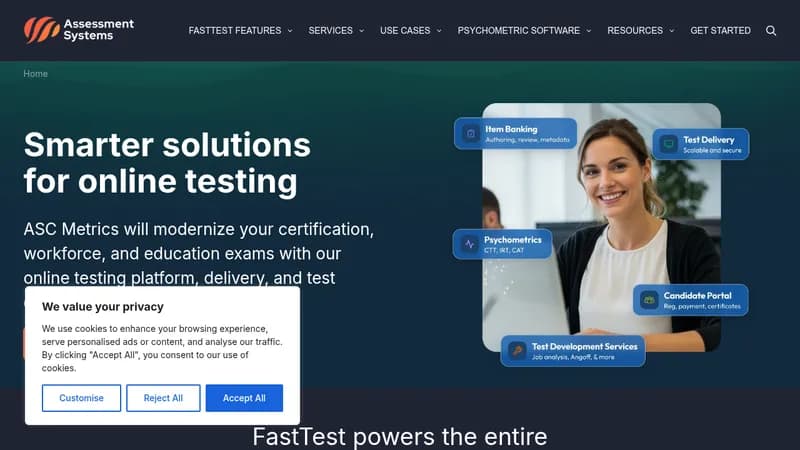
Assess provides enterprise-level online testing solutions for organizations that rely on accurate, secure evaluations. It helps certification boards, schools, and HR teams create exams with advanced features like AI-proctored remote testing and psychometric analysis. The platform specializes in high-stakes scenarios where exam integrity and statistical validity matter most, using modern methods like item response theory to improve assessment quality.

Key Features of Assess

  1. 1

    Remote Proctoring

    AI-powered surveillance with live human monitoring options

  2. 2

    Adaptive Testing

    Personalizes exam difficulty using machine learning models

  3. 3

    Item Banking

    Central repository for managing/test question lifecycle

  4. 4

    Psychometric Support

    Built-in tools for validity studies and statistical analysis

Assess AI Tool Use Cases

  • 🔒
    Certification Exam Delivery
  • 🎓
    Educational Achievement Tracking
  • 💼
    Pre-Employment Skill Assessments
  • 📹
    Remote Proctoring Solutions
  • 📊
    Psychometric Analysis

FAQs from Assess

How do I create an online assessment?

Define your goals, develop questions using item banking, choose features like adaptive testing, validate through pilot testing, then publish and monitor results.

Can I try the platform before committing?

Yes, create a free account to explore features and schedule a personalized demo with experts.

Does it support remote proctoring?

Yes, offers AI flagging to full lockdown exams with live proctors watching two video streams.

Pros & Cons of Assess

Pros (4)

  • Enterprise-grade security for high-stakes testing
  • Built-in psychometric analysis tools
  • Flexible remote proctoring configurations
  • Custom workflow management for exam creation

Cons (3)

  • Steep learning curve for non-technical users
  • No mention of mobile app support
  • Focuses on institutional clients rather than individuals

More Info About Assess

Who is using assess?

This tool is best for:

  1. Certification/Licensure Boards
  2. Educational Institutions
  3. HR Departments
  4. Psychometric Consultants

Assess's Tags

Explore more niche AI tool websites by clicking on a tag* (works only if it has enough tools).

#RemoteProctoring#PsychometricAnalysis#CertificationExams#AdaptiveTesting#OnlineTestingPlatform

Website Analytics of Assess

Assess Website Traffic & SEO Analysis:

Recent data shows that Assess has 81.7K monthly visits (-2.7% decrease from the previous month), 37.0% bounce rate, and average 2.60 pages per visit.
Traffic is primarily driven by 6 different sources, with users from 5 countries worldwide, led by United States contributing 70% of total traffic. SEO performance is shown by 5 tracked keywords, with "distribution curve with z, t and percentile rank" being the top-performing keyword with 420 monthly searches. See below for more info.

Monthly Visits

81.7K

(-2.7%)

Pages per Visit

2.60

Bounce Rate

37.0%

Average Time on Site

3m 5s

Traffic Trend(Apr 2025 - Oct 2025)

Loading chart...

Top Keywords

SEO KeywordVolumeCPC
distribution curve with z, t and percentile rank
420-
exam paper
2.6K$0.24
modified ebel method
220-
generalized partial credit model in erm
210-
bad psychometric item graph
190-

Traffic Sources Distribution

Traffic Share by Source

Loading chart...

Source Breakdown Details

SourceTraffic Share
Direct
41%
Search
47%
Social
3%
Referrals
9%
Paid Referrals
1%

Global Traffic Distribution

Traffic Share by Country

Loading chart...

Geographic Breakdown Details of top 5 countries

Country NameTraffic Share
United States70%
Nigeria3%
Colombia2%
India2%
Vietnam2%
Analytics data is estimated (from third-party analytics providers) and for reference only.

🚀 Assess Launch Badge

Promote your Toolbit Launch by using the badge on your website. It can be inserted on your home page or footer easily.

How to use: Simply copy and paste the embed code into your homepage or footer HTML to display it instantly and build community support.

ToolBit badge

Reviews for Assess